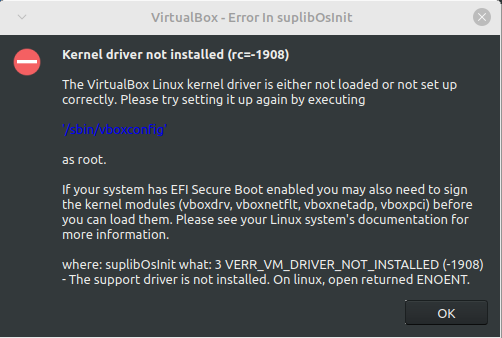
I tried looking into this myself but I couldn't really find much about this error. The only solutions I could find didn't work for me. The first one was to use mokutil but at the point where I was supposed to run sudo mokutil --import MOK.der it gives me the error message "Failed to get file status, MOK.der" even though I did everything it told me to do. The other one was to disable secure boot and then run sudo '/sbin/vboxconfig' but even though it looked like it worked, I'm still getting the error message. I have re-enabled secure boot, so you don't have to worry about that.

Is there something else I can try or does VirtualBox not work in Linux Mint for some reason?

top 50 comments

sorted by: hot top controversial new old
[–] 17 points 2 years ago (3 children)

if you just need software to set up virtual machines you might look into Gnome Boxes or virt-manager which don't require external kernel modules like Virtuap Box to work

anyway these issues typically happen on Ubuntu based distros (like Linux Mint) because your linux kernel is to new for the Virtual Box version (or the Virtual Box version is simply too old)

  • source
  • hideshow 6 child comments
  • [–] [S] 3 points 2 years ago (3 children)

    So I tried virt-manager but it's giving me an error message about not being able to connect to "libvirt qemu:///system" and it wont let me install a virtual machine. I'm assuming that I'm supposed to download "libvirtd", but I can't figure out how to install it. I think it wants me to build it from the source but there doesn't seem to be a guide on how to do that.

  • source
  • parent
  • hideshow 6 child comments
  • [–] 6 points 2 years ago* (last edited 2 years ago) (1 child)

    Yayy, I have the same problem.

    Try a

    sudo systemctl enable --now libvirtd
    

    I dont know how manual everything is in Mint

    Also add your user to thr libvirt group

    groupadd libvit
    sudo usermod -aG libvirt $USER
    
  • source
  • parent
  • hideshow 2 child comments
  • [–] 3 points 2 years ago (1 child)

    Are you using a package manager or downloading everything from virtualboxs website? When I installed virtual box earlier today it all worked fine so that's why I ask.

  • source
  • parent
  • hideshow 2 child comments
  • [–] [S] 1 point 2 years ago* (last edited 2 years ago) (1 child)

    I installed it through apt with just sudo apt install virtualbox-7.0. I also downloaded the deb file from their website but, at least when installed through apt, it just ignores it and uses the version from Mint's repository anyways.

    Edit: Because I just checked and you can't install it directly like that anymore, I first tried installing VirtualBox a few months ago, with an older version of Linux Mint. When I tried installing it several hours ago, it was with the deb file but for some reason apt still selects a different version when it actually installs it.

  • source
  • parent
  • hideshow 2 child comments
  • [–] [S] 1 point 2 years ago (1 child)

    Ok thanks, I might try those later if I can't get VirtualBox working.

  • source
  • parent
  • hideshow 2 child comments
  • [–] 7 points 2 years ago (1 child)

    virt-manager

    I've used VirtualBox for years and only just tried virt-manager. I wish I had tried years ago, so much simpler and it is in my distro's default repository.

  • source
  • parent
  • hideshow 2 child comments
  • [–] [S] 1 point 2 years ago (2 children)

    I tried virt-manager but it's giving me an error message about not being able to connect to "libvirt qemu:///system" and it wont let me install a virtual machine. I'm assuming that I'm supposed to download "libvirtd", but I can't figure out how to install it. I think it wants me to build it from the source but there doesn't seem to be a guide on how to do that.

  • source
  • parent
  • hideshow 3 child comments
  • [–] 4 points 2 years ago (1 child)

    I'm assuming that I'm supposed to download "libvirtd", but I can't figure out how to install it.

    Try sudo apt install libvirt-daemon-system libvirt-clients in the terminal and rebooting the system.

  • source
  • parent
  • hideshow 2 child comments
  • [–] [S] 3 points 2 years ago

    It stated that they were already installed so I went through the process of re-installing them and rebooting the computer, which seems to have fixed the problem. I wont really be able to test it much right now because of how late it is for me but I was able to at least start the installation for Windows XP.

  • source
  • parent
  • load more comments (1 reply)
  • [–] [S] 1 point 2 years ago (1 child)

    I'm currently installing virt-manager but I ran into a problem with Gnome Boxes where I’m trying to run a Windows XP virtual machine but I can’t figure out how to get files from my host to the guest. Apparently, I need some software to be running on the guest but the website that I need to download the software from doesn’t work in internet explorer and I obviously can’t just download it on the host and transfer it to the guest.

  • source
  • parent
  • hideshow 1 child comment
  • load more comments (1 reply)
  • [–] 14 points 2 years ago* (last edited 2 years ago)

    First of all, check that hardware virtualization is enabled in your UEFI setup.

    You need to have packages virtualbox-dkms and linux-headers installed (together with all their dependencies, but you don't have to check them manually). linux-headers must be of the same version as linux-image. That's all that you need to get driver properly built. Don't listen those users who recommend you to remove and reinstall these packages or install additional packages manually, this kind of magic doesn't work.

    Also note that you cannot use kvm and virtualbox simultaneously. If you are using some kvm-based virtualization system, it causes a conflict.

  • source
  • [–] 8 points 2 years ago (2 children)

    Is there something else I can try

    I use virt-manager, since it uses KVM which should already be present in the kernel.

  • source
  • hideshow 4 child comments
  • [–] [S] 5 points 2 years ago (2 children)

    How similar to VirtualBox is virt-manager? I've only ever used VirtualBox but if virt-manager is easy to use, I have no problem trying it out.

  • source
  • parent
  • hideshow 4 child comments
  • [–] 7 points 2 years ago (1 child)

    Gnome's Boxes is pretty easy to use and of course uses qemu + KVM. This would be a type 1 hypervisor vs. Virtualbox's type 2. It is point and click like Virtualbox. You don't need to use Gnome's DE to use Boxes.

    I have seen people post about your specific error for years when using the virtualbox website's repository instead of their own distro's repository (if it exists).

  • source
  • parent
  • hideshow 2 child comments
  • [–] [S] 2 points 2 years ago (1 child)

    I just tried Gnome Boxes and it seems to work mostly fine but the only problem I’m having is that I’m trying to run a Windows XP virtual machine but I can’t figure out how to get files from my host to the guest. Apparently, I need some software to be running on the guest but the website that I need to download the software from doesn’t work in internet explorer and I obviously can’t just download it on the host and transfer it to the guest.

  • source
  • parent
  • hideshow 2 child comments
  • [–] 2 points 2 years ago* (1 child)

    In Boxes, power down your XP VM, click Settings -> Sharing Panel -> Enable Sharing toggle. Click File Sharing and enable File Sharing. Power on the VM.

    At that point you should be able to drag and drop from your host direct into your VM for a file transfer.

    You can also click the vertical dots menu in the Guest's console "screen" and click Send File... menu option.

    In the same menu you can click Devices & Shares -> Realtek USB or whatever -> Local Folder -> Select from the dropdown for the Host's folder that you'd like to share -> Save -> Make sure Toggle on the right is on.

    Then your folder, I believe in XP, will show up as a removable drive like a USB drive would.

  • source
  • parent
  • hideshow 2 child comments
  • [–] [S] 1 point 2 years ago

    Ok so I've already determined a solution for Boxes but I should mention that none what you said works for me. I'm not sure if I have a different version of Boxes than you (even though the only version that seems to exist is the one on flathub) but there is no sharing panel in settings. The only three options in settings is keyboard shortcuts, help and about boxes. When I'm running a VM, the option for "send file" is grayed out and can't be selected.

    For "devices & shares" that is, at least for me, located in the preferences for each VM. I can't use USB devices because it's not supported in the flatpak version and if I try to use the shared folders option, the folder I specified doesn't show up in the VM. From what I can tell this might be an issue specific to some guests, like Windows XP, because Boxes links to a specific program that the guest needs to be running but when I try to run it in Windows XP, I get an error message stating that Windows XP isn't a supported guest.

    The only solution that seems to work for me, is taking the files I want to use in the VM and compress them into an iso file (if they're not already) and mount it to the VM. It might be tedious but it's the only thing that seems to be working for me.

  • source
  • parent
  • [–] 3 points 2 years ago (2 children)

    I probably wouldn't describe it as similar, but virt-manager is fairly simple but powerful at the same time (like it will let you expose more advanced KVM/QEMU features like PCIe passthrough and similar).

    But like the other guy said, gnome boxes is very straight forward and probably more similar in it's simplicity.

    They both use QEMU + KVM, so you can have both virt-manager and boxes installed at once, and I believe virt-manager (probably boxes too) easily let you use existing VirtualBox .vdi files, if you've got an existing VM you want to run. Also like I said before, KVM is already mainlined into the Linux kernel, so you don't have to install sketchy kernel modules and stuff.

    I've only used VirtualBox once though, so I can't really compare them.

  • source
  • parent
  • hideshow 3 child comments
  • [–] [S] 1 point 2 years ago (1 child)

    I tried both virt-manager and Gnome Boxes but I'm having issues with both of them.

    Gnome Boxes works mostly fine but I can't seem to get files from the host to the guest. It says that the guest is supposed to have some special software but I'm trying to use Windows XP and I can't seem to figure out how to get the required software because the website doesn't work in internet explorer and I obviously can't just download it from the host and transfer it over.

    For virt-manager, it's giving me an error message about not being able to connect to "libvirt qemu:///system" and it wont let me install a virtual machine. I'm assuming that I'm supposed to download "libvirtd", but I can't figure out how to install it. I think it wants me to build it from the source but there doesn't seem to be a guide on how to do that.

  • source
  • parent
  • hideshow 2 child comments
  • [–] 2 points 2 years ago

    It says that the guest is supposed to have some special software

    That sounds like virtio-win. I usually use the iso and mount it from virt-manager, but if the internet is working then I guess you can download the exe.

    I'm assuming that I'm supposed to download "libvirtd"

    Just searched it up, something like this should work: sudo apt install qemu-kvm libvirt-clients libvirt-daemon-system bridge-utils virtinst libvirt-daemon

    Sorry I don't have too much experience with gnome boxes either, I mostly use virt-manager.

  • source
  • parent
  • load more comments (1 reply)
  • [–] [S] 1 point 2 years ago

    So I tried virt-manager but it's giving me an error message about not being able to connect to "libvirt qemu:///system" and it wont let me install a virtual machine. I'm assuming that I'm supposed to download "libvirtd", but I can't figure out how to install it. I think it wants me to build it from the source but there doesn't seem to be a guide on how to do that.

  • source
  • parent
  • [–] 8 points 2 years ago (1 child)

    Really try virt-manager with qemu and kvm. It doesnt need any kernel mods.

  • source
  • hideshow 1 child comment
  • load more comments (1 reply)
    [–] 7 points 2 years ago

    As others have said, there's no reason not to be using virt manager with qemu/KVM at this point

    This should get you started: https://hrishikeshpathak.com/blog/install-and-configure-linux-virtual-machine-using-virt-manager/

  • source
  • [–] 5 points 2 years ago* (10 children)

    Try

    sudo apt-get install linux-headers-$(uname -r)

    Then reboot your machine. Virtualbox needs the kernel headers to work.

  • source
  • hideshow 10 child comments
  • load more comments (10 replies)
    [+] 4 points 2 years ago (1 child)
  • [–] [S] 1 point 2 years ago (3 children)

    That doesn't work for me as they give me error messages:

    j@j-HP-Notebook:~$ sudo apt remove virtualbox-dkms
    [sudo] password for j:  
    Reading package lists... Done
    Building dependency tree... Done
    Reading state information... Done
    Package 'virtualbox-dkms' is not installed, so not removed
    0 upgraded, 0 newly installed, 0 to remove and 0 not upgraded.
    j@j-HP-Notebook:~$ sudo apt-get install make gcc build-essential linux-headers-'uname -r' dkms
    Reading package lists... Done
    Building dependency tree... Done
    Reading state information... Done
    E: Unable to locate package linux-headers-uname -r
    j@j-HP-Notebook:~$ sudo apt install virtualbox-dkms
    Reading package lists... Done
    Building dependency tree... Done
    Reading state information... Done
    The following packages were automatically installed and are no longer required:
      libqt5help5 libqt5sql5 libqt5sql5-sqlite libqt5xml5 libsdl-ttf2.0-0
    Use 'sudo apt autoremove' to remove them.
    The following additional packages will be installed:
      libgsoap-2.8.117 liblzf1 libvncserver1 virtualbox virtualbox-qt
    Suggested packages:
      vde2 virtualbox-guest-additions-iso
    The following packages will be REMOVED:
      virtualbox-7.0
    The following NEW packages will be installed:
      libgsoap-2.8.117 liblzf1 libvncserver1 virtualbox virtualbox-dkms virtualbox-qt
    0 upgraded, 6 newly installed, 1 to remove and 0 not upgraded.
    Need to get 0 B/46.5 MB of archives.
    After this operation, 43.0 MB disk space will be freed.
    Do you want to continue? [Y/n] y
    debconf: DbDriver "config": /var/cache/debconf/config.dat is locked by another process: Resource temporarily unavailable
    (Reading database ... 642834 files and directories currently installed.)
    Removing virtualbox-7.0 (7.0.12-159484~Ubuntu~jammy) ...
    debconf: DbDriver "config": /var/cache/debconf/config.dat is locked by another process: Resource temporarily unavailable
    dpkg: error processing package virtualbox-7.0 (--remove):
     installed virtualbox-7.0 package pre-removal script subprocess returned error exit status 1
    dpkg: too many errors, stopping
    vboxdrv.sh: failed: modprobe vboxdrv failed. Please use 'dmesg' to find out why.
    
    There were problems setting up VirtualBox.  To re-start the set-up process, run
      /sbin/vboxconfig
    as root.  If your system is using EFI Secure Boot you may need to sign the
    kernel modules (vboxdrv, vboxnetflt, vboxnetadp, vboxpci) before you can load
    them. Please see your Linux system's documentation for more information.
    Errors were encountered while processing:
     virtualbox-7.0
    Processing was halted because there were too many errors.
    E: Sub-process /usr/bin/dpkg returned an error code (1)
    
  • source
  • parent
  • hideshow 4 child comments
  • load more comments (2 replies)
  • [–] 3 points 2 years ago (1 child)

    That's really odd. I'm running Linux Mint Debian Edition 6 and I installed virtual box from the oracle website just fine.

    As others have said, try Gnome Boxes and see if they works. If it also has issues then it's something with your system.

  • source
  • hideshow 2 child comments
  • [–] [S] 2 points 2 years ago (2 children)

    I actually just tried Gnome Boxes and it seems to work mostly fine but the only problem I'm having is that I'm trying to run a Windows XP virtual machine but I can't figure out how to get files from my host to the guest. Apparently, I need some software to be running on the guest but the website that I need to download the software from doesn't work in internet explorer and I obviously can't just download it on the host and transfer it to the guest.

  • source
  • parent
  • hideshow 4 child comments
  • [–] 3 points 2 years ago (1 child)

    Have you tried to download it on the host to a USB (formatted with fat32) and then in Boxes select that usb in Windows to copy and run the software?

  • source
  • parent
  • hideshow 2 child comments
  • [–] [S] 2 points 2 years ago (1 child)

    While I have already found a solution (and with it found out that the software doesn't even work in windows xp) the only way to download Boxes that I could find was through flathub, which doesn't allow usb devices for some reason. What does work is that I can just put all of the files I want transferred into an iso file and mount it to the VM.

    Also, if there is a way to install Boxes outside of flathub, I'll have to check it out tomorrow because of late it is for me right now.

  • source
  • parent
  • hideshow 1 child comment
  • load more comments (1 reply)
  • [–] 3 points 2 years ago (1 child)

    Does loading the kernel module help, assuming it’s installed?

    sudo modprobe vboxdrv

  • source
  • hideshow 1 child comment
  • load more comments (1 reply)
    [+] 2 points 2 years ago* (last edited 1 year ago)
    load more comments
    view more: next ›