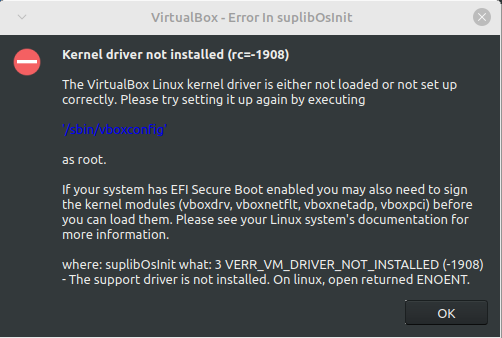
I tried looking into this myself but I couldn't really find much about this error. The only solutions I could find didn't work for me. The first one was to use mokutil but at the point where I was supposed to run sudo mokutil --import MOK.der it gives me the error message "Failed to get file status, MOK.der" even though I did everything it told me to do. The other one was to disable secure boot and then run sudo '/sbin/vboxconfig' but even though it looked like it worked, I'm still getting the error message. I have re-enabled secure boot, so you don't have to worry about that.

Is there something else I can try or does VirtualBox not work in Linux Mint for some reason?

you are viewing a single comment's thread
view the rest of the comments
[–] 3 points 2 years ago (2 children)

I probably wouldn't describe it as similar, but virt-manager is fairly simple but powerful at the same time (like it will let you expose more advanced KVM/QEMU features like PCIe passthrough and similar).

But like the other guy said, gnome boxes is very straight forward and probably more similar in it's simplicity.

They both use QEMU + KVM, so you can have both virt-manager and boxes installed at once, and I believe virt-manager (probably boxes too) easily let you use existing VirtualBox .vdi files, if you've got an existing VM you want to run. Also like I said before, KVM is already mainlined into the Linux kernel, so you don't have to install sketchy kernel modules and stuff.

I've only used VirtualBox once though, so I can't really compare them.

  • source
  • parent
  • hideshow 4 child comments
  • [–] [S] 1 point 2 years ago (1 child)

    I tried both virt-manager and Gnome Boxes but I'm having issues with both of them.

    Gnome Boxes works mostly fine but I can't seem to get files from the host to the guest. It says that the guest is supposed to have some special software but I'm trying to use Windows XP and I can't seem to figure out how to get the required software because the website doesn't work in internet explorer and I obviously can't just download it from the host and transfer it over.

    For virt-manager, it's giving me an error message about not being able to connect to "libvirt qemu:///system" and it wont let me install a virtual machine. I'm assuming that I'm supposed to download "libvirtd", but I can't figure out how to install it. I think it wants me to build it from the source but there doesn't seem to be a guide on how to do that.

  • source
  • parent
  • hideshow 2 child comments
  • [–] 2 points 2 years ago

    It says that the guest is supposed to have some special software

    That sounds like virtio-win. I usually use the iso and mount it from virt-manager, but if the internet is working then I guess you can download the exe.

    I'm assuming that I'm supposed to download "libvirtd"

    Just searched it up, something like this should work: sudo apt install qemu-kvm libvirt-clients libvirt-daemon-system bridge-utils virtinst libvirt-daemon

    Sorry I don't have too much experience with gnome boxes either, I mostly use virt-manager.

  • source
  • parent