[–] 3 points 1 week ago

I know it's probably not what you're asking for but there's an album where a bunch of Japanese anime voice actresses did covers for popular songs from the 80s and 90s. It called Voice Actresses Legendary Punk Songs Collection and here's a playlist that has most of the songs (one of them is unavailable for some reason).

Outside of that, I mostly only know bands who have covers of video game music (and some movies) from the 80s and 90s. If you are counting those, here are some examples of them:

Lighting Strikes Again and Metal Squad from Thunder Force IV by SSH. SSH is known for metal covers of old video game music, so this is just one example of his music.

Cranial Syphon by Armcannon, which is a cover of some song from Metroid but I'm not familiar with that game so I don't know what it is exactly. On top of covers for other video game music, they also have stuff like the Ghostbuster's theme.

Kraid by Metroid Metal, which is obviously another metroid song (possibly the same one). There music was a bit hard to find on YouTube, I've forgotten where I first heard their music before but Youtube might not be the best platform to find the rest of their music.

Battle Scene from Final fantasy by The Black Mages. While they are currently disbanded, they were known for rock/metal covers of music from the Final Fantasy games (which makes sense given that the band was created by Nobuo Uematsu himself). They did briefly rebrand as "Earthbound Papas" for one album because not only did they want to cover more than just the Final Fantasy games but they also wanted to branch out to more genres.

I know for sure that there are some that I'm forgetting and there's also some that I don't feel like looking for examples for (mainly artists who've covered the music from the 90s era Touhou games). If asked, I may do through and provide them but I think I've provided more than enough already.

  • source
  • [–] [S] 1 point 3 months ago

    Yeah, I don't want to waste my time trying other options. As I said before, it's working fine the way it is. There's around 120MB of free space and I was able to fit a little under 250MB worth of files with the folder I used for testing, so this seems pretty as good as is.

    Also, this part isn't directed at you specifically, but I'm thinking about just deleting my post. It seems like a troll is trying to use my post to effectively harass me by both misinterpreting some lines in my original post and using some others to belittle me. Because I don't want to deal with them and possible others, I think it's best I just delete my post. I may also step away from this site for a bit, I dealt with this kinda shit on Reddit and I don't want to deal with it here.

  • source
  • parent
  • context
  •  

    If you're not aware of what preload is, it's a command line application that allows you to add files to ram, so they can be accessed faster by the applications that need them.

    It seems to work well for what I'm using it for, which is to run games from slower storage devices, but there doesn't seem to be any documentation for a proper way to remove the files once they've been added to ram. What I've been doing is to just use htop to terminate the preload command, but I feel like this is not intended at all. Is there a better way to remove these files?

    I should mention that while trying to search for a solution myself, I did see gopreload mentioned a few times. I would try this out myself, but there's no proper installation instructions, at least not any I could find that work in Linux Mint.


    As a sort of follow up to the post I made on my alt account, would I need to do to anything to Grub to continue using Linux Mint after removing Windows or would I still be able to boot into Linux Mint without having to do anything? As stated in the previous post, Windows is installed onto an SSD and I want run games from that SSD but I'd need to reformat the SSD in order to use it.

    Edit: I don't need help with this anymore but because it seems like there is some confusion, I'm including the fact that I have Linux installed onto an external hard drive and Windows was installed onto the SSD which is in the laptop. I've already remove Windows from the SSD and reformatted it to ext4 so I can run games from it.


    There's a game that, while I will admit that I don't really have an interest in playing, isn't working properly because it's trying to default to a GPU driver that isn't even loaded ( and possibly not even installed). The game is called Zbridge and it's standalone app is only distributed through Flathub. For some reason, it's trying to default to using "iris" even though the only GPU driver that's loaded is "i915". I have confirmed this with this:

    j@j-Latitude-E7470:~$ lspci -k -s 2
    00:02.0 VGA compatible controller: Intel Corporation Skylake GT2 [HD Graphics 520] (rev 07)
    	DeviceName:  Onboard IGD
    	Subsystem: Dell Latitude E7470
    	Kernel driver in use: i915
    	Kernel modules: i915
    

    But the game, on top of giving some other errors I've found to be trivial, still tries to load iris by default for some reason:

    j@j-Latitude-E7470:~$ flatpak run club.zbridge.zbridge
    [2:1229/172053.425891:ERROR:bus.cc(407)] Failed to connect to the bus: Failed to connect to socket /run/dbus/system_bus_socket: No such file or directory
    Gtk-Message: 17:20:55.221: Failed to load module "xapp-gtk3-module"
    [2:1229/172056.788306:ERROR:bus.cc(407)] Failed to connect to the bus: Failed to connect to socket /run/dbus/system_bus_socket: No such file or directory
    [2:1229/172056.788423:ERROR:bus.cc(407)] Failed to connect to the bus: Failed to connect to socket /run/dbus/system_bus_socket: No such file or directory
    MESA: error: Failed to query drm device.
    glx: failed to create dri3 screen
    failed to load driver: iris
    [41:1229/172103.010356:ERROR:viz_main_impl.cc(196)] Exiting GPU process due to errors during initialization
    MESA: error: Failed to query drm device.
    [2:1229/172118.159439:ERROR:gpu_process_host.cc(989)] GPU process exited unexpectedly: exit_code=512
    MESA: error: Failed to query drm device.
    [2:1229/172133.299896:ERROR:gpu_process_host.cc(989)] GPU process exited unexpectedly: exit_code=512
    MESA: error: Failed to query drm device.
    [2:1229/172148.425964:ERROR:gpu_process_host.cc(989)] GPU process exited unexpectedly: exit_code=512
    MESA: error: Failed to query drm device.
    [2:1229/172203.465700:ERROR:gpu_process_host.cc(989)] GPU process exited unexpectedly: exit_code=512
    MESA: error: Failed to query drm device.
    [2:1229/172218.491001:ERROR:gpu_process_host.cc(989)] GPU process exited unexpectedly: exit_code=512
    MESA: error: Failed to query drm device.
    [2:1229/172233.517237:ERROR:gpu_process_host.cc(989)] GPU process exited unexpectedly: exit_code=512
    [2:1229/172233.517295:FATAL:gpu_data_manager_impl_private.cc(448)] GPU process isn't usable. Goodbye.
    

    I have found a temporary solution by running export MESA_LOADER_DRIVER_OVERRIDE=i915 but as far as I can tell, I shouldn't have to do this because it should just be defaulting to the driver that's already loaded. If this is an issue with the app itself, I am going to submit a bug report but I want to make sure this issue isn't on my end before submitting one.


    Final update (hopefully): It seems that I have been able to fix the issue. I'm not sure what exactly caused the problem but either removing fluidsynth or installing the wireplumber ppa fixed the issue and I have working audio again. I've also removed pulseaudio and undid my edit to the modprobe blacklist, as they were only done as a temporary solution and they are no longer necessary.

    For the past three days, I've been having this issue where my computer starts with no audio and the only sound device listed is a "dummy output" device. I've tried looking online for solution but the only solution I found has to be redone manually every time I start/restart my computer. It also seems like this issue is common with and possibly specific to the sound card my computer has, which is an "Intel Sunrise Point-LP HD Audio".

    The solution that worked for me was to add blacklist snd_soc_avs to the modprobe blacklist and then run the two commands sudo alsa force-reload and pulseaudio. Adding snd_soc_avs to the blacklist permanently brought back my actually audio devices but it didn't fix the audio nor did it remove the dummy output device. The two commands I listed do restore the audio and remove the dummy output device but they only work for the current session and I have to run them again after starting/restarting my computer.

    I have no problem doing this if there isn't a permanent solution but I would like a permanent solution, if possible.


    There is a mod for the DSi/3DS called "Twilight Menu" and it allows DS games to use the DSi's better clock speeds. Given that overclocking is a common feature for emulators, I was wondering if there were any DS emulators with this feature. I have seen discussions on other websites about this topic and how it would be possible but none of the emulators are listed as having an overclocking feature. All of the documentation and discussions about this seem to be at least a few years old and I know a lot can happen in a few years.


    I'm using the Cinnamon edition of Linux Mint 22 (Wilma) and I've installed all of the dependencies listed on the build documention but when I try running meson setup builddir in the android_translation_layer folder, it gives me this error:

    ERROR: C shared or static library 'art' not found

    Assuming that the "art" that it needs is "art_standalone", I've already installed that and it seemed to install just fine but for some reason meson still can't find it. Assuming that it can work in Linux Mint, what should I try next?


    Edit: I think I've figured it out, it seems like Linux Mint defaulted to the wrong Kernel driver and I was able to switch it to the correct one.

    I've already tried searching for this online but there is a reason I'm posting about it here. The last time I tried to install Vulkan drivers in Linux Mint, there was an update to the oibaf PPA that completely broke my Linux Mint installation and I had to manually reinstall it. I've read that, at least in the past, the oibaf PPA causes problems in Ubuntu but I can't find another solution to installing Vulkan drivers in Linux Mint. Is that the only way to install the Vulkan Drivers in Linux Mint, or is there another way?

    Also, yes, Vulkan works in Windows and it did work in my previous installation of Linux.


    Edit: Last night, I used the "Fix MergeList problems" option in the maintenance tab of software sources and at least for now, it seems to be working. So I probably wont need help with this anymore, hopefully.

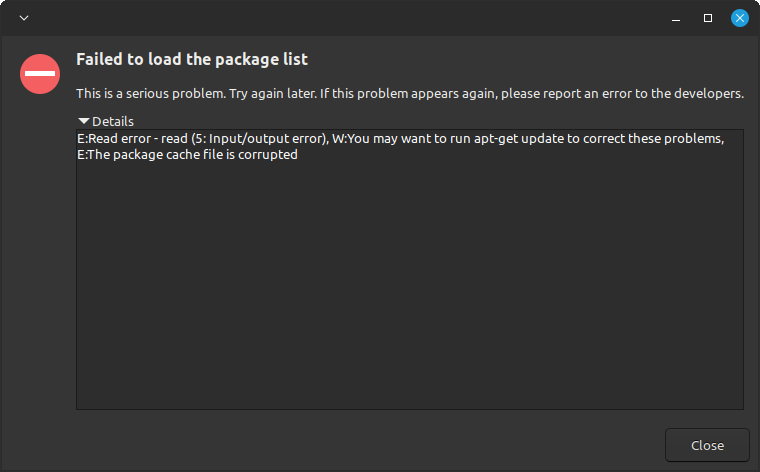
    Every hour or two, the Update Manager keeps giving me an error message saying that my APT configuration is corrupt and that I should switch to another Linux Mint mirror. It usually goes away when I do a manual refresh but it just keeps coming back. I have also tried switching to a different mirror but I get the same error. It also tells me to run apt-get update but even if I add "sudo" it just gives me an error message saying to run apt-get update.

    It happened again so I'm adding screenshots in case they help. The first is the initial error, then it's the error I get when I try to change the repository and the third is the error I get when I try running the command it suggested:


    I recently found out about a Linux Distro named Q4OS and I wanted to test out their claim that it only requires 256 MB of ram when using the trinity desktop environment. However, when I used the live cd in virt-manager with 256 MB or ram, it just kernel panicked at boot. So I then tried it with 512 MB of ram. In addition to some issues that are not present when you are using at least 1 GB of ram, such as "sudo apt update" causing the entire VM to become unresponsive, I noticed that it seemed to actually use anywhere between 290 MB to 370 MB of ram when the only thing running was the process viewer (which is htop).

    Obviously, this is still very low for a modern Linux distro but I was wondering how accurate VMs are for testing ram usage.

    And, yes I know that it would be pretty much useless on a PC that only had 256 MB of ram even if it did work. I'm actually checking the ram usage because there is a possibility that I may be using a very old computer of mine that only has 1 GB of ram at some point in the future. So I'm just testing it and eventually other distros out to to see which one I'm going to end up using (assuming I do actually end up even using that computer).

    Edit: I just tried the 32-bit version in virt-manager and htop stated it was only using 232 MB of ram, which means that their claim was right and that I might have been using the wrong version.

    Edit 2: I just tried installing the 64-bit version in virt-manager and htop stated that it was using about 350 MB of ram, so I don't know if installing it actually made a difference.


    Edit: I'm no longer looking for help with this. The issue seems to be with the app itself and I have submitted a bug report for the app on github.

    Before you tell me I should try another n64 emulator, I have been using other emulators but I have a game that isn't working and I'm trying to run it in other emulators.

    Anyways, if I try to run simple64 through the terminal, I get the error message:

    Failed to load module "xapp-gtk3-module"

    I tried to look into this and it seems that I'm supposed to install "xapp" but I'm getting the error message:

    The following packages have unmet dependencies: xapp : Depends: libxapp1 (= 2.2.8-1) but 2.8.2+virginia is to be installed E: Unable to correct problems, you have held broken packages.

    I tried to fix it with sudo apt --fix-broken install xapp but it's just giving me the same error message. Is there anything else I can try before I try another emulator?


    I need to reinstall Linux Mint but MOK Management is preventing me from booting into the live CD. I tried looking for a solution online but (assuming I did everything correctly) I couldn't find anything that actually worked for me. How do I properly disable it?

    Also, I forgot to mention that I do have access to Linux Mint, I just have to run it in recovery mode because it wont boot normally.

    Update: I was able to bypass MOK using my password, I still wasn't able to disable it but I was at least able to boot into my Live CD for Linux Mint and I'm in the process of reinstalling it. I would prefure if I could just disable MOK but I at least know how to work around it.

    Update 2: I have fully reinstalled and updated Linux Mint but for some reason everything looks different despite the fact that I'm using the same settings and software I was before everything broke. But whatever, outside of the fact that I no longer have the dual boot menu and instead I get a string of text saying "booting in insecure mode" for some reason, it seems to be working fine.


    I got an external hard drive enclosure for the purpose of recovering some of the files from my old laptops hard drive. The hard drive and all of it's partitions show up in both disks and gparted but it wont mount. When I tried to mount it manually, it gave the error message stating that it can't read the superblock. I've never had to deal with this issue before, so the only things I've tried so far were fsck and the data recovery option in GParted, and neither of them helped.

    I tried searching about it online but all of the solutions I found online either didn't work or required methods that are currently not possible for me. The hard drive had Ubuntu (22.04 if I remember correctly) installed on it and I just need access to the files in the sdd3 partition, which was formatted in ext4.

    view more: next ›