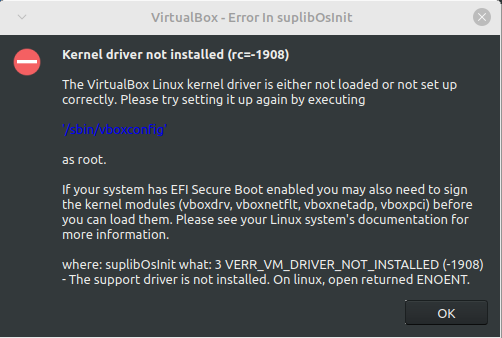
I tried looking into this myself but I couldn't really find much about this error. The only solutions I could find didn't work for me. The first one was to use mokutil but at the point where I was supposed to run sudo mokutil --import MOK.der it gives me the error message "Failed to get file status, MOK.der" even though I did everything it told me to do. The other one was to disable secure boot and then run sudo '/sbin/vboxconfig' but even though it looked like it worked, I'm still getting the error message. I have re-enabled secure boot, so you don't have to worry about that.

Is there something else I can try or does VirtualBox not work in Linux Mint for some reason?

you are viewing a single comment's thread
view the rest of the comments
[–] [S] 3 points 2 years ago (3 children)

So I tried virt-manager but it's giving me an error message about not being able to connect to "libvirt qemu:///system" and it wont let me install a virtual machine. I'm assuming that I'm supposed to download "libvirtd", but I can't figure out how to install it. I think it wants me to build it from the source but there doesn't seem to be a guide on how to do that.

  • source
  • parent
  • hideshow 6 child comments
  • [–] 6 points 2 years ago* (last edited 2 years ago) (1 child)

    Yayy, I have the same problem.

    Try a

    sudo systemctl enable --now libvirtd
    

    I dont know how manual everything is in Mint

    Also add your user to thr libvirt group

    groupadd libvit
    sudo usermod -aG libvirt $USER
    
  • source
  • parent
  • hideshow 2 child comments
  • [–] 3 points 2 years ago (1 child)

    Are you using a package manager or downloading everything from virtualboxs website? When I installed virtual box earlier today it all worked fine so that's why I ask.

  • source
  • parent
  • hideshow 2 child comments
  • [–] [S] 1 point 2 years ago* (last edited 2 years ago) (1 child)

    I installed it through apt with just sudo apt install virtualbox-7.0. I also downloaded the deb file from their website but, at least when installed through apt, it just ignores it and uses the version from Mint's repository anyways.

    Edit: Because I just checked and you can't install it directly like that anymore, I first tried installing VirtualBox a few months ago, with an older version of Linux Mint. When I tried installing it several hours ago, it was with the deb file but for some reason apt still selects a different version when it actually installs it.

  • source
  • parent
  • hideshow 2 child comments
  • [–] 2 points 2 years ago (1 child)

    OK, why are you installing it from a deb file and not just from your repo?
    Try that first.

  • source
  • parent
  • hideshow 2 child comments
  • [–] [S] 0 points 2 years ago (1 child)

    How much of my comment did you read before replying?

  • source
  • parent
  • hideshow 2 child comments
  • [–] 0 points 2 years ago* (1 child)

    I read that you installed a specific version months ago, but now installed it from a .deb file recently.
    I'm asking why you don't just sudo apt install virtualbox now?

  • source
  • parent
  • hideshow 2 child comments
  • [–] [S] 0 points 2 years ago (1 child)

    I literally stated in my comment that you can't install it like that anymore. The reason why is because you get an error saying "E: Package 'virtualbox-7.0' has no installation candidate". This means that in Linux Mint, you have to install it via the deb file.

  • source
  • parent
  • hideshow 2 child comments
  • [–] 1 point 2 years ago* (2 children)

    And I literally wrote in the comment above yours to install the version in the repo instead, with sudo apt install virtalbox.
    NOT sudo apt install virtualbox-7.0

    It's in the Ubuntu repository:
    https://packages.ubuntu.com/jammy/virtualbox

    Which Mint 21.2 points to according to the default sources.list:

    deb http://packages.linuxmint.com victoria main upstream import backport
    deb http://archive.ubuntu.com/ubuntu jammy main restricted universe multiverse
    deb http://archive.ubuntu.com/ubuntu jammy-updates main restricted universe multiverse
    deb http://archive.ubuntu.com/ubuntu jammy-backports main restricted universe multiverse
    deb http://security.ubuntu.com/ubuntu/ jammy-security main restricted universe multiverse
    deb http://archive.canonical.com/ubuntu/ jammy partner
    

    It's version 6.1, which is better than having no working Virtualbox.

  • source
  • parent
  • hideshow 4 child comments
  • [–] [S] 1 point 2 years ago (1 child)

    I kind of wanted to be using the newest version but I'll try the old version to see if it works.

  • source
  • parent
  • hideshow 2 child comments
  • [–] 0 points 2 years ago (1 child)

    6.1 is the newest version included in your OS. That's just how Linux works.
    Downloading newer versions from somewhere else is sometimes possible, but can lead to a lot of headaches, especially with packages that interact with the kernel.

    If you notice you keep running into this issue and using the newest stuff is important to you, consider switching to OpenSUSE Tumbleweed. It's the most beginner-friendly rolling release distro.

  • source
  • parent
  • hideshow 2 child comments
  • [–] [S] 1 point 2 years ago (1 child)

    No, in addition to having a broken UI, it's still giving me the same error message.

  • source
  • parent
  • hideshow 2 child comments
  • [–] 1 point 2 years ago (1 child)

    reinstall virtualbox-dkms (from your repo), disable secure boot in BIOS and reboot.
    If that doesn't work, I'm out of ideas.

  • source
  • parent
  • hideshow 2 child comments
  • [–] [S] 2 points 2 years ago

    I already tried that yesterday and it didn't work. It's not that big of a problem though because both Gnome Boxes and virt-manager are working fine. So I wont need VirtualBox anymore.

  • source
  • parent