top 50 comments

sorted by: hot top controversial new old
[–] 79 points 2 years ago (13 children)

I know it's a joke, I hate to be that guy. But this meme feels old and obsolete now. I can't remember the last time I had to tweak my Linux. The fun is gone

  • source
  • hideshow 19 child comments
  • [–] 29 points 2 years ago (2 children)

    Cool! Maybe I can challenge you. Can you help me figure out how I can get my Hyprland session back on my Arch install? I have a Radeon 7700 XT and I recently installed an RTX 4070 to assist with some compute tasks. With both cards installed GDM doesn't populate the Hyprland option. If I remove the 4070 everything goes back to normal.

    (This is also a joke, you don't need to help me troubleshoot this.)

    (Unless you actually know how in which case I can pay you $20 for your time)

  • source
  • parent
  • hideshow 4 child comments
  • [–] 32 points 2 years ago (2 children)

    Hyprland session

    Wayland compositor

    RTX 4070

    Nvidia GPU.

  • source
  • parent
  • hideshow 3 child comments
  • [–] 10 points 2 years ago (1 child)

    Haha, I was hoping that because all my monitors are plugged into my AMD card that it wouldn't cause as many issues, but I was mistaken.

    I'm looking at it as an opportunity to learn more about the Linux kernel, the order that certain modules are being loaded in, and environment variables.

  • source
  • parent
  • hideshow 2 child comments
  • [–] 8 points 2 years ago* (2 children)

    You should consider passing through your Nvidia GPU to a virtual machine in order to do compute tasks on; that way, your host machine won't be infected with proprietary Nvidia drivers (I'm assuming you need CUDA for your compute tasks). The only performance differences you'll notice is less available system RAM (you will have access to all of your VRAM), and very slightly less CPU performance, due to running two operating systems at the same time (barely even noticable, TBH). This is the option that I would personally recommend.

    If you want to try a super hacky solution which might not work for everything you need, you can try using the open source, recently released ZLUDA translation layer to perform CUDA tasks on your AMD GPU.

    https://github.com/vosen/ZLUDA

    The reason Hyprland doesn't work with proprietary Nvidia drivers is due to Nvidia refusing to implement the accepted Wayland standard in favor of their own, home-rolled solution which is incompatible. AFAIK, only GNOME and KDE implement that standard.

  • source
  • parent
  • hideshow 3 child comments
  • [–] 6 points 2 years ago

    Hyprland works fine on Nvidia, I've been using it for about a year now. It's only going to improve now that Nvidia hired people from the Nouveau team to work on Nouveau and Nvidia is making the open drivers the default in version 560. Can't wait for the 555 drivers they've been working on with the Wayland team and most of the major desktops to implement explicit sync etc.

    An option would be to only install the CUDA toolkit without the drivers but distros like Ubuntu just don't support it. You could also switch display managers to sddm because Hyperland recommends it, might work better. Hyprland prints information in the tty if you launch it with Hyprland. I'm just thinking it's gdm being weird tbh.

  • source
  • parent
  • load more comments (1 reply)
  • load more comments (1 reply)
  • [–] 12 points 2 years ago*

    By an Index and get into VR gaming on Linux. We livin on the edge ovar her. Shit breaks every day and there's a wonky python script you have to use if you wanna be able to put the base stations into sleep mode πŸ‘

  • source
  • parent
  • [–] 5 points 2 years ago

    Yeah it just works now. Sometimes I miss the days where we had to troubleshoot sound drivers, because it made us learn so much. Even if we didn't manage to fix the problem, we learned about how sound works in Linux.

  • source
  • parent
  • load more comments (7 replies)
    [–] 50 points 2 years ago* (2 children)

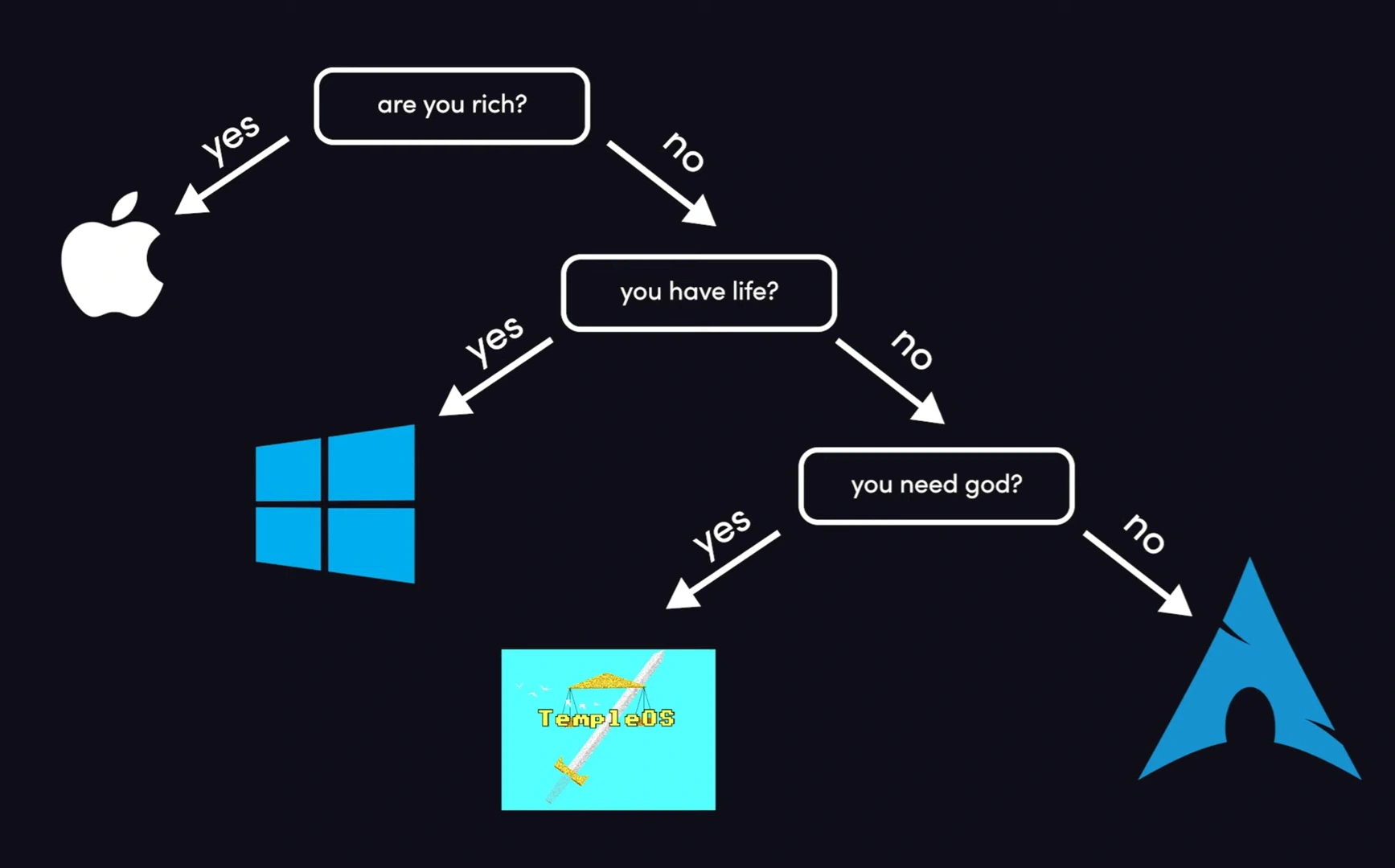
    Do you have multiple monitors?
    Yes - Don't buy a mac
    No - Still don't buy a mac

  • source
  • hideshow 4 child comments
  • [–] 37 points 2 years ago (1 child)
    $ pacman -Si god
    error: package 'god' was not found
    

    Take that, theists!

  • source
  • hideshow 2 child comments
  • [–] 31 points 2 years ago (4 children)

    I can be as rich as god and wouldn't go for windows or apple. I would rather invest the money in good Foss development

  • source
  • hideshow 6 child comments
  • load more comments (2 replies)
    [–] 31 points 2 years ago (1 child)

    I have tried templeOS. It is amazing one guy built all that. It feels like it needs training sessions to make better use of it, and also it is wacky as hell

  • source
  • hideshow 2 child comments
  • [–] 30 points 2 years ago (2 children)

    Everyone always forgets the "it just works," easy, normie distributions like Fedora. I guess people figure if you're looking for an OS like that, you might as well just use Windows, but I'd rather not.

  • source
  • hideshow 2 child comments
  • load more comments (2 replies)
    [–] 24 points 2 years ago

    If you have money you still shouldn't buy a mac.

  • source
  • [–] 23 points 2 years ago

    This one seriously lack of Hannah Montana Linux.

  • source
  • [–] 21 points 2 years ago (2 children)
  • load more comments (1 reply)
    [–] 18 points 2 years ago

    There is never a wrong time to choose Linux

  • source
  • [–] 15 points 2 years ago* (3 children)

    Haha, it amuses me to no end that ever since I watched a "Down the Rabbit Hole" video on Youtube about TempleOS a few years back I have seen it crop up in varies places from time to time as I don't remember ever seeing anything about it before.

    Makes me wonder if it was always there and I just didn't notice it until I was familiar with it.

  • source
  • hideshow 5 child comments
  • load more comments (1 reply)

    ah yes, a fireship viewer.

  • source
  • [–] 10 points 2 years ago (1 child)

    Where's Hannah Montana Linux?

  • source
  • hideshow 1 child comment
  • load more comments (1 reply)
    [–] 10 points 2 years ago* (11 children)

    Let say I want to try Linux but I want to keep my Windows OS intact (for now), and I only have 1 SSD in my PC.

    Is there a solution that I can just partition the drive, install Linux, switch between OS by just restarting without affecting the other, AND later on remove one OS without wiping the SSD?

  • source
  • hideshow 13 child comments
  • [–] 7 points 2 years ago (2 children)

    Yes, first you need to resize the partition to accommodate the new OS. Usually 40-60 GB is good enough for minimal linux installation if you didn't do any gaming or other massive applications. The resizing can be done in windows using disk management utility baked into windows, or some other partition manager (easeus, magic tools, etc). After that, linux can be safely installed in the free space as a single partition.

    Now, sometimes the bootloader is fucked, but it is quite easy to fix. In fact, if you use grub, it usually runs os-probe for you to check for any other OS. So sometimes, fixing it is as simple as rerunning grubmkconfig. But there are other times where it is not as simple. It will vary depending on what happened and too long to list here. Arch Wiki usually covers a lot of the topic so you could try searching there, especially on the topic of boot sequence.

    Lastly, if you need to move the partition, the data already inside will need to be moved too. This can take time depending on the size. But it is doable and safe.

    If, later down the road you want to remove either OS, you can simply remove the partition after moving the data first. Linux can mount ntfs natively so no problem there. On windows, there is a program called ext4 explorer or something along the line to browse and copy from linux filesystem (which is usually ext4). Don't forget to remove the boot information too after you're done removing the partition.

    Now there is also the other suggestion to use a live environment but I didn't suggest it since the experience can be lacking and more hassle in and of itself.

  • source
  • parent
  • hideshow 4 child comments
  • [–] 6 points 2 years ago* (1 child)

    I want to add to this that Windows sometimes has its own ideas and decides it owns the disk. I had a dual boot with Windows and Linux and Windows updated and fucked up the file system. I was able to recover almost everything without that much issue, that it did require some extra tools and some knowledge. The boot partition I never recovered though. (I was able to fix it to get it to boot into the Linux install again, but not Windows no matter what I tried.)

    This was about a year ago, maybe a bit more. The issue I had with Linux prior to this, which is why I was dual booting, was gaming. At this point gaming was perfectly fine for me to ditch windows, so I just grabbed all the files I needed to keep and set the drive up new with a fresh install.

  • source
  • parent
  • hideshow 2 child comments
  • [–] 4 points 2 years ago* (1 child)

    Thanks, but on second thought I don't want to risk anything as I'm not quite the "technical" kind. I don't even know how to dual boot 2 different windows version. I don't think I'll be able to fix it if anything broke.

    So I'll buy another cheap SSD and put Linux on it while unplugged my old SSD. Then I'll be choosing the boot drive during POST.

    I'm damn sick of Windows BS, I hope this'll work out.

  • source
  • parent
  • hideshow 1 child comment
  • load more comments (1 reply)
  • load more comments (9 replies)
    [–] 7 points 2 years ago

    Are you a space alien ?

    PLAN 9

  • source
  • [–] 7 points 2 years ago (7 children)

    Hey in have a Mac and can confirm I am poor 🀣

  • source
  • hideshow 8 child comments
  • load more comments (6 replies)

    Are you rich question should also be applied to windows nowadays.

  • source
  • load more comments
    view more: next β€Ί