[–] 6 points 11 months ago (2 children)

I’m just a few days away from homelessness.

The past few years have been absolutely brutal, and only got significantly worse in recent months. I’m not even talking about the current political climate and all that.

Back in April, I had to have my dog, best friend, and foundation to my mental wellbeing put down as I helplessly watched his epilepsy get worse. His seizures got exponentially worse over the years and getting him a proper treatment to alleviate his symptoms, or even a simple diagnosis, has been an absolute nightmare. His seizures got so bad and so frequent that he ended up getting hurt. I could see the bone stick out of his elbow from the constant friction on the ground. I couldn’t even keep him safe, and in the end I had to make the call to just have him put down because I’d given up after countless attempts to try and get him the care he needed.

The most support I’ve gotten through that entire process were shallow “sorry to hear, I’m doing great on my end”s.

He was the best dog I’d ever met, so full of love and joy despite his circumstances, he meant everything to me, he was all I had.

And now he’s gone. He deserved so much better, he was barely 7.

I’ve been unable to get a job since. My last “job” was driving for Uber because it was the only way I could manage to make any amount of money to keep a roof over our heads while still being able to stay home to try to take care of him when his seizures would flare up. I haven’t driven since his last batch of seizures, not that it’d matter because I wasn’t making enough to stay afloat anyway. Losing most of the money i made over taxes and vehicle maintenance.

I’ve applied, applied, applied, sought help, applied some more, and I either never hear back or get automatically rejected nearly instantly.

This week, I thought things were finally starting to look up when I got an interview for a retail job and it seemed to have gone well, the way the manager was talking made it seem like they were going to hire me, told me to look forward to a call from them within the next couple of days and get going with the onboarding process. The next morning I woke up to an automated email saying my application had been rejected.

I can’t even get a dead-end, minimum wage retail or fast food job.

I’ve been paying rent for the past few months with a credit card, and as of right now, I’m all out of money, I don’t know how I’m going to pay rent next month.

I don’t know what to do anymore. I’m going to try to talk to my landlord about the situation, but I’m not too hopeful. Maybe at best they’ll “let me” break out of my lease without charging me a termination fee. I don’t know.

I’ve kinda just checked out, trying to keep my mind distracted as much as I can before everything eventually catches up to me. I feel so fucking worthless and pathetic.

I’m sorry, it’s probably a lot heavier than what this thread was intended for, it just saw it as I was doomscrolling to keep myself distracted and kinda just threw myself in…

  • source
  • [–] 3 points 1 year ago

    Yeah, they do have a forum where you may find better direct download links, but you need to sign up and sign-ups are locked and only unlock once a month or so.

    They also have a torrent-specific site but that one also requires an account and is pretty much always locked from what I’ve seen.

  • source
  • parent
  • context
  • [–] 3 points 1 year ago* (last edited 1 year ago) (2 children)

    I haven’t gone there in a while, but a good few years ago I found cgpersia whoch which had a whole bunch of tutorials and asset packs.

    Don’t know if they’re still reliable though.

  • source
  • [–] [S] 1 point 1 year ago

    Unfortunately I can't use the front ports on the case because the cables for it don't reach the plug on the motherboard.

    Haven't thought to try OBS, I'll have to give it a go tomorrow!

    I do appreciate the attempt to help me troubleshoot it, even if unsuccessful!

  • source
  • parent
  • context
  • [–] [S] 1 point 1 year ago (1 child)

    Yyyyep, shows up on lsusb

    Bus 001 Device 001: ID 1d6b:0002 Linux Foundation 2.0 root hub
    Bus 001 Device 002: ID 0bda:5411 Realtek Semiconductor Corp. RTS5411 Hub
    Bus 001 Device 003: ID 174c:2174 ASMedia Technology Inc. ASMT2307
    Bus 001 Device 004: ID 0bda:5411 Realtek Semiconductor Corp. RTS5411 Hub
    Bus 001 Device 005: ID 0b05:1b9b ASUSTek Computer, Inc. USB Audio
    Bus 001 Device 006: ID 1532:00aa Razer USA, Ltd Razer Basilisk V3 Pro
    Bus 001 Device 007: ID 1532:0292 Razer USA, Ltd DSV2 Pro
    Bus 001 Device 008: ID 0b05:19af ASUSTek Computer, Inc. AURA LED Controller
    Bus 001 Device 009: ID 0489:e13a Foxconn / Hon Hai Wireless_Device
    Bus 002 Device 001: ID 1d6b:0003 Linux Foundation 3.0 root hub
    Bus 002 Device 002: ID 0bda:0411 Realtek Semiconductor Corp. Hub
    Bus 002 Device 003: ID 174c:3174 ASMedia Technology Inc. ASMT2307
    Bus 002 Device 004: ID 0bda:0411 Realtek Semiconductor Corp. Hub
    Bus 003 Device 001: ID 1d6b:0002 Linux Foundation 2.0 root hub
    Bus 004 Device 001: ID 1d6b:0003 Linux Foundation 3.0 root hub
    Bus 005 Device 001: ID 1d6b:0002 Linux Foundation 2.0 root hub
    Bus 006 Device 001: ID 1d6b:0003 Linux Foundation 3.0 root hub
    Bus 007 Device 001: ID 1d6b:0002 Linux Foundation 2.0 root hub
    Bus 008 Device 001: ID 1d6b:0003 Linux Foundation 3.0 root hub
    Bus 009 Device 001: ID 1d6b:0002 Linux Foundation 2.0 root hub
    Bus 010 Device 001: ID 1d6b:0003 Linux Foundation 3.0 root hub
    
  • source
  • parent
  • context
  • [–] [S] 1 point 1 year ago* (3 children)

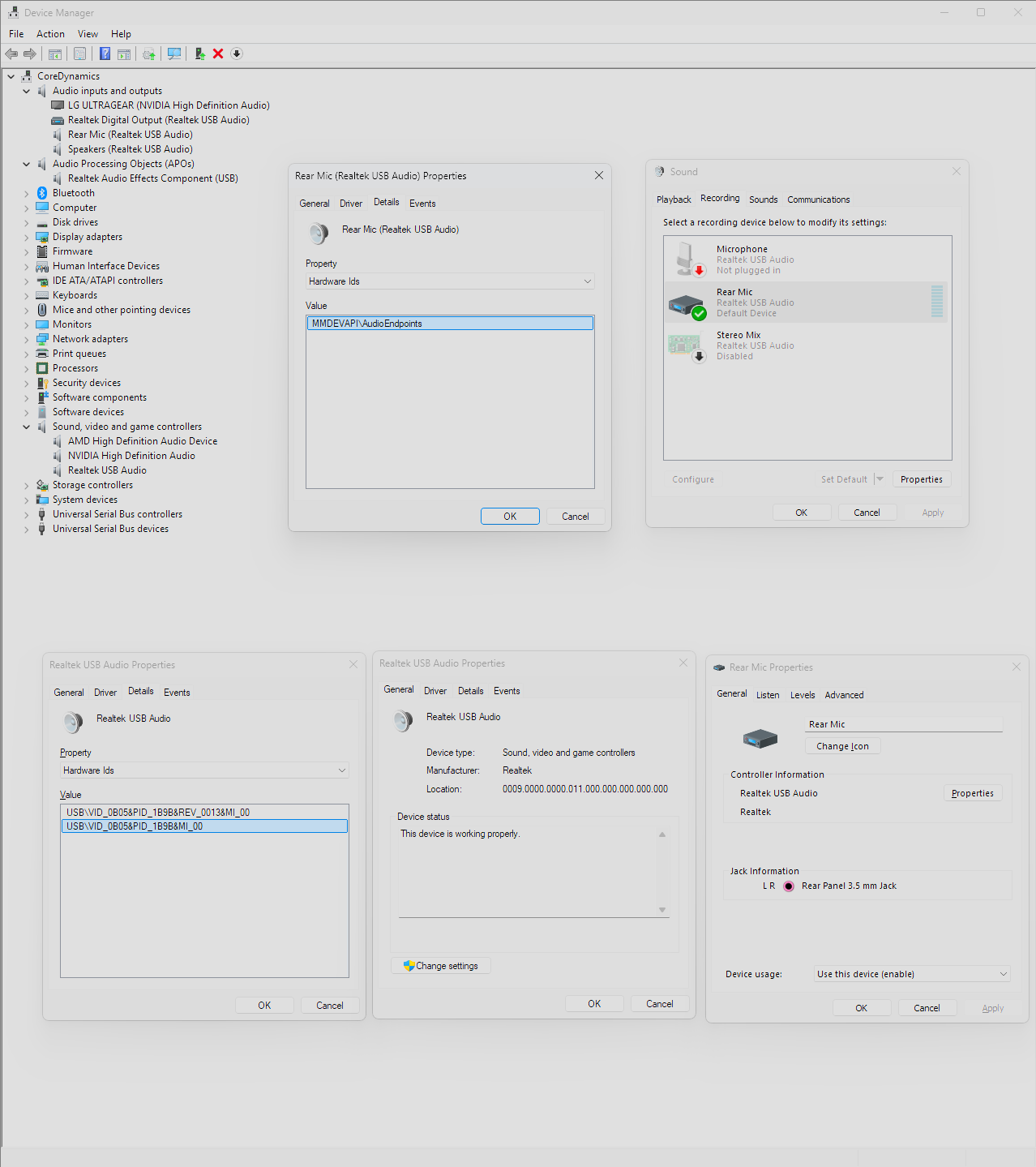
    I went and booted into Windows to double check how the audio devices are set up and I don't think I've ever seen onboard audio controllers show up like this with previous motherboards, which might explain why I'm having such a hard time getting it to work on Linux. It seems to be throwing whatever is plugged into the jack ports through two different hoops. The devices themselves (Speakers and Mac Mini) aren't directly connecting to the integrated Realtek audio card, and it seems like there's another layer of audio processing happening in-between. I don't know, I know nothing about audio so I'm kinda talking out of my ass based on what I'm expecting to see and what I'm seeing...

    This is what lspci -k returns, I'm seeing no mention of Realtek and the only audio related things I'm seeing appear to be the CPU's iGPU (73:00.1) and the GPU's (01:00.1) audio...

    00:00.0 Host bridge: Advanced Micro Devices, Inc. [AMD] Raphael/Granite Ridge Root Complex
    	Subsystem: ASUSTeK Computer Inc. Device 8877
    00:00.2 IOMMU: Advanced Micro Devices, Inc. [AMD] Raphael/Granite Ridge IOMMU
    	Subsystem: ASUSTeK Computer Inc. Device 8877
    00:01.0 Host bridge: Advanced Micro Devices, Inc. [AMD] Raphael/Granite Ridge Dummy Host Bridge
    00:01.1 PCI bridge: Advanced Micro Devices, Inc. [AMD] Raphael/Granite Ridge GPP Bridge
    	Subsystem: ASUSTeK Computer Inc. Device 8877
    	Kernel driver in use: pcieport
    00:01.2 PCI bridge: Advanced Micro Devices, Inc. [AMD] Raphael/Granite Ridge GPP Bridge
    	Subsystem: ASUSTeK Computer Inc. Device 8877
    	Kernel driver in use: pcieport
    00:02.0 Host bridge: Advanced Micro Devices, Inc. [AMD] Raphael/Granite Ridge Dummy Host Bridge
    00:02.1 PCI bridge: Advanced Micro Devices, Inc. [AMD] Raphael/Granite Ridge GPP Bridge
    	Subsystem: ASUSTeK Computer Inc. Device 8877
    	Kernel driver in use: pcieport
    00:02.2 PCI bridge: Advanced Micro Devices, Inc. [AMD] Raphael/Granite Ridge GPP Bridge
    	Subsystem: ASUSTeK Computer Inc. Device 8877
    	Kernel driver in use: pcieport
    00:03.0 Host bridge: Advanced Micro Devices, Inc. [AMD] Raphael/Granite Ridge Dummy Host Bridge
    00:04.0 Host bridge: Advanced Micro Devices, Inc. [AMD] Raphael/Granite Ridge Dummy Host Bridge
    00:08.0 Host bridge: Advanced Micro Devices, Inc. [AMD] Raphael/Granite Ridge Dummy Host Bridge
    00:08.1 PCI bridge: Advanced Micro Devices, Inc. [AMD] Raphael/Granite Ridge Internal GPP Bridge to Bus [C:A]
    	Subsystem: ASUSTeK Computer Inc. Device 8877
    	Kernel driver in use: pcieport
    00:08.3 PCI bridge: Advanced Micro Devices, Inc. [AMD] Raphael/Granite Ridge Internal GPP Bridge to Bus [C:A]
    	Subsystem: ASUSTeK Computer Inc. Device 8877
    	Kernel driver in use: pcieport
    00:14.0 SMBus: Advanced Micro Devices, Inc. [AMD] FCH SMBus Controller (rev 71)
    	Subsystem: ASUSTeK Computer Inc. Device 8877
    	Kernel driver in use: piix4_smbus
    	Kernel modules: i2c_piix4, sp5100_tco
    00:14.3 ISA bridge: Advanced Micro Devices, Inc. [AMD] FCH LPC Bridge (rev 51)
    	Subsystem: ASUSTeK Computer Inc. Device 8877
    00:18.0 Host bridge: Advanced Micro Devices, Inc. [AMD] Raphael/Granite Ridge Data Fabric; Function 0
    00:18.1 Host bridge: Advanced Micro Devices, Inc. [AMD] Raphael/Granite Ridge Data Fabric; Function 1
    00:18.2 Host bridge: Advanced Micro Devices, Inc. [AMD] Raphael/Granite Ridge Data Fabric; Function 2
    00:18.3 Host bridge: Advanced Micro Devices, Inc. [AMD] Raphael/Granite Ridge Data Fabric; Function 3
    	Kernel driver in use: k10temp
    	Kernel modules: k10temp
    00:18.4 Host bridge: Advanced Micro Devices, Inc. [AMD] Raphael/Granite Ridge Data Fabric; Function 4
    00:18.5 Host bridge: Advanced Micro Devices, Inc. [AMD] Raphael/Granite Ridge Data Fabric; Function 5
    00:18.6 Host bridge: Advanced Micro Devices, Inc. [AMD] Raphael/Granite Ridge Data Fabric; Function 6
    00:18.7 Host bridge: Advanced Micro Devices, Inc. [AMD] Raphael/Granite Ridge Data Fabric; Function 7
    01:00.0 VGA compatible controller: NVIDIA Corporation GA104 [GeForce RTX 3060 Ti] (rev a1)
    	Subsystem: NVIDIA Corporation Device 147a
    	Kernel driver in use: nvidia
    	Kernel modules: nouveau, nvidia_drm, nvidia
    01:00.1 Audio device: NVIDIA Corporation GA104 High Definition Audio Controller (rev a1)
    	Subsystem: NVIDIA Corporation Device 147a
    	Kernel driver in use: snd_hda_intel
    	Kernel modules: snd_hda_intel
    02:00.0 Non-Volatile memory controller: Sandisk Corp WD Black SN850X NVMe SSD (rev 01)
    	Subsystem: Sandisk Corp WD Black SN850X NVMe SSD
    	Kernel driver in use: nvme
    	Kernel modules: nvme
    […]
    71:00.0 USB controller: ASMedia Technology Inc. Device 2426 (rev 01)
    	Subsystem: ASMedia Technology Inc. Device 2421
    	Kernel driver in use: xhci_hcd
    72:00.0 USB controller: ASMedia Technology Inc. Device 2425 (rev 01)
    	Subsystem: ASMedia Technology Inc. Device 2421
    	Kernel driver in use: thunderbolt
    	Kernel modules: thunderbolt
    73:00.0 VGA compatible controller: Advanced Micro Devices, Inc. [AMD/ATI] Granite Ridge [Radeon Graphics] (rev c5)
    	Subsystem: ASUSTeK Computer Inc. Device 8877
    	Kernel driver in use: amdgpu
    	Kernel modules: amdgpu
    73:00.1 Audio device: Advanced Micro Devices, Inc. [AMD/ATI] Rembrandt Radeon High Definition Audio Controller
    	Subsystem: ASUSTeK Computer Inc. Device 8877
    	Kernel driver in use: snd_hda_intel
    	Kernel modules: snd_hda_intel
    73:00.2 Encryption controller: Advanced Micro Devices, Inc. [AMD] Family 19h PSP/CCP
    	Subsystem: ASUSTeK Computer Inc. Device 8877
    	Kernel driver in use: ccp
    	Kernel modules: ccp
    73:00.3 USB controller: Advanced Micro Devices, Inc. [AMD] Raphael/Granite Ridge USB 3.1 xHCI
    	Subsystem: ASUSTeK Computer Inc. Device 8877
    	Kernel driver in use: xhci_hcd
    73:00.4 USB controller: Advanced Micro Devices, Inc. [AMD] Raphael/Granite Ridge USB 3.1 xHCI
    	Subsystem: ASUSTeK Computer Inc. Device 8877
    	Kernel driver in use: xhci_hcd
    74:00.0 USB controller: Advanced Micro Devices, Inc. [AMD] Device 15b8
    	Subsystem: ASUSTeK Computer Inc. Device 8877
    	Kernel driver in use: xhci_hcd
    

    The deeper I dig the less I understand.

    Edit: had to redact the code-block because it seems there’s a character limit and it was long enough to hit it.

  • source
  • parent
  • context
  • [–] [S] 1 point 1 year ago (5 children)

    The only actual microphone I have is a USB microphone, and I've had no problem using it for Discord calls, but that unfortunately doesn't apply to the Line In port.

    Currently looking up how to figure out if I can force Arch to use snd_hda_intel if it isn't already.

    This is what lspci returns:

    00:00.0 Host bridge: Advanced Micro Devices, Inc. [AMD] Raphael/Granite Ridge Root Complex
    00:00.2 IOMMU: Advanced Micro Devices, Inc. [AMD] Raphael/Granite Ridge IOMMU
    00:01.0 Host bridge: Advanced Micro Devices, Inc. [AMD] Raphael/Granite Ridge Dummy Host Bridge
    00:01.1 PCI bridge: Advanced Micro Devices, Inc. [AMD] Raphael/Granite Ridge GPP Bridge
    00:01.2 PCI bridge: Advanced Micro Devices, Inc. [AMD] Raphael/Granite Ridge GPP Bridge
    00:02.0 Host bridge: Advanced Micro Devices, Inc. [AMD] Raphael/Granite Ridge Dummy Host Bridge
    00:02.1 PCI bridge: Advanced Micro Devices, Inc. [AMD] Raphael/Granite Ridge GPP Bridge
    00:02.2 PCI bridge: Advanced Micro Devices, Inc. [AMD] Raphael/Granite Ridge GPP Bridge
    00:03.0 Host bridge: Advanced Micro Devices, Inc. [AMD] Raphael/Granite Ridge Dummy Host Bridge
    00:04.0 Host bridge: Advanced Micro Devices, Inc. [AMD] Raphael/Granite Ridge Dummy Host Bridge
    00:08.0 Host bridge: Advanced Micro Devices, Inc. [AMD] Raphael/Granite Ridge Dummy Host Bridge
    00:08.1 PCI bridge: Advanced Micro Devices, Inc. [AMD] Raphael/Granite Ridge Internal GPP Bridge to Bus [C:A]
    00:08.3 PCI bridge: Advanced Micro Devices, Inc. [AMD] Raphael/Granite Ridge Internal GPP Bridge to Bus [C:A]
    00:14.0 SMBus: Advanced Micro Devices, Inc. [AMD] FCH SMBus Controller (rev 71)
    00:14.3 ISA bridge: Advanced Micro Devices, Inc. [AMD] FCH LPC Bridge (rev 51)
    00:18.0 Host bridge: Advanced Micro Devices, Inc. [AMD] Raphael/Granite Ridge Data Fabric; Function 0
    00:18.1 Host bridge: Advanced Micro Devices, Inc. [AMD] Raphael/Granite Ridge Data Fabric; Function 1
    00:18.2 Host bridge: Advanced Micro Devices, Inc. [AMD] Raphael/Granite Ridge Data Fabric; Function 2
    00:18.3 Host bridge: Advanced Micro Devices, Inc. [AMD] Raphael/Granite Ridge Data Fabric; Function 3
    00:18.4 Host bridge: Advanced Micro Devices, Inc. [AMD] Raphael/Granite Ridge Data Fabric; Function 4
    00:18.5 Host bridge: Advanced Micro Devices, Inc. [AMD] Raphael/Granite Ridge Data Fabric; Function 5
    00:18.6 Host bridge: Advanced Micro Devices, Inc. [AMD] Raphael/Granite Ridge Data Fabric; Function 6
    00:18.7 Host bridge: Advanced Micro Devices, Inc. [AMD] Raphael/Granite Ridge Data Fabric; Function 7
    01:00.0 VGA compatible controller: NVIDIA Corporation GA104 [GeForce RTX 3060 Ti] (rev a1)
    01:00.1 Audio device: NVIDIA Corporation GA104 High Definition Audio Controller (rev a1)
    02:00.0 Non-Volatile memory controller: Sandisk Corp WD Black SN850X NVMe SSD (rev 01)
    03:00.0 PCI bridge: Advanced Micro Devices, Inc. [AMD] 600 Series Chipset PCIe Switch Upstream Port (rev 01)
    04:00.0 PCI bridge: Advanced Micro Devices, Inc. [AMD] 600 Series Chipset PCIe Switch Downstream Port (rev 01)
    04:06.0 PCI bridge: Advanced Micro Devices, Inc. [AMD] 600 Series Chipset PCIe Switch Downstream Port (rev 01)
    04:07.0 PCI bridge: Advanced Micro Devices, Inc. [AMD] 600 Series Chipset PCIe Switch Downstream Port (rev 01)
    04:08.0 PCI bridge: Advanced Micro Devices, Inc. [AMD] 600 Series Chipset PCIe Switch Downstream Port (rev 01)
    04:0c.0 PCI bridge: Advanced Micro Devices, Inc. [AMD] 600 Series Chipset PCIe Switch Downstream Port (rev 01)
    04:0d.0 PCI bridge: Advanced Micro Devices, Inc. [AMD] 600 Series Chipset PCIe Switch Downstream Port (rev 01)
    06:00.0 Ethernet controller: Intel Corporation Ethernet Controller I226-V (rev 06)
    07:00.0 Network controller: MEDIATEK Corp. Device 7927
    08:00.0 Non-Volatile memory controller: Sandisk Corp WD Black SN850X NVMe SSD (rev 01)
    09:00.0 USB controller: Advanced Micro Devices, Inc. [AMD] Device 43fc (rev 01)
    0a:00.0 SATA controller: Advanced Micro Devices, Inc. [AMD] 600 Series Chipset SATA Controller (rev 01)
    0b:00.0 PCI bridge: ASMedia Technology Inc. Device 2421 (rev 01)
    0c:00.0 PCI bridge: ASMedia Technology Inc. Device 2423 (rev 01)
    0c:01.0 PCI bridge: ASMedia Technology Inc. Device 2423 (rev 01)
    0c:02.0 PCI bridge: ASMedia Technology Inc. Device 2423 (rev 01)
    0c:03.0 PCI bridge: ASMedia Technology Inc. Device 2423 (rev 01)
    71:00.0 USB controller: ASMedia Technology Inc. Device 2426 (rev 01)
    72:00.0 USB controller: ASMedia Technology Inc. Device 2425 (rev 01)
    73:00.0 VGA compatible controller: Advanced Micro Devices, Inc. [AMD/ATI] Granite Ridge [Radeon Graphics] (rev c5)
    73:00.1 Audio device: Advanced Micro Devices, Inc. [AMD/ATI] Rembrandt Radeon High Definition Audio Controller
    73:00.2 Encryption controller: Advanced Micro Devices, Inc. [AMD] Family 19h PSP/CCP
    73:00.3 USB controller: Advanced Micro Devices, Inc. [AMD] Raphael/Granite Ridge USB 3.1 xHCI
    73:00.4 USB controller: Advanced Micro Devices, Inc. [AMD] Raphael/Granite Ridge USB 3.1 xHCI
    74:00.0 USB controller: Advanced Micro Devices, Inc. [AMD] Device 15b8
    

    dmesg | grep snd returns the following so it seems like snd_hda_intel is at least present if not being used already?

    [    6.081625] snd_hda_intel 0000:01:00.1: enabling device (0000 -> 0002)
    [    6.081703] snd_hda_intel 0000:01:00.1: Disabling MSI
    [    6.081707] snd_hda_intel 0000:01:00.1: Handle vga_switcheroo audio client
    [    6.081779] snd_hda_intel 0000:73:00.1: enabling device (0000 -> 0002)
    [    6.081804] snd_hda_intel 0000:73:00.1: Handle vga_switcheroo audio client
    [    6.125693] snd_hda_intel 0000:73:00.1: bound 0000:73:00.0 (ops amdgpu_dm_audio_component_bind_ops [amdgpu])
    [   11.806279] usbcore: registered new interface driver snd-usb-audio
    
  • source
  • parent
  • context
  • [–] [S] 1 point 1 year ago (2 children)

    Same as other audio software, “USB Audio Device” for both Output and Input, both are enabled and volume at 75% or higher, capture is enabled on the Input, if Kmix shows audio activity levels then it’s not detecting anything either despite media playing on the Mac Mini

  • source
  • parent
  • context
  • [–] [S] 1 point 1 year ago (7 children)

    If I plug the speakers directly to the Mac Mini and play media, audio comes out of the speakers. Running arecord to try to record the Mac Mini’s audio coming in from Line In results in a blank WAV file with no audio.

    I believe KDE’s sound settings is supposed to show audio activity levels, but to be extra sure I tried pavucontrol and other apps (like Discord) and they all show zero audio activity levels despite Line In being enabled and volume up.

  • source
  • parent
  • context
  • [–] [S] 1 point 1 year ago

    The HD-Audio Generic is the CPU’s (AMD Ryzen 7 9700X) iGPU (ATI R6xx HDMI) audio, when I select it, it shows four S/PDIF items that are disabled and cannot be enabled.

    Disabling USB Audio in KDE’s sound settings and enabling HD-Audio Generic gives 8 audio channel that provide no audio whatsoever.

  • source
  • parent
  • context
  • [–] [S] 1 point 1 year ago (2 children)

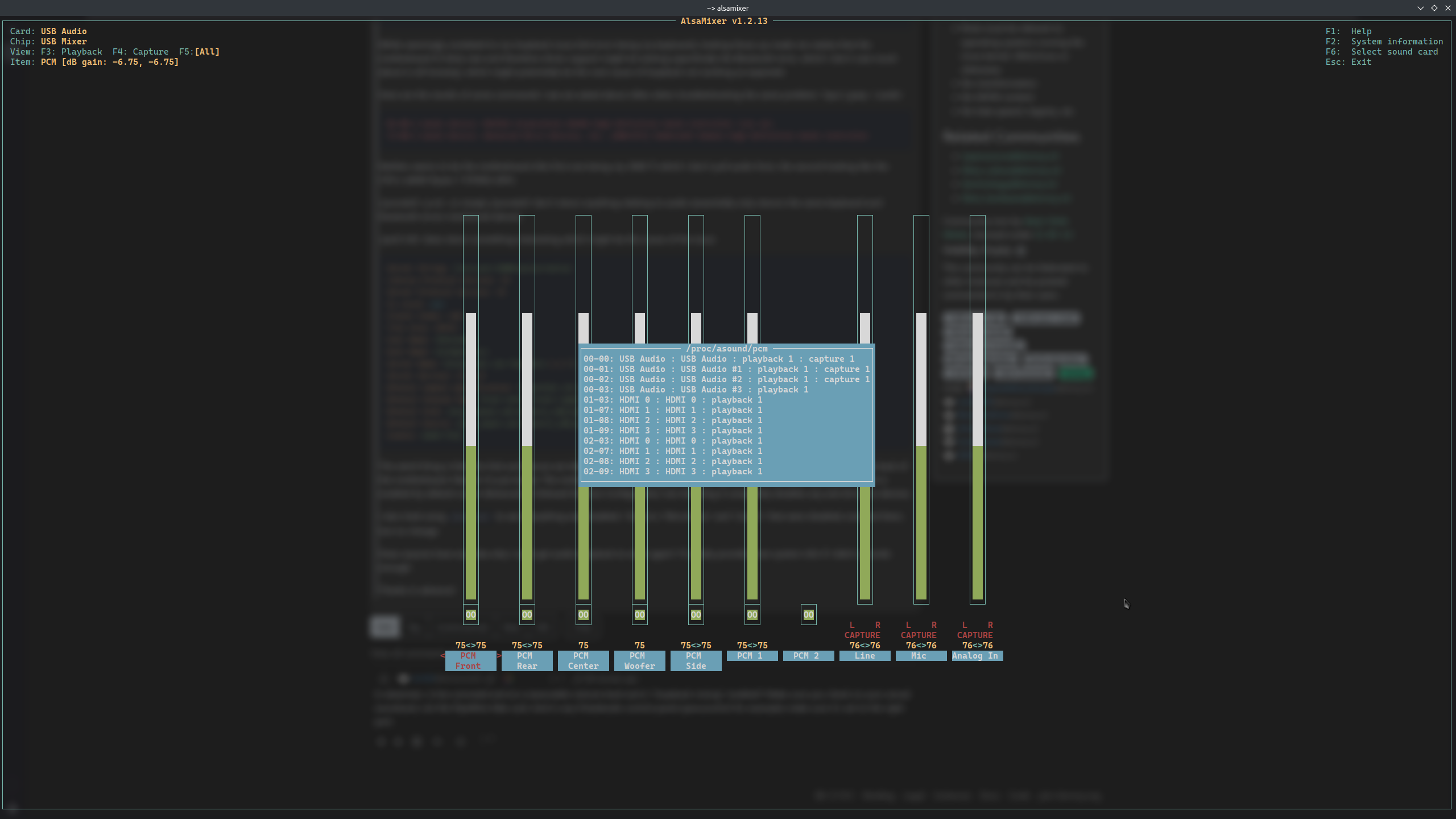
    I'm not seeing anything about loopback mixing, but here's how my alsamixer looks at the moment:

    In KDE Plasma's sound settings, both ports are set correctly, I tried messing around with the profiles but Analog Stereo Duplex seems to be the default and seems to work best.

    All settings are pretty much identical compared to before the motherboard upgrade, back when audio loopback worked no problem.

  • source
  • parent
  • context
  • submitted 1 year ago* (last edited 1 year ago) by to c/linux@lemmy.ml
     

    EDIT: Making the specs clearer as my long-winded breakdown is causing confusions:

    • Motherboard: Asus ROG STRIX X870-F Gaming Wifi
    • CPU: AMD Ryzen 7 9700X
    • RAM: 64GB (DDR5)
    • GPU: Nvidia RTX 3070 Ti
    • Storage: (2x) WesternDigital Black SN850X (2Tb)
    • OS: Dual-Boot: Arch Linux with KDE Plasma 6 and PipeWire on one drive, Windows 11 IoT LTSC on the other.

    Problem: "Line In" from the Mac Mini to the PC described above does not receive any audio whatsoever on Linux, but works perfectly fine on Windows. Trying to get Audio Loopback working on Linux so audio from the Mac Mini plays out from the PC described above.

    cross-posted from: https://programming.dev/post/25416188

    Hey all, I have a bit of a weird issue I’ve been struggling to fix for a little while now and am hoping a kind soul here might have the knowledge to help me figure it out.

    A couple of years ago i switched from a single-system-dual-display setup to dual-system-single-display (as in one screen per system). I’ll spare the long winded explanation for it, but the gist of it is that the new system (a Mac Mini) is connected to the original, main system (custom built PC) via the motherboard’s audio jack so I can get the audio from both systems to play on the same speakers. That way the main PC focuses on the game or whatever else i’m doing, while the Mac Mini focuses on tools/streams/movies/etc. and both share the same set of speakers.

    So it goes: Mac Mini (audio out) > (line in) Main PC (audio out) > Speakers

    The way I had it work on Windows was by simply going to the audio settings, going to the Line In item’s properties, and checking the “listen to this device” box.

    On Linux (Arch, KDE 6 if that helps at all), it was as simple as running either pactl load-module module-loopback or pw-loopback and it would work the same way as Windows out of the box.

    Problem is, my motherboard (Asus TUF Gaming X570-Pro (Wi-Fi)) in the main PC died recently, so I had to get a new one (Asus ROG STRIX X870-F Gaming Wifi), and ever since, I’ve been unable to get audio loopback to work even after a clean, fresh install. Listening to device on Windows works fine still but I’m looking to completely get rid of Windows.

    By default, running pw-loopback with no tinkering (which worked on the previous build) cut the audio from the main PC and replaced it by what sounds like slow steps in a very echo-y cave.

    With a bit of tinkering trying to follow online guides and documentations which i’ve since undone (but the changes remained somehow) it changed to just duplicating the main PC audio with a tiny bit of delay (or at least the audio from one app on the main PC).

    One thing I’ve noticed is that when I boot up my main PC, a couple of errors do show up:

    Hub 10-0:1.0: config failed, hub doesn’t have any ports! (err -19)
    hid-generic 0003:1532:0292.0008: No inputs registered, leaving
    Bluetooth: hci0: Opcode 0x0c03 failed: -16
    

    While seemingly unrelated to my loopback issue (hid error being my keyboard), looking those up made me realize that the motherboard IS fairly new and therefore driver support might be lacking (specifically the Bluetooth error, which I don’t care much about in all honesty), which might potentially be the root cause of loopback not working as expected.

    Here are the results of some commands I see are asked about often when troubleshooting the same problem: ‘lspci | grep -i audio’

    01:00.1 Audio device: NVIDIA Corporation GA104 High Definition Audio Controller (rev a1)
    73:00.1 Audio Device: Advanced Micro Devices, Inc. [AMD/ATI] Rembrandt Radeon High Definition Audio Controller
    

    Neither seems to be the motherboard (the first one being my 3060 Ti which I don’t pull audio from, the second looking like the CPU’s (AMD Ryzen 7 9700X) iGPU.

    ‘journalctl -p err’, or simply ‘journalctl’ don’t return anything relating to audio (essentially only returns the same keyboard and bluetooth errors mentioned above).

    ‘pactl info’ does return something interesting which might be the cause of the issue:

    Server String: /run/user/1000/pulse/native
    Library Protocol Version: 35
    Server Protocol Version: 35
    Is Local: yes
    Client Index: 128
    Tile Size: 65472
    User Name: thelvadam
    Host Name: CoreDynamics
    Server Name: PulseAudio (on PipeWire 1.2.7)
    Server Version: 15.0.0
    Default Sample Specification: float32le 2ch 48000Hz
    Default Channel Map: front-left, front-right
    Default Sink: alsa_output.usb-Generic_USB_Audio-00.analog-stereo
    Default Source: alsa_input.usb-Generic_USB_Audio-00.analog-stereo
    Cookie: 6a69:7312
    

    The weird thing is that the Sink and Source are labeled as usb-Generic_USB_Audio despite being the audio jack ports on the back of the motherboard. Maybe I’m just dumb. The motherboard BIOS settings do have an option for “USB Audio Controller” which is enabled by default under Advanced > Onboard Devices Configuration, but disabling it completely disables any and all audio devices.

    I also tried using alsamixer to see if anything was disabled. I found a “Microhone” and “Line In” that were disabled, enabled them, but no change.

    Does anyone have any idea why I can’t get audio loopback to work again? I’ll gladly provide more system info if I didn’t provide enough.

    Thanks in advance!-

    submitted 1 year ago* (last edited 1 year ago) by to c/linux4noobs@programming.dev
     

    Hey all, I have a bit of a weird issue I’ve been struggling to fix for a little while now and am hoping a kind soul here might have the knowledge to help me figure it out.

    A couple of years ago i switched from a single-system-dual-display setup to dual-system-single-display (as in one screen per system). I’ll spare the long winded explanation for it, but the gist of it is that the new system (a Mac Mini) is connected to the original, main system (custom built PC) via the motherboard’s audio jack so I can get the audio from both systems to play on the same speakers. That way the main PC focuses on the game or whatever else i’m doing, while the Mac Mini focuses on tools/streams/movies/etc. and both share the same set of speakers.

    So it goes: Mac Mini (audio out) > (line in) Main PC (audio out) > Speakers

    The way I had it work on Windows was by simply going to the audio settings, going to the Line In item’s properties, and checking the “listen to this device” box.

    On Linux (Arch, KDE 6 if that helps at all), it was as simple as running either pactl load-module module-loopback or pw-loopback and it would work the same way as Windows out of the box.

    Problem is, my motherboard (Asus TUF Gaming X570-Pro (Wi-Fi)) in the main PC died recently, so I had to get a new one (Asus ROG STRIX X870-F Gaming Wifi), and ever since, I’ve been unable to get audio loopback to work even after a clean, fresh install. Listening to device on Windows works fine still but I’m looking to completely get rid of Windows.

    By default, running pw-loopback with no tinkering (which worked on the previous build) cut the audio from the main PC and replaced it by what sounds like slow steps in a very echo-y cave.

    With a bit of tinkering trying to follow online guides and documentations which i’ve since undone (but the changes remained somehow) it changed to just duplicating the main PC audio with a tiny bit of delay (or at least the audio from one app on the main PC).

    One thing I’ve noticed is that when I boot up my main PC, a couple of errors do show up:

    Hub 10-0:1.0: config failed, hub doesn’t have any ports! (err -19)
    hid-generic 0003:1532:0292.0008: No inputs registered, leaving
    Bluetooth: hci0: Opcode 0x0c03 failed: -16
    

    While seemingly unrelated to my loopback issue (hid error being my keyboard), looking those up made me realize that the motherboard IS fairly new and therefore driver support might be lacking (specifically the Bluetooth error, which I don’t care much about in all honesty), which might potentially be the root cause of loopback not working as expected.

    Here are the results of some commands I see are asked about often when troubleshooting the same problem: ‘lspci | grep -i audio’

    01:00.1 Audio device: NVIDIA Corporation GA104 High Definition Audio Controller (rev a1)
    73:00.1 Audio Device: Advanced Micro Devices, Inc. [AMD/ATI] Rembrandt Radeon High Definition Audio Controller
    

    Neither seems to be the motherboard (the first one being my 3060 Ti which I don’t pull audio from, the second looking like the CPU’s (AMD Ryzen 7 9700X) iGPU.

    ‘journalctl -p err’, or simply ‘journalctl’ don’t return anything relating to audio (essentially only returns the same keyboard and bluetooth errors mentioned above).

    ‘pactl info’ does return something interesting which might be the cause of the issue:

    Server String: /run/user/1000/pulse/native
    Library Protocol Version: 35
    Server Protocol Version: 35
    Is Local: yes
    Client Index: 128
    Tile Size: 65472
    User Name: thelvadam
    Host Name: CoreDynamics
    Server Name: PulseAudio (on PipeWire 1.2.7)
    Server Version: 15.0.0
    Default Sample Specification: float32le 2ch 48000Hz
    Default Channel Map: front-left, front-right
    Default Sink: alsa_output.usb-Generic_USB_Audio-00.analog-stereo
    Default Source: alsa_input.usb-Generic_USB_Audio-00.analog-stereo
    Cookie: 6a69:7312
    

    The weird thing is that the Sink and Source are labeled as usb-Generic_USB_Audio despite being the audio jack ports on the back of the motherboard. Maybe I’m just dumb. The motherboard BIOS settings do have an option for “USB Audio Controller” which is enabled by default under Advanced > Onboard Devices Configuration, but disabling it completely disables any and all audio devices.

    I also tried using alsamixer to see if anything was disabled. I found a “Microhone” and “Line In” that were disabled, enabled them, but no change.

    Does anyone have any idea why I can’t get audio loopback to work again? I’ll gladly provide more system info if I didn’t provide enough.

    Thanks in advance!


    Hey everyone, I’ve recently been trying to go back to a dual boot setup with Windows and Arch. I would fully switch to Arch, but unfortunately there are still a few things I need access to that either don’t have a FOSS alternative that meets my needs or won’t run through WINE/Proton.

    I used to already have a dual boot setup but recently had to buy a new motherboard, which also involved getting a new CPU, so I ended up wiping everything and just riding on Windows for a while, but I did make sure to give Windows’ boot partition enough space knowing that I was planning on dual booting again soon.

    I figured it was all going to be easy-peasy as I’ve done it before and it worked with no problems at all. However, after installing Arch the same way I’d done before and rebooting my PC, it booted straight to Windows, completely skipping GRUB.

    I went the lazy route and used Archinstall, which received a UI update since last time I used it so I figured maybe the process changed and I messed it up by not noticing it. So I tried again, this time taking the manual install route… same result.

    No GRUB entry would show up on UEFI so I figured maybe it installed in the wrong location or I messed it up again somehow. Booted on the Arch ISO, mounted the EFI partition to check it, both GRUB Windows’ boot manager are there.

    After a quick search I found that some motherboard might need you to toggle secure boot on and back off to force it to check for bootloaders. It apparently specifically applies to Acer motherboards, both of my motherboards are Asus (old one was TUF Gaming x570-Pro, new one is ROG Strix x870-F Gaming) but I figured I’d give it a try.

    Only way I managed to get anything else to show up was by enabling CSM, then a second “boot” entry on that drive would show up. But it seems that “boot” entry is just the drive itself because when I tried to boot from it, it just gave me that dreaded screen that tells you it couldn’t find anything to boot, to plug in a bootable drive and press enter.

    I tried again via Archinstall, this time picking systemd-boot since during my search earlier i found that systemd-boot is apparently easier to set up a dual boot than GRUB… same result. My PC just won’t see Linux bootloaders, it seems.

    The only way I managed to make it “work” was by making a second EFI partition on that same drive, leaving the Windows boot partition untouched and giving Arch its own boot partition. By “work” I mean I could finally get systemd-boot to launch, but if I wanted to boot into Windows, I’d have to boot into UEFI and switch the boot devices priorities around, which, while better than nothing, is far from ideal.

    In doing so I also noticed that the systemd-boot entry showed up the same way as the “empty drive” entry did earlier when I enabled CSM, might be normal, nit-picking, figured it was worth mentioning.

    The way my UEFI is currently set up is:

    • CSM disabled
    • Secure Boot > OS Type > Other OS
    • Secure Boot mode > Standard

    That’s the way I had it set up on my old motherboard back when dual boot worked, and it’s the way it needs to be set up for secure boot to be disabled according to Asus support posts I found.

    Does anyone have any suggestions on what I might be doing wrong?

    Additionally, somewhat unrelated but something I found when messing around with Archinstall is that if I set Archinstall to automatically partition everything using BTRFS, it generates 5 subvolumes, one of which is @.snapshots, but if I try to manually replicate that set up (because the automatic one wants to wipe the whole drive and I don’t want that because I want to keep Windows), it won’t let me make a @.snapshots subvolume. Is this important at all? If so, can I add it post-install?

    Thanks in advance! And happy new year!

    view more: next ›