1


I do not wish for it to be magnified. I hit some combination of super, alt, Ctrl, shift, maybe z? I have checked like twenty Linux keyboard shortcut websites and checked my actual keyboard shortcuts on my computer to no avail.

CachyOS 7.1.3-2

2


Any linux wizards know why when my sound sources go to background and CPU is under heavy load the audio crackles?

apps tested: minecraft, vlc(flatpak), spotify(flatpak), other fltapaks
crackles on both bluetooth and minijack headphones,
disabling microphone, easyeffects, gpu screen recorder ( gsr-default_output) didn't help

I use blender to put the load on CPU but it also happens when compiling or gaming

I have increased stuff in cat /etc/pipewire/pipewire.conf

[…]
## Properties for the DSP configuration.
    default.clock.rate          = 192000
    #default.clock.allowed-rates = [ 48000 ]
    default.clock.quantum       = 1024
    default.clock.min-quantum   = 32
    default.clock.max-quantum   = 4096
[…]
pw-top -b
S   ID  QUANT   RATE    WAIT    BUSY   W/Q   B/Q  ERR FORMAT           NAME 
S   29      0      0   
***
   
***
 
***
 
***
    0                  Dummy-Driver
S   30      0      0   
***
   
***
 
***
 
***
    0                  Freewheel-Driver
S   45      0      0   
***
   
***
 
***
 
***
    0                  Midi-Bridge
S   48      0      0   
***
   
***
 
***
 
***
    0                  bluez_midi.server
R   52   2048 192000  10,6ms  69,7us  0,99  0,01  453    S32LE 2 48000 alsa_output.pci-0000_06_00.6.analog-stereo
R  213    900  48000 229,0us  69,1us  0,02  0,01    0    F32LE 2 48000  + Firefox
R  219      0      0  13,0us  41,1us  0,00  0,00    0    F32P 2 192000  + easyeffects_sink
R  217      0      0    +++   17,0us  +++   0,00  428                   + ee_soe_output_level
R  174      0      0   9,3ms  34,3us  0,88  0,00  5416                   + ee_soe_spectrum
R  206    512  48000 300,5us  54,3us  0,03  0,01    0    F32LE 2 48000  + java
R  186    900  48000 359,5us  56,2us  0,03  0,01    0    F32LE 2 48000  + Firefox
R  242    900  48000 417,2us  52,4us  0,04  0,00    0    F32LE 2 48000  + Firefox
R  129    960  48000 152,1us  74,5us  0,01  0,01    0    S16LE 2 48000  + gsr-default_output
R  116   1920  48000 472,4us  62,5us  0,04  0,01    0    F32LE 2 48000  + VLC media player (LibVLC 3.0.23)
I   53   4096 192000   8,9us   3,3us  0,00  0,00  109   S32LE 2 192000 alsa_input.pci-0000_06_00.6.analog-stereo
S   68      0      0   
***
   
***
 
***
 
***
    0                  v4l2_input.pci-0000_06_00.3-usb-0_3_1.0
I  191      0      0   0,0us   0,0us  ???   ???     0    F32LE 2 48000 Firefox
I  216      0      0   0,0us   0,0us  ???   ???     0    F32LE 2 48000 Firefox
I  220      0      0   0,0us   0,0us  ???   ???     0    F32LE 2 48000 Firefox
S  244      0      0   
***
   
***
 
***
 
***
    0                  Blender
I  205      0      0   0,0us   0,0us  ???   ???     0    F32LE 2 44100 spotify
R  249   2048 192000  10,7ms  35,5us  1,00  0,00  1339    S16LE 1 48000 alsa_input.usb-145f_Trust_GXT_242_Microphone-00.mono-fallback
R  120      0      0  12,2us  13,5us  0,00  0,00    7    F32P 2 192000  + easyeffects_source
R  145      0      0   6,2us   8,2us  0,00  0,00   90                   + ee_sie_output_level
R  230      0      0   5,7us   7,6us  0,00  0,00  118                   + ee_sie_spectrum
R  144    960  48000  18,9us  49,7us  0,00  0,00    0    S16LE 2 48000  + gsr-default_input
R  257      0      0 122,2us    +++   0,01  +++   1101                   + ee_sie_rnnoise
R  106      0      0  44,8us 139,8us  0,00  0,01  236                   + ee_sie_stereo_tools
R   84      0      0   
***
   8,6us 
***
  0,00  235                   + ee_sie_crossfeed
R  158      0      0   5,3us   7,8us  0,00  0,00   30                   + ee_sie_reverb
R  171      0      0   5,2us   8,9us  0,00  0,00    4                   + ee_sie_equalizer
S  172      0      0   
***
   
***
 
***
 
***
    0                  plasmashell
S  119      0      0   
***
   
***
 
***
 
***
    0                  plasmashell
S  233      0      0   
***
   
***
 
***
 
***
    0                  ee_test_signals
S  193      0      0   
***
   
***
 
***
 
***
    0                  plasmashell
I  175      0      0   0,0us   0,0us  ???   ???     0    F32LE 2 48000 plasmashell

I know to little to dig into the scheduler stuff. systemctl status rtkit-daemon prints about pipewire sucess at priority 20.

I am on KDE/linux (bazzite based on fedora atomic44)

--------------
OS: Bazzite x86_64
Host: 82JU (Legion 5 15ACH6H)
Kernel: Linux 7.1.3-ogc3.4.fc44.x86_64
Uptime: 4 hours, 46 mins
Packages: 2 (appimage), 4 (brew), 1 (brew-cask), 173 (flatpak), 3014 (rpm)
Shell: bash 5.3.9
Display (BOE08E8): 1920x1080 in 16", 120 Hz [Built-in]
DE: KDE Plasma 6.7.2
WM: KWin (Wayland)
WM Theme: leaf-dark-color
Theme: Fusion (LeafDark) [Qt], Vapor [GTK2/3]
Icons: breeze-dark [Qt], breeze-dark [GTK3/4]
Font: Noto Sans (10pt) [Qt], Noto Sans (10pt) [GTK3/4]
Cursor: Teto (30px)
Terminal: konsole 26.4.3
CPU: AMD Ryzen 5 5600H (12) @ 4.28 GHz
GPU 1: NVIDIA GeForce RTX 3060 Mobile / Max-Q [Discrete]
GPU 2: AMD Radeon Vega Series / Radeon Vega Mobile Series [Integrated]
Memory: 12.05 GiB / 13.49 GiB (89%)
Swap: 16.62 GiB / 35.59 GiB (47%)
Disk (/): 49.00 MiB / 49.00 MiB (100%) - overlay [Read-only]
Disk (/etc): 845.89 GiB / 929.93 GiB (91%) - btrfs
Local IP (tun0): 10.96.0.42/16
Battery (L20M4PC0): 100% [AC Connected]
Locale: pl_PL.UTF-8
3


theres no "disable during full screen" option in Night Light itself, brightness and gamma applet was a nice workaround for a while but stopped working last week, it increases gamma levels to 100% but doesn't disable the night light anymore; the gnome extension caffeine sounded perfect but after installing I cant open settings/config/manual, there's just a tray icon that doesn't seem to do anything.

any ideas?

4


So at the moment I know that an official unixporn server on discord does exist, but first I don't wanna use discord and second, they want me to verify myself via phone number before I'll be able to chat, and that's like a bit of BS. So what I'm actually looking for instead is preferably an xmpp room or an IRC chat Thanks to all of you in advance

5


6


I have a CachyOS computer at home and I really enjoy it, but I'm worried by the trend of Ubuntu and Fedora adding AI recently. I've seen the admins on the Forum admit that they DO NOT oppose AI. I'm a bit worried about the future and I think I would like to learn about options for switching to Arch.

If it's more trouble than it's worth then I acknowledge it would be preeeetttyyy eaaasy to just install Arch on a cleared off drive and move all my work over, I basically did exactly that when I left Windows, but the downside is I'm not sure how hard it will be to recreate my workflow without some of the CachyOS packages.

7


I'm intent on getting rid of Ubuntu since their embrace of AI, and would prefer to avoid any other distro based on Ubuntu, since that's just kicking the can down the road.

But a thorough search of the web for various versions of "Linux with no AI" only returns results that recommend AI infused distros and articles touting how great AI will be for Linux, or how to fix Linux using AI. 🤮

Can anyone recommend a distro that has proudly announced their refusal to ever consider adding #AIslop to their distro?

8
 
 
9
 
 
10


Hi,

I bought a Lenovo M910q (i5-6500T, 16Gib RAM, Intel Mesa graphics) to play with Proxmox, but I'm dying on the first level!

After installing Proxmox from Ventoy using either the default settings or the ones from someone's guide , I get kernel panics on the first boot. As a test, I've just installed Debian on it from Ventoy with the default settings, and it seems to work fine.

I ran the Processor, Memory, and SSD checks from the Intel BIOS without any flags.

Any guesses what I've done wrong here?

11
submitted 4 weeks ago* (last edited 4 weeks ago) by to c/linux4noobs@programming.dev


Linux Mint Cinnamon 22.1// Logitech G433 with on-wire microphone

Yesterday my headset-mic just felt like not picking up sound properly anymore. I do not recall doing anything that could cause this, like updates etc. I can scream directly into my micorphone and nothing. Yet, when I tap on it it suddenly records sound perfectly?

I tried

  • rebooting
  • installing system updates
  • reinstalling pipewire packages
  • replugging my headset
  • checking and increasing sound levels of the mic using wpctl wpctl get-volume 50 Volume: 10.00 wpctl set-volume 50 100 wpctl set-volume 50 10000

I am at my wits end here. Do you have any ideas how to solve this?

12
automatic bind mount/unmount (discuss.tchncs.de)
submitted 1 month ago* (last edited 1 month ago) by to c/linux4noobs@programming.dev


I have bind mounts configured in my /etc/fstab. The source (i.e. where the files physically exist) is on a removable USB drive.

Right now it works but I have to mount/unmount everything individually when I plug/unplug the drive. I would like to be able to have the bind mounts follow the state of of the USB drive automatically.

Is there a way?

Edit here is relevant section of fstab:

/dev/mapper/external-crypt	/mount/external		auto	nosuid,nodev,nofail,x-systemd.device-timeout=5	0 0
/mount/external/realfolder	/home/user/folder	none	bind,nofail	0 0

So when I run sudo mount "/mount/external" I want sudo mount /home/user/folder to be implied; likewise for umount.

13


I've spent hours on MX fluxbox, but wasn't able to make the brightness and the time adjustments permanent.

I boot it from my live USB stick by the way.

14


What do you think of this framing of linux distributions? Accurate? Horrible?

cross-posted from: https://mander.xyz/post/53932495

15


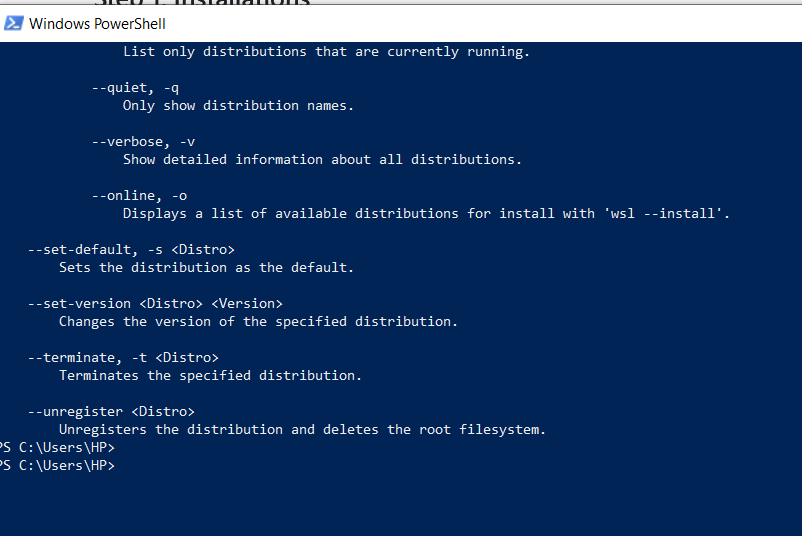
I simply opened the power shell on my windows computer and gave the command wsl --install.

16
 
 
17


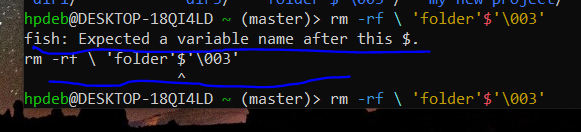
When l typed in a command for kolourpaint, this came up.

18


I'm totally new on GitHub, and don't know how to make good use of it. How do l make use of this link https://docs.github.com/en/authentication/connecting-to-github-with-ssh/testing-your-ssh-connection?platform=windows ??

My purpose is to try out my SSH key.

19


I am working on windows 10 currently. I was wondering if MX Linux could be installed directly from online. Thanks for taking the time to reply.

20


Perhaps I missed the setting, but I want blank username/password fields instead of selecting from available users if that makes any sense. On KDE Plasma if that matters.

Thank you!

21


Hi, y'all. Running Linux Mint and I have the puzzle presented above.

From what I gather, I'm using rename (1p) which makes mention of Perl and in the man page it says it will also run as file-rename. I'm not sure if this is the right rename utility for the common argument

s/old_pattern/new_pattern/

but any time I try to run anything (including -n), I just get an angle bracket > and have to ctrl-c out.

I'd also need some details on how the wildcards work, which seems to be lacking in the documentation.

Edit: Instructions unclear. I have a bunch of episodes that are very wordy. I'm moving them onto DVD and truncated on my player the directory will look like:

Star Trek The Next Gene....

so I want to take (sample episode)

Star Trek The Next Generation Season 1 Episode 1 - Encounter at Far Point

and

  • Replace 'Star Trek The Next Generation Season ' with 'S0'

  • Replace 'Episode ' with 'E0' or 'E' depending on digits

  • Keep episode title as is.

So it looks like

S01E01 - Encounter at Farpoint.mkv

22


Imagine a young explorer who's just heard that word, "git". But it actually means an entire world. How is this young explorer supposed to dive into this mysterious world with just a machine in hand ?

He's got vs code though !! And he's also got fish and zsh on WSL !

23


I wish to work on Linux, but the only machine l have at my disposal is my brother's windows laptop when it's free. Can I create a virtual Linux system using QEMU ?

24
submitted 2 months ago* (last edited 2 months ago) by to c/linux4noobs@programming.dev


I've installed Kubuntu (26.04 LTS) on a laptop with a touchscreen. When logging in, there is a button for the virtual keyboard in the lock screen, but it does nothing, nor does tapping on the password field. Once I've logged in, it works fine (including on the lock screen), but once I've logged out it breaks again. I also tried the Silent theme, which has a different on-screen keyboard, but that also didn't work (it shows up, but the keys do nothing). How do I fix this?

25


I installed Ubuntu 24.04 LTS about a year ago. Now that 26.04 is out, I was planning to upgrade, but instead I think I'm going to wipe and re-install from scratch. Does anyone have any tips or tweaks they recommend for new installs? Things like, do or don't encrypt the drive during the install process, make an administrator account separate from your regular user account? I already plan to install the Flatpak repo and the Gnome Software Center.

Thanks!

view more: next ›