submitted 2 years ago* (last edited 2 years ago) by to c/programmer_humor@programming.dev
you are viewing a single comment's thread
view the rest of the comments
[–] 58 points 2 years ago (3 children)

I wouldn't assume "discard changes" means "delete files that existed before the editor did".

  • source
  • parent
  • hideshow 6 child comments
  • [–] 10 points 2 years ago (2 children)

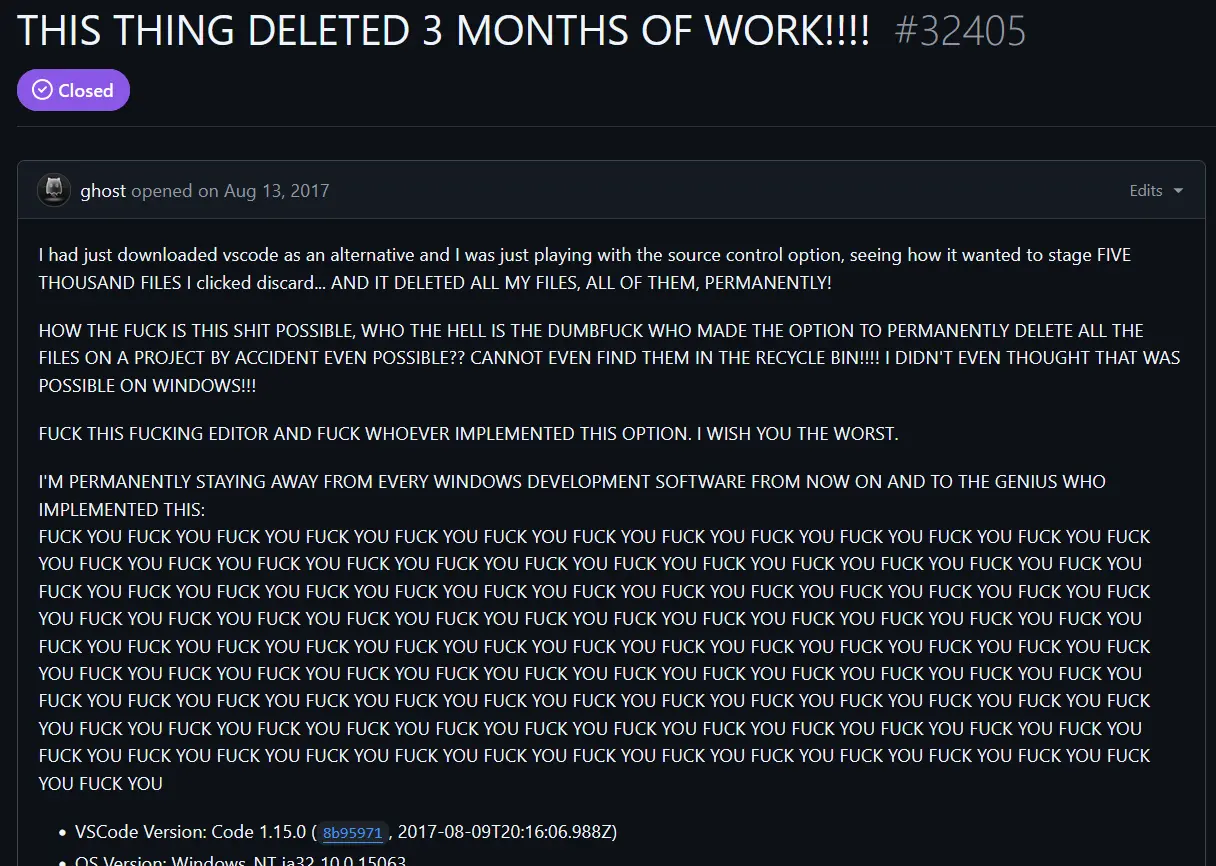
    It's changes from the prior commit in the repository, which, if they had not committed anything prior, would have been an empty directory.

    This is perhaps a good lesson in teaching version control as its own concept rather than "streamlining it" by bundling it with an editor.

  • source
  • parent
  • hideshow 4 child comments
  • [–] 18 points 2 years ago (1 child)

    You shouldn't be taking ownership of files and then deleting them without communication a hell of a lot better than that.

    I understand what happened. I'm saying that if you're going to delete stuff that was there before the software was, your flow to adding a project should include suggesting a base level commit of everything that's there already.

  • source
  • parent
  • hideshow 2 child comments
  • [–] 5 points 2 years ago (1 child)

    That's definitely fair, creating a repository in a non-empty directory could definitely suggest auto-committing the current state if it doesn't already. I don't use VSCode so I wouldn't know.

    Although now that I think about it, that could have been the intention here but not automatic, if that's why 5k+ files were staged without the user explicitly staging them. Extra tragic if that's the case.

  • source
  • parent
  • hideshow 2 child comments
  • [–] 1 point 2 years ago (1 child)

    Although now that I think about it, that could have been the intention here but not automatic, if that's why 5k+ files were staged without the user explicitly staging them. Extra tragic if that's the case.

    From the git discussions around the issue, it wasn't that the files were automatically staged, but that the "discard all changes" feature invoked a git clean, and also deleted untracked files.

    Since OP's project wasn't tracked, it got detonated.

  • source
  • parent
  • hideshow 2 child comments
  • [–] 0 points 2 years ago (2 children)

    Ok then, the changes to the repository shouldve been discarded. Anything he uploaded shouldve been deleted from the server. Why were files on his local machine deleted?

  • source
  • parent
  • hideshow 4 child comments
  • [–] 3 points 2 years ago (1 child)

    What makes you think a server was involved here? It was a local repository, evidenced by the reporter's bewilderment that files can be deleted without going to the Recycle Bin first. Which tells us that in addition to VCS, they were unfamiliar with Windows as well.

  • source
  • parent
  • hideshow 2 child comments
  • [–] 3 points 2 years ago (2 children)

    Admittedly i dont use source control myself as im a hobbiest, but I didnt realize that git was local. As for the recycle bin bit, yeah theyre kinda dumb. Is source control different from git?

  • source
  • parent
  • hideshow 4 child comments
  • [–] 4 points 2 years ago

    Hobbyist myself so no worries! Git is one example of source control / version control software. You normally have your local working copy of a repository and then a remote where you push your changes when they are finished or to share them with others.

  • source
  • parent
  • [–] 2 points 2 years ago*

    You may be confusing git with GitHub.

    git is a version control tool that lets you keep and manage a history of the files you are editing

    GitHub is a website (not directly affiliated with the group maintaining git) that lets you upload, backup, and share your code using the format used by the git tool.

    source control just refers to software to manage your source code in some form. git is the most popular tool of its kind, but there are others, for example mercurial.

  • source
  • parent
  • [–] 5 points 2 years ago (1 child)

    It's not that. It means discard all changes made after the last change committed to this local repository.

  • source
  • parent
  • hideshow 2 child comments
  • [+] -3 points 2 years ago (2 children)
  • [–] 8 points 2 years ago (1 child)

    discarding changes does not discard uncommitted new files. The VS Code button did a git clean which is completely unexpected. Git even refers to a git clean with completely different terminology.

    git reset -> "Resets the index and working tree. Any changes to tracked files in the working tree since are discarded."

    git clean -> "Cleans the working tree by recursively removing files that are not under version control, starting from the current directory.". This command also requires you to specify a force option to actually do something, else it quits with an error.

    Note that git clean never once refers to discarding anything, and git reset never refers to removing untracked files. VS Code was doing an idiotic thing. Running git reset --hard AND git clean. There is absolutely no reason to be running git clean from an UI button ever. If you want to remove a file you can explicitly remove it.

    Imagine that the button said "Discard all changes" and then it ran rm -rf --no-preserve-root /*. Would that make sense as a button? No. It definitely would not.

  • source
  • parent
  • hideshow 2 child comments