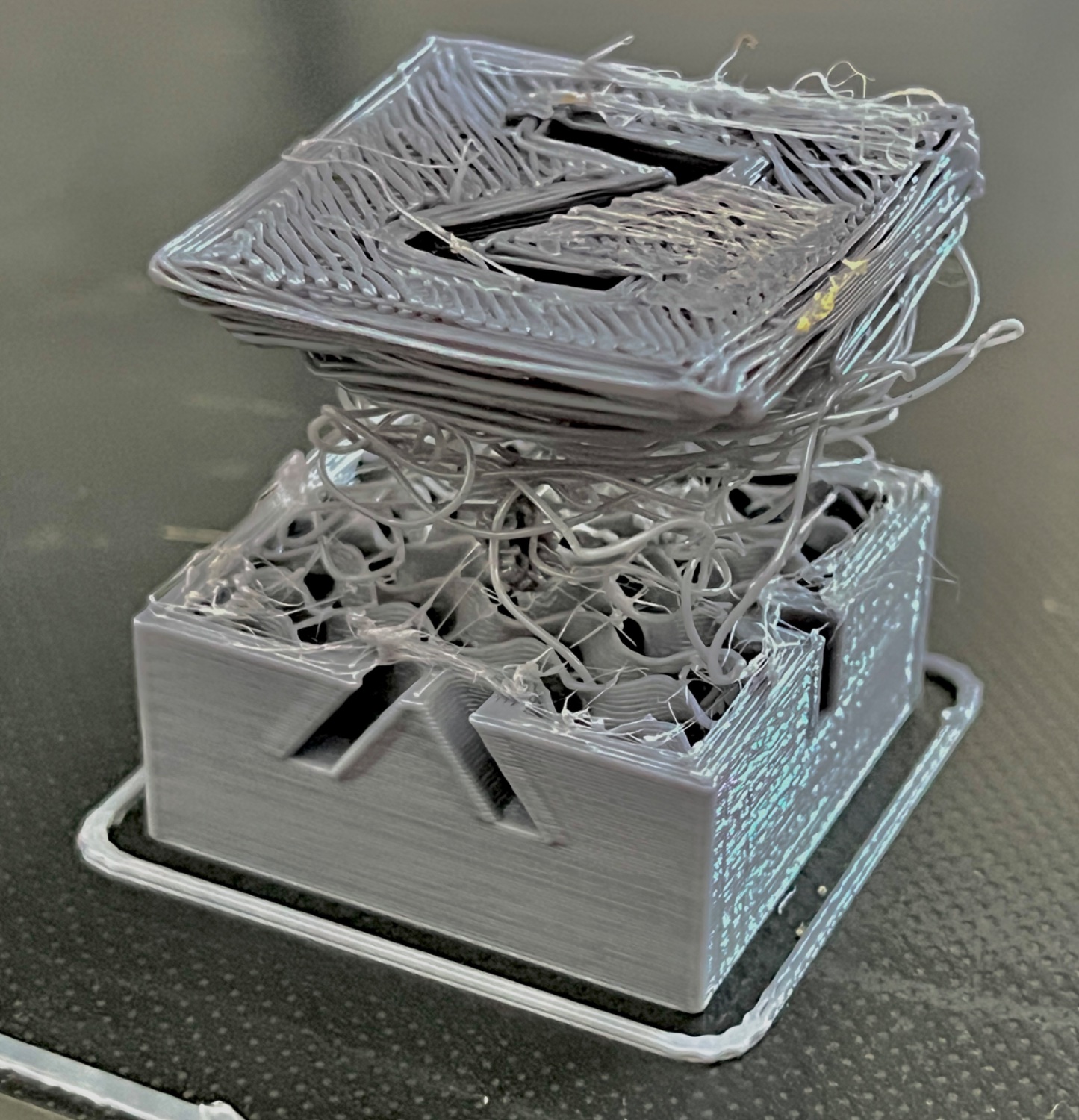
▲ 511 ▼ Print failed successfully! (lemmy.world) submitted 2 years ago by spckls@lemmy.world to c/3dprinting@lemmy.world 37 comments fedilink hide all child comments Turned on retraction speed to 11 and i guess it wore down the filament at one part but then managed to push it after some 10 minutes of spaghetti 👌
[+] FredericChopin_@feddit.uk 11 points 2 years ago* (last edited 2 years ago) (4 children) [deleted] permalink fedilink source parent hideshow 8 child comments replies: [–] marcos@lemmy.world 3 points 2 years ago (1 child) Get an automatic bed leveler. My printer just sits there, covered. When I want something, I uncover it, clean the printing surface with some alcohol, and tell it to print. By the way, resin printers have a completely different set of issues. But yeah, they don't have those ones. permalink fedilink source parent hideshow 2 child comments replies: [+] FredericChopin_@feddit.uk 1 point 2 years ago* (last edited 2 years ago) (1 child) [deleted] permalink fedilink source parent hideshow 2 child comments replies: [–] marcos@lemmy.world 2 points 2 years ago I have one of those servo sensors that use a microswitch at the end. The printer has a sturdy frame build from extruded aluminum. That probably makes a lot of difference. I can take the printer, move it into some other surface, turn it on and print, without leveling issues. Before it I had a wooden one without autoleveling. That one needed leveling before each print. permalink fedilink source parent [–] dept@lemmy.sdf.org 3 points 2 years ago resin printers have the slight issue of being a chemical hazard and requiring PPE. permalink fedilink source parent [–] nothacking@discuss.tchncs.de 2 points 2 years ago With resin when a print fails, you just get a half print stuck to the bottom of the resin tank, no spaghetti. The most common cause of failure is the part falling of the lifting platform, typical due to poor supports, but rarelybecause the platform is crooked. Leveling is pretty easy on most printers, just loosen the bed, remove the resin tank, placing some thin cardboard in it's place, lower the platform until it touches the cardboard, and lock it in place. permalink fedilink source parent [–] Theharpyeagle@lemmy.world 1 point 2 years ago (1 child) Getting an auto leveler was a game changer for me. I still manually level the bed and check the Z offset every two months or so along with other maintenence, but I've gone on week long printing sprees without touching the bed springs once. permalink fedilink source parent hideshow 2 child comments replies: [+] FredericChopin_@feddit.uk 1 point 2 years ago* (last edited 2 years ago) (1 child) [deleted] permalink fedilink source parent hideshow 2 child comments replies: [–] chris@l.roofo.cc 2 points 2 years ago* (1 child) A few tips that made my prints much better: Check if your rollers are tight enough. None of the axes should wobble if you pull on them Use a PEI sheet for printing Clean the PEI Sheet with Soap and Water at least once Clean with IPA after every print Don't touch the print bed. The oil on your skin really doesn't help with sticking. Get yourself a metal feeler gauge with 0.2mm. Level your bed heat nozzel and bed to your normal print temp an then move the nozzel 0.2 mm above the bed. Adjust your Z Offset until you can get the metal gauge undr the nozzle but still feel it touching. that should be your perfect height If you still have problems try all the steps here one after another: https://teachingtechyt.github.io/calibration.html I used to have a lot of problems with parts lifting up or my prints being unclean but since I did this my prints look great and stick to the bed. permalink fedilink source parent hideshow 2 child comments replies: [+] FredericChopin_@feddit.uk 1 point 2 years ago* (last edited 2 years ago) [deleted] permalink fedilink source parent
[–] marcos@lemmy.world 3 points 2 years ago (1 child) Get an automatic bed leveler. My printer just sits there, covered. When I want something, I uncover it, clean the printing surface with some alcohol, and tell it to print. By the way, resin printers have a completely different set of issues. But yeah, they don't have those ones. permalink fedilink source parent hideshow 2 child comments replies: [+] FredericChopin_@feddit.uk 1 point 2 years ago* (last edited 2 years ago) (1 child) [deleted] permalink fedilink source parent hideshow 2 child comments replies: [–] marcos@lemmy.world 2 points 2 years ago I have one of those servo sensors that use a microswitch at the end. The printer has a sturdy frame build from extruded aluminum. That probably makes a lot of difference. I can take the printer, move it into some other surface, turn it on and print, without leveling issues. Before it I had a wooden one without autoleveling. That one needed leveling before each print. permalink fedilink source parent
[+] FredericChopin_@feddit.uk 1 point 2 years ago* (last edited 2 years ago) (1 child) [deleted] permalink fedilink source parent hideshow 2 child comments replies: [–] marcos@lemmy.world 2 points 2 years ago I have one of those servo sensors that use a microswitch at the end. The printer has a sturdy frame build from extruded aluminum. That probably makes a lot of difference. I can take the printer, move it into some other surface, turn it on and print, without leveling issues. Before it I had a wooden one without autoleveling. That one needed leveling before each print. permalink fedilink source parent
[–] marcos@lemmy.world 2 points 2 years ago I have one of those servo sensors that use a microswitch at the end. The printer has a sturdy frame build from extruded aluminum. That probably makes a lot of difference. I can take the printer, move it into some other surface, turn it on and print, without leveling issues. Before it I had a wooden one without autoleveling. That one needed leveling before each print. permalink fedilink source parent
[–] dept@lemmy.sdf.org 3 points 2 years ago resin printers have the slight issue of being a chemical hazard and requiring PPE. permalink fedilink source parent
[–] nothacking@discuss.tchncs.de 2 points 2 years ago With resin when a print fails, you just get a half print stuck to the bottom of the resin tank, no spaghetti. The most common cause of failure is the part falling of the lifting platform, typical due to poor supports, but rarelybecause the platform is crooked. Leveling is pretty easy on most printers, just loosen the bed, remove the resin tank, placing some thin cardboard in it's place, lower the platform until it touches the cardboard, and lock it in place. permalink fedilink source parent
[–] Theharpyeagle@lemmy.world 1 point 2 years ago (1 child) Getting an auto leveler was a game changer for me. I still manually level the bed and check the Z offset every two months or so along with other maintenence, but I've gone on week long printing sprees without touching the bed springs once. permalink fedilink source parent hideshow 2 child comments replies: [+] FredericChopin_@feddit.uk 1 point 2 years ago* (last edited 2 years ago) (1 child) [deleted] permalink fedilink source parent hideshow 2 child comments replies: [–] chris@l.roofo.cc 2 points 2 years ago* (1 child) A few tips that made my prints much better: Check if your rollers are tight enough. None of the axes should wobble if you pull on them Use a PEI sheet for printing Clean the PEI Sheet with Soap and Water at least once Clean with IPA after every print Don't touch the print bed. The oil on your skin really doesn't help with sticking. Get yourself a metal feeler gauge with 0.2mm. Level your bed heat nozzel and bed to your normal print temp an then move the nozzel 0.2 mm above the bed. Adjust your Z Offset until you can get the metal gauge undr the nozzle but still feel it touching. that should be your perfect height If you still have problems try all the steps here one after another: https://teachingtechyt.github.io/calibration.html I used to have a lot of problems with parts lifting up or my prints being unclean but since I did this my prints look great and stick to the bed. permalink fedilink source parent hideshow 2 child comments replies: [+] FredericChopin_@feddit.uk 1 point 2 years ago* (last edited 2 years ago) [deleted] permalink fedilink source parent
[+] FredericChopin_@feddit.uk 1 point 2 years ago* (last edited 2 years ago) (1 child) [deleted] permalink fedilink source parent hideshow 2 child comments replies: [–] chris@l.roofo.cc 2 points 2 years ago* (1 child) A few tips that made my prints much better: Check if your rollers are tight enough. None of the axes should wobble if you pull on them Use a PEI sheet for printing Clean the PEI Sheet with Soap and Water at least once Clean with IPA after every print Don't touch the print bed. The oil on your skin really doesn't help with sticking. Get yourself a metal feeler gauge with 0.2mm. Level your bed heat nozzel and bed to your normal print temp an then move the nozzel 0.2 mm above the bed. Adjust your Z Offset until you can get the metal gauge undr the nozzle but still feel it touching. that should be your perfect height If you still have problems try all the steps here one after another: https://teachingtechyt.github.io/calibration.html I used to have a lot of problems with parts lifting up or my prints being unclean but since I did this my prints look great and stick to the bed. permalink fedilink source parent hideshow 2 child comments replies: [+] FredericChopin_@feddit.uk 1 point 2 years ago* (last edited 2 years ago) [deleted] permalink fedilink source parent
[–] chris@l.roofo.cc 2 points 2 years ago* (1 child) A few tips that made my prints much better: Check if your rollers are tight enough. None of the axes should wobble if you pull on them Use a PEI sheet for printing Clean the PEI Sheet with Soap and Water at least once Clean with IPA after every print Don't touch the print bed. The oil on your skin really doesn't help with sticking. Get yourself a metal feeler gauge with 0.2mm. Level your bed heat nozzel and bed to your normal print temp an then move the nozzel 0.2 mm above the bed. Adjust your Z Offset until you can get the metal gauge undr the nozzle but still feel it touching. that should be your perfect height If you still have problems try all the steps here one after another: https://teachingtechyt.github.io/calibration.html I used to have a lot of problems with parts lifting up or my prints being unclean but since I did this my prints look great and stick to the bed. permalink fedilink source parent hideshow 2 child comments replies: [+] FredericChopin_@feddit.uk 1 point 2 years ago* (last edited 2 years ago) [deleted] permalink fedilink source parent
[+] FredericChopin_@feddit.uk 1 point 2 years ago* (last edited 2 years ago) [deleted] permalink fedilink source parent