1
submitted 2 days ago* (last edited 1 day ago) by to c/retrocomputing@lemmy.sdf.org


Someone made an effort to work out which are the latest AMD chips that were released just prior to the PSP (iow, they discovered the non-spy chips). The linked article gives a list resulting from their efforts. This is interesting because intel began their spy chips in 2008. So an AMD from 2013 likely well outperforms the last of the spy-chip-free intels.

The author ended with:

Conclusion: You can choose any CPU/APU of the leftmost list to get the „latest“/last CPU without a PSP builtin.

What is meant by “leftmost list”? I just see a single list in my browser. And the sequence seems to be the opposite of what is claimed. Bulldozer seems to be older than Piledriver.

This is also just the 1st step. It would be useful to know which devices contain these AMD chips from 2013. In particular, laptops and mini PCs would be interesting. The search must be painful because ads for hardware tend not to mention the code names. In fact, h/w makers were not proud of their AMD selection and might altogether not mention AMD.

Where do I start? Anyone know which makers of laptops and mini PCs made heavy use of AMD in 2013? Searching for AMD mini pc 2013 gets a lot of hits mentioning “Ryzen”, which did not exist in 2013.

(update) Bulldozer was for the desktop and server markets. So probably safe to assume it would not be found in a mini PC or laptop. Worth noting that in 2025 there were FOSS firmware updates for piledriver and bulldozer.

(update 2) It is strange and annoying that Thinkpad timelines and history pages deceive readers into thinking AMD chips did not appear in Thinkpads until 2017. The 15h.org page reveals that the Thinkpad e545 not only has an AMD chip but it is pre-spychip. Searching specifically for Thinkpad e545 shows this.

(update 3) The author (“ro”) relied heavily on the cpu list in Wikipedia. But Wikipedia is incomplete. E.g. the AMD A4-9120e (code named “Stoney Ridge”) is unknown to wikipedia. It likely has PSP b/c it was designed 5 yrs after the first spy chip. But it’s hard to know what other CPUs were overlooked by Wikipedia around 2013.

2
3


Yes, it was, in fact, a Unix system.

Everything in the set was real. We couldn’t fake any of it, because audiences are so sophisticated now in their knowledge of computers. All told, $875,000 worth of computer hardware loaned by Silicon Graphics, $350,000 worth from Apple and some $500,000 in additional hardware and software went into equipping both the set and off-stage control room.

The Ars article is just a summary of this: https://fabiensanglard.net/jurrasic_park_computers/index.html

4


Decades before we had HomeAssistant, you could hook your IBM PC, Commodore 64, TRS-80, and several other vintage home computers into an X-10 interface and control your devices from your PC.

Our 1996 IBM Aptiva came with the IBM Home Director which was based on the same X-10 hardware and had a nice GUI.

5
6
7
8


That is really impressive, I always feel nostalgic when specifications, original code, data books and schematics are lost over time.

Then some guys like said : not this time. Nand2mario’s GitHub z386 repository.

9
10
11


Post-video thoughts:

  1. What is the situation with this on modern Linux? Something like a community edition, or is it only using the Windows version (lower hardware utilization?) via WINE?

  2. Does modern use make any sense (size, performance, registration) beyond sightseeing? I mainly want live rendering (Godot), so I'm guessing that makes it make less sense.

  3. Are there any model packs with models like this? Objects (low-poly room decoration etc.), or more particularly the architecture? Textureless is fine for me, vertex color or simple materials works (even if I had to do this myself from a blank model file).

I would've posted to !3dart@lemmy.world but that's dead.

There's a similar video on Animation Master as well: The 90s CGI software that fell through the cracks

12
13


From Andrew, of the Andrew's OS Blog:

Today I am (finally) releasing the Virtual OS Museum, which is the world's first multi-platform interactive virtual museum of operating systems and standalone applications, implemented as a Linux VM.

Nearly all well-known OSes and platforms (and many obscure ones) are included in some form, spanning the entire history of stored-program computing from the 1948 Manchester Baby to the present day. This is the result of over 20 years of collecting emulators and VM images; over 1700 VM installations are included, across over 250 platforms, representing nearly 600 distinct OSes.

I have put a lot of effort into making this readily accessible; all OSes and emulators are pre-installed, and a cross-emulator graphical launcher with a snapshot feature to revert VM installations to a working state is included. Shortcuts to run the OS museum VM on Windows, macOS, and Linux are included (and it is possible to run it on pretty much anything that runs QEMU or VirtualBox).

14
 
 
15


So yesterday I pulled out my old "luggable" IBM 5155 because I wanted to know if I could use it as a Terminal for a terminal.

I have previously successfully connected a Psion 5mx over a null modem to a Raspberry Pie. Figured it would be cool to see if I can get it working on this behemoth as well. I have DOS 3.3 on a 5.25" floppy and another with some supplementary software for DOS 3.3. And wow, not a lot of software included. CTTY won't let me set Baud rate, parity och bit size. So it just freezes, and the CONNECT application doesn't throw up errors either but just sort of is there, regardless of settings.

Anyway will in the future get my self a carrier card for a CF -to-IDE so I can throw DOS 6.6 and PROCOMM on it and see if that gets me anywhere. Unless any of you folks have any tips or scathing criticism on my lack of knowledge of DOS.

16


So I recently got a steal of a deal on a powermac g4, only because I wanted the Philips CRT monitor for my dreamcast. I have a lot of computers and while I love the g4 (and always loved them when i was little), I don't really need another computer thats not good for much. Its the 860 ish MHz dual ppc, 512 mb ram, 60 GB HDD, has a graphics card. Super drive, and another CD rw drive.

Should I keep or sell? Not sure its worth more than $50 in my area. Most people would throw it in the trash.

Side note, it will only boot in safe mode. Previous owner put 10.5.8. on it. I think it has a bad ram stick.

And yeah. This feels like calling a ps2 retro which is cringe. This thing is still the future far as I'm concerned!

Edit: reset pram/nvram , no fix. Only boots on safe mode. Otherwise I get " you need to restart your computer.."

17


Crossposted from https://ibbit.at/post/217882

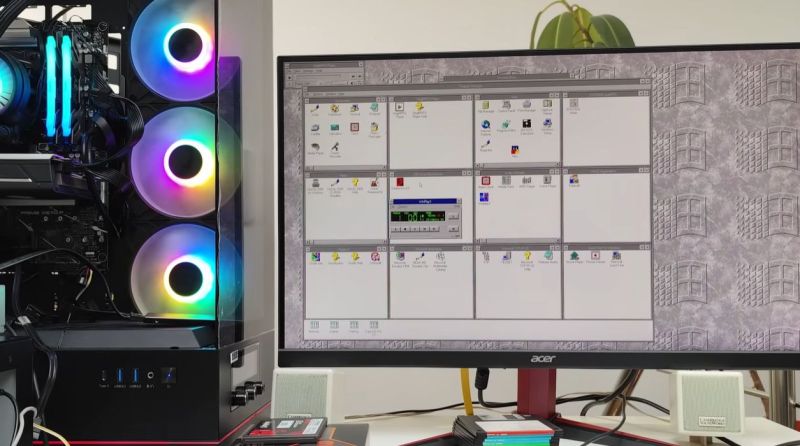
Although Windows 95 stole the show, Windows 3.0 was arguably the first version of Windows that more or less nailed the basic Windows UI concept, with the major 3.1 update being quite recognizable to a modern-day audience. Even better is that you can still install Win3.1 on a modern x86-compatible PC and get some massive improvements along the way, as [Omores] demonstrates in a recent video.

The only real gotcha here is that the AMD AM5 system with Asus Prime X670-P mainboard is one of those boards whose UEFI BIOS still has the ‘classic BIOS’ Compatibility Support Module (CSM) option. With that enabled, Win 3.1 installs without further fuss via a USB floppy drive from a stack of ‘backup’ floppies that someone made in the early 90s. [Omores] also tried it with CSMWrap, but with this USB to PS/2 emulation didn’t work.

Windows 3.1 supports ‘enhanced mode’ by default, which adds virtual memory and multi-tasking if you have an 80386 CPU or better. To fix crashing on boot and having to use ‘standard mode’ instead, the ahcifix.386 fix for the responsible SATA issue by [PluMGMK] should help, or a separate SATA expansion card.

For the video driver the vbesvga.drv by [PluMGMK] was used, to support all VESA BIOS Extensions modes. This driver has improved massively since we last covered it and works great with an RTX 5060 Ti GPU. There’s now even DCI support to enable direct GPU VRAM access for e.g. video playback, with audio also working great with only a few driver-related gotchas.


From Blog – Hackaday via this RSS feed

18
19
20
21
22
23


Ah, I was just about to ask around whether anybody has some advice on how to burn some music for my walkman.

24


An implementation of sudo for DOS, to run the given command with full privileges. It can be used to edit important system files, run disk partitioning tools, and so on!

25
view more: next ›