1
submitted 2 years ago by [M] to c/degoogle@lemmy.ml


Hi, all.

We've grown considerably since rebuilding the sub (see https://lemmy.ml/post/2262830). Active monthly users 150 -> 380. 3.5k -> 5.42k subs. It seems to be growing organically now, and the higher we go, the more people will stumble across it. There is always a need to get away from Google, and hopefully our community can help people with this.

If you'd like to join us to help moderate so we have folk in place as we need them, that would be awesome.

If you are interested. Please send a message about why you think you'd be good for the role, and also an example post/comment in this community previously.

Thanks,

CrypticCoffee

2
submitted 3 years ago* (last edited 2 years ago) by [M] to c/degoogle@lemmy.ml


Here I will pin a list of recommendations for software. Getting started can be daunting, and it'd be great to pull that information together here for newcomers so they can take practical steps to degoogle their lives.

Disclaimer: These are recommendations by regulars here and on privacy forums. Use at own risk. We cannot due diligence on these, so if people do have issue with items in the list, please create a post and raise your concerns.

Recommendations

Browser -

  • Firefox (Strongly recommend in light of WEI and Google's plan that could potentially restrict access to websites)
  • Librewolf
  • Brave (Not recommended, due to Google's WEI changes. Using chromium is a bad idea. I left this in case you really must)

Search

  • Duck Duck Go
  • Brave

Email

  • Proton mail
  • Tutanota

Cloud storage

  • Proton mail

Productivity Suite (Alternative to google docs)

  • Libre office (Maybe not cloud based)
  • Only office (for MS doc compatibility)

Degoogled Android phones

Phone OS - https://lemm.ee/post/663113

  • GrapheneOS

  • LineageOS (wihh or without MicroG)

  • /e/OS

Android app store -

  • F-droid

Messaging

  • Signal

  • Element (Matrix)

Maps - https://lemmy.ml/post/2211048

  • Organic Maps

  • OsmAnd+

SMS - https://lemmy.ml/post/2256135

Organisation

Task lists - https://lemmy.ml/post/2249613

Calendar - https://lemm.ee/post/704703

Discussion

These items are ones either recommended multiple times or seem to have some form of consensus on them being good and privacy focussed. I will link discussion topics so people can see the logic and reasoning behind recommendation. If you are not happy with anything here, please discuss here: https://lemmy.ml/post/2262409

If you would like another item in this, please create a post discussion and we can pull it in and link to it.

3


Rooting seems to have some benefits like bypassing API integrity, so I want to know if rooting my phone is a good idea? And is it safe? (By that I mean will I break my device?) I don't use Google Play Services nor any banking apps (I use the website) and there's no supported custom ROM for my phone (Xiaomi redmi note 12 S) so I think it might be a solution

4


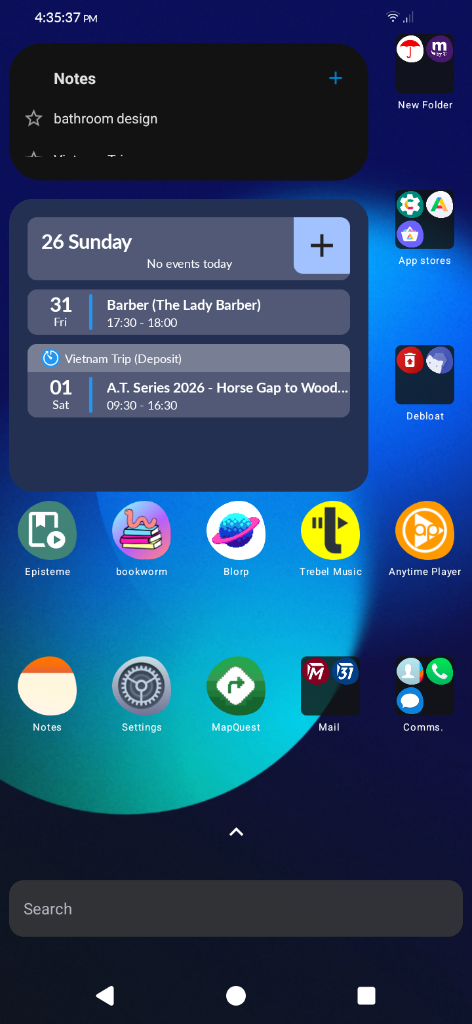
New phone has finally been set up. Calls and texts work effortlessly. (after some slight issues transferring over from Verizon😮‍💨) But everything is functional.

This phone is running degoogled e/OS with some slight debloating( used Canta and Shizuku). Current set up so far:

Mobile Provider: Metro PCS (Metro by T-Mobile)

Launcher: Bliss Launcher -> Yagni Launcher (via debloating)

Email/Calander: Gmail - > Tuta Mail and Tuta Calander

Notes: Default app

Reader for PDFs and Books: Episteme

Maps: Google Maps - > Map Quest

Podcast Reader: Anytime Player

Phone/Contacts/Messages: Default/Default/ Right Messages (SMS and MMS support, No RCS)

Camera, Clock, Calculator and OpenKeyChain are Default.

Music: Trebel Music (for now)

Bookworm(NOT BookWyrm; this app is not apart of the Fediverse) a small community based app to talk about everything books.

Fediverse: Blorp (Lemmy)

The app with the umbrella is Travelers Insurance ( my car insurance)

App Stores: Aurora Store and App Lounge (default) along with the MicroG Compactibility if wanting to use that.

Keyboard: FUTO Keyboard

Browser: Startpage

Apps/Systems that I have removed via debloating: Blisslauncher, Blissweather, Mail (Default), Browser, Calander, FindMyDevice, Magic Earth (Maps), Tasks, Parental Control, Music, MJ PDF, Message (Default), Android Easter Egg.

This phone started running so much faster when debloating it. I cant believe it's not already an option to begin with. 😑
5


I decided to give it a try and both are working flawlessly. I've removed so far, Browser, Calander, Message, Task app and Mail and no problems at all. All are default apps preinstalled in the Teracube 2s. ( I still haven't tried connecting to a mobile carrier, I've been so busy, but that will come soon).

So overall, good news, debloating this phone is possible.

6
submitted 2 days ago by to c/degoogle@lemmy.ml


Hello, i was exploring this community (im very new in all the Lemmy stuff) and i see that there is a modlog section (great! i dont knew about this transparency feature before, very healthy), so i click in and see that there are a few recents bans with reason "rule 4" (i suppose that the banned people break this rule), but there is no rule 4 in this community summary! so wich rule is it? thanks for read and sorry my bad english.

7


Like what the title states, just want to give a heads up that this app completely doesn't work when I try to play my offline music. I can download, scroll and look for songs, but once I get to the menu were all my music is listed and try to play them, this screen appears every time.

I currently had this app as an alternative to Trebel Music, but looks like I'll have to keep looking elsewhere.

8
submitted 1 week ago* (last edited 1 week ago) by to c/degoogle@lemmy.ml


I have all my apps that I'm using, along with moving everything over from my other phone with an SD card. Pretty close to being done.

I'm using most of the default apps to save on storage. But here are them listed:

Episteme oss -> this is just a PDF reader for any documents, including books and comics.

Anytime Player -> this is a Podcast app I'm using to replace Podcast Addict, another podcast app that is riddled with ads.

FM radio -> default app

Trebel Music -> Musify: I'm moving all my music from Trebel to Musify to listen to them completely offline and not having to deal with ads.

Pixelfed -> Instagram Alternative

Blorp -> Lemmy

Bookworm -> this is not BookWyrm(which is part of the fediverse) but its a cute, small community alternative to GoodReads. Its an app for book lovers wanting to talk about books.

Google Messages -> Quik and default texting app

All of the utility apps are default: calculator, clock, files, recorder, notes, tasks, music.

Gmail -> Tuta Mail along with the default mail app for all other imported email addresses.

Google Calander -> Tuta Calander

My bank apps: Chase and Bask Bank. They both work well, surprisingly, without Google Play Services.

Maps: I'm using MapQuest to replace Google Maps but I also use CoMaps mostly for hiking and the phone comes with a default map app.

Browser: This is default (Muerna) with your different search engines available, like DuckDuck Go, DuckDuck Go Lite, Qwant or Mojeek.

Gallery: Gallery is default but using Ente Photos for "cloud" storage to replace google photos.

Travel: Grab and Trip Plans: these two are apps from Aurora store that I'll be using soon when traveling. Grab is a Southeast Asia version of Uber. Trip Plans is a app used when planning/organizing trips with a travel advisor (private between you and/or the group with the advisor only)Aurora store mentions they don't work well without the play store but so far I haven't had issues running the apps.

App stores: I have these just to try them out besides the default App Lounge:

Komi Store, F-Droid, Aurora Store, Neo Store, Repo Store, Droid-ify.

Camera is default

Privacy Scanner (I believe its from Droid-ify or NeoStore) an app use to simply check if all of your system and installed apps are actually "private" sometimes it gets paranoid and it'll say that an app is not private because you let one use a feature like "access to Gallery" but it gives a nice visualization of what is running on your phone.

FreeDictionary: Open source dictionary app, not riddled with ads.

Quotes.app : just an app from Aurora store to read inspirational, motivating quotes when needed.

9


Since v1.6, Obtainium has switched to using Material 3 Expressive for its UI.

Personally, I don't like it as it uses up more space to show less information. The old UI (v1.5 and below) had everything visible and was easy to navigate.

But what do you think? Do you like it? What would you want improved or changed?

10


I'm not the best at keeping track of anything. Samsung Find has had my back on so many different occasions. But i'm going to switch to Pixel phone, with GrapheneOS, and I can say bye bye to Samsung Find. Is there a good equivalent?

Any experiences?

11


I got this Moto g84 with CalyxOS from ebay but had to update it to the 7.2.2.0 release. Now the thing is, the seller specifically said if I relock the bootloader the phone will be bricked. I used the web installer for the g84 model and left it unlocked, but that g84 installer says its safe and a different part of the CalyxOS site also says don't relock any Motorola phones. Do any of you guys know more about this or what the consequences of leaving it unlocked could be?

12


I’ve been using a de-Googled Android setup and found myself running into the same issue a lot of people probably do: the privacy-first option is great right up until the everyday stuff stops working properly.

In my case, banking apps and Android Auto were the sticking points. GrapheneOS was excellent in principle, but iodéOS ended up being the more practical fit for my actual use case.

I’d be interested to hear where other people draw that line between privacy, convenience, and reliability.

13
KOSA is coming (sh.itjust.works)
submitted 2 weeks ago by to c/degoogle@lemmy.ml


I'm just here to say KOSA is coming and I've decided that this will be the hill I die on. I'm not scanning biometrics or uploading my id. I don't give a single shit what I get locked out of. I know this is not strictly google related but very likely many people will be pissed when they find out they need to age verify just to use a Google account. I'd like to here other people's plans for mitigation.

14


Hello,

I'd like to move on from Google Keep for shopping lists and other similar simple to-do lists.

I've checked the thread for task lists, but all of them require you to make tasks one by one, and I'm just looking for a simple list that I can add to by typing something and pressing enter to create a new line.

It would also need to have tick boxes to mark the task as done and ideally move it to a section of tasks that are done.

You know, like a simple to-do list works.

Any recommendations? :)

Edit: I'm going with Quillpad, thank you ropatrick@lemmy.world !

15


One very convenient feature of Google allows a single log-in to third-party websites and apps with a single click. If you're logged into google on your phone/app, there's a good chance you can just click the "log in with Google" button and you're in.

Of course, such convenience comes at a cost to your privacy.

So what happens when you try to switch away, when you try to either switch your account or create a new one from an e-mail address? Well, so far I've noticed three things:

  1. Indeed kept sending e-mail to my google account for months afterward.
  2. Patreon made the process of switching my account off of Google so convoluted, I opted to just nuke my account entirely.
  3. One retail site is giving me an error creating a new non-G account, probably because my device, a Samsung-owned tablet, is already "registered", probably through some super invasive Google process hardware fingerprinting it and linking it to my account. I'm kicking it back to the website for the time being.
16


Ive been using google's services since 2017-2018, now its time to finally depart from that. I just got it in the mail yesterday and I'm already in love with it. So much lighter and easier to carry than my samsung galaxy. Gonna transfer everything over in a sim card, switch to Tmobile and ill be good to go. 😁

17
submitted 2 weeks ago* (last edited 2 weeks ago) by to c/degoogle@lemmy.ml


Privacy/encryption is a top priority

Large Gmail archive needs migrating over. If possible, I'd need to receive emails sent to my Gmail account (even if I can't answer them from that Google email adress).

I recently switched from Gmail to Proton but I'm already looking to switch again.

I just want a mailbox that's safe and nice. Much like Ente really. I tried Tuta because they are "friends" but I only saw negative feedback...

EDIT: I choose mailbox.org!

18
19


I'll cut straight to the chase: updating the Signal app annoys me and I'd like to know your best practices.

As far as I know, there are three ways of updating Signal:

  1. From the Play Store. This works quite reliably, yet comes at the cost of trusting and connecting to Google's servers.
  2. Via the app's built-in auto-updater that will, after a while, suggest an update through a notification. However, the frequency of these updates is really lackluster and thus unreliable, and there's no way to trigger an update check manually.
  3. Via the APK on Signal's website. In order for this to work, you need to have done the initial installation of the app from an APK already. Also, as far as I know, this version will not use GCM / Push notifications, but rather deliver notifications through a web socket, which is a huge drain on battery. Also, you'll have to constantly check for updates yourself or rely on the (unreliable) self-updating mechanism (see 2).
  4. //Edit a fourth way might be to just update via Obtainium and pulling APKs off their Github. I'm not sure what that does to GCM/Websocket usage, see 3.

Let me know how you do it, and if there's something I've overlooked.

20
CalyxOS is back! (calyxos.org)
submitted 3 weeks ago by to c/degoogle@lemmy.ml


After being on hiatus for almost a year Calyx OS has started releasing again. A degoogled Android ROM for Pixels, Fairphones, Shift phones and Motorolas.

21


last night, my pixel came! I flashed Graphene and I am now running it smoothly!

I am in the process of downloading apps and I have a question: I am interested in at least using discord on this device. It is absolutely one of my most used apps. On PC, I use legchord. Im a big fan. Is there something similar available for mobile? and I have a similar question for Whatsapp, and FB messenger (although those are less important)?

22
23


ddGrjYOtdWMyb6D.png

MZhbW2ByL8vvPXS.png

They inform you that they have updated their terms of service and

  1. They summarize the changes using language that is incomprehensible and vague
  2. They require a login for you to read the new terms

There's just no end to their bullshit 🤣

nAxSSjGxeTq5GPH.jpg

@mods: Just wanted to vent. Delete if you find the post inappropriate.

24
submitted 1 month ago* (last edited 3 weeks ago) by to c/degoogle@lemmy.ml


I just hit an "are you a bot" captcha screen on mojeek. At first I was shocked that mojeek, beloved search engine of the privacy crowd, would go down that path: Blocking people who use VPN and a minimal-fingerprint browser just because. However, reading the footnote and digging around a little, Mojeek seems to use Altcha, which can be self-hosted without any external calls or data sharing. https://altcha.org/docs/v2/sentinel/features/threat-intelligence/

While I can't say I identify as a threat quite now (to Mojeek, anyway), I can see how adding a little friction for the bots and scrapers out there can be a good thing for the web overall. As long as this doesn't happen on every second search and as long as the data stay where they belong, I'm chill with it. Peace out.

Edit: I now started to regularly receive a full access blocked page instead of a captcha. If anyone at Mojeek reads this: Folks, you can't claim to be "a search engine that does what's right, that values and respects your privacy" and block access because I'm using VPN and a minimal fingerprint browser. It doesn't work like that.

25


I was recently web searching for the EFF tool that checks how unique your fingerprint is. During that search, I stumbled upon the URL linked below. It was such a weird experience to see all the things that privacy advocates, like people in this community, complain / warn about from the other side of the aisle: How do you prevent people from exerting their right to privacy because you have dollar signs tattooed into your eyeballs. Gave me a spooky feeling I wanted to share. This relates to my previous vent about a hostile web, specifically how it gets harder and harder to use big parts of the web that used to be free and accessible if you are privacy conscious. Companies like Abstract, together with their attention merchant customers, are responsible for that. Of course their services are not perfect but it's a cat and mouse of big corpo vs small users and a handful of non-profits.

A quote from the 2023 movie "The Pope's Exorcist" comes to mind, even though it might be a little fatalistic:

"Ah, the other two percent,” Father Amorth replies solemnly. “That is something that has confounded all of science and all of medicine for a very long time. I call it…evil." (cited via).

Link to the tracking enabling company proudly advertising their services. Take a look at their services in the attached photo and despair.

view more: next ›