I'm working on getting rid of my Nest cameras around the house and trying to figure out my best option for an NVR. I really only have need/want for 2 cameras right now. One is the doorbell, and another is just a camera pointed at my back door/garage doors. I've already replaced the doorbell with a Reolink, and the other one is on the list for replacement soon.

As far as hardware I currently have the following possible landing places for Frigate(or other software):

  • Lenovo ThinkCentre M910q with an i5-7500T
    • This currently has a Proxmox with:
      • Linux Mint VM (running Jellyfin inside here)
      • Several other LXCs (adguard, docker, tailscale etc)
  • Lincplus Lincstation N2 NAS running Truenas
    • This currently has Immich running as an app

I don't really need a ton of long term storage or video or anything. A few days would be more than enough, especially if I am able to get some smart alerts through Home Assistant as well.

I have thought about buying another mini pc of some form and dedicating it to Frigate because I understand it can be a bit resource hungry, but I don't really know for sure if that is necessary. Another option along those lines would be to just buy a Reolink NVR.

I have also thought about moving Jellyfin to an LXC and passing the intel igpu to Jellyfin there. And then I could run Frigate inside of Docker? Do I understand that I could then share the igpu between Jellyfin and Docker/Frigate?

I know this is all kinda scattered. I feel like I almost have too many possible options and I don't know which one is best these days.

[–] 1 point 7 months ago

I used Music Assistant a little bit some time back. It seemed promising but it was pretty slow. It left me wondering if the CM4 in my Home Assistant yellow was to blame. I've been thinking about installing the CM5. Does anyone think that would make music assistant work better for me?

  • source
  • [–] [S] 3 points 2 years ago (1 child)

    I have figured out that I was even further confused. When I went into the disks program to figure out what type of partition was on the drive I realized the drive isn't really at media/RVAtom/SSD it is at mnt/SSD. That makes a little more sense, as I was confused a couple of days ago that it seemed to be in media without me remembering.

    Running ls -l on the correct drive gives: rvatom@rvatom-mint-PC:/mnt$ ls -l total 4 drwxr-x---+ 6 rvatom rvatom 4096 Dec 18 22:00 SSD

    Under the disks tool I have gone into mount options and checked "mount at system startup". The drive type is Ext4 I believe. I'm going to try a few more reboots but it seems like Jellyfin is willing to look at this drive now. We may have success.

  • source
  • parent
  • context
  •  

    I have added an SSD to my computer that hosts Jellyfin where I want to have my Shows and Movies folders. When I go to add them to my library I get the following error:

    The path could not be found. Please ensure the path is valid and try again.

    So the path I had entered was /media/RVAtom/SSD. SSD is the name of the drive, and it was not offered as a choice by Jellyfin, I typed the SSD part myself.

    I get the impression by reading some stuff that I either need to mount the drive at each reboot, or give jellyfin permission to read (or read and write?) that drive, but I am not sure how to go about that.

    [–] [S] 2 points 2 years ago (1 child)

    Thank you so much for your help! I went to that folder and the migrations.xml was a blank file, but system.xml was still okay.

    I searched a little about the migrations.xml and found a thread on the jellyfin forum with exactly the same problem so I renamed all of the xml files in the /etc/jellyfin folder and it started back up nicely.

  • source
  • parent
  • context
  •  

    I am not sure what I have done to my Jellyfin install. I have been having various issues with my computer that I am using for Jellyfin and when I fixed one (ran out of hard drive space) I now have this one. I do not believe Jellyfin is starting when I reboot my computer. Here is the output of my logs file:

    spoiler__ [2024-12-18 21:54:12.874 -05:00] [INF] Jellyfin version: "10.10.3" [2024-12-18 21:54:12.925 -05:00] [INF] Environment Variables: ["[JELLYFIN_FFMPEG_OPT, --ffmpeg=/usr/lib/jellyfin-ffmpeg/ffmpeg]", "[JELLYFIN_DATA_DIR, /var/lib/jellyfin]", "[JELLYFIN_LOG_DIR, /var/log/jellyfin]", "[JELLYFIN_ARGS, $JELLYFIN_WEB_OPT $JELLYFIN_FFMPEG_OPT $JELLYFIN_SERVICE_OPT $JELLYFIN_NOWEBAPP_OPT $JELLFIN_ADDITIONAL_OPTS --datadir $JELLYFIN_DATA_DIR --configdir $JELLYFIN_CONFIG_DIR --logdir $JELLYFIN_LOG_DIR --cachedir $JELLYFIN_CACHE_DIR]", "[JELLYFIN_ADDITIONAL_OPTS, ]", "[JELLYFIN_USER, jellyfin]", "[JELLYFIN_CACHE_DIR, /var/cache/jellyfin]", "[JELLYFIN_WEB_OPT, --webdir=/usr/share/jellyfin/web]", "[JELLYFIN_CONFIG_DIR, /etc/jellyfin]"] [2024-12-18 21:54:12.945 -05:00] [INF] Arguments: ["/usr/lib/jellyfin/bin/jellyfin.dll", "--webdir=/usr/share/jellyfin/web", "--ffmpeg=/usr/lib/jellyfin-ffmpeg/ffmpeg"] [2024-12-18 21:54:12.945 -05:00] [INF] Operating system: "Linux Mint 21.3" [2024-12-18 21:54:12.945 -05:00] [INF] Architecture: X64 [2024-12-18 21:54:12.946 -05:00] [INF] 64-Bit Process: True [2024-12-18 21:54:12.947 -05:00] [INF] User Interactive: True [2024-12-18 21:54:12.947 -05:00] [INF] Processor count: 2 [2024-12-18 21:54:12.947 -05:00] [INF] Program data path: "/var/lib/jellyfin" [2024-12-18 21:54:12.947 -05:00] [INF] Log directory path: "/var/log/jellyfin" [2024-12-18 21:54:12.947 -05:00] [INF] Config directory path: "/etc/jellyfin" [2024-12-18 21:54:12.947 -05:00] [INF] Cache path: "/var/cache/jellyfin" [2024-12-18 21:54:12.948 -05:00] [INF] Temp directory path: "/tmp/jellyfin" [2024-12-18 21:54:12.948 -05:00] [INF] Web resources path: "/usr/share/jellyfin/web" [2024-12-18 21:54:12.948 -05:00] [INF] Application directory: "/usr/lib/jellyfin/bin/" [2024-12-18 21:54:13.017 -05:00] [FTL] Unhandled Exception System.InvalidOperationException: There is an error in XML document (0, 0). ---> System.Xml.XmlException: Root element is missing. at System.Xml.XmlTextReaderImpl.Throw(Exception e) at System.Xml.XmlTextReaderImpl.ThrowWithoutLineInfo(String res) at System.Xml.XmlTextReaderImpl.ParseDocumentContent() at System.Xml.XmlReader.MoveToContent() at Microsoft.Xml.Serialization.GeneratedAssembly.XmlSerializationReaderMigrationOptions.Read4_MigrationOptions() at System.RuntimeMethodHandle.InvokeMethod(Object target, Void** arguments, Signature sig, Boolean isConstructor) at System.Reflection.MethodBaseInvoker.InvokeWithNoArgs(Object obj, BindingFlags invokeAttr)


    End of inner exception stack trace


    at System.Xml.Serialization.XmlSerializer.Deserialize(XmlReader xmlReader, String encodingStyle, XmlDeserializationEvents events) at System.Xml.Serialization.XmlSerializer.Deserialize(XmlReader xmlReader) at Emby.Server.Implementations.Serialization.MyXmlSerializer.DeserializeFromStream(Type type, Stream stream) at Emby.Server.Implementations.Serialization.MyXmlSerializer.DeserializeFromFile(Type type, String file) at Jellyfin.Server.Migrations.MigrationRunner.RunPreStartup(ServerApplicationPaths appPaths, ILoggerFactory loggerFactory) at Jellyfin.Server.Program.StartApp(StartupOptions options) at Jellyfin.Server.Program.(String[] args)_

    I googled "There is an error in XML document (0, 0)." and was completely overwhelmed by the posts and solutions I found. Is that even the best starting point for picking this apart?
     

    After over a decade of seasonal use, my outdoor holiday lights controller didn't wake up when I brought it down from the attic this weekend. I knew I wanted to replace it with something that worked with Home Assistant, but wasn't sure what to go with. I have had a lot of luck lately with some Zigbee devices around the house, and I love having Home Assistant be in charge rather than some other cloud integration. However there didn't seem to be much to choose from Zigbee wise.

    Somehow I ended up looking at a Matter enabled device, specifically the TP-Link - Tapo Smart Wi-Fi Outdoor Plug with Matter. I am really pleased with how adding it to Home Assisant worked! I have the Home Assistant Yellow, so I have all of the hardware needed for that. Once I realized I needed my phone on the 2.4 GHz WiFi to provision the TP-Link device, it was smooth as it could be. I never installed a TP-Link app, nor created an account in their cloud.

    The Matter dream might be alive after all?!


    I've been having a hard time with my Pixel Buds Pro for a week or so. It is hard to explain but I think the case and the right earbud don't get along anymore. I'm not sure which one is at fault though.

    When I have a charge on the case, and both buds in the case, the devices connect and disconnect really quickly to Bluetooth. Sometimes it charges the right one while it is doing this, sometimes it doesn't. It will actually pull down the charge on my phone while it is going on.

    Any ideas? I'm 99% sure I need to replace them, but hoping there is something simple and cheap that could fix it.


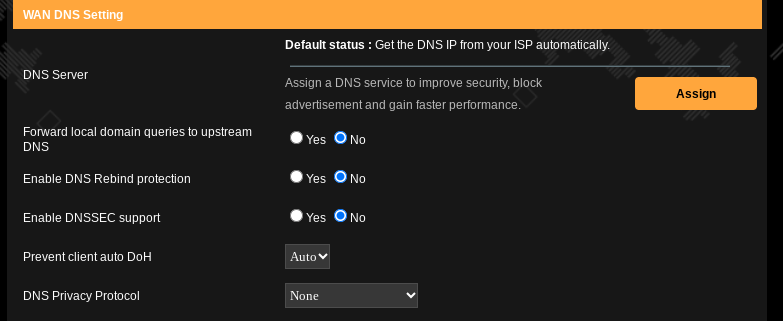
    I want to undo some of my setup on my network so I can redo it in a different configuration on the same machine. The first thing I wanted to do was disable my Adguard server, making sure I could still use the internet after.

    I thought I had cleared out all of the settings in my router that made it use Adguard for DNS, but when I shut down Adguard afterward, all outside connectivity fell apart. I could still get to websites if I knew their specific IP address, but nothing that needed DNS worked. When I booted Adguard back up, everything started working again.

    I have tried several options in the DNS server settings in my Asus router (TUF-AX5400). Is there something I need to do in Adguard first to make this work? Or is this maybe something I need to reset in my Asus router and then give it time and a few reboots to work?

    [–] [S] 1 point 2 years ago

    So this definitely seems like the guide that helped the most. I spent more hours than I would like to admit working on this over this weekend.

    I am trying to figure out if I have a way to do what I want to here. When it was all said and done I could no longer log into the remote computer I was using to run my Jellyfin server. I have been messing around a little bit using a Linux PC with that, and enjoyed that aspect of things, but it seems like once you get hardware acceleration going, you cannot see the desktop anymore. There were several warnings about this so I wasn't entirely surprised when it happened.

    I think I am going to end up needing to get rid of the proxmox part, and just run Linux directly on the computer if I want to do this, and remote into it. It is currently not hooked up to a monitor and is actually on top of my kitchen cabinets out of the way. It was a fun challenge and I learned a lot I think.

  • source
  • parent
  • context
  •  

    I have a used Lenovo Thinkcenter 910 with a i5 7500T running Proxmox with Linux Mint in one VM and Adguard running in another. I’m just getting started so I am reading/searching for tons of answers still

    I was hoping to host Jellyfin within Linux Mint. It works pretty well, but I did notice while watching a movie the CPU was pretty well pegged out. I wanted to enable hardware based acceleration but when I started reading setup guides to hope to understand what I was doing, I think I may have painted myself into a corner already.

    I think I need to tell Proxmox to pass the hardware acceleration on to Linux, and then get Linux to, but also some of the things I have read make it sound like I need to have set up the VM from the beginning this way.

    Am I trying to do this the hard way somehow? Does anyone have any suggestions on the best guide to follow for this?

    [–] 2 points 2 years ago

    I have never used Feit lights with Home Assistant, but yes, my bedroom lights turn on when it senses motion. That automation disables when my living room lights are off (assuming we turn them off at bedtime) or when my phone plugs in to charge (which I do at bedtime). I use a motion sensor by Phillips Hue, and it integrates directly with the Home Assistant Yellow thru its Zigbee radio without an additional hub.

  • source
  • [–] 4 points 2 years ago

    This is where the 120 volt power makes it a little worse for us Americans. 2200w would be 18 amps, easily taking most of the power on a breaker.

    If kettles ever got more popular in the US maybe they could put 240v outlets in kitchens for kettles, but that would be a huge change.

  • source
  • parent
  • context
  • [–] 1 point 2 years ago

    21 miles this week. I had to cut my 10 mile run short yesterday because it was just too hot. It was 85°F when I left for my run in the early afternoon sun. Not a real smart move, but I thought it wouldn't be so bad based on the season.

    Running a half in a few weeks and wishing I had run a bit more over the last month.

  • source
  • view more: next ›