[–] 40 points 1 week ago (2 children)

Reddit was so important in my life, each of these steps is more saddening. I’ve come to realize that that company can’t and won’t make the spaces that matter to us: we were always the ones doing it.

  • source
  • [–] [S] 1 point 1 week ago

    It zooms in on the whole screen and follow focus works as expected. I haven’t tried this, but you can enable full keyboard access and should be able to pan with the keyboard, although you may need to adjust shortcuts. Speaking of shortcuts, the keyboard doesn’t have arrow keys, but you can use Symbol plus WASD.

  • source
  • parent
  • context
  • [–] [S] 2 points 3 weeks ago (1 child)

    This one felt pretty short to me.

    I appreciate the question about disability so we get less cross-contamination between use by disabled people and developers or auditors: the objectives are different and so are the usage patterns and needs.

    The question about AI was also pretty nuanced. This might be one of the best editions of the survey.

  • source
  •  

    Early this year I preordered this new Blackberry like phone keyboard that attaches via MagSafe (or Qi2).

    So far - and I’m typing this on it - it’s pretty interesting. I’m used to touch typing, but my muscle memory was never trained for BBM.

    Symbols seem to roughly match the iOS keyboard, dead keys work as expected and holding a key pops up the numbered list of accents like on macOS. That’s amazing for me as a multi-lingual low-vision typist.

    Ergonomics are kinda weird and I’ll need to get used to it. Using it with the phone in landscape and zoom gives lots of space for text though, I like that.

    Just some day 1 impressions, I’d love to answer any questions from BVI folks.

    [–] 11 points 3 months ago (2 children)

    I’ve been playing Disco Elysium for a few months, a few hours here and there on weekends.

    It’s so interesting. I don’t usually play games that are so clearly based on tabletop RPGs.

    There are obvious rolls, but also lots of passive rolls that happen behind the proverbial GM screen you might not notice if you’re not used to TTRPGs.

    There are also clever ways to “no, but” after failed rolls. Situations where a game master would just want to railroad the players into success, for the benefit of the narrative. Having been in that position, I respect the way this is pulled off.

    I also enjoy the options for doing completely unhinged things. Obviously counterproductive things that may bring up a “you can certainly try” or a “sure, why not?” at the table.

    In terms of accessibility the interface text gets pretty big, the highlighting for points of interests isn’t bad at all and the voiceover for speech is very nice, even if a lot of text ends up not being read.

    This is essentially a point and click game, so I ended up having to buy a vertical mouse for it.

    Overall, it’s been a great experience. I’m into it.

  • source
  •  

    Crossposted from https://rblind.com/post/16757682

    It’s a light plastic bowl shape with a hole in the center where a black plastic cylindrical piece screws in. About as tall as a coffee mug and twice as wide.

    I’m really into coffee. I have an Aeropress and a home espresso machine. I recently got a V60 to make pour overs for my partner who likes gentle flavors and I’m doing OK with it, but it does tax my vision 20/200 in one eye.

    For those not in the know, pour over is a coffee brewing technique where you pour hot water over coffee grounds on a poster filter. Think your Mr. Coffee, but manual. The V50 is basically a funnel with a flared base that you can put on top of a mug.

    I just might get this brewer… Sometimes I’m not confident I can make a V60 without making a mess, but this looks so very convenient.

    How do you fine folks make coffee? Do you feel limited by accessibility issues or do you have the perfect technique figured out?


    It’s a light plastic bowl shape with a hole in the center where a black plastic cylindrical piece screws in. About as tall as a coffee mug and twice as wide.

    I’m really into coffee. I have an Aeropress and a home espresso machine. I recently got a V60 to make pour overs for my partner who likes gentle flavors and I’m doing OK with it, but it does tax my vision 20/200 in one eye.

    For those not in the know, pour over is a coffee brewing technique where you pour hot water over coffee grounds on a poster filter. Think your Mr. Coffee, but manual. The V60 is basically a funnel with a flared base that you can put on top of a mug.

    I just might get this brewer… Sometimes I’m not confident I can make a V60 without making a mess, but this looks so very convenient.

    How do you fine folks make coffee? Do you feel limited by accessibility issues or do you have the perfect technique figured out?


    I’m finding myself on the verge of being influencer-ed and getting a Clicks keyboard when I replace my phone.

    It’s that case with a BlackBerry-inspired keyboard under the phone. Aside from tactile typing, one of their selling points is you can use keyboard shortcuts to operate the phone, like the ones on macOS or an iPad with a keyboard. I feel like cmd-H might genuinely be much nicer than a careful just-long-enough detour from the bottom. Even entering a pin would be better. Not to mention VoiceOver shortcuts.

    Has anybody tried them? Or other small keyboards for iPhones?


    The other week the cord on my Ambutech Slimline cane frayed and broke. I’ll write about that in another post, but it prompted me to get a backup lightweight cane.

    Use Case

    For context, I’m legally blind (acuity) and have a reduced field of view, but could conceivably travel without a cane. I would just have a lot more conversations with people and utility poles I bumped into and bruised legs from encounters with bollards.

    I use the cane for a mix between ID, use for protective technique and lightweight two-point touch in trickier areas.

    The Revolution Identity Cane

    Quickly looking at a few options, in person, I picked up a Revolution so-called “Identity” cane. It’s very similar to the Ambutech Slimline.

    The tip is a translucent white plastic similar to what’s used on the marshmallow roller. It’s a pear-shaped slip-on and they call it an “identity tip,” so I guess it’s not meant for serious mobility use.

    The body is more textured than the Ambutech, probably affecting reflectivity, and the handle segment is fully made of a gray slightly rubberized plastic. There’s more to grip than on the competitor, but there’s no spongy cushion. Additionally the joints are far smoother on the outside with the overlap in sections being completely internal and longer, with no rings around the outside.

    It’s a lightweight cane. Shocking! Seriously, it weighs like 125g in the 54 inch size I got. Just about the same as my Ambutech with ceramic tip.

    I have both of these in 7 segments. That’s an option on the Ambutech, but it seems that’s just how Revolution makes the Identity cane.

    Handling and Dynamics

    I like the balance, especially the available length of the grip. I feel like I can either grip closer to the end to get more reach for two point touch or lower on that segment for balance and sideways reach when holding it across my body.

    Although I like the usable length of the grip - I extended the slimline’s grip with grip tape - the material doesn’t provide much cushioning. I really like the golf club grip on standard Ambutech canes for this.

    The tip slips on so one could, conceivably, replace it with something else, but Revolution only sell the Identity Tip for these. I don’t expect to get anywhere near the durability or feedback of the ceramic tip. For what it’s worth these are pretty cheap.

    It folds easily into a compact package, which you’d always want from an ID cane.

    Real-World Use

    I tried the cane out in a mixed outdoor area. Smooth concrete sidewalks, truncated domes and guide lines on some crosswalks, rougher concrete, older sidewalks with cracks and wooden detours around construction sites. This is a location I visit once or twice every month.

    I expected decent enough results in the smooth areas and not so much in the older sections. The Slimline performs well throughout in my experience.

    The Revolution was… not revolutionary. The grip tired me out more than I’d like due to its lack of cushioning. The tip got caught on absolutely everything.

    I’m honestly very surprised at the poor performance of the tip. It would get caught even on relatively smooth concrete. It was genuinely scary on the rough sidewalks, where the Slimline is OK-ish. No technique seemed to make it much better including a very shallow sweep at an angle that should have it bump off of, well, bumps.

    I avoided a path that’s very narrow with a foot-high drop on one side. Normally I’d swipe off and back up from that ledge, but I just didn’t feel confident doing it with this cane. Maybe with more practice with it? Definitely with better light where I could trust my vision a bit more on the first go-around.

    The whole cane performed well for stairs and curbs, but the feedback from truncated domes didn’t feel fantastic. Not awful, just not super clear.

    I’ll have to give it smoother go in other situations. I think it would be great at the hospital with very smooth surfaces and nicer folding action for sitting for two hours. I have to try it at the office on a set of stairs with floating steps where the ceramic tip’s horizontal lip sometimes gets caught on the way up. The rubber lip on the Ambutech ceramic tip, by the way, is probably what makes it so decent for cracked sidewalks.

    Conclusion

    Overall I think this will be an excellent backup. Does it have the best performance on tricky surfaces and for long walks? No. Is it super durable? Probably OK, but definitely not the tip.

    I think it’s a very good ID cane, possibly even overbuilt for that. It’s an OK lightweight travel cane.

    I was talking to the blind guy who works at the store I got this from and we agreed canes are all about personal preference and each person’s particular needs and circumstances, as well as specific use cases. A perfect cane doesn’t exist, so it’s good to have options.

    What do you guys think? Have you used either or both of these canes? How did they work out? Are there third-party tips for the Revolution Identity cane? While we’re on the topic of preferences, what’s your favorite white cane and why?


    Disclosure: I do street photography on Fuji Instax color and monochrome, B&W film, and color and B&W edited digital. My username is accurate, I have low vision.

    What we now call street photography - that many of us do as a hobby or with a focus on art - came from journalism and documentary photography, right? The Leica and black and white workflow was good for professionals documenting current events.

    As photographic technology progressed, photojournalism moved to color film, then to digital as those became more appropriate for the workflow and for the reader.

    In general broad strokes, photojournalists have been capturing current events with the technology of their time, therefore they’ve been representing their times with the look that technology brings. If the early 1900s happened in black and white, and so much of the rest of the century happened in Kodachrome, the 21st century is happening in whatever “color science” means. Sharp lens - lacking in character? - and balanced - realistic? - colors.

    With all that context, when we use film simulations, edit in black and white or - gasp! - shoot on film, are we documenting our own time or are we bound to nostalgia? Magnum Photos was all about the most effective technology to capture the moment, not charcoal sketches. Are we effectively capturing the spirit and visual aesthetics of the 2020s or are confusing future historians? Or… are we just really enjoying ourselves and creating art, while we leave the documentation to people using their smartphones and PJs?

    What are your thoughts? I’d love to hear from hobbyists and pros alike. Are you editing for a nostalgic feel or focusing on focusing on sharp realism? Both? Why and when? And how do you feel about others’ work? Do you miss a more current look in street and documentary photography?


    Crossposted from https://beehaw.org/post/20362400

    Among the prominent leaders in the history of Blind education in Japan are Konishi Nobuhachi (1854-1938) and Ishikawa Kuraji (1859-1944), two sighted educators who contributed greatly to the early development of Japanese Braille in the 1880s and 1890s. Kunmōain, the school where Konishi and Ishikawa taught, opened its doors to blind and deaf students in 1880, and was renamed in 1887 as the Tokyo School for the Blind and Deaf (in short, the Tokyo School; the school was reorganized into a school for blind students in 1909, and a school for deaf students in 1910).

    At the time in Japanese society, Blind education in schools, as well as Deaf education, was fairly new. People with disabilities, in general, had limited opportunities and support. The Tokyo School, which earned its status as a school under the direct authority of the Ministry of Education, was one of the few places in Japan where blind and deaf students with some financial means could receive formal education. In addition to a broad curriculum of academic courses, such as language, history, and mathematics, the school offered vocational training in music, acupuncture, and massage – the traditional professions of blind people. Shortly after Konishi was appointed to the school in 1886, Ishikawa joined the teaching staff there upon Konishi’s recommendation. Ishikawa’s immediate task was to thoroughly understand the principles of Braille and transform Braille into a suitable script for the Japanese language. This was no easy feat for anyone, not least because the phonetic and semantic nature of the Japanese scripts had to be accurately codified in the much more limited template of Braille dots.

    Japanese Braille took shape over a few years of trial and error. Ishikawa and his committee aimed to develop a functional Japanese-based Braille template that could be used not only at the Tokyo School but also disseminated nationwide as the new standard script for Blind education. From early on, the committee made the crucial decision of comparing Braille with the Japanese kana syllabaries, which are phonetic characters and can be used in writing to represent the sounds of a vast number of kanji characters. [...]

    submitted 1 year ago* (last edited 1 year ago) by [M] to c/main@rblind.com
     

    I use Uber to commute about once a week and I’ve noticed that having my cane clearly visible makes drivers more likely to back up, make a U-turn or otherwise go out of their way to make the pickup and drop-off experience better for me.

    I’ve also noticed a couple of Bolt drivers (that’s a similar company you get in Europe) literally not picking me up. Reported and handled, but I’ve stopped using that app.

    Do you guys do anything to self-disclose before a pickup? Like send a message like “hi, please note I’m blind and may miss you where you arrive?” Some drivers have told me you can do that in your profile, but I can’t find any setting about that or info on Uber’s support pages, apart from the Uber Assist service that I don’t think I need.

    Any particularly good or bad experiences with this?


    A technical issue on RBind.com has been identified by the admin team and is under investigation.

    The user-facing symptom is intermittent errors when loading a user profile, both on the web interface and via apps.

    Investigation and fixes may cause brief periods of downtime and/or degraded performance. The team will update this post if and when longer downtime is necessary.

    submitted 2 years ago* (last edited 2 years ago) by [M] to c/main@rblind.com
     

    As part of OurBlind's continued efforts to provide accessible online spaces for the blind and visually impaired community, we've developed custom themes for Lemmy, to use on our Lemmy instance on Rblind, and to make available for others, in keeping with the themes' license terms and the spirit of free and open source software.

    If you're reading this on www.rblind.com and are not signed in, you're using RBlind-Dark. We hope you're enjoying it! If you log in, you can switch to RBlind-Light. Once logged in, go to your username, then Settings and, use the Themes dropdown to make your selection: we suggest RBlind-Dark or RBlind-Light at the end of the list.

    Why these themes matter to us

    We started this Lemmy instance back in 2023, prompted by the Reddit API protests. Reddit Inc., the company that controls the website our community r/Blind is on, had announced policy changes that made the apps most of us used to participate in the Reddit community impossible to maintain. During this time it became clear to us and many other online communities that a corporate-owned platform would always be subject to pressures that are contrary to our needs. We launched this site as our blind-friendly home base in the fediverse, a decentralized and often self-hosted social media platform.

    The goal of having our own home server was always to be able to make our own decisions about the software we run on it. One of those decisions is that the visual styling should always be comfortable for low-vision users and other disabled people, as part of our core audience. That meant designing and providing themes that, within our technical limitations, conform to the Web Content Accessibility Guidelines (WCAG).

    How we designed our Lemmy themes

    OurBlind admins contracted Travis, a talented graphic designer from within the community, for this project. Check out his website here. Together we went over specific requirenments within WCAG and the site's usage, colors, layout, preliminary testing, and communication, to develop both the themes themselves and the framework for future work and sharing.

    How these themes meet our goals

    In short, the new themes ensure high contrast, colorblind friendly colors, readable fonts, and appropriately-sized and readable buttons and links.

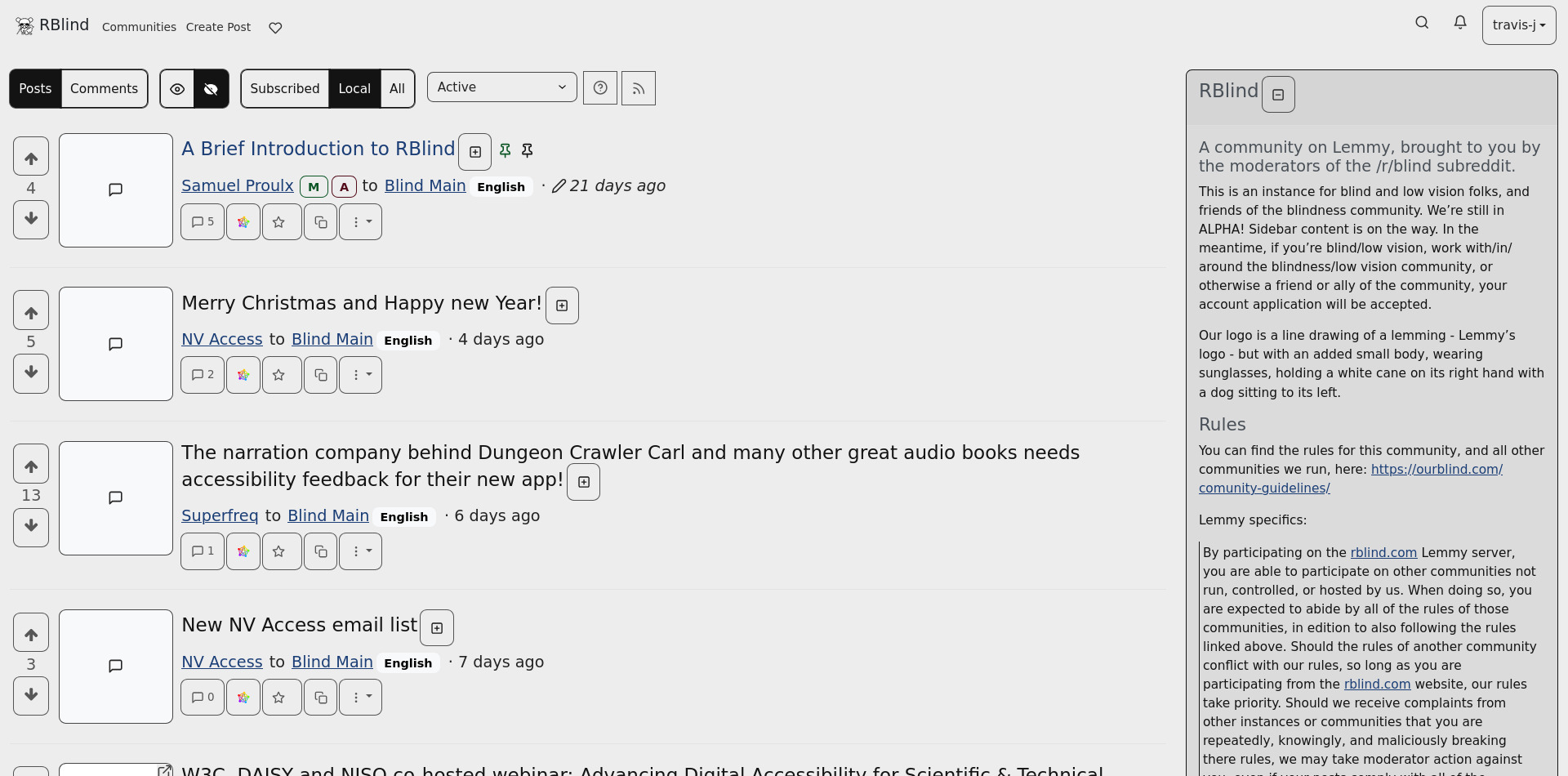
    Following are examples of the home feed using the new themes.

    RBlind-Dark example
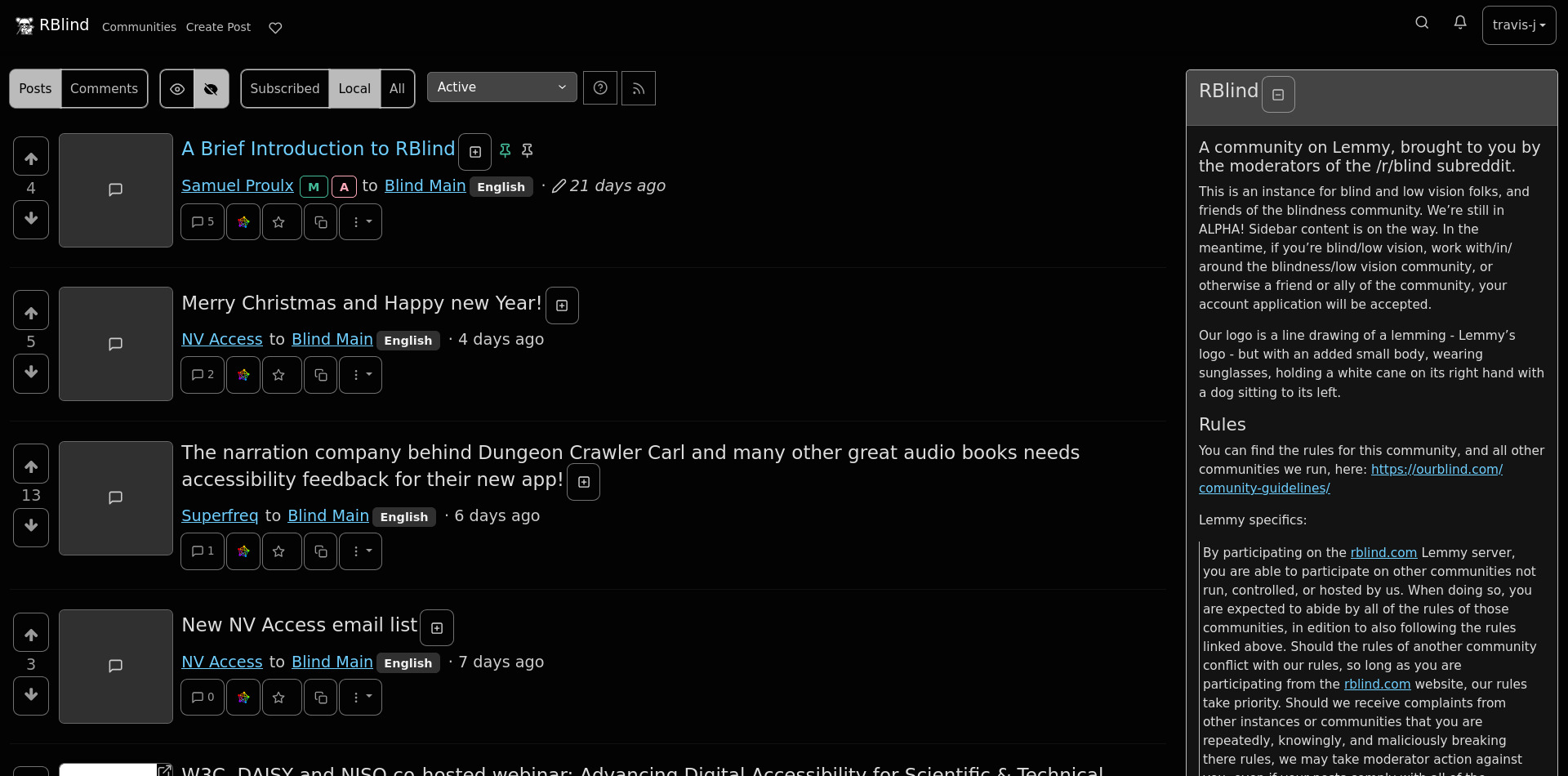
    RBlind Lemmy homepage with Local selected in RBlind-Dark

    RBlind-Light example

    RBlind Lemmy homepage with Local selected in RBlind-Light

    Time for testing and feedback

    These have been audited by OurBlind admins, but that's only part of the validation process. If you're using this site and have low vision, colorblindness, a cognitive or a motor disability, consider providing feedback. Do they work well given your needs and use case? Do you like them? Does something not work quite right? Comment below or fill out the anonymous survey. Don't hesitate to comment if you're not a member of this instance or not disabled - we want these to be helpful to as many people as possible. Thank you!

    We'll be collecting feedback and open to revisions until February 1st 2025. Even after that, we'll still be interested in your experience, but will take longer to respond and adjust.

    How to use these themes on your own instance

    As mentioned, this project is all about the value of free and open source software in ensuring control and autonomy. We're making this our home in the fediverse and we want to be good neighbors. We already offer the broader community a place for discussions around blindness, but we also want to contribute back.

    These themes are licensed under GNU AFFERO General Public License and available at the Codeberg repo to be used or modified. Updates to the themes that come as a result of user feedback will be available there. Definitely give Travis a star and consider hiring for your own design needs, he's been a delight to work with.

    The repo is also mirrored on GitHub for accessibility reasons.

    Thanks, from RBlind

    This community's journey has been long and thrilling, across three platforms and over a decade. Everybody on the admin and moderation team has deeply benefitted from and grown with the community. These themes are a humble gift to our members and our neighbors on the fediverse. May they make all our lives that bit more comfortable.

    view more: next ›