Testing problem (programming.dev)
submitted 1 week ago* (last edited 1 week ago) by to c/golang@lemmy.ml
 

I have a todo CLI app with the following structure

tree .
.
|-- cmd
|   `-- todo
|       |-- main.go
|       `-- main_test.go
|-- go.mod
|-- todo.go
|-- todo.json
`-- todo_test.go

In the main.go, I have a function called expand, it expand range string like in the cut command When I call the expand function from main_test.go, I get the following error

cmd/todo/main_test.go:141:12: undefined: expand
FAIL  PACKAGE_URI/todo/cmd/todo [build failed]
FAIL

I tried to change the function visibility, but this doesn't help either. I replicated the dir structure on a dummy project, and it did work!!

codeberg.org repo

edit: Add repo uri

Trouble with keyboard (gist.github.com)
submitted 2 years ago* (last edited 2 years ago) by to c/archlinux@lemmy.ml
 

cross-posted from: https://programming.dev/post/22695206

Hey people! I hope you are having good time I recently installed arch, but I have trouble with my keyboard during installation and post installation which is null character (^@) printed to stdout, if I pressed function or Esc key null character stop appearing until some command wait for input (e.g. passwd) or pacman updating repo which will mess up progress bar or install conformation

I managed to install arch by enabling ssh with shell redirection, since I can't use vim or nano. I thought post installation everything should go fine since I installed base, linux, linux-firmware and amd-ucode packages, but now I can't log in as a result of null character

I should also mention that my problem across many distros like mint and mint xfce4, parrot, fedora, arch and EndeavourOS

note:

  • hot keys (sound, brightness control keys etc.) work fine on fedora, but not on EndeavourOS version (25/06/2024)
  • Keyboard response time feel slow, and I can't repeat key press by holding the key (e.g. hold backspace to delete several characters)
  • vim not working, it will switch from insert to normal mode
  • nano will go to end of file by moving line by line
  • Sometime in live arch iso systemctl log will interrupt and appear

additional note: I think Fn key is what causing the problem

the gist is output from fedora workstation 40.1 livecd I think it may help

edit: notes list format

edit: Sorry for being a bit late, but it is solved, please check

Trouble with keyboard (gist.github.com)
submitted 2 years ago* (last edited 2 years ago) by to c/linux@lemmy.ml
 

Hey people! I hope you are having good time I recently installed arch, but I have trouble with my keyboard during installation and post installation which is null character (^@) printed to stdout, if I pressed function or Esc key null character stop appearing until some command wait for input (e.g. passwd) or pacman updating repo which will mess up progress bar or install conformation

I managed to install arch by enabling ssh with shell redirection, since I can't use vim or nano. I thought post installation everything should go fine since I installed base, linux, linux-firmware and amd-ucode packages, but now I can't log in as a result of null character

I should also mention that my problem across many distros like mint and mint xfce4, parrot, fedora, arch and EndeavourOS

note:

  • hot keys (sound, brightness control keys etc.) work fine on fedora, but not on EndeavourOS version (25/06/2024)
  • Keyboard response time feel slow, and I can't repeat key press by holding the key (e.g. hold backspace to delete several characters)
  • vim not working, it will switch from insert to normal mode
  • nano will go to end of file by moving line by line
  • Sometime in live arch iso systemctl log will interrupt and appear

additional note: I think Fn key is what causing the problem

the gist is output from fedora workstation 40.1 livecd I think it may help

edit: notes list format

edit: Sorry for being a bit late, but it is solved, please check


I've tried to stow dot files by following online blog/form, and it worked now, I tried to manage my $HOME/bin directory with stow, but it didn't

$HOME/.dotfiles directory structure

/home/USER/.dotfiles/
|-- bash
|   |-- .bash_aliases
|   |-- .bash_logout
|   `-- .bashrc
|-- .git
|   |-- branches
|   |-- COMMIT_EDITMSG
|   |-- config
|   |-- description
|   |-- HEAD
|   |-- hooks
|   |-- index
|   |-- info
|   |-- logs
|   |-- objects
|   `-- refs
|-- git
|   `-- .gitconfig
|-- .gitignore
|-- install.sh
|-- Makefile
|-- .stow-local-ignore
|-- vim
|   `-- .vimrc
`-- zsh

$HOME/bin/src directory structure

/home/USER/bin/
|-- src
|   |-- backup
|   |   |-- backup
|   |-- clone
|   |   `-- clone
|   |-- epub2html
|   |   `-- epub2html
|   |-- gnome-nightlight
|   |   `-- nightlight.sh
|   |-- list
|   |   `-- list
|   |-- new
|   |-- pomorodo
|   |   |-- notification.wav
|   |   |-- old_pomo
|   |   |-- pomorodo
|   |   `-- test
|   |-- revoke_exec
|   |   `-- revoke_exec
|   |-- rm_exec
|   |   |-- rm_exec
|   |   `-- tmp
|   |-- install

Where is my mistake and thanks in advance.


I am sorry and aware this is the wrong community. However, I am unable to find Ask Programmer.

I wrote a small bash script, and I would like to share it on GitHub. However, to operate probably it requires dir with some files in user $HOME dir.

The only solutions came to my mind were, tar the directory BUT is this pragmatic solution?

[–] 6 points 2 years ago* (6 children)

It seems an opportunity to ask my stupid questions.

Q1. If I am going to build my minimum linux installation without a GUI, does this require a display manager?

Q2. is there other way to interact with my machine other than tty

  • source
  • parent
  • context
  • submitted 2 years ago* (last edited 2 years ago) by to c/linux4noobs@programming.dev
     

    Hey guys, i a am using ParrotOS and trying to install virtualbox from .deb package and i got the following warning

    dpkg: dependency problems prevent configuration of virtualbox-7.0:
     virtualbox-7.0 depends on libc6 (>= 2.34); however:
      Version of libc6:amd64 on system is 2.31-13+deb11u6.
     virtualbox-7.0 depends on libssl3 (>= 3.0.0~~alpha1); however:
      Package libssl3 is not installed.
     virtualbox-7.0 depends on libstdc++6 (>= 12); however:
      Version of libstdc++6:amd64 on system is 11.2.0-18really16parrot1.
     virtualbox-7.0 depends on libvpx7 (>= 1.10.0); however:
      Package libvpx7 is not installed.
    

    but it seems like ParrotOS repo outdated so i add http://archive.ubuntu.com jammy main universe to /etc/apt/sources.list update repo list apt-get update and then obtain libc6 package information

    apt-cache policy libc6
    libc6:
      Installed: 2.31-13+deb11u7
      Candidate: 2.31-13+deb11u7
      Version table:
         2.35-0ubuntu3 50
             50 http://archive.ubuntu.com/ubuntu jammy/main amd64 Packages
     *** 2.31-13+deb11u7 600
            600 https://deb.parrot.sh/parrot lts/main amd64 Packages
            600 https://deb.parrot.sh/parrot parrot/main amd64 Packages
            600 https://deb.parrot.sh/direct/parrot parrot-security/main amd64 Packages
            100 /var/lib/dpkg/status
    

    then install libc6 via sudo apt-get install libc6=2.35-0ubuntu3 BUT i got

    Reading package lists... Done
    Building dependency tree... Done
    Reading state information... Done
    The following packages were automatically installed and are no longer required:
      afl++-doc docbook-to-man greenbone-security-assistant gtk-doc-tools gvmd-common hashcat-data intltool libapache2-mod-php libapache2-mod-php7.4
      libc-devtools libclang-cpp11 libclang-cpp9 libclang1-11 libcrypt-dev libfakeroot libffi-dev libgc1 libgvm21 libhiredis0.14 libllvm9 libltdl-dev liblzf1
      libmicrohttpd12 libnsl-dev libobjc-10-dev libobjc4 libomp-11-dev libomp5-11 libpfm4 libpocl2-common libradcli4 libtirpc-dev libucl1 libz3-dev llvm-9
      llvm-9-runtime llvm-9-tools openvas-scanner oracle-instantclient-basic ospd-openvas php-common php7.4-cli php7.4-common php7.4-json php7.4-opcache
      php7.4-readline postgresql-common python3-defusedxml python3-qrcode python3-terminaltables redis-server redis-tools sysstat upx-ucl xsltproc
    Use 'sudo apt autoremove' to remove them.
    The following additional packages will be installed:
      libncurses6 libncursesw6 libtinfo6
    Suggested packages:
      glibc-doc locales
    Recommended packages:
      libnss-nis libnss-nisplus
    The following packages will be REMOVED:
      afl afl++ afl++-clang armitage bluelog build-essential clang clang-11 clang-9 commix fakeroot g++ g++-10 gsad gvm gvm-tools gvmd hashcat lib32gcc-s1
      lib32stdc++6 libbluetooth-dev libc-bin libc-dev-bin libc6-dev libc6-i386 libclang-common-11-dev libclang-common-9-dev libexpat1-dev libncurses-dev
      libpocl2 libpython3-dev libpython3.9-dev libstdc++-10-dev libtinfo-dev libtool llvm-9-dev locales mate-common metasploit-framework pocl-opencl-icd
      postgresql postgresql-13 python3-dev python3-gvm python3.9-dev set unicorn-magic zlib1g-dev
    The following packages will be upgraded:
      libc6 libncurses6 libncursesw6 libtinfo6
    WARNING: The following essential packages will be removed.
    This should NOT be done unless you know exactly what you are doing!
      libc-bin
    4 upgraded, 0 newly installed, 48 to remove and 180 not upgraded.
    Need to get 3,812 kB of archives.
    After this operation, 1,122 MB disk space will be freed.
    You are about to do something potentially harmful.
    To continue type in the phrase 'Yes, do as I say!'
    

    What should i do?

    Edit: format command output

    submitted 2 years ago* (last edited 2 years ago) by to c/linux4noobs@programming.dev
     

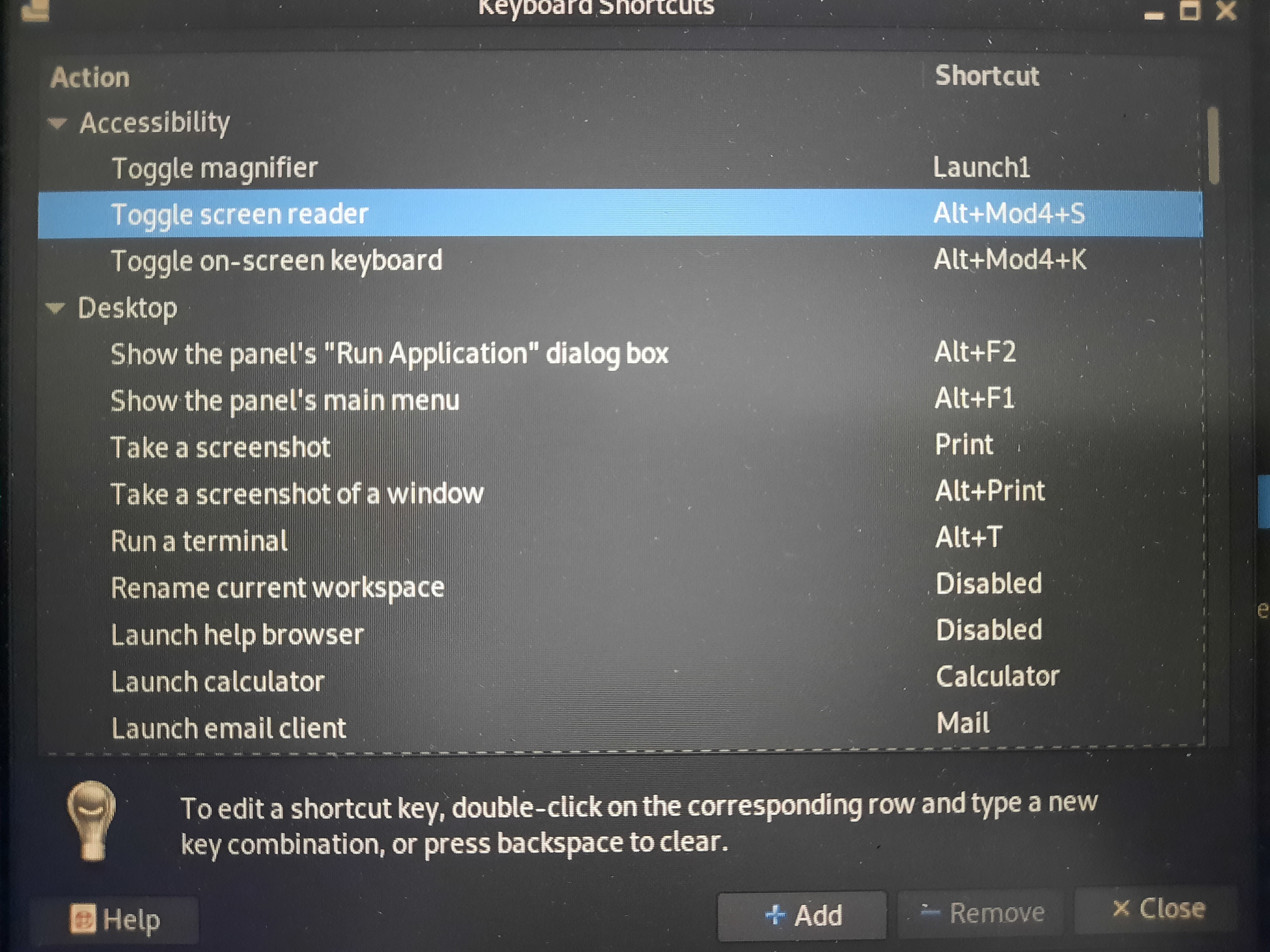
    Hello guys, I'm using Parrot OS on an Asus G513. My problem is when I unintentionally adjust shortcuts (filled with Launcher1) automatically. However, this problem didn't catch my attention, when I used to boot live USB, after user space load any keystroke I press seems not working, from opening terminal to other shortcuts, however after like 5 min it will start to respond but each few key press screen brightness will get dimmer and dimmer, I thought it's problem with DE. now I just can press key combination (Alt + arrow) or (Mod + f) When I keep pressing return to delete, launcher1 eventually will get filled again before I realized it The only way I can adjust things now, via ssh

    additional notes

    1. I can type in my password normally on the lock screen

    2. I can't log in via tty. Even before this incident, this is what will happen when I try to log in

    hostname login: USER@^@^@^@^@^@^@^@^@^@^@^@^@^@^@^@^@^@^@^@^@^@^
    password:@^@^@^@^@^@^@^@^@^@^@^@^@^@^@^@^@^@^@^@^@^@^@^@^@^@^@^@^@^@^@^@^@^@^@^@^@^@^@^@^@^@^@^@^
    login inncorrect
    

    tty will keep printing @^ combination until i hit Ctrl + c

    Things I've tried: looking at /home/USER/.config/kglobalshortcutsrc, but there's no luck, and the last modification date is May 2

    Edit: add shortcut photo

    Update: I've managed to adjust the shortcut by holding "return + ctrl + alt + m" . But still, I can't figure out what causes rapid input.

    thanks in advance.
    view more: next ›