Tools > Preferences > Downloads > Saving Management
Change "Default Torrent Management Mode" to automatic
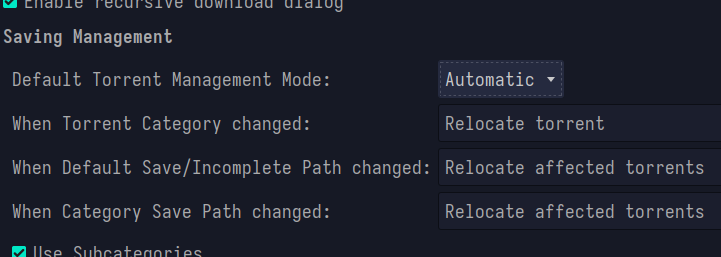
Tools > Preferences > Downloads > Saving Management
Change "Default Torrent Management Mode" to automatic
You need to enable Automatic Torrent Management
I know on Windows there's settings to enable moving torrents automatically when the category changes. Also make sure to enable automatic torrent management otherwise I don't think it will work properly.
I'd also check the default download paths too, there's also a setting to keep inprogress torrents in a different spot. Hope that helps
Edit: see screenshot elsewhere in the comments: https://pawb.social/comment/2238730
all 8 comments