all 16 comments

sorted by: hot top controversial new old
[–] 4 points 1 month ago (1 child)

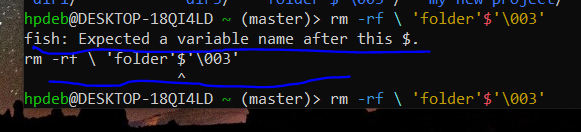
It's just not escaped properly.

You can probably just get away with putting a backslash \ before the $ so it looks like \$.

  • source
  • hideshow 2 child comments
  • [–] [S] 0 points 1 month ago (1 child)
  • [–] 2 points 1 month ago

    I'm unfamiliar with fish but that $'\003' also looks a lot like how bash escapes unprintable control characters (ASCII 3 is 'end of text' apparently).

    You probably have sh or bash available. Try the same command in that.

    sh -c "rm -rf 'folder'$'\003'"
    

    Or just delete all directories that start with folder with confirmation (no -f):

    rm -r folder*
    
  • source
  • parent
  • [–] 2 points 1 month ago (1 child)

    The quotes and escapes are mangled.

    cd into the directory with the folder to remove, type rm -rf ./ then press tab until the folder you’re looking for is autocompleted after the ./

  • source
  • hideshow 2 child comments
  • [–] [S] -1 points 1 month ago (1 child)
  • [–] 2 points 1 month ago (1 child)

    If you’re struggling, might as well either open a file manager like midnight commander to make your life easier.

  • source
  • parent
  • hideshow 2 child comments
  • [–] 2 points 1 month ago
    [–] 2 points 1 month ago

    Just type rm -rf f and use tab to auto complete.

  • source
  • [–] 1 point 1 month ago*

    Are you sure the name is 'folder'$'\003'? I think the outer quotes might be added by ls. I would try rm -rf 'folder\'\$\'\\003'

    Edit: Or rm -rf 'folder\'$\'\\003'

  • source
  • [–] 0 points 1 month ago (1 child)

    You probably don't own the folder. Use sudo.

  • source
  • hideshow 2 child comments
  • [–] [S] -1 points 1 month ago (1 child)
  • [–] [S] 0 points 1 month ago (1 child)
  • [–] 2 points 1 month ago

    Oh. Sudo is the special word meaning admin. So if you have a command like rm and it fails due to permissions you simply add sudo. sudo rm. But I see that your problem is the folder name. So nevermind. Maybe look at the spaces? Maybe you have tab$tab instead of space$space?

  • source
  • parent