Teams also doesn't support multiple "work" accounts, so I had to boot up a laptop to accept the call. 🤷
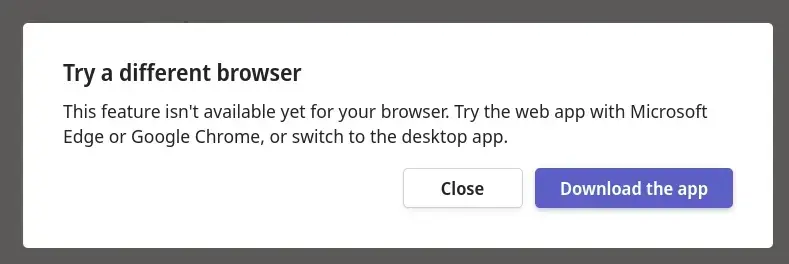
top 50 comments

sorted by: hot top controversial new old
[–] 240 points 2 years ago (12 children)

Well they are just lying, it works fine with Firefox and has worked fine for years. I live in the EU though. Sucks to be american these days, I guess?

  • source
  • hideshow 14 child comments
  • [–] 24 points 2 years ago

    I have the same issue, but I am also in the EU. however, I just used an extension to spoof my user agent and now it works fine. there is some weird behavior sometimes, like when I call someone it doesn't actually ring the other person etc.

  • source
  • parent
  • load more comments (10 replies)
    [–] 168 points 2 years ago

    Just one more upside to Firefox, less interruptions during work~

  • source
  • [–] 145 points 2 years ago (3 children)

    Its cool how all these companies are allowed to just lie to you about their products functionality.

  • source
  • hideshow 4 child comments
  • [–] 45 points 2 years ago (12 children)

    If you use Firefox, you are a communist; and if you are a communist why would you need the glorious tools of corporate communication? Just make do with rotten turnips as Lenin intended

  • source
  • parent
  • hideshow 13 child comments
  • load more comments (11 replies)
  • load more comments (2 replies)
    [–] 105 points 2 years ago (2 children)

    This team block is so agressive to firefox users that it's literaly hardcoded as if web browser firefox then deny.

    You cam override that by changing a parameter in firefox to advertise itself as another we browser. I don't remeber how i did it but, once i had to use firefox and i just changed that stting in order to advertise me to the host as a edge browser. With that changed i could use teams as normal.

    Epic drm.

  • source
  • hideshow 3 child comments
  • [–] 75 points 2 years ago* (last edited 2 years ago) (11 children)

    When I'd search "(location) weather" on Google (e: in Chrome) and I'd get a really nice at a glance forecast right on top. Do the same thing in Firefox and I'd get a whole bunch of weather websites I could go to. The former obviously being a better, more direct experience. I found an extension that fools Google into thinking it's Chrome and all works fine with that.

    I'm amazed if this doesn't violate some antitrust regulation

  • source
  • parent
  • hideshow 12 child comments
  • load more comments (10 replies)
  • load more comments (1 reply)
    [–] 94 points 2 years ago (26 children)

    This is not mildly infuriating this is the free internet being eroded through Google’s control of Chrome

  • source
  • hideshow 26 child comments
  • load more comments (26 replies)
    [–] 82 points 2 years ago* (last edited 2 years ago) (5 children)

    This is likely legacy code. Firefox used to have a lot of issues with WebRTC, so practically all video conferencing systems blocked it. Teams probably has some "block Firefox because it doesn't work properly" check that was written 5+ years ago and none of the current developers are even aware of its existence.

    Well-coded ones did feature detection instead of checking the user-agent, meaning they automatically started allowing Firefox as soon as it implemented all the required features.

    Feature detection is usually the way to go. If your website / webapp depends on a particular feature, check if that specific feature exists, rather than checking for particular browsers. Browser checks are still needed in some cases, for example Safari sometimes reports that it supports particular features but it really doesn't (or they're so buggy to the point where they're unusable), but that's relatively rare.

  • source
  • hideshow 7 child comments
  • [–] 17 points 2 years ago (3 children)

    Feature detection is usually the way to go. If your website / webapp depends on a particular feature, check if that specific feature exists, rather than checking for particular browsers. Browser checks are still needed in some cases, for example Safari sometimes reports that it supports particular features but it really doesn’t (or they’re so buggy to the point where they’re unusable), but that’s relatively rare.

    This is tough to implement when the feature is present, but implemented wrong. Or, even worse, when it's implemented right, but the most popular browser implements it wrong and almost everyone else follow suit for compatibility reasons, except for one that takes the stance of following standards. I know safari is notorious for this, think pale moon had those issues, too, and there are still echoes from the past from pre-chrome internet explorer, thank god it's finally dead.

  • source
  • parent
  • hideshow 4 child comments
  • load more comments (2 replies)
  • load more comments (3 replies)
    [–] 74 points 2 years ago (3 children)

    Try changing your user agent to a Chrome one (e.g. Mozilla/5.0 (Windows NT 10.0; Win64; x64) AppleWebKit/537.36 (KHTML, like Gecko) Chrome/120.0.0.0 Safari/537.36). Works a treat!

  • source
  • hideshow 5 child comments
  • [–] 61 points 2 years ago (8 children)

    Sidenote:

    HTTP user agents have become absolutely bonkers over the years.

  • source
  • parent
  • hideshow 9 child comments
  • load more comments (7 replies)
  • load more comments (1 reply)
    [–] 55 points 2 years ago (2 children)

    Just change your Useragent, Microsoft is a bunch of dummies and didn't even bother to code it in a way that makes sense as a DRM lmfao.

  • source
  • hideshow 3 child comments
  • [–] 15 points 2 years ago* (8 children)

    I had to look it up, here's what I found (please correct me if I got it wrong):

    To change the user agent in Firefox, you can use the built-in Developer Tools. Here's how you can do it:

    1. Open Firefox.
    2. Press Ctrl + Shift + I on Windows or Cmd + Option + I on macOS to open the Developer Tools.
    3. Click on the "Network" tab.
    4. Look for a small icon that looks like a mobile phone and a tablet together, usually located at the top-right of the Network tab. This is the "Responsive Design Mode" button. Click on it.
    5. Once in Responsive Design Mode, you'll see a dropdown menu at the top of the screen where you can select different user agents (like various mobile devices, different browsers, etc.).

    Remember, changing the user agent can sometimes lead to unexpected behavior on websites, as it tells the website that you're using a different browser or device than you actually are. This is usually used for testing and development purposes.

    Edit: a word

  • source
  • parent
  • hideshow 9 child comments
  • load more comments (7 replies)
  • load more comments (1 reply)
    [–] 43 points 2 years ago

    Ms teams sucks in a big way

  • source
  • [–] 27 points 2 years ago (2 children)

    Teams won't even open on Safari. Must use a chrome-based browser (like... Edge!)

  • source
  • hideshow 2 child comments
  • load more comments (2 replies)
    [–] 24 points 2 years ago*

    given the love Teams receives, it not working in [ insert browser ] is definitely a feature

  • source
  • [–] 20 points 2 years ago (5 children)

    I used to freelance for a big corp who used MS teams and provided me with separate credentials, while also having my private MS account, that I occasionally use for other corps I worked for.

    It was a hell using it that way. I had to run each one in a private Brave window to be able to work on two different accounts.

    I know they only use MS teams, bc their infra is all based on MS, and it probably works fine for them internally. But man, this shit needs to be fixed in some way to account for external people, especially the ones who chose their own stack and work simultaneously with others.

  • source
  • hideshow 5 child comments
  • load more comments (5 replies)
    [–] 20 points 2 years ago (1 child)

    Have you tried changing your user agent string to Chrome? I know it can sometimes sidestep these types of "errors". It can be changed manually through about:config under general.useragent.override, or there exists plenty of addons to switch it more easily.

  • source
  • hideshow 1 child comment
  • load more comments (1 reply)
    [–] 18 points 2 years ago (8 children)

    You can make it work by changing your UserAgent string (there's plugins for that) to some older chrome version to make things work.

  • source
  • hideshow 8 child comments
  • load more comments (8 replies)
    [–] 16 points 2 years ago

    I works for me without a user agent change if I enter through the Microsoft 365 teams workspace and not a teams share link.

  • source
  • [–] 16 points 2 years ago* (last edited 2 years ago) (2 children)

    Im sure if you swap user agent to chrome they wouldn't give a fuck

  • source
  • hideshow 2 child comments
  • load more comments (2 replies)
    [+] 16 points 2 years ago (1 child)
    load more comments (1 reply)
    [–] 14 points 2 years ago* (1 child)

    Teams also doesn’t support multiple “work” accounts

    Firefox lets you have completely separate profiles with separate accounts (URL: about:profiles, it can't be linked to for security reasons) and also an official extension to have another layer of profiles on a per-tab basis (containers).

  • source
  • hideshow 1 child comment
  • load more comments (1 reply)
    [–] 12 points 2 years ago

    I feel validated, reading about my daily struggles with Teams.

  • source
  • load more comments
    view more: next ›