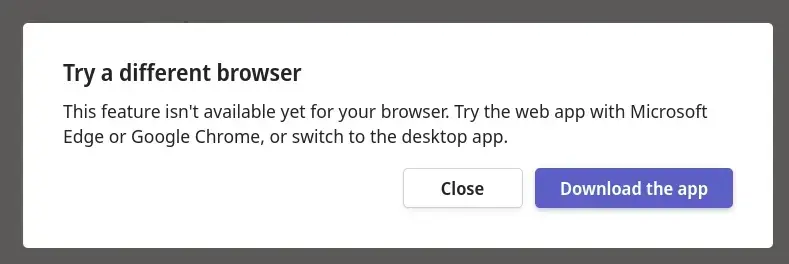
▲ 1106 ▼ Teams apparently can't call when using Firefox (lemmy.world) submitted 2 years ago by qaz@lemmy.world to c/mildlyinfuriating@lemmy.world 197 comments fedilink hide all child comments Teams also doesn't support multiple "work" accounts, so I had to boot up a laptop to accept the call. 🤷
[–] Zuberi@lemmy.dbzer0.com 55 points 2 years ago (2 children) Just change your Useragent, Microsoft is a bunch of dummies and didn't even bother to code it in a way that makes sense as a DRM lmfao. permalink fedilink source hideshow 4 child comments replies: [–] MojoMcJojo@lemmy.world 15 points 2 years ago* (4 children) I had to look it up, here's what I found (please correct me if I got it wrong): To change the user agent in Firefox, you can use the built-in Developer Tools. Here's how you can do it: Open Firefox. Press Ctrl + Shift + I on Windows or Cmd + Option + I on macOS to open the Developer Tools. Click on the "Network" tab. Look for a small icon that looks like a mobile phone and a tablet together, usually located at the top-right of the Network tab. This is the "Responsive Design Mode" button. Click on it. Once in Responsive Design Mode, you'll see a dropdown menu at the top of the screen where you can select different user agents (like various mobile devices, different browsers, etc.). Remember, changing the user agent can sometimes lead to unexpected behavior on websites, as it tells the website that you're using a different browser or device than you actually are. This is usually used for testing and development purposes. Edit: a word permalink fedilink source parent hideshow 8 child comments replies: [–] user224@lemmy.sdf.org 11 points 2 years ago And here I was just setting general.useragent.override each time. Fun fact: Some time in past Firefox used to support per-domain overrides (without add-ons). permalink fedilink source parent [–] oce@jlai.lu 8 points 2 years ago There are add-ons to select a different user agent without getting that technical. permalink fedilink source parent [–] camelbeard@lemmy.world 8 points 2 years ago (1 child) There's an addon that can do it and remember the setting per domain or website. permalink fedilink source parent hideshow 2 child comments replies: [–] Akasazh@feddit.nl 2 points 2 years ago (1 child) I, for one, would appreciate a link to said addon permalink fedilink source parent hideshow 2 child comments replies: [–] SavvyBeardedFish@reddthat.com 7 points 2 years ago (2 children) I've used: User Agent Switcher Successfully using; Whitelist mode Domain = teams.microsoft.com UserAgentString = Mozilla/5.0 (Windows NT 10.0; Win64; x64) AppleWebKit/537.36 (KHTML, like Gecko) Chrome/118.0.0.0 Safari/537.36 permalink fedilink source parent hideshow 4 child comments replies: [–] camelbeard@lemmy.world 2 points 2 years ago Awesome I was on my phone so I couldn't quickly check what addon I was using. permalink fedilink source parent [–] Akasazh@feddit.nl 2 points 2 years ago Thnx! permalink fedilink source parent [–] shadowintheday2@lemmy.world 4 points 2 years ago Ctrl+ shift + M permalink fedilink source parent [–] FlyingSquid@lemmy.world 5 points 2 years ago Sure, but the point is that you shouldn't have to. There should be cross-compatibility. permalink fedilink source parent
[–] MojoMcJojo@lemmy.world 15 points 2 years ago* (4 children) I had to look it up, here's what I found (please correct me if I got it wrong): To change the user agent in Firefox, you can use the built-in Developer Tools. Here's how you can do it: Open Firefox. Press Ctrl + Shift + I on Windows or Cmd + Option + I on macOS to open the Developer Tools. Click on the "Network" tab. Look for a small icon that looks like a mobile phone and a tablet together, usually located at the top-right of the Network tab. This is the "Responsive Design Mode" button. Click on it. Once in Responsive Design Mode, you'll see a dropdown menu at the top of the screen where you can select different user agents (like various mobile devices, different browsers, etc.). Remember, changing the user agent can sometimes lead to unexpected behavior on websites, as it tells the website that you're using a different browser or device than you actually are. This is usually used for testing and development purposes. Edit: a word permalink fedilink source parent hideshow 8 child comments replies: [–] user224@lemmy.sdf.org 11 points 2 years ago And here I was just setting general.useragent.override each time. Fun fact: Some time in past Firefox used to support per-domain overrides (without add-ons). permalink fedilink source parent [–] oce@jlai.lu 8 points 2 years ago There are add-ons to select a different user agent without getting that technical. permalink fedilink source parent [–] camelbeard@lemmy.world 8 points 2 years ago (1 child) There's an addon that can do it and remember the setting per domain or website. permalink fedilink source parent hideshow 2 child comments replies: [–] Akasazh@feddit.nl 2 points 2 years ago (1 child) I, for one, would appreciate a link to said addon permalink fedilink source parent hideshow 2 child comments replies: [–] SavvyBeardedFish@reddthat.com 7 points 2 years ago (2 children) I've used: User Agent Switcher Successfully using; Whitelist mode Domain = teams.microsoft.com UserAgentString = Mozilla/5.0 (Windows NT 10.0; Win64; x64) AppleWebKit/537.36 (KHTML, like Gecko) Chrome/118.0.0.0 Safari/537.36 permalink fedilink source parent hideshow 4 child comments replies: [–] camelbeard@lemmy.world 2 points 2 years ago Awesome I was on my phone so I couldn't quickly check what addon I was using. permalink fedilink source parent [–] Akasazh@feddit.nl 2 points 2 years ago Thnx! permalink fedilink source parent [–] shadowintheday2@lemmy.world 4 points 2 years ago Ctrl+ shift + M permalink fedilink source parent
[–] user224@lemmy.sdf.org 11 points 2 years ago And here I was just setting general.useragent.override each time. Fun fact: Some time in past Firefox used to support per-domain overrides (without add-ons). permalink fedilink source parent
[–] oce@jlai.lu 8 points 2 years ago There are add-ons to select a different user agent without getting that technical. permalink fedilink source parent
[–] camelbeard@lemmy.world 8 points 2 years ago (1 child) There's an addon that can do it and remember the setting per domain or website. permalink fedilink source parent hideshow 2 child comments replies: [–] Akasazh@feddit.nl 2 points 2 years ago (1 child) I, for one, would appreciate a link to said addon permalink fedilink source parent hideshow 2 child comments replies: [–] SavvyBeardedFish@reddthat.com 7 points 2 years ago (2 children) I've used: User Agent Switcher Successfully using; Whitelist mode Domain = teams.microsoft.com UserAgentString = Mozilla/5.0 (Windows NT 10.0; Win64; x64) AppleWebKit/537.36 (KHTML, like Gecko) Chrome/118.0.0.0 Safari/537.36 permalink fedilink source parent hideshow 4 child comments replies: [–] camelbeard@lemmy.world 2 points 2 years ago Awesome I was on my phone so I couldn't quickly check what addon I was using. permalink fedilink source parent [–] Akasazh@feddit.nl 2 points 2 years ago Thnx! permalink fedilink source parent
[–] Akasazh@feddit.nl 2 points 2 years ago (1 child) I, for one, would appreciate a link to said addon permalink fedilink source parent hideshow 2 child comments replies: [–] SavvyBeardedFish@reddthat.com 7 points 2 years ago (2 children) I've used: User Agent Switcher Successfully using; Whitelist mode Domain = teams.microsoft.com UserAgentString = Mozilla/5.0 (Windows NT 10.0; Win64; x64) AppleWebKit/537.36 (KHTML, like Gecko) Chrome/118.0.0.0 Safari/537.36 permalink fedilink source parent hideshow 4 child comments replies: [–] camelbeard@lemmy.world 2 points 2 years ago Awesome I was on my phone so I couldn't quickly check what addon I was using. permalink fedilink source parent [–] Akasazh@feddit.nl 2 points 2 years ago Thnx! permalink fedilink source parent
[–] SavvyBeardedFish@reddthat.com 7 points 2 years ago (2 children) I've used: User Agent Switcher Successfully using; Whitelist mode Domain = teams.microsoft.com UserAgentString = Mozilla/5.0 (Windows NT 10.0; Win64; x64) AppleWebKit/537.36 (KHTML, like Gecko) Chrome/118.0.0.0 Safari/537.36 permalink fedilink source parent hideshow 4 child comments replies: [–] camelbeard@lemmy.world 2 points 2 years ago Awesome I was on my phone so I couldn't quickly check what addon I was using. permalink fedilink source parent [–] Akasazh@feddit.nl 2 points 2 years ago Thnx! permalink fedilink source parent
[–] camelbeard@lemmy.world 2 points 2 years ago Awesome I was on my phone so I couldn't quickly check what addon I was using. permalink fedilink source parent
[–] shadowintheday2@lemmy.world 4 points 2 years ago Ctrl+ shift + M permalink fedilink source parent
[–] FlyingSquid@lemmy.world 5 points 2 years ago Sure, but the point is that you shouldn't have to. There should be cross-compatibility. permalink fedilink source parent