Hi, and sorry in advance if this is the wrong community to post this. But I seek some advice on how I can upgrade my home networking setup that also connects my selfhosted services.

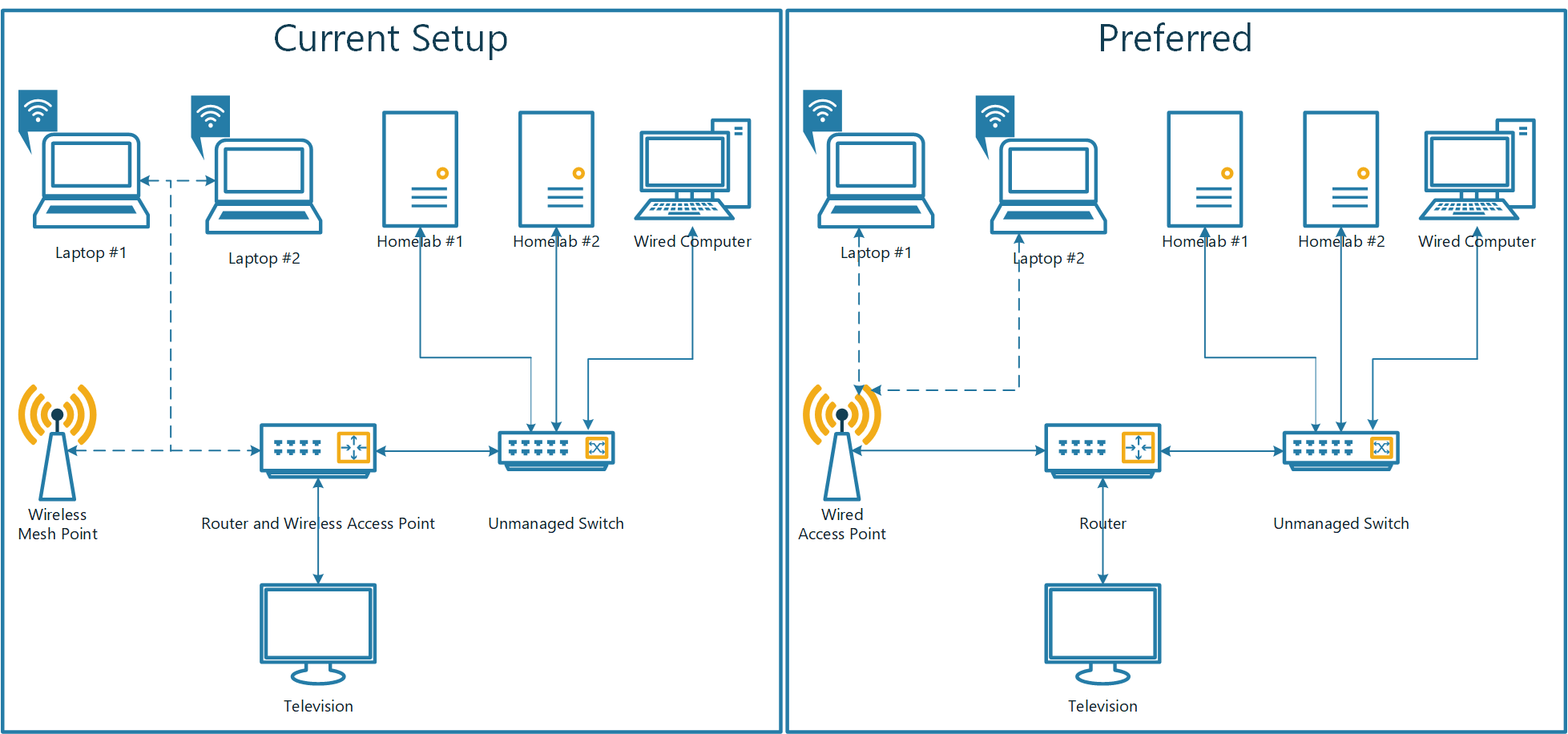
I have posted a shitty Visio that visualized my current setup, but just to describe it in some words.

I use an aging Amplifi HD router and access point, that is connected through wireless to a mesh point.

It works, but I am aware how much of the throughput disappears when connecting through the meshpoint. And I would also like to utilize newer technologies like Wifi 6 (i already have devices that support this standard) or even 6E.

So I thought about switching the router to a dedicated one without a wireless access point, and then wire an access point to provide wireless access.

While I was at it, it could be interesting going from gigabit to 2.5 for the wired devices. One of the homelabs could be modified to utilize it. Or at least just gain the possibility in a future upgrade, by getting a router that supports it while I am at it.

My question is, what would you suggest I upgraded with? I'm open for OpenWRT or PFsense/OPNsense, and keeping things modular.

Edit: and I am located within the EU, if it has any bearing on what devices are available without crazy import duties.
all 25 comments

sorted by: hot top controversial new old
[–] 12 points 2 years ago* (last edited 2 years ago) (1 child)

Budget (about 200 euro):

  • Mikrotik hex s router
  • TP-Link eap610 access point
  • Unmanaged trendnet switch

Better(400-500 euro):

TP-Link omada line is basically a bunch of ubiquity clones at much lower price

  • source
  • hideshow 2 child comments
  • [–] 11 points 2 years ago (4 children)

    I'd suggest looking into the Unifi product line. They have products that meet your needs and then some. I believe the company is based out of the EU so you are likely good in imports.

  • source
  • hideshow 8 child comments
  • [–] [S] 2 points 2 years ago*

    Very tempting, as I am accustomed to Amplifi, and I like their access points a lot. But if I am to achieve above 1 Gbps wired speeds, it appears that I have to go for the UDM Pro which I think is quite above the mark. It seems like many other options have opened up, like a retrofitted Fujitsu S920 as I commented to another.

  • source
  • parent
  • [–] 8 points 2 years ago

    I would definitely go Opnsense for the router, it's much more flexible than other options. You can get various Intel mini-PCs with very low power usage that have 2.5GbE ports.

    For the APs I'm pretty happy with my Unifi setup, but I've heard decent things about TP-Link Omada hardware too.

  • source
  • [–] 5 points 2 years ago (1 child)

    I thought about switching the router to a dedicated one without a wireless access point

    Is there a reason for this? Unless it has specific issues you'd like to fix, I'd just keep using the current router and simply disable its WiFi.

  • source
  • hideshow 2 child comments
  • [–] [S] 2 points 2 years ago (3 children)

    Would be from the assumptions that typical routers that do everything, tends to be underpowered. One thing I looked at was repurposing a second hand Fujitsu S920 for the task of being a router. But again, I am just spitballing, seeking inspiration.

  • source
  • parent
  • hideshow 6 child comments
  • [–] 2 points 2 years ago

    "underpowered" routers are usually underpowered for multiple high bandwidth wireless connections. if you disable the wireless, shoving bits over copper would -usually- be efficient enough to not be the bottleneck.

  • source
  • parent
  • [–] 1 point 2 years ago*

    S920

    I'm running this as my router. It handles a 500/500mbit connection over WireGuard for me without a problem. CPU usage can spike up to 80% when I push it as much as I can, so depending on how it scales I'm not 100% sure how it would handle 1gbit routing+vpn for example.

  • source
  • parent
  • [–] 5 points 2 years ago
    • Raspberry Pi 4 + TP-Link UE300, w/ OpenWrt
    • Netgear G308 switch, any GigE switch would do
    • Ubiquiti AC access point, second hand from eBay

    Supports gigabit speeds with SQM (QoS) over Ethernet and up to 400Mbps over WiFi in its current form.

  • source
  • [–] 3 points 2 years ago

    Have a look at the Bananapi options, especially the R3. (Or the R2, it's a bit more mature)

    It's a very capable single board computer with onboard managed switch, including SFP cages. If you want, you can buy antennas and utilise the wifi 6, or get a dedicated access point.

    PFsense, openwrt, et al all have images. I think some people also run the mikrotik OS on it. It's powerful enough to run as a hypervisor so you can chop and change between all of these if you want.

    It gets bonus points for accepting 5G modems for failover.

  • source
  • [–] 2 points 2 years ago

    Hi!I see a lot of great suggestions here but I was just looking at your chart and I think just one fundamental change would benefit you.

    Think of your switch as the "core" of your network. Everything should connect to that switch (computers, access points, firewall) for your best experience/performance.

    If you go with unifi, you should know that their switches are managed but if you intend to self host anything, you're actually going to want the managed features!

    Thanks and goodluck!

  • source
  • [–] 2 points 2 years ago (1 child)

    What is your bandwidth from your ISP?

  • source
  • hideshow 2 child comments
  • [–] [S] 2 points 2 years ago (1 child)

    The ONT allows for 1Gbs up and down, through fibre. But the possibility of buying more is possible. Having multi gig within the network, was more for internal communication and keeping options open for future upgrades.

  • source
  • parent
  • hideshow 2 child comments
  • [–] 2 points 2 years ago (1 child)

    I've heard good things about TP Link WAP as well. They have some that support 2.5G/Wifi6. I like pfsense if it is available in your country/budget for firewall. I use a virtual appliance but it's essentially the same thing software wise. It has a bit of a learning curve and but it's a very common enterprise level firewall so the skills you learn will be transferrable not just to work (if you work in IT) but also to other firewalls like fortinet, Palo Alto, etc. because the fundamental firewall principles are the same even if the GUI and specific features are not.

  • source
  • hideshow 2 child comments
  • [–] [S] 2 points 2 years ago (1 child)

    I work with the Azure cloud infrastructure, with quite a bit of networking included, so it's one of the motivations of not necessarily taking the easy route. What hardware are you using?

  • source
  • parent
  • hideshow 2 child comments
  • [–] 1 point 2 years ago

    Oh nice. For mine personally I have a proxmox server and pfsense is one of my vms. It's not my edge router though because I am not passing through the nic it is using directly to the firewall so technically it would be proxmox virtual switch on the edge which I don't inherently trust so my provider router is at the edge and I just port forward any ports for services I need. This can all be simplified of you just get a physical appliance from netgate website lol. I'm planning on doing so myself in the near future. It's a great product though software wise once you get the hang of it it's fairly straightforward. Fortigate also has home equipment but I think it comes with license cost. I'd look into it if you have money to spend because they are another industry leader.

  • source
  • parent
  • [–] 1 point 2 years ago

    Why the unmanaged switch? Putting servers on a switch I like to know that the switch can handle VLAN and link aggregation.

  • source
  • [–] 1 point 2 years ago

    I have similar to your current but my AP is able to be connected via cat 5 instead of mesh.

  • source