I started using gestures, and haven't been able to transition away since.
Both have their pros and cons.
I started using gestures, and haven't been able to transition away since.
Both have their pros and cons.
I use the nav bar. Never got used to gestures and don't need them.
I still prefer the navigation buttons. I just can't get used to gesture controls
Gestures solely for the edge swipe to go back. It just makes sense and I can never go back. Plus one-handing big phones with the nav bar is tough
The back gesture is fine until it takes me out of an app. I hate that. Sometimes I trigger it unintentionally because I’m trying to swipe in an app but the system picks it up instead.
A navigation bar is so simple, so direct, with little room for error.
It was actually painful and annoying for me to try navigating with gestures after updating Android, to the point where I simply disabled them because someone had the right idea to make them default.
Yet, for me this was peak -> 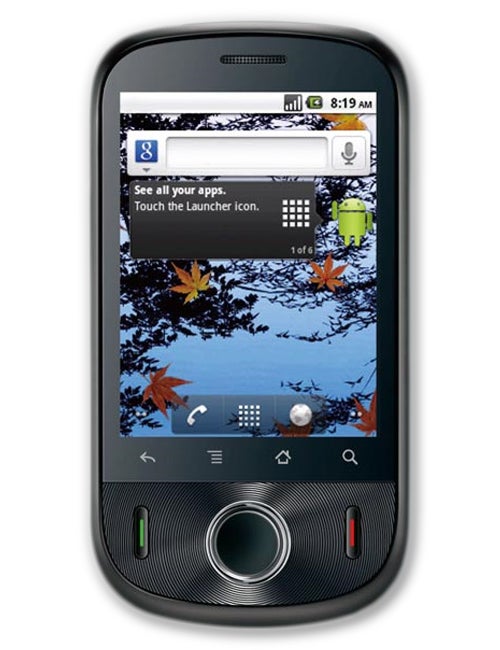
I want physical buttons back.
I'm so used to gesture control now that I struggle to go back when I need to sort out my mum's phone for her.
Have been using gesture control since android 10 came out.
To be honest with you, I was a die hard 3 button fan, and an anti-gesture person (cause iOS vibes). After sometime, it was like the best way to navigate! Can't go back to 3 buttons ever again. It feels so slow, and choppy.
P.S. If your apps has swipe to left to do X, you should change them for a better experience.
Nav bar, gestures are just awkward. Faster to tap than to swipe.
Gesture, it's a lot more elegant than navbars UI wise.
I started using Pie controls with Paranoid Android back in 2015 and never gave them up. It's great for muscle memory
I never got on with gestures, the effort of swiping is not worth the additional 5% screen size for me.
Although I will add that the pill navigation with a separate back button that Android 8 or so introduced was by far my favorite back then and I would love to have that back
I much prefer gestures
Gestures because on-screen buttons just suck for full screen apps. Buttons only work if they're always in the same place and always available. Why the hell would I want them to be hidden? Give me my hardware buttons back please.
Gestures are only half-way usable because I patch the android framework to ignore apps' requests to change orientation (fuck that) and the pill to be much smaller but even then landscape is pretty meh with it taking way too much movement to change apps and the pill requiring quite a lot of vertical space that is already very limited.
I really dislike gestures as I'll accidentally trigger them all the time. I just want physical buttons back. They're far superior for me. Sadly it is not a common opinion so I'll just have to deal with whatever is popular.
Used to be a bar person, but at some point it broke on the custom ROM im running for a few updates so i switched. Been using gestures ever since. I like them maybe a lil less because phones are too big, but it feels faster
I still use nav buttons. I really liked apps that had that left slide out drawer (something Google pushed for a while and then quietly abandoned) and I kept navigating elsewhere while trying to pull out the menu drawers, so I went to buttons.
My final cool app with a drawer, rif is fun, is no longer on my phone, so I guess I can switch to navigation gestures... But it would take a lot of getting used to and "what gesture goes where?" (Note that I am particularly bad at remembering this sort of stuff - I'm the type of person who keeps a screenshot of a keybinding map on my second monitor while playing games.)
I like gesture controls on my Pixel. It took me a bit to adjust, too, but now I can't go back. My biggest gripe is that swiping from the right side of the screen will go back or exit an app instead of letting me go forward (thinking of Chrome specifically). Also, it can be hard to crop images because the gesture area conflicts with the edge of a lot of images.
edit: typo
Once I got used to gesture controls in android 10 I never looked back. It was hard to adapt but now it's muscle memory.
Gestures but swipe to right to go back disabled through adb so I can still swipe for drawers
I use edge gestures for gesturing but I keep the 3 button on the screen just in case. I like both.
I have a Pixel 7 now. Use gestures. Sometimes when I'm on the iPad I'd want them there too.
I have and use both. But for gestures I use the one hand operation from Samsung.
Default on grapheneOS , took a bit to get used to but sooo much better and effective
Gesture navigation is good enough for me to use, but bad enough to be infuriating.
Its better than the navigation buttons, because non-tactile buttons are bad generally. Gesture navigation lets you navigate basic system interactions without looking at the screen, but its badly implimrnted. A horizontal swipe often accidentally becomes a back.
A physical set of navigation buttons would be best, but gestures is a solid second place, C tier navigation system.
If you own a recent Samsung device, definitely try One Hand Operations app - takes gesture navigation to a whole another level. One of my favourite apps.
Gestures for me, although I don't mind using the navbar.
3-button nav bar all the way. gesture navigation just feels so ambiguous and inexact compared to discrete buttons. I never understood why google decided to copy that stupid anti-feature from ios when they already had a superior system that worked (and still works) perfectly well.
I'm the weirdo who misses the hybrid two button layout. It has some gestures and some nav bar and once I got used to it I did like it. The new gestures nav throws me off something terrible.
I just use gestures.
I'm using the aosp/pixel gesture nav. Took a bit to get used to and I rarely have weird glitches (like using the fast swipe to previous app, but the app manager is yeeting to the last app or so; the nav bar/pill being visible in a video; the pill being on the wrong side of the display after having it rotated), but I like the look and feel. Also I'm still hoping that we will get to the point where it's "embedded" like in iOS.
top 50 comments