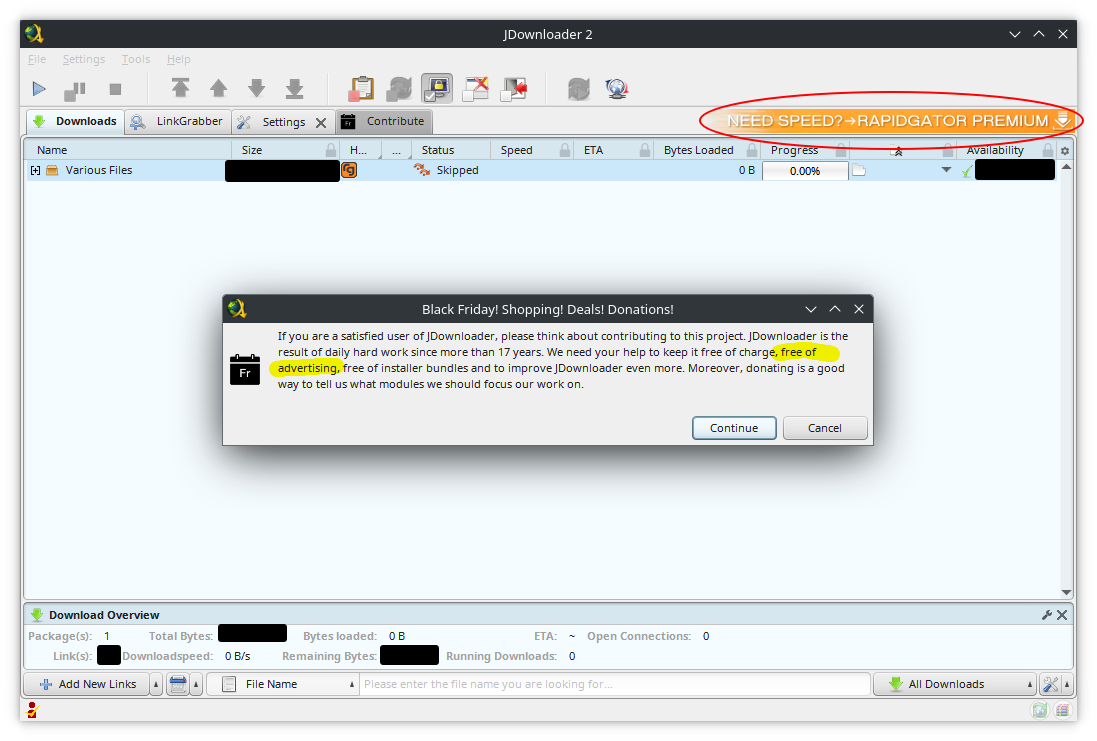
▲ 189 ▼ JDownloader2 asking for donations to keep it "free of advertising" while showing an ad on the same screen (feddit.org) submitted 2 years ago* by Lemmchen@feddit.org to c/piracy@lemmy.dbzer0.com 39 comments fedilink hide all child comments It also says "free of installer bundles" while (at least in past, don't know about now) their default windows installer was including ads (source) P.S.: If you want to disable the in-app ads, here's how to: https://gist.github.com/yunooooo/87564a0293a1c7a53fb3e233a604c638
[–] eric@lemmy.ca 79 points 2 years ago (3 children) I wrote a blog post about how to remove the ads and enable dark mode for JDownloder2 here. permalink fedilink source hideshow 6 child comments replies: [–] MaggiWuerze@feddit.org 19 points 2 years ago Oh nice, dark mode. Thanks permalink fedilink source parent [–] Draconic_NEO@lemmy.dbzer0.com 7 points 2 years ago Thanks I just did that right now. It's so nice having the Ad banners gone, and also a nice and well functioning dark mode too. permalink fedilink source parent [–] StarlightDust@lemmy.blahaj.zone 1 point 2 years ago* (last edited 2 years ago) (1 child) You can also get it to use your KDE theme if that is more your thing Edit: gtk theme, not kde permalink fedilink source parent hideshow 2 child comments replies: [–] eric@lemmy.ca 1 point 2 years ago (1 child) How? permalink fedilink source parent hideshow 2 child comments replies: [–] StarlightDust@lemmy.blahaj.zone 1 point 2 years ago (1 child) I was mistaken and said KDE rather than GTK theme but you just need to add this add an environment variable before the operator on the desktop shortcut file and it should work _JAVA_OPTIONS="-Dawt.useSystemAAFontSettings=on -Dswing.aatext=true -Dswing.defaultlaf=com.sun.java.swing.plaf.gtk.GTKLookAndFeel -Dswing.crossplatformlaf=com.sun.java.swing.plaf.gtk.GTKLookAndFeel ${_JAVA_OPTIONS}" permalink fedilink source parent hideshow 2 child comments replies: [–] eric@lemmy.ca 1 point 2 years ago I didn't know that. I'll try that and maybe make an edit and mention of it in that blog post permalink fedilink source parent
[–] MaggiWuerze@feddit.org 19 points 2 years ago Oh nice, dark mode. Thanks permalink fedilink source parent
[–] Draconic_NEO@lemmy.dbzer0.com 7 points 2 years ago Thanks I just did that right now. It's so nice having the Ad banners gone, and also a nice and well functioning dark mode too. permalink fedilink source parent
[–] StarlightDust@lemmy.blahaj.zone 1 point 2 years ago* (last edited 2 years ago) (1 child) You can also get it to use your KDE theme if that is more your thing Edit: gtk theme, not kde permalink fedilink source parent hideshow 2 child comments replies: [–] eric@lemmy.ca 1 point 2 years ago (1 child) How? permalink fedilink source parent hideshow 2 child comments replies: [–] StarlightDust@lemmy.blahaj.zone 1 point 2 years ago (1 child) I was mistaken and said KDE rather than GTK theme but you just need to add this add an environment variable before the operator on the desktop shortcut file and it should work _JAVA_OPTIONS="-Dawt.useSystemAAFontSettings=on -Dswing.aatext=true -Dswing.defaultlaf=com.sun.java.swing.plaf.gtk.GTKLookAndFeel -Dswing.crossplatformlaf=com.sun.java.swing.plaf.gtk.GTKLookAndFeel ${_JAVA_OPTIONS}" permalink fedilink source parent hideshow 2 child comments replies: [–] eric@lemmy.ca 1 point 2 years ago I didn't know that. I'll try that and maybe make an edit and mention of it in that blog post permalink fedilink source parent
[–] eric@lemmy.ca 1 point 2 years ago (1 child) How? permalink fedilink source parent hideshow 2 child comments replies: [–] StarlightDust@lemmy.blahaj.zone 1 point 2 years ago (1 child) I was mistaken and said KDE rather than GTK theme but you just need to add this add an environment variable before the operator on the desktop shortcut file and it should work _JAVA_OPTIONS="-Dawt.useSystemAAFontSettings=on -Dswing.aatext=true -Dswing.defaultlaf=com.sun.java.swing.plaf.gtk.GTKLookAndFeel -Dswing.crossplatformlaf=com.sun.java.swing.plaf.gtk.GTKLookAndFeel ${_JAVA_OPTIONS}" permalink fedilink source parent hideshow 2 child comments replies: [–] eric@lemmy.ca 1 point 2 years ago I didn't know that. I'll try that and maybe make an edit and mention of it in that blog post permalink fedilink source parent
[–] StarlightDust@lemmy.blahaj.zone 1 point 2 years ago (1 child) I was mistaken and said KDE rather than GTK theme but you just need to add this add an environment variable before the operator on the desktop shortcut file and it should work _JAVA_OPTIONS="-Dawt.useSystemAAFontSettings=on -Dswing.aatext=true -Dswing.defaultlaf=com.sun.java.swing.plaf.gtk.GTKLookAndFeel -Dswing.crossplatformlaf=com.sun.java.swing.plaf.gtk.GTKLookAndFeel ${_JAVA_OPTIONS}" permalink fedilink source parent hideshow 2 child comments replies: [–] eric@lemmy.ca 1 point 2 years ago I didn't know that. I'll try that and maybe make an edit and mention of it in that blog post permalink fedilink source parent
[–] eric@lemmy.ca 1 point 2 years ago I didn't know that. I'll try that and maybe make an edit and mention of it in that blog post permalink fedilink source parent