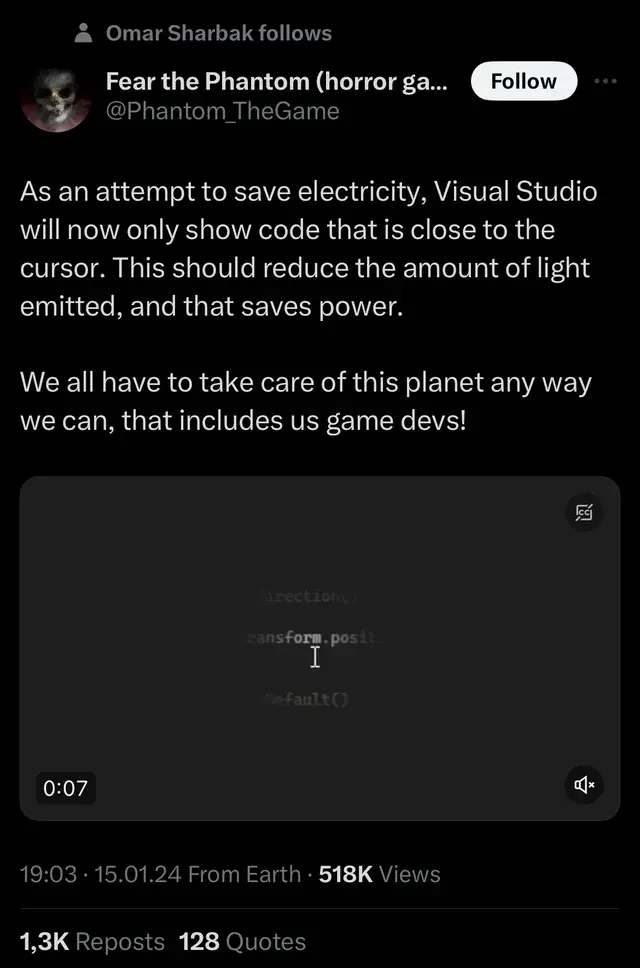
▲ 987 ▼ Programming: The Horror Game (programming.dev) submitted 2 years ago* by JPDev@programming.dev to c/programmer_humor@programming.dev 52 comments fedilink hide all child comments
[–] BatmanAoD@programming.dev 4 points 2 years ago (1 child) It's not too far off from how ed works! permalink fedilink source parent hideshow 2 child comments replies: [–] UndercoverUlrikHD@programming.dev 1 point 2 years ago (1 child) How does ed work? permalink fedilink source parent hideshow 2 child comments replies: [–] BatmanAoD@programming.dev 8 points 2 years ago (1 child) ed, the "standard editor" (according to its man page) and the predecessor of vi (the "visual editor"), is a terminal editor that doesn't automatically display any of the text you're working on; you have to use the p ("print") command to display the lines your wish to see. permalink fedilink source parent hideshow 2 child comments replies: [–] UndercoverUlrikHD@programming.dev 6 points 2 years ago (2 children) ಠ_ಠ permalink fedilink source parent hideshow 4 child comments replies: [–] BatmanAoD@programming.dev 3 points 2 years ago If you have a Linux or Mac handy, you can trying it out! It's...kinda wild. If you know some Vim commands that start with :, there's a good chance they'll work in ed, except you don't type : itself (effectively you're always in "command mode"). There's also a novelty Twitter account, @ed1conf, that tweets about ed. Some coworkers told me a story about a previous job candidate who said his preferred editor was ed. They thought it would be really interesting to see someone actually use it. But during the actual interview, when he opened ed, he didn't recognize or understand it; he was actually accustomed to a graphical editor that he thought was called ed because he apparently did all his work on a system where someone had symlinked or aliased ed to a modern tool. permalink fedilink source parent [–] pmjv@lemmy.sdf.org 2 points 2 years ago* Have fun: gopher://katolaz.net/0/ed_tutorial.txt permalink fedilink source parent
[–] UndercoverUlrikHD@programming.dev 1 point 2 years ago (1 child) How does ed work? permalink fedilink source parent hideshow 2 child comments replies: [–] BatmanAoD@programming.dev 8 points 2 years ago (1 child) ed, the "standard editor" (according to its man page) and the predecessor of vi (the "visual editor"), is a terminal editor that doesn't automatically display any of the text you're working on; you have to use the p ("print") command to display the lines your wish to see. permalink fedilink source parent hideshow 2 child comments replies: [–] UndercoverUlrikHD@programming.dev 6 points 2 years ago (2 children) ಠ_ಠ permalink fedilink source parent hideshow 4 child comments replies: [–] BatmanAoD@programming.dev 3 points 2 years ago If you have a Linux or Mac handy, you can trying it out! It's...kinda wild. If you know some Vim commands that start with :, there's a good chance they'll work in ed, except you don't type : itself (effectively you're always in "command mode"). There's also a novelty Twitter account, @ed1conf, that tweets about ed. Some coworkers told me a story about a previous job candidate who said his preferred editor was ed. They thought it would be really interesting to see someone actually use it. But during the actual interview, when he opened ed, he didn't recognize or understand it; he was actually accustomed to a graphical editor that he thought was called ed because he apparently did all his work on a system where someone had symlinked or aliased ed to a modern tool. permalink fedilink source parent [–] pmjv@lemmy.sdf.org 2 points 2 years ago* Have fun: gopher://katolaz.net/0/ed_tutorial.txt permalink fedilink source parent
[–] BatmanAoD@programming.dev 8 points 2 years ago (1 child) ed, the "standard editor" (according to its man page) and the predecessor of vi (the "visual editor"), is a terminal editor that doesn't automatically display any of the text you're working on; you have to use the p ("print") command to display the lines your wish to see. permalink fedilink source parent hideshow 2 child comments replies: [–] UndercoverUlrikHD@programming.dev 6 points 2 years ago (2 children) ಠ_ಠ permalink fedilink source parent hideshow 4 child comments replies: [–] BatmanAoD@programming.dev 3 points 2 years ago If you have a Linux or Mac handy, you can trying it out! It's...kinda wild. If you know some Vim commands that start with :, there's a good chance they'll work in ed, except you don't type : itself (effectively you're always in "command mode"). There's also a novelty Twitter account, @ed1conf, that tweets about ed. Some coworkers told me a story about a previous job candidate who said his preferred editor was ed. They thought it would be really interesting to see someone actually use it. But during the actual interview, when he opened ed, he didn't recognize or understand it; he was actually accustomed to a graphical editor that he thought was called ed because he apparently did all his work on a system where someone had symlinked or aliased ed to a modern tool. permalink fedilink source parent [–] pmjv@lemmy.sdf.org 2 points 2 years ago* Have fun: gopher://katolaz.net/0/ed_tutorial.txt permalink fedilink source parent
[–] UndercoverUlrikHD@programming.dev 6 points 2 years ago (2 children) ಠ_ಠ permalink fedilink source parent hideshow 4 child comments replies: [–] BatmanAoD@programming.dev 3 points 2 years ago If you have a Linux or Mac handy, you can trying it out! It's...kinda wild. If you know some Vim commands that start with :, there's a good chance they'll work in ed, except you don't type : itself (effectively you're always in "command mode"). There's also a novelty Twitter account, @ed1conf, that tweets about ed. Some coworkers told me a story about a previous job candidate who said his preferred editor was ed. They thought it would be really interesting to see someone actually use it. But during the actual interview, when he opened ed, he didn't recognize or understand it; he was actually accustomed to a graphical editor that he thought was called ed because he apparently did all his work on a system where someone had symlinked or aliased ed to a modern tool. permalink fedilink source parent [–] pmjv@lemmy.sdf.org 2 points 2 years ago* Have fun: gopher://katolaz.net/0/ed_tutorial.txt permalink fedilink source parent
[–] BatmanAoD@programming.dev 3 points 2 years ago If you have a Linux or Mac handy, you can trying it out! It's...kinda wild. If you know some Vim commands that start with :, there's a good chance they'll work in ed, except you don't type : itself (effectively you're always in "command mode"). There's also a novelty Twitter account, @ed1conf, that tweets about ed. Some coworkers told me a story about a previous job candidate who said his preferred editor was ed. They thought it would be really interesting to see someone actually use it. But during the actual interview, when he opened ed, he didn't recognize or understand it; he was actually accustomed to a graphical editor that he thought was called ed because he apparently did all his work on a system where someone had symlinked or aliased ed to a modern tool. permalink fedilink source parent
[–] pmjv@lemmy.sdf.org 2 points 2 years ago* Have fun: gopher://katolaz.net/0/ed_tutorial.txt permalink fedilink source parent