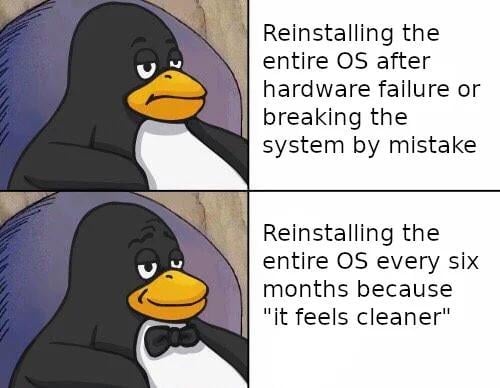
▲ 1025 ▼ So, timeshift or NixOS? (lemmy.world) submitted 2 years ago by Geert@lemmy.world to c/linuxmemes@lemmy.world 103 comments fedilink hide all child comments
[–] yamanii@lemmy.world 55 points 2 years ago (7 children) I thought the point of Linux was not doing this every year like with Windows? permalink fedilink source hideshow 14 child comments replies: [–] Ibaudia@lemmy.world 45 points 2 years ago (2 children) Realistically you don't have to if you're not constantly tinkering, but if you're changing a lot of low-level stuff without knowing what you're doing, you have the ability to break things. If you don't know how to fix them, then it's easier to just reformat. Basically it's a skill issue lol. permalink fedilink source parent hideshow 4 child comments replies: [–] eletes@sh.itjust.works 7 points 2 years ago (5 children) I've broke things often and had to reinstall a lot because I didn't know what I was doing. Still kinda don't know, but do y'all recommend anyways to learn the knowledge? Like I could probably read through man pages but I want something that shows how everything builds on each other to fill any gaps I'm missing permalink fedilink source parent hideshow 10 child comments replies: [–] CalicoJack@lemmy.dbzer0.com 8 points 2 years ago (1 child) The Arch Linux Wiki is an incredible resource, even if you're running another distro. Most of it is pretty universal (other than specific commands like the package manager), and it explains how everything functions and fits together. If I'm troubleshooting, it's always my first stop. permalink fedilink source parent hideshow 2 child comments replies: [–] laurelraven@lemmy.blahaj.zone 3 points 2 years ago That and the Gentoo handbook are two of the best resources for learning things about how Linux works permalink fedilink source parent [–] PainInTheAES@lemmy.world 7 points 2 years ago* Just keep breaking stuff! It means your learning and trying new things, for the most part. Eventually you'll just break stuff less and less or know what to look for when something breaks. On that note do try to struggle with something a little bit before rolling back or reinstalling. permalink fedilink source parent [–] jozep@lemmy.world 1 point 2 years ago I would recommend reading the manuals yes. Their are many manuals and not all are equal. The man pages can feel a bit strange as they list everything the software can do. To learn I found the archwiki to be better. (Also info manuals but many people are weirded out by the controls used to read these.) Also don't blame yourself for reinstalling if you mess up. It's normal especially if you need the computer to actually work in a timely fashion permalink fedilink source parent [–] Ibaudia@lemmy.world 1 point 2 years ago Depends on what you're breaking I guess. If it's DE stuff, kernel stuff, etc. Usually I just find a good YouTube tutorial if I want to learn something new and don't know what I'm doing. permalink fedilink source parent [–] TunaCowboy@lemmy.world 1 point 2 years ago Getting comfortable with manpages and regex will get you pretty far, this is a really great resource for beginners (available for free as .pdf): https://linuxcommand.org/tlcl.php permalink fedilink source parent [–] fuck_u_spez_in_particular@lemmy.world 2 points 2 years ago Yep tinkering with the system is probably the main issue (for that NixOS is awesome btw.). But even when you're not constantly tinkering. System-State accumulates over time, bugs are also apparent in (upgrading of) distros, and the maintainers of a distro cannot realistically handle every upgrade time-point x -> y, so stuff will likely break after some time. But even when I have fixed all the issues in my previous at some time broken distros, at some point it just feels good to have a freshly installed system without all that dirty accumulated state (NixOS + impermanence and you'll have that every reboot :P, see also this) permalink fedilink source parent [–] Hexarei@programming.dev 13 points 2 years ago (1 child) I've been running the same installation of Manjaro since 2018, across three different machines. Each time I've upgraded hardware I just pop the SSD out and stick it in the new motherboard. Zero instability or troubles from that. Meanwhile I've done that to my wife's Windows PC and it resulted in going through a whole rigmarole with calling Microsoft because the OS install was suddenly no longer activated. Linux didn't even care that I went from AMD to Intel to AMD. permalink fedilink source parent hideshow 2 child comments replies: [–] ikidd@lemmy.world 2 points 2 years ago (1 child) I have 3 clones of my 10yo Manjaro desktop install running on other hardware around my network, including a Proxmox VM. It just jumps across, fires up and I fix the hostname, good to go. permalink fedilink source parent hideshow 2 child comments replies: [–] Hexarei@programming.dev 1 point 2 years ago Cloning a base image and creating VMs from it is one of the coolest things. I do it for my VMs on my Proxmox cluster any time i need a new server for something - and yeah just copying my dev desktop to my new laptop for going to a conference was such a great way to avoid hours of setup permalink fedilink source parent [–] PM_ME_FEET_PICS@sh.itjust.works 10 points 2 years ago (1 child) I've gone from windows 7 to windows 10 to windows 11 all without a reformat. permalink fedilink source parent hideshow 2 child comments replies: [–] Land_Strider@lemmy.world 5 points 2 years ago (1 child) In the timeframe those products first released, or in a day? permalink fedilink source parent hideshow 2 child comments replies: [–] PM_ME_FEET_PICS@sh.itjust.works 1 point 2 years ago First released. permalink fedilink source parent [–] kshade@lemmy.world 8 points 2 years ago* You don't have to do this, I manage some machines that haven't been reinstalled for over a decade. It's really just because "it feels cleaner", I guess. permalink fedilink source parent [–] morrowind@lemmy.ml 6 points 2 years ago (1 child) "like windows"? I've never reinstalled windows in my life. permalink fedilink source parent hideshow 2 child comments replies: [–] fuck_u_spez_in_particular@lemmy.world 1 point 2 years ago You cannot reinstall Windows, if you've never installed it ¯\(ツ)/¯ permalink fedilink source parent [–] Rolder@reddthat.com 3 points 2 years ago (1 child) Whose doing it every year with Windows? I’ve had it for years and only reinstalled once when I got a bunch of new hardware permalink fedilink source parent hideshow 2 child comments replies: [–] TwanHE@lemmy.world 2 points 2 years ago (2 children) I reinstall about every 6 months, or whenever there is a big feature update. It's rather noticeable when running benchmarks that performance drops over time mostly 0.1% lows. Especially when running a stripped install, Microsoft somehow always finds a way to enable shit again or reinstall bloat with updates. permalink fedilink source parent hideshow 4 child comments replies: [–] confusedbytheBasics@lemmy.world 1 point 2 years ago (1 child) What do you change after a clean Windows install? I used to have a script that would turn everything off but it doesn't work anymore. permalink fedilink source parent hideshow 2 child comments replies: [–] TwanHE@lemmy.world 1 point 2 years ago I use ghostspectre toolbox. permalink fedilink source parent [–] Ibaudia@lemmy.world 1 point 2 years ago This, plus I've found corruption to be a way bigger issue on Windows. I had been using a Win10 install for about 5 years and eventually it just stopped booting and I had to reformat. Maybe it was my SSD, but I've been running Linux on that same SSD ever since then with 0 issues. permalink fedilink source parent [–] agent_flounder@lemmy.world 1 point 2 years ago* It is nowhere near necessary to reinstall the OS to fix anything... at least for Mint and Raspbian which are the two I've used over the last decade. I may have done an upgrade on mint a few times. Otherwise it chugged on merrily. PS: now that I think about it I've never reinstalled windows on my old laptop either. I like to find the root cause of problems and fix them rather than giving up and reinstalling... call me crazy? permalink fedilink source parent
[–] Ibaudia@lemmy.world 45 points 2 years ago (2 children) Realistically you don't have to if you're not constantly tinkering, but if you're changing a lot of low-level stuff without knowing what you're doing, you have the ability to break things. If you don't know how to fix them, then it's easier to just reformat. Basically it's a skill issue lol. permalink fedilink source parent hideshow 4 child comments replies: [–] eletes@sh.itjust.works 7 points 2 years ago (5 children) I've broke things often and had to reinstall a lot because I didn't know what I was doing. Still kinda don't know, but do y'all recommend anyways to learn the knowledge? Like I could probably read through man pages but I want something that shows how everything builds on each other to fill any gaps I'm missing permalink fedilink source parent hideshow 10 child comments replies: [–] CalicoJack@lemmy.dbzer0.com 8 points 2 years ago (1 child) The Arch Linux Wiki is an incredible resource, even if you're running another distro. Most of it is pretty universal (other than specific commands like the package manager), and it explains how everything functions and fits together. If I'm troubleshooting, it's always my first stop. permalink fedilink source parent hideshow 2 child comments replies: [–] laurelraven@lemmy.blahaj.zone 3 points 2 years ago That and the Gentoo handbook are two of the best resources for learning things about how Linux works permalink fedilink source parent [–] PainInTheAES@lemmy.world 7 points 2 years ago* Just keep breaking stuff! It means your learning and trying new things, for the most part. Eventually you'll just break stuff less and less or know what to look for when something breaks. On that note do try to struggle with something a little bit before rolling back or reinstalling. permalink fedilink source parent [–] jozep@lemmy.world 1 point 2 years ago I would recommend reading the manuals yes. Their are many manuals and not all are equal. The man pages can feel a bit strange as they list everything the software can do. To learn I found the archwiki to be better. (Also info manuals but many people are weirded out by the controls used to read these.) Also don't blame yourself for reinstalling if you mess up. It's normal especially if you need the computer to actually work in a timely fashion permalink fedilink source parent [–] Ibaudia@lemmy.world 1 point 2 years ago Depends on what you're breaking I guess. If it's DE stuff, kernel stuff, etc. Usually I just find a good YouTube tutorial if I want to learn something new and don't know what I'm doing. permalink fedilink source parent [–] TunaCowboy@lemmy.world 1 point 2 years ago Getting comfortable with manpages and regex will get you pretty far, this is a really great resource for beginners (available for free as .pdf): https://linuxcommand.org/tlcl.php permalink fedilink source parent [–] fuck_u_spez_in_particular@lemmy.world 2 points 2 years ago Yep tinkering with the system is probably the main issue (for that NixOS is awesome btw.). But even when you're not constantly tinkering. System-State accumulates over time, bugs are also apparent in (upgrading of) distros, and the maintainers of a distro cannot realistically handle every upgrade time-point x -> y, so stuff will likely break after some time. But even when I have fixed all the issues in my previous at some time broken distros, at some point it just feels good to have a freshly installed system without all that dirty accumulated state (NixOS + impermanence and you'll have that every reboot :P, see also this) permalink fedilink source parent
[–] eletes@sh.itjust.works 7 points 2 years ago (5 children) I've broke things often and had to reinstall a lot because I didn't know what I was doing. Still kinda don't know, but do y'all recommend anyways to learn the knowledge? Like I could probably read through man pages but I want something that shows how everything builds on each other to fill any gaps I'm missing permalink fedilink source parent hideshow 10 child comments replies: [–] CalicoJack@lemmy.dbzer0.com 8 points 2 years ago (1 child) The Arch Linux Wiki is an incredible resource, even if you're running another distro. Most of it is pretty universal (other than specific commands like the package manager), and it explains how everything functions and fits together. If I'm troubleshooting, it's always my first stop. permalink fedilink source parent hideshow 2 child comments replies: [–] laurelraven@lemmy.blahaj.zone 3 points 2 years ago That and the Gentoo handbook are two of the best resources for learning things about how Linux works permalink fedilink source parent [–] PainInTheAES@lemmy.world 7 points 2 years ago* Just keep breaking stuff! It means your learning and trying new things, for the most part. Eventually you'll just break stuff less and less or know what to look for when something breaks. On that note do try to struggle with something a little bit before rolling back or reinstalling. permalink fedilink source parent [–] jozep@lemmy.world 1 point 2 years ago I would recommend reading the manuals yes. Their are many manuals and not all are equal. The man pages can feel a bit strange as they list everything the software can do. To learn I found the archwiki to be better. (Also info manuals but many people are weirded out by the controls used to read these.) Also don't blame yourself for reinstalling if you mess up. It's normal especially if you need the computer to actually work in a timely fashion permalink fedilink source parent [–] Ibaudia@lemmy.world 1 point 2 years ago Depends on what you're breaking I guess. If it's DE stuff, kernel stuff, etc. Usually I just find a good YouTube tutorial if I want to learn something new and don't know what I'm doing. permalink fedilink source parent [–] TunaCowboy@lemmy.world 1 point 2 years ago Getting comfortable with manpages and regex will get you pretty far, this is a really great resource for beginners (available for free as .pdf): https://linuxcommand.org/tlcl.php permalink fedilink source parent
[–] CalicoJack@lemmy.dbzer0.com 8 points 2 years ago (1 child) The Arch Linux Wiki is an incredible resource, even if you're running another distro. Most of it is pretty universal (other than specific commands like the package manager), and it explains how everything functions and fits together. If I'm troubleshooting, it's always my first stop. permalink fedilink source parent hideshow 2 child comments replies: [–] laurelraven@lemmy.blahaj.zone 3 points 2 years ago That and the Gentoo handbook are two of the best resources for learning things about how Linux works permalink fedilink source parent
[–] laurelraven@lemmy.blahaj.zone 3 points 2 years ago That and the Gentoo handbook are two of the best resources for learning things about how Linux works permalink fedilink source parent
[–] PainInTheAES@lemmy.world 7 points 2 years ago* Just keep breaking stuff! It means your learning and trying new things, for the most part. Eventually you'll just break stuff less and less or know what to look for when something breaks. On that note do try to struggle with something a little bit before rolling back or reinstalling. permalink fedilink source parent
[–] jozep@lemmy.world 1 point 2 years ago I would recommend reading the manuals yes. Their are many manuals and not all are equal. The man pages can feel a bit strange as they list everything the software can do. To learn I found the archwiki to be better. (Also info manuals but many people are weirded out by the controls used to read these.) Also don't blame yourself for reinstalling if you mess up. It's normal especially if you need the computer to actually work in a timely fashion permalink fedilink source parent
[–] Ibaudia@lemmy.world 1 point 2 years ago Depends on what you're breaking I guess. If it's DE stuff, kernel stuff, etc. Usually I just find a good YouTube tutorial if I want to learn something new and don't know what I'm doing. permalink fedilink source parent
[–] TunaCowboy@lemmy.world 1 point 2 years ago Getting comfortable with manpages and regex will get you pretty far, this is a really great resource for beginners (available for free as .pdf): https://linuxcommand.org/tlcl.php permalink fedilink source parent
[–] fuck_u_spez_in_particular@lemmy.world 2 points 2 years ago Yep tinkering with the system is probably the main issue (for that NixOS is awesome btw.). But even when you're not constantly tinkering. System-State accumulates over time, bugs are also apparent in (upgrading of) distros, and the maintainers of a distro cannot realistically handle every upgrade time-point x -> y, so stuff will likely break after some time. But even when I have fixed all the issues in my previous at some time broken distros, at some point it just feels good to have a freshly installed system without all that dirty accumulated state (NixOS + impermanence and you'll have that every reboot :P, see also this) permalink fedilink source parent
[–] Hexarei@programming.dev 13 points 2 years ago (1 child) I've been running the same installation of Manjaro since 2018, across three different machines. Each time I've upgraded hardware I just pop the SSD out and stick it in the new motherboard. Zero instability or troubles from that. Meanwhile I've done that to my wife's Windows PC and it resulted in going through a whole rigmarole with calling Microsoft because the OS install was suddenly no longer activated. Linux didn't even care that I went from AMD to Intel to AMD. permalink fedilink source parent hideshow 2 child comments replies: [–] ikidd@lemmy.world 2 points 2 years ago (1 child) I have 3 clones of my 10yo Manjaro desktop install running on other hardware around my network, including a Proxmox VM. It just jumps across, fires up and I fix the hostname, good to go. permalink fedilink source parent hideshow 2 child comments replies: [–] Hexarei@programming.dev 1 point 2 years ago Cloning a base image and creating VMs from it is one of the coolest things. I do it for my VMs on my Proxmox cluster any time i need a new server for something - and yeah just copying my dev desktop to my new laptop for going to a conference was such a great way to avoid hours of setup permalink fedilink source parent
[–] ikidd@lemmy.world 2 points 2 years ago (1 child) I have 3 clones of my 10yo Manjaro desktop install running on other hardware around my network, including a Proxmox VM. It just jumps across, fires up and I fix the hostname, good to go. permalink fedilink source parent hideshow 2 child comments replies: [–] Hexarei@programming.dev 1 point 2 years ago Cloning a base image and creating VMs from it is one of the coolest things. I do it for my VMs on my Proxmox cluster any time i need a new server for something - and yeah just copying my dev desktop to my new laptop for going to a conference was such a great way to avoid hours of setup permalink fedilink source parent
[–] Hexarei@programming.dev 1 point 2 years ago Cloning a base image and creating VMs from it is one of the coolest things. I do it for my VMs on my Proxmox cluster any time i need a new server for something - and yeah just copying my dev desktop to my new laptop for going to a conference was such a great way to avoid hours of setup permalink fedilink source parent
[–] PM_ME_FEET_PICS@sh.itjust.works 10 points 2 years ago (1 child) I've gone from windows 7 to windows 10 to windows 11 all without a reformat. permalink fedilink source parent hideshow 2 child comments replies: [–] Land_Strider@lemmy.world 5 points 2 years ago (1 child) In the timeframe those products first released, or in a day? permalink fedilink source parent hideshow 2 child comments replies: [–] PM_ME_FEET_PICS@sh.itjust.works 1 point 2 years ago First released. permalink fedilink source parent
[–] Land_Strider@lemmy.world 5 points 2 years ago (1 child) In the timeframe those products first released, or in a day? permalink fedilink source parent hideshow 2 child comments replies: [–] PM_ME_FEET_PICS@sh.itjust.works 1 point 2 years ago First released. permalink fedilink source parent
[–] PM_ME_FEET_PICS@sh.itjust.works 1 point 2 years ago First released. permalink fedilink source parent
[–] kshade@lemmy.world 8 points 2 years ago* You don't have to do this, I manage some machines that haven't been reinstalled for over a decade. It's really just because "it feels cleaner", I guess. permalink fedilink source parent
[–] morrowind@lemmy.ml 6 points 2 years ago (1 child) "like windows"? I've never reinstalled windows in my life. permalink fedilink source parent hideshow 2 child comments replies: [–] fuck_u_spez_in_particular@lemmy.world 1 point 2 years ago You cannot reinstall Windows, if you've never installed it ¯\(ツ)/¯ permalink fedilink source parent
[–] fuck_u_spez_in_particular@lemmy.world 1 point 2 years ago You cannot reinstall Windows, if you've never installed it ¯\(ツ)/¯ permalink fedilink source parent
[–] Rolder@reddthat.com 3 points 2 years ago (1 child) Whose doing it every year with Windows? I’ve had it for years and only reinstalled once when I got a bunch of new hardware permalink fedilink source parent hideshow 2 child comments replies: [–] TwanHE@lemmy.world 2 points 2 years ago (2 children) I reinstall about every 6 months, or whenever there is a big feature update. It's rather noticeable when running benchmarks that performance drops over time mostly 0.1% lows. Especially when running a stripped install, Microsoft somehow always finds a way to enable shit again or reinstall bloat with updates. permalink fedilink source parent hideshow 4 child comments replies: [–] confusedbytheBasics@lemmy.world 1 point 2 years ago (1 child) What do you change after a clean Windows install? I used to have a script that would turn everything off but it doesn't work anymore. permalink fedilink source parent hideshow 2 child comments replies: [–] TwanHE@lemmy.world 1 point 2 years ago I use ghostspectre toolbox. permalink fedilink source parent [–] Ibaudia@lemmy.world 1 point 2 years ago This, plus I've found corruption to be a way bigger issue on Windows. I had been using a Win10 install for about 5 years and eventually it just stopped booting and I had to reformat. Maybe it was my SSD, but I've been running Linux on that same SSD ever since then with 0 issues. permalink fedilink source parent
[–] TwanHE@lemmy.world 2 points 2 years ago (2 children) I reinstall about every 6 months, or whenever there is a big feature update. It's rather noticeable when running benchmarks that performance drops over time mostly 0.1% lows. Especially when running a stripped install, Microsoft somehow always finds a way to enable shit again or reinstall bloat with updates. permalink fedilink source parent hideshow 4 child comments replies: [–] confusedbytheBasics@lemmy.world 1 point 2 years ago (1 child) What do you change after a clean Windows install? I used to have a script that would turn everything off but it doesn't work anymore. permalink fedilink source parent hideshow 2 child comments replies: [–] TwanHE@lemmy.world 1 point 2 years ago I use ghostspectre toolbox. permalink fedilink source parent [–] Ibaudia@lemmy.world 1 point 2 years ago This, plus I've found corruption to be a way bigger issue on Windows. I had been using a Win10 install for about 5 years and eventually it just stopped booting and I had to reformat. Maybe it was my SSD, but I've been running Linux on that same SSD ever since then with 0 issues. permalink fedilink source parent
[–] confusedbytheBasics@lemmy.world 1 point 2 years ago (1 child) What do you change after a clean Windows install? I used to have a script that would turn everything off but it doesn't work anymore. permalink fedilink source parent hideshow 2 child comments replies: [–] TwanHE@lemmy.world 1 point 2 years ago I use ghostspectre toolbox. permalink fedilink source parent
[–] TwanHE@lemmy.world 1 point 2 years ago I use ghostspectre toolbox. permalink fedilink source parent
[–] Ibaudia@lemmy.world 1 point 2 years ago This, plus I've found corruption to be a way bigger issue on Windows. I had been using a Win10 install for about 5 years and eventually it just stopped booting and I had to reformat. Maybe it was my SSD, but I've been running Linux on that same SSD ever since then with 0 issues. permalink fedilink source parent
[–] agent_flounder@lemmy.world 1 point 2 years ago* It is nowhere near necessary to reinstall the OS to fix anything... at least for Mint and Raspbian which are the two I've used over the last decade. I may have done an upgrade on mint a few times. Otherwise it chugged on merrily. PS: now that I think about it I've never reinstalled windows on my old laptop either. I like to find the root cause of problems and fix them rather than giving up and reinstalling... call me crazy? permalink fedilink source parent