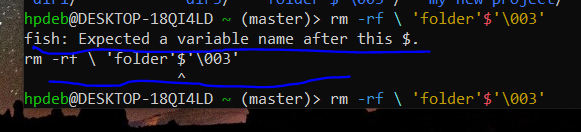
▲ 5 ▼ I am trying to get rid of this folder, but the result is saying that fish expects a variable name after this $. What does it mean ? And how do i get rid of this folder ? (objectstorage.eu-amsterdam-1.oraclecloud.com) submitted 1 month ago by OrangePumkin@piefed.nl to c/linux4noobs@programming.dev 31 comments fedilink hide all child comments
[–] OrangePumkin@piefed.nl [S] 3 points 1 month ago (5 children) 'folder'$'\003' That's the name of the folder. permalink fedilink source parent hideshow 10 child comments replies: [–] ludrol@programming.dev 9 points 1 month ago What does ls show? you can escape special charcters with \ something like \'folder\'\$\'\\003\' might work be careful with rm -rf as you might delete your entire disk if done badly. use some other command to test if it targets the correct directory like ls \'folder\'\$\'\\003\' permalink fedilink source parent [–] AbidingOhmsLaw@lemmy.ml 6 points 1 month ago* Yep as others have noted put a \ in front of each special character. The \ tells the system to treat the following character as a alphanumeric character in the string and not as a operator or a command. Since ', $ and \ are all special characters you will need a \ just before each when typing this name. Also as mentioned do this with a benign command like ls first to make sure your only acting on that specific directory or you might have a bad day. Edit: How the heck did you get some of those folder names? Looks like a script with incorrect variable/macro substitution made these. permalink fedilink source parent [–] Digit@lemmy.wtf 5 points 1 month ago ‘folder’$‘\003’ Oh that is unpleasantly fiddly to insert all the backslashes to escape the bits. Testing here, (fiddly to even make a dir called that, lol), for fun, instead of just pressing tab, ... is it just the $ and the \ you need to escape? and the ' are fine? Results here are inconclusive, not sure I managed to make a file with the same name, it showing here with extra outer '. Probably easier to just interactively.... but yeah, in case needing to have it written for a script... probably easiest still to just press tab, to see how it arranges the escape syntax, and paste that into your script. ;) The fi in fish is friendly interactive, after all. permalink fedilink source parent [–] Successful_Try543@feddit.org 2 points 1 month ago* (last edited 1 month ago) (3 children) Are the hyphens apostrophes and the backslash part of the folder name too? If so, try \'folder\'\$\'\\003\' escaping the hyphens apostrophes ', the dollar sign $ and the backslash \. permalink fedilink source parent hideshow 6 child comments replies: [–] OrangePumkin@piefed.nl [S] 0 points 1 month ago Nothing happened. permalink fedilink source parent [–] OrangePumkin@piefed.nl [S] 0 points 1 month ago (1 child) permalink fedilink source parent hideshow 2 child comments replies: [–] OrangePumkin@piefed.nl [S] 0 points 1 month ago (2 children) Do you see the folder with the strange name here ? permalink fedilink source parent hideshow 4 child comments replies: [–] Digit@lemmy.wtf 2 points 1 month ago Oh hey, seeing that has just given me another idea (not sure if anyone else mentioned this yet elsewhere further down in the conversation... but...) Tried just using a unique portion of the name that's easy to type, along with asterisks for the rest? e.g. rmdir *old*00* (or rm -r if it's not an empty dir you want rid of). permalink fedilink source parent [–] Successful_Try543@feddit.org 1 point 1 month ago (1 child) As the other commenters and I have mentioned, you should try escaping any of the special characters ', $, and \ by a backslash, i.e. \', \$ and \\ permalink fedilink source parent hideshow 2 child comments replies: [–] OrangePumkin@piefed.nl [S] 0 points 1 month ago (1 child) rm -rf command ? permalink fedilink source parent hideshow 2 child comments replies: [–] Successful_Try543@feddit.org 1 point 1 month ago rm -rf \'folder\'\$\'\\003\' permalink fedilink source parent [–] OrangePumkin@piefed.nl [S] 0 points 1 month ago (1 child) There are no hyphens. permalink fedilink source parent hideshow 2 child comments replies: [–] Successful_Try543@feddit.org 1 point 1 month ago sorry, I mean apostrophes. permalink fedilink source parent [–] neo@feddit.org 2 points 1 month ago* (1 child) I believe u should Type rm -r \'folder\'\$\'\\003\' Basically a \ interprets the following character as a character. With the ' I’m not sure, so maybe rm -r 'folder'\$'\\003' could do the trick too Edit: correct code permalink fedilink source parent hideshow 2 child comments replies: [–] OrangePumkin@piefed.nl [S] -2 points 1 month ago (1 child) After doing the step, the cursor simply came in the centre. permalink fedilink source parent hideshow 2 child comments replies: [–] Successful_Try543@feddit.org 2 points 1 month ago* there is a space between your first \ and the ' that doesn't belong there. (The backslash escapes the space, but not the apostrophe, that's why it's coloured red and not cyan) Press Ctrl+C and try again with the corrected command. permalink fedilink source parent
[–] ludrol@programming.dev 9 points 1 month ago What does ls show? you can escape special charcters with \ something like \'folder\'\$\'\\003\' might work be careful with rm -rf as you might delete your entire disk if done badly. use some other command to test if it targets the correct directory like ls \'folder\'\$\'\\003\' permalink fedilink source parent
[–] AbidingOhmsLaw@lemmy.ml 6 points 1 month ago* Yep as others have noted put a \ in front of each special character. The \ tells the system to treat the following character as a alphanumeric character in the string and not as a operator or a command. Since ', $ and \ are all special characters you will need a \ just before each when typing this name. Also as mentioned do this with a benign command like ls first to make sure your only acting on that specific directory or you might have a bad day. Edit: How the heck did you get some of those folder names? Looks like a script with incorrect variable/macro substitution made these. permalink fedilink source parent
[–] Digit@lemmy.wtf 5 points 1 month ago ‘folder’$‘\003’ Oh that is unpleasantly fiddly to insert all the backslashes to escape the bits. Testing here, (fiddly to even make a dir called that, lol), for fun, instead of just pressing tab, ... is it just the $ and the \ you need to escape? and the ' are fine? Results here are inconclusive, not sure I managed to make a file with the same name, it showing here with extra outer '. Probably easier to just interactively.... but yeah, in case needing to have it written for a script... probably easiest still to just press tab, to see how it arranges the escape syntax, and paste that into your script. ;) The fi in fish is friendly interactive, after all. permalink fedilink source parent
[–] Successful_Try543@feddit.org 2 points 1 month ago* (last edited 1 month ago) (3 children) Are the hyphens apostrophes and the backslash part of the folder name too? If so, try \'folder\'\$\'\\003\' escaping the hyphens apostrophes ', the dollar sign $ and the backslash \. permalink fedilink source parent hideshow 6 child comments replies: [–] OrangePumkin@piefed.nl [S] 0 points 1 month ago Nothing happened. permalink fedilink source parent [–] OrangePumkin@piefed.nl [S] 0 points 1 month ago (1 child) permalink fedilink source parent hideshow 2 child comments replies: [–] OrangePumkin@piefed.nl [S] 0 points 1 month ago (2 children) Do you see the folder with the strange name here ? permalink fedilink source parent hideshow 4 child comments replies: [–] Digit@lemmy.wtf 2 points 1 month ago Oh hey, seeing that has just given me another idea (not sure if anyone else mentioned this yet elsewhere further down in the conversation... but...) Tried just using a unique portion of the name that's easy to type, along with asterisks for the rest? e.g. rmdir *old*00* (or rm -r if it's not an empty dir you want rid of). permalink fedilink source parent [–] Successful_Try543@feddit.org 1 point 1 month ago (1 child) As the other commenters and I have mentioned, you should try escaping any of the special characters ', $, and \ by a backslash, i.e. \', \$ and \\ permalink fedilink source parent hideshow 2 child comments replies: [–] OrangePumkin@piefed.nl [S] 0 points 1 month ago (1 child) rm -rf command ? permalink fedilink source parent hideshow 2 child comments replies: [–] Successful_Try543@feddit.org 1 point 1 month ago rm -rf \'folder\'\$\'\\003\' permalink fedilink source parent [–] OrangePumkin@piefed.nl [S] 0 points 1 month ago (1 child) There are no hyphens. permalink fedilink source parent hideshow 2 child comments replies: [–] Successful_Try543@feddit.org 1 point 1 month ago sorry, I mean apostrophes. permalink fedilink source parent
[–] OrangePumkin@piefed.nl [S] 0 points 1 month ago Nothing happened. permalink fedilink source parent
[–] OrangePumkin@piefed.nl [S] 0 points 1 month ago (1 child) permalink fedilink source parent hideshow 2 child comments replies: [–] OrangePumkin@piefed.nl [S] 0 points 1 month ago (2 children) Do you see the folder with the strange name here ? permalink fedilink source parent hideshow 4 child comments replies: [–] Digit@lemmy.wtf 2 points 1 month ago Oh hey, seeing that has just given me another idea (not sure if anyone else mentioned this yet elsewhere further down in the conversation... but...) Tried just using a unique portion of the name that's easy to type, along with asterisks for the rest? e.g. rmdir *old*00* (or rm -r if it's not an empty dir you want rid of). permalink fedilink source parent [–] Successful_Try543@feddit.org 1 point 1 month ago (1 child) As the other commenters and I have mentioned, you should try escaping any of the special characters ', $, and \ by a backslash, i.e. \', \$ and \\ permalink fedilink source parent hideshow 2 child comments replies: [–] OrangePumkin@piefed.nl [S] 0 points 1 month ago (1 child) rm -rf command ? permalink fedilink source parent hideshow 2 child comments replies: [–] Successful_Try543@feddit.org 1 point 1 month ago rm -rf \'folder\'\$\'\\003\' permalink fedilink source parent
[–] OrangePumkin@piefed.nl [S] 0 points 1 month ago (2 children) Do you see the folder with the strange name here ? permalink fedilink source parent hideshow 4 child comments replies: [–] Digit@lemmy.wtf 2 points 1 month ago Oh hey, seeing that has just given me another idea (not sure if anyone else mentioned this yet elsewhere further down in the conversation... but...) Tried just using a unique portion of the name that's easy to type, along with asterisks for the rest? e.g. rmdir *old*00* (or rm -r if it's not an empty dir you want rid of). permalink fedilink source parent [–] Successful_Try543@feddit.org 1 point 1 month ago (1 child) As the other commenters and I have mentioned, you should try escaping any of the special characters ', $, and \ by a backslash, i.e. \', \$ and \\ permalink fedilink source parent hideshow 2 child comments replies: [–] OrangePumkin@piefed.nl [S] 0 points 1 month ago (1 child) rm -rf command ? permalink fedilink source parent hideshow 2 child comments replies: [–] Successful_Try543@feddit.org 1 point 1 month ago rm -rf \'folder\'\$\'\\003\' permalink fedilink source parent
[–] Digit@lemmy.wtf 2 points 1 month ago Oh hey, seeing that has just given me another idea (not sure if anyone else mentioned this yet elsewhere further down in the conversation... but...) Tried just using a unique portion of the name that's easy to type, along with asterisks for the rest? e.g. rmdir *old*00* (or rm -r if it's not an empty dir you want rid of). permalink fedilink source parent
[–] Successful_Try543@feddit.org 1 point 1 month ago (1 child) As the other commenters and I have mentioned, you should try escaping any of the special characters ', $, and \ by a backslash, i.e. \', \$ and \\ permalink fedilink source parent hideshow 2 child comments replies: [–] OrangePumkin@piefed.nl [S] 0 points 1 month ago (1 child) rm -rf command ? permalink fedilink source parent hideshow 2 child comments replies: [–] Successful_Try543@feddit.org 1 point 1 month ago rm -rf \'folder\'\$\'\\003\' permalink fedilink source parent
[–] OrangePumkin@piefed.nl [S] 0 points 1 month ago (1 child) rm -rf command ? permalink fedilink source parent hideshow 2 child comments replies: [–] Successful_Try543@feddit.org 1 point 1 month ago rm -rf \'folder\'\$\'\\003\' permalink fedilink source parent
[–] Successful_Try543@feddit.org 1 point 1 month ago rm -rf \'folder\'\$\'\\003\' permalink fedilink source parent
[–] OrangePumkin@piefed.nl [S] 0 points 1 month ago (1 child) There are no hyphens. permalink fedilink source parent hideshow 2 child comments replies: [–] Successful_Try543@feddit.org 1 point 1 month ago sorry, I mean apostrophes. permalink fedilink source parent
[–] Successful_Try543@feddit.org 1 point 1 month ago sorry, I mean apostrophes. permalink fedilink source parent
[–] neo@feddit.org 2 points 1 month ago* (1 child) I believe u should Type rm -r \'folder\'\$\'\\003\' Basically a \ interprets the following character as a character. With the ' I’m not sure, so maybe rm -r 'folder'\$'\\003' could do the trick too Edit: correct code permalink fedilink source parent hideshow 2 child comments replies: [–] OrangePumkin@piefed.nl [S] -2 points 1 month ago (1 child) After doing the step, the cursor simply came in the centre. permalink fedilink source parent hideshow 2 child comments replies: [–] Successful_Try543@feddit.org 2 points 1 month ago* there is a space between your first \ and the ' that doesn't belong there. (The backslash escapes the space, but not the apostrophe, that's why it's coloured red and not cyan) Press Ctrl+C and try again with the corrected command. permalink fedilink source parent
[–] OrangePumkin@piefed.nl [S] -2 points 1 month ago (1 child) After doing the step, the cursor simply came in the centre. permalink fedilink source parent hideshow 2 child comments replies: [–] Successful_Try543@feddit.org 2 points 1 month ago* there is a space between your first \ and the ' that doesn't belong there. (The backslash escapes the space, but not the apostrophe, that's why it's coloured red and not cyan) Press Ctrl+C and try again with the corrected command. permalink fedilink source parent
[–] Successful_Try543@feddit.org 2 points 1 month ago* there is a space between your first \ and the ' that doesn't belong there. (The backslash escapes the space, but not the apostrophe, that's why it's coloured red and not cyan) Press Ctrl+C and try again with the corrected command. permalink fedilink source parent