201


I am trying to use wireshark to verify that my outgoing rsync is encrypted. I can easily see that the SSH protocol packets are reported as "Encrypted packet." The other packets being exchanged are TCP packets, I am not sure how to actually verify if these are encrypted, and if not, if they contain anything sensitive.

Should TCP be encrypted? Can they leak anything when facilitating the ssh connection? How can I tell?

202


I was able to setup a debugger using a launch mode using Visual Studio Code with the Bash Debug extension. Is it possible to setup the debugger in VSCode to be able to debug a bash script using a attach debug mode?

For debugging scripts on the host machine and scripts inside a docker container?

203
 
 
204


I have a NTFS drive for Storage, which is shared between WIn 11.

I want to change the location of (or replace) ~/Downloads, ~/Music, etc..,.

Note that the link to made is between NTFS and EXT4.

I found two ways while searching.

   1.Creating **Symlinks** in `~` with target pointed to folders in NTFS drive.

   2. **Mounting** the NTFS folders **directly** to`~/Downloads`, `~/Music`, etc..,.

Which one should I do? Which one is more beneficial?

Also how to mount folders to other folders (option 2) ? (I would really appreciate a GUI way)

205
submitted 2 years ago* (last edited 2 years ago) by to c/linux4noobs@programming.dev


I can't change directory and file permissions which is in /mnt/ through elevated Nemo. But can change in /. Why?

Apparently, this happens due to Automount. Because when I mount manually, this problem doesn't occur.

I also changed /mnt/Storage to /media/user/Storage/ on auto mount, still the same problem occurs.

uploaded on reddit because lemmy doen't allow videos .sorry for the quality reddit squashed it. Also my user name is blurred.

Also this an automounted NTFS partition, if it has to do anything with this,
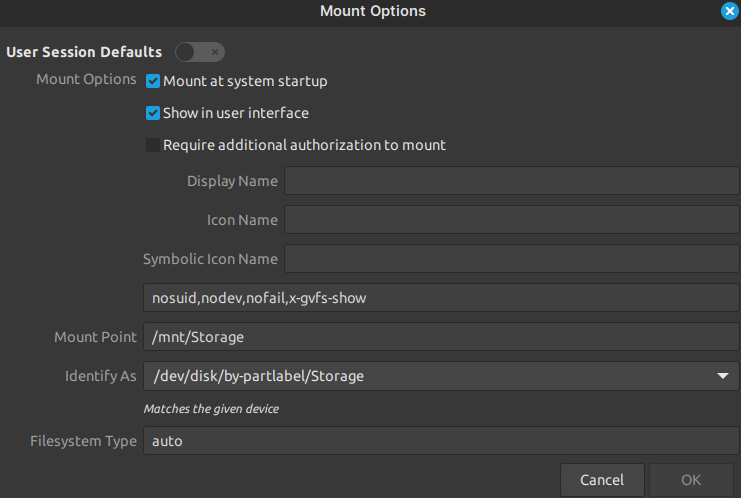
I know about chown and chmod. But I wanna do it in GUI.


SOLVED

Include uid= and gid= as part of your mount options.
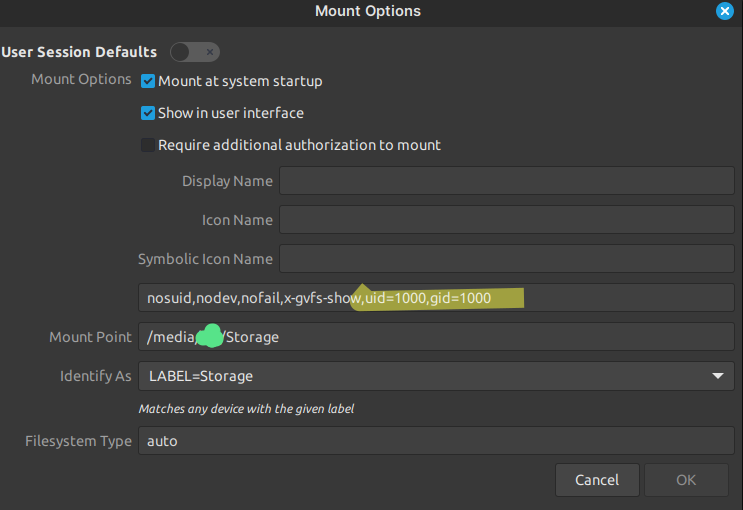
For More info look at this.

Thanks to this Chad @neidu@feddit.nl

206


What are the packages that comes default with Linux Mint Cinnamon that I can remove without any problems.

Linux Mint comes with lots of packages installed by default to give full experience to new users. But not everyone needs everything. In my case for example, I don't need celluloid, pix, hexchat, hypnotix, rhythmbox, LibreOffice, etc,... Those applications has their own audience and Linux Mint including them is a good thing but I personally don't want them.

Mini Rant or QA maybe?

I searched the internet a bit for the answer, on various forums, and subreddits. And All the people who asked this question got obliterated as far as I've seen. The common answers are:

if you remove the applications that came installed with Mint by default, it will cause Dependency issues.

If I remove an application and the dependencies shold be removed UNLESS some other application need those dependency, right? If that's the case, why removing packages can cause dependency issues?

Why would you want to remove essential applications like LibreOffice, pix etc. ? (this question is asked in the sense of "what sane person would want to remove those?")

Cause why not? Maybe I like GwenView more than Pix, maybe I don't need office applications at all. Why this even matter?

If you want don't want Mint's default applications, then what's the point of using Mint? Just use something like Ubuntu server or something. People need to realize that lot of people (at least me) using Mint for it's System management (updates, apt source list, etc..) via GUI ability. Just because I want to manage my system with ease, that doesn't mean I need everyt applications it offers me.

I honestly feel bad for the person who asked the question in the first place. They didn't got the answers till the very end. All they got is Criticism and it's not constructive one.

Why this kind of behaviour even exist?

P.S.: I'm using Mint inside VM for testing purposes. I don't want my VM to take a lot of space. That's why I don't need lot of applications.

207


I recently an install of Nobara Linux and there seems to be an issue during boot. Sometimes it fails to boot correctly and the screen looks glitchy with random noise and colors with no obvious way to move past it, forcing a manual shutdown via the power button (a couple times it seems to have failed complete and the system automatically booted in Windows 10). When this doesn’t happen, Nobara appears to boot normally and have no issues once I reach the login screen.

I only have a few weeks of experience with Linux with Linux Mint. I did not encounter any boot problems with Mint so I don't think there are any hardware issues. I suspect I must have made an error somewhere with the Nobara installation or with how I set up the partitions. I tried to follow with advice I found online, but maybe the info was incomplete or out of date.

I installed Nobara-39-Official-2024-01-24 and finished running all system and driver updates.

Nobara Partition setup:

• /boot/efi = 600 MB, FAT32, flags: boot & bios-grub
• /boot = 1 GB, EXT4
• / = 50 GB, EXT4
• / home = 110 GB, EXT4
• no mount (label: games) = remaining SSD space ~273GB, EXT4

The remaining portion of my 1TB SSD is dual boot Windows 10.

If anyone could diagnose this, it would be a great help.

208


Where should I mount my internal drive partitions?

As far as I searched on the internet, I came to know that

/Media = mount point for removable media that system do it itself ( usb drive , CD )

/Mnt = temporarily mounting anything manually

I can most probably mount anything wherever I want, but if that's the case what's the point of /mnt? Just to be organised I suppose.

TLDR

If /mnt is for temporary and /media is for removable where should permanent non-removable devices/partitions be mounted. i.e. an internal HDD which is formatted as NTFS but needs to be automounted at startup?

Asking with the sole reason to know that, what's the practice of user who know Linux well, unlike me.

I know this is a silly question but I asked anyway.

209


Which folders and files do I need to exclude from TimeShift?

Also is there a way to also exclude programs installed as .deb ?

I doing this to reduce Backup size as I have limited storage.

100GB - Windows 11
400GB - Storage
400GB - Mint
100GB - TimeShift
210


So which one is actually official one? I can't describe what "official" mean here, maybe the one that actually came from reddit or the one with more subsscribers or one with more activity ?
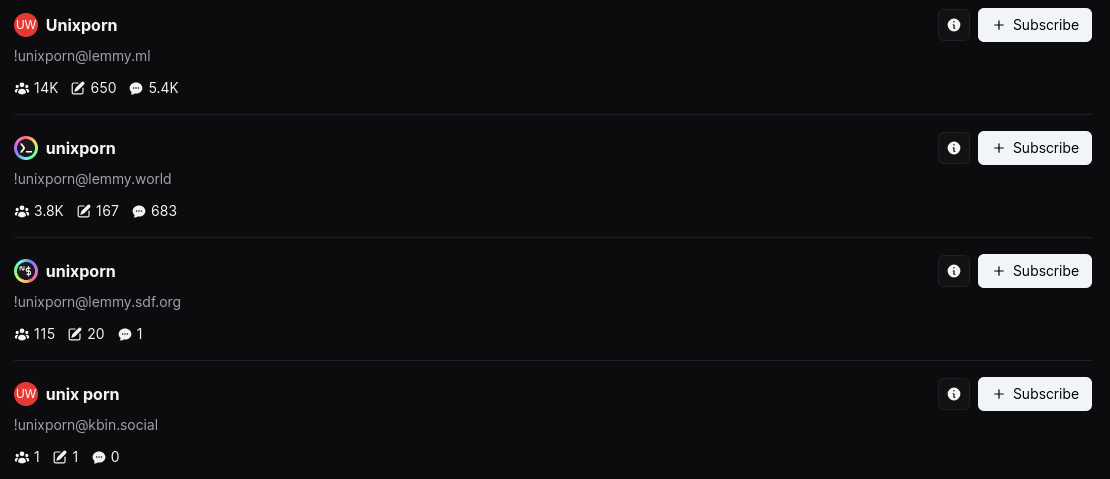
Also Why there are multiple copies of same community in different instances? Isn't the whole point of lemmy is that it is federated?

There is also three linux4noob communities 🥲

211


Can I delete previous backups, without affecting following backups, Since TimeShift (RSync) make increamental backups.

212


I've tried to stow dot files by following online blog/form, and it worked now, I tried to manage my $HOME/bin directory with stow, but it didn't

$HOME/.dotfiles directory structure

/home/USER/.dotfiles/
|-- bash
|   |-- .bash_aliases
|   |-- .bash_logout
|   `-- .bashrc
|-- .git
|   |-- branches
|   |-- COMMIT_EDITMSG
|   |-- config
|   |-- description
|   |-- HEAD
|   |-- hooks
|   |-- index
|   |-- info
|   |-- logs
|   |-- objects
|   `-- refs
|-- git
|   `-- .gitconfig
|-- .gitignore
|-- install.sh
|-- Makefile
|-- .stow-local-ignore
|-- vim
|   `-- .vimrc
`-- zsh

$HOME/bin/src directory structure

/home/USER/bin/
|-- src
|   |-- backup
|   |   |-- backup
|   |-- clone
|   |   `-- clone
|   |-- epub2html
|   |   `-- epub2html
|   |-- gnome-nightlight
|   |   `-- nightlight.sh
|   |-- list
|   |   `-- list
|   |-- new
|   |-- pomorodo
|   |   |-- notification.wav
|   |   |-- old_pomo
|   |   |-- pomorodo
|   |   `-- test
|   |-- revoke_exec
|   |   `-- revoke_exec
|   |-- rm_exec
|   |   |-- rm_exec
|   |   `-- tmp
|   |-- install

Where is my mistake and thanks in advance.

213


cross-posted from: https://lemdro.id/post/9853743

I'm running OpenSUSE leap 15.5, When I was on the linux mint, I was using warpinator but using it on openSUSE is troublesome and I wish there was a linux version of blip but unfortunately there is not.

214


Display of OpenGL context works fine on Windows, no issues with resizing. Function glViewport works as intended.

It only has issues with X11 on Linux (no plans yet to implement Wayland due to lack of free time). Resizing breaks everything, and it doesn't really work the way you expect (point of triangle moves down if you make it taller, etc). I cannot find anything on if I should call anything else besides glViewport, only that "you should use [insert already existing library], which will take care of this behavior". Others are suggesting me that it's an issue with my distro, but I cannot find any OpenGL testcase that is small enough to test on my VM or my Raspberry Pi to actually test whether that's the case.

215
scrcpy (slrpnk.net)


Is there a way to use scrcpy without requiring my phone screen to actually be on?

216


I saw that there's this nifty xdg-ninja that informs you on what you have installed that doesn't respect the XDG spec, if it has support for it or not and what you can do to make it comply.
But now I was wondering if there was any tool to do the actual work automatically, I believe I have once seen a program that spoofed your home directory to non-complying apps so that you could transparently override their whole app data location to a path you wanted so they can keep functioning, but I can't for the life of me find it again.
It would be double awesome if it did both, i.e. auto-applying any changes to apps that support XDG but need to be configured to enable it and, for those who don't, forcefully spoofing the home directory

217
submitted 2 years ago* (last edited 2 years ago) by to c/linux4noobs@programming.dev


(my first post on lemmy so I hope I'm doing this right)

Distro: Spiral Linux (Debian, KDE spin), by recommendation

System: Lenovo ThinkPad X13 Gen 2 (Intel) (distro recommended as I am looking for Debian(-based), + btrfs, snapshots, and fde, included via the gui installer)

I'm having issues getting ModemManager to unlock my X55 modem. This morning I wiped my drive to install Spiral (KDE), coming from Kubuntu 24.04. While the modem worked after running the proper fcc unlock script in Kubuntu, it is entirely missing in my Spiral install. While I assumed that it would not be that simple, I copied /etc/ModemManager from my Kubuntu live environment to Spiral, ran

sudo ln -sft /etc/ModemManager/fcc-unlock.d /usr/share/ModemManager/fcc-unlock.available.d/105b:e0ab

and restarted, but alas that's not enough, so I'm stuck. I have added the network profile + apn to ModemManager (the UI) but of course without the modem unlocked, I can't connect. I'm new to cellular modems in Linux (this was a windows machine until ~6 weeks ago) but I'm otherwise comfortable with the terminal and commands. The modem was working as expected last night in Kubuntu.

I haven't got the system setup yet (trying this first before going further) so if I botch this, an install is no problem. I'm assuming it's either (or both?) a service, or a missing package that sets up what's needed, but I'm at a loss as to how to proceed.

I discussed this here https://lemmy.world/comment/10540509 this morning, though I think I got all the important details typed up above. But maybe it could be useful somehow.

Any suggestions are welcomed :)

218


So I was looking for some kind of Ulauncher functionality (file/directory search) and direct url opening from rofi or dmenu and I found dmenu-extended, but I doesn't work at all for me and maybe someone more experienced can help me with this.

My first problem is that I cannot make nomacs the default image viewer with dmenu_extended, although the default image viewer in my system is nomacs, when I open any file image with dmenu_extended, it always open it with some basic image viewer but not with nomacs, to launch it with nomacs I need to first type 'nomacs:' and then the file route.

And other problem that I'm facing is that when I try to open Steam (installed as a flatpak) it never opens, instead gives me this error message:

xdg-open: file '/usr/bin/flatpak run --branch=stable --arch=x86_64 --command=/app/bin/steam --file-forwarding com.valvesoftware.Steam @@u' does not exist

219


I started to use Linux Mint on my VM, however it seems like it uses a different channel for packages, which means I get some outdated packages such as D compilers, which makes me unable to compile my programs.

While the D compilers have some userspace installer scripts, they're userspace only, meaning they need initialization scripts, which only work until the end of the given shell instance, which makes it particularly hard to use in certain contexts.

Is there some "untested" or similar branch to get some newer stuff? The compilers don't seem to interfere with anything system level, so it should be fine.

220
 
 
221


I would like to set a specific command to not require sudo privileges, is there a way to accomplish this? I know you can add commands to the sudoer file to allow certain commands to be used by non root accounts, so maybe there is something similar for adding commands to allow regular users to use?

222
submitted 2 years ago* (last edited 2 years ago) by to c/linux4noobs@programming.dev


I'm looking to move to Linux, but I've seen there is a gaming bug related to the kernel. The issue is reportedly fixed in 6.9, but I can't find the version used in the current release on GitHub.

I'm currently looking at Bazzite, but knowing how to locate the kernel version (prior to download) would be helpful for any distro.

223


Inspired by this post by Randall Munroe.

I want something that does basically the same thing - mirror the keyboard's letter and common punctuation keys - but while pressing either of the Alt keys instead of using CapsLock. Also, I use Dvorak, not QWERTY.

I'd rather use my thumb as the modifier so that reaching the shift key in addition to the modifier key doesn't mess with my finger movement too much, and this way I'll be able to type one-handed with either my left or right hand. Also, I never use any of the Alt shortcuts that use the letter/punctuation keys, so getting rid of those shortcuts won't be a problem

Any ideas on how this could be accomplished? I'm on Linux Mint 21.3 Cinnamon (but also have a Mint MATE laptop that I'd like to replicate this on, if possible).

Edit: All I've tried so far is checking the keyboard layout options to try to turn off Alt shortcuts activating the top bar of applications, to free them up for the shortcuts I'd need, but no luck so far.

224


Apparently there is a F35 Key within xkbcommon.

I know about F1-24 where the upper level was accessible by holding down a modifier key; So how are keys beyond this issued via a keyboard (my keyboard is qwerty, de_DE if of interest)?

And... why the fuck was it a good idea to expand the function keys beyond 24?

225


Hello, I broke my laptop about a week ago and could use a hand figuring out the best approach for recovering the files when my new laptop arrives

The laptop was running fedora and would have used whatever encryption option is default in the fedora installer (The laptop required a password before it'd fininish booting so I'm pretty confident it was encrypted), which I believe would be LUKS?

If I understand correctly the ssd is a socketed sata drive, so I figured I'd buy a sata drive enclosure when I get my new laptop that'd let me plug it in via USB

I have the password I needed to boot when the device was working, if I get a sata enclosure can I access the files?

Any input, guidance, thoughts or suggestions are appreciated :)

view more: ‹ prev next ›