posts
Hey there, I could use a little help.
I'm running Kubuntu 24.10 (the non-LTS variant) and after some system updates through KDE's Discovery, I'm unable to boot.
First off, some specs:
Kernel: 6.11.0-14-generic
GPU: GTX 1080 w/ proprietary drivers, version 560 550 stable
I was first greeted with these lines:
[ TIME ] Timed out waiting for device dev-disk-by/x2duuid-[...].device
[DEPEND] Dependency failed for mnt-games.mount
This is not the first time this happened, so I went into recovery mode, opened /etc/fstab to comment out the device-specific line, saved, and rebooted.
The error disappeared, however the system still won't boot and I'm left with these entries visible on screen (abbreviated for clarity):
[ OK ] Started cups.service
[ OK ] Reached target printer.target
[ OK ] Started ipp-usb.service
[ OK ] Finished NetworkManager-wait-online.service
[ OK ] Reached target network-online.target
[ OK ] Started update-notifier-download.timer
[ OK ] Started update-notifier.motd.timer
[ OK ] Reached target timers.target
[ OK ] Started cups-browsed.service
Starting kerneloops.service
[ OK ] Started kerneloops.service
[ OK ] Reached target multi-user.target\
Starting power-profiles-daemon.service
[ OK ] Started power-profiles-daemon.service
[ OK ] Reached target graphical.target
Starting systemd-update-utmp-runlevel.service
[ OK ] Finished Starting systemd-update-utmp-runlevel.service
...and then nothing.
I need to leave, I'll fix the formatting and provide further information as soon as I'm back at my desk.
I've installed Samba on my Debian 12 home server but can't get it to start. I ran:
sudo systemctl start smbd
sudo systemctl status smbd
Here is the output:
Duration: 7h 25min 18.079s
Condition: start condition failed at Fri 2025-02-14 17:13:11 EST; 14min ago
Docs: man:smbd(8)
man:samba(7)
man:smb.conf(5)
Process: 598599 ExecCondition=/usr/share/samba/is-configured smb (code=exited, status=1/FAILURE)
CPU: 1ms
Feb 14 17:13:11 harvee systemd[1]: Starting smbd.service - Samba SMB Daemon...
Feb 14 17:13:11 harvee systemd[1]: smbd.service: Skipped due to 'exec-condition'.
Feb 14 17:13:11 harvee systemd[1]: Condition check resulted in smbd.service - Samba SMB Daemon being skipped.
The install also doesn't seem to have created a samba configuration directory in /etc or a log in /var/log
I'm stumped. Googling turns up a lot of people accidentally checking the status of 'samba' instead of 'smbd', but I'm not finding much on this issue. What am I doing wrong?
Hey all, I have a bit of a weird issue I’ve been struggling to fix for a little while now and am hoping a kind soul here might have the knowledge to help me figure it out.
A couple of years ago i switched from a single-system-dual-display setup to dual-system-single-display (as in one screen per system). I’ll spare the long winded explanation for it, but the gist of it is that the new system (a Mac Mini) is connected to the original, main system (custom built PC) via the motherboard’s audio jack so I can get the audio from both systems to play on the same speakers. That way the main PC focuses on the game or whatever else i’m doing, while the Mac Mini focuses on tools/streams/movies/etc. and both share the same set of speakers.
So it goes: Mac Mini (audio out) > (line in) Main PC (audio out) > Speakers
The way I had it work on Windows was by simply going to the audio settings, going to the Line In item’s properties, and checking the “listen to this device” box.
On Linux (Arch, KDE 6 if that helps at all), it was as simple as running either pactl load-module module-loopback or pw-loopback and it would work the same way as Windows out of the box.
Problem is, my motherboard (Asus TUF Gaming X570-Pro (Wi-Fi)) in the main PC died recently, so I had to get a new one (Asus ROG STRIX X870-F Gaming Wifi), and ever since, I’ve been unable to get audio loopback to work even after a clean, fresh install. Listening to device on Windows works fine still but I’m looking to completely get rid of Windows.
By default, running pw-loopback with no tinkering (which worked on the previous build) cut the audio from the main PC and replaced it by what sounds like slow steps in a very echo-y cave.
With a bit of tinkering trying to follow online guides and documentations which i’ve since undone (but the changes remained somehow) it changed to just duplicating the main PC audio with a tiny bit of delay (or at least the audio from one app on the main PC).
One thing I’ve noticed is that when I boot up my main PC, a couple of errors do show up:
Hub 10-0:1.0: config failed, hub doesn’t have any ports! (err -19)
hid-generic 0003:1532:0292.0008: No inputs registered, leaving
Bluetooth: hci0: Opcode 0x0c03 failed: -16
While seemingly unrelated to my loopback issue (hid error being my keyboard), looking those up made me realize that the motherboard IS fairly new and therefore driver support might be lacking (specifically the Bluetooth error, which I don’t care much about in all honesty), which might potentially be the root cause of loopback not working as expected.
Here are the results of some commands I see are asked about often when troubleshooting the same problem: ‘lspci | grep -i audio’
01:00.1 Audio device: NVIDIA Corporation GA104 High Definition Audio Controller (rev a1)
73:00.1 Audio Device: Advanced Micro Devices, Inc. [AMD/ATI] Rembrandt Radeon High Definition Audio Controller
Neither seems to be the motherboard (the first one being my 3060 Ti which I don’t pull audio from, the second looking like the CPU’s (AMD Ryzen 7 9700X) iGPU.
‘journalctl -p err’, or simply ‘journalctl’ don’t return anything relating to audio (essentially only returns the same keyboard and bluetooth errors mentioned above).
‘pactl info’ does return something interesting which might be the cause of the issue:
Server String: /run/user/1000/pulse/native
Library Protocol Version: 35
Server Protocol Version: 35
Is Local: yes
Client Index: 128
Tile Size: 65472
User Name: thelvadam
Host Name: CoreDynamics
Server Name: PulseAudio (on PipeWire 1.2.7)
Server Version: 15.0.0
Default Sample Specification: float32le 2ch 48000Hz
Default Channel Map: front-left, front-right
Default Sink: alsa_output.usb-Generic_USB_Audio-00.analog-stereo
Default Source: alsa_input.usb-Generic_USB_Audio-00.analog-stereo
Cookie: 6a69:7312
The weird thing is that the Sink and Source are labeled as usb-Generic_USB_Audio despite being the audio jack ports on the back of the motherboard. Maybe I’m just dumb. The motherboard BIOS settings do have an option for “USB Audio Controller” which is enabled by default under Advanced > Onboard Devices Configuration, but disabling it completely disables any and all audio devices.
I also tried using alsamixer to see if anything was disabled. I found a “Microhone” and “Line In” that were disabled, enabled them, but no change.
Does anyone have any idea why I can’t get audio loopback to work again? I’ll gladly provide more system info if I didn’t provide enough.
Thanks in advance!
I have a friend who I recently learned is looking to switch to Linux and I offered to help, since I've been using Linux for ages. I'm not the most technical user, but in some ways I think that makes me uniquely well suited to be a new person's guide, and I'm pretty familiar with the install and setup process sans one big thing, proprietary graphics drivers, I've generally always been installing Linux on a laptop it an integrated gpu
They let me know they have an nvidia graphics card, I think 30 series if I remember right, we don't know what DE or distro might be a good fit for them and I told them we'd start by test driving a few, see what they thought of the interfaces, and pick a distro from there
Can you boot and use the OS without installing the proprietary drivers, or do you need to install them via like tty or something? I know nvidia started open sourcing their drivers and some amount is in the kernel now, I assume proprietary drivers are still optimal, if not explicitly necessary?
Any and all advice is welcome, it's kinda hard to research something this general and get a sense for what the big picture looks like
Thank you!
I just installed a Debian 13 Trixie system on my laptop. I have 5 GPT partitions on 1 terabyte SSD and NO LVM!
partition layout
sda1 vfat 256M EFI system partition
sda2 ext4 512M boot partition
sda3 LUKS 460G encrypted root
-- sda3_crypt root partition, unlocks with passphrase
sda4 LUKS 465G encrypted home
-- sda4_crypt home partition, unlocks with passphrase
sda5 LUKS 4G encrypted swap
-- sda5_crypt swap partition, unlocks with keyfile
GRUB works fine, it loads the kernel, then I enter the password to decrypt my root partition. It decrypts correctly, then hangs for 1 minute 30 seconds.
After that, I get this error:
[ TIME ] Timed out waiting for device dev-mapper-sda4_crypt.device - /dev/mapper/sda4_crypt.
[DEPEND] Dependency failed for home.mount - /home/
[DEPEND] Dependency failed for local-fs.target - Local File Systems.
[DEPEND] Dependency failed for systemd-fsck@dev-mapper-sda4_crypt.service - File System Check on /dev/mapper/sda4_crypt.
[ TIME ] Timed out waiting for device dev-mapper-sda5_crypt.device - /dev/mapper/sda5_crypt.
[DEPEND] Dependency failed for dev-mapper-sda5_crypt.swap - /dev/mapper/sda5_crypt.
[DEPEND] Dependency failed for swap.target - Swaps
Not once does it ask me for the password to decrypt my home partition, it just waits until it fails.
When I use the Timeshift GUI to create a snapshot, it takes a very long time to complete. If I click Cancel, my desktop environment crashes and I get kicked to a black screen or a login prompt.
When I use Timeshift CLI, it creates the snapshot in less than a second, but the command waits for a long time afterward. However, it can be safely interrupted with control-C.
Timeshift is in BTRFS mode.
Output of Timeshift command, interrupted
Using system disk as snapshot device for creating snapshots in BTRFS mode
Mounted '/dev/dm-0 (sda3)' at '/run/timeshift/33685/backup'
btrfs: Quotas are not enabled
Creating new backup...(BTRFS)
Saving to device: /dev/dm-0, mounted at path: /run/timeshift/33685/backup
Created directory: /run/timeshift/33685/backup/timeshift-btrfs/snapshots/2025-01-29_15-21-49
Created subvolume snapshot: /run/timeshift/33685/backup/timeshift-btrfs/snapshots/2025-01-29_15-21-49/@
Created control file: /run/timeshift/33685/backup/timeshift-btrfs/snapshots/2025-01-29_15-21-49/info.json
BTRFS Snapshot saved successfully (0s)
^C
#output of time command
real 0m1.165s
user 0m0.004s
sys 0m0.009s
Output of Timeshift command, run to completion
[Warning] Deleted invalid lock
Using system disk as snapshot device for creating snapshots in BTRFS mode
Mounted '/dev/dm-0 (sda3)' at '/run/timeshift/32947/backup'
btrfs: Quotas are not enabled
Creating new backup...(BTRFS)
Saving to device: /dev/dm-0, mounted at path: /run/timeshift/32947/backup
Created directory: /run/timeshift/32947/backup/timeshift-btrfs/snapshots/2025-01-29_15-13-13
Created subvolume snapshot: /run/timeshift/32947/backup/timeshift-btrfs/snapshots/2025-01-29_15-13-13/@
Created control file: /run/timeshift/32947/backup/timeshift-btrfs/snapshots/2025-01-29_15-13-13/info.json
BTRFS Snapshot saved successfully (0s)
Tagged snapshot '2025-01-29_15-13-13': ondemand
------------------------------------------------------------------------------
Maximum backups exceeded for backup level 'weekly'
#output of time command
real 1m12.419s
user 0m0.001s
sys 0m0.009s
Possibly related to this bug?
So, i have been a Linux only user for about a year now I think. I went with bazzite, and am quite happy so far, i haven't yet managed to brick anything and almost everything I want to do is easily done.
However, there is the keyring app that gives me nothing but grief. Supposedly it stores login credentials for applications on the system. Practically, it does whatever the fuck it wants, and I have no idea why.
Randomly, on every system boot, it asks me to create a new keyring. Doesn't access already stored info, doesn't store afterwards entered credentials properly either. Ultimately it doesn't work for me at all.
...or so you would think. Sometimes, for no discernible reason, it works as expected. No keyring creation prompt, no manual typing of my vpn credentials. It has them stored, reads them properly, and connects the vpn automatically and quietly in the background just as I set it up and want to behave.
But anytime I get used to it just working as expected it goes back to a period of constant password typing and dozens upon dozens of (empty) duplicate entries in its credential list.
What the fuck is going on with that damn app, and how do I fix it?
Thanks in advance
Hi, I've been fiddling with PopOS the past year on an old laptop and I like it. I'm getting ready to convert my windows 10 desktop to Pop and leave windows behind entirely, before I do I want to be sure I understand a few security concepts.
I've read suggestions that say don't run as root, create a separate user account and only use root when necessary. Do you give that user account sudo privileges? If so, is that any different from just being root?
Also I've installed the ufw firewall but left it with default settings. Is that something I need to look into more?
Thanks in advance!
I often want to read output from the terminal from the beginning but by default I have to scroll back up. This can be laborious when there is a lot of text. Is there anything I can do about this?
Thanks :)
For a long time, when using my computer (Arch linux), I would sometimes run into this problem. When trying to open an application in a new window, I'll be met by:
Invalid MIT-MAGIC-COOKIE-1 key
cannot open display: :0
I've tried a lot of "solutions" without luck, but I've finally found a way to consistently reproduce the error. It happens everytime I connect to a new wifi.
I found this 9 year old post about the same problem, but it does not include a real solution or the cause of the problem.
I'll try asking it here, to see if anybody knows why it happens and how to solve it, and perhaps to help others with the same problem find the cause of this error. It is such a relief for me, knowing that it is caused by changing wifi.
In advance, thanks for the help/feedback :)
I digged out my dad's old business laptop from 2006. This Asus rust is almost as old as me. But it booted up a horribly slow Windows 7 Home Premium that is totally unusable. Takes 30-40 minutes to open Chrome. Here are the specs: 40 gb old hard drive that is suprisingly healthy (96℅ according to HDDsentinel, more than 1000 days left) 1.73 ghz Intel Celeron M single core cpu that wasn't exactly the fastest even in 2006 1.25 gb of terribly slow RAM American Megatrends BIOS from 2006 I know Linux can't do miracles, but are there any still supported distro i could install that would actually run better than this shitty windows stuff?
I found puppy slitaz antix tahrpup ArchBang Slax Delicate Damn Small Linux Absolute FunOS LegacyOS exe gnu/linux Do you know others? Or from these which you recommend if my goal is to create a relatively useable, faster computer, preferably while it doesn't look that awful (the desktop or wm). So usability>speed>looks But all these are very important, just in this order. Also recommend a desktop enviroment or a window manager that runs well, but doesn't look that awful and can be installed on these distros
I haven't updated my Arch (Plasma) for some time.
When I updated it yesterday, suddenly all the exe icons started to show up ( I'm dualbooting with Win ), which is not the case before.

As far I looked up, I can't find anything on internet.
I don't know if it's whether WINE or Dolphin or some other package.
So, what's changed ?
I'm having network issues on Arch Linux, particularly with Steam download speeds, which fluctuate and are slower than usual. Additionally, I've noticed that things sometimes take longer than normal to load but usually load up after refreshing which makes me think the issue is not specific to Steam.
Here’s what I’ve tried:
- Tested on a Windows laptop which showed normal speeds.
- Reinstalled my system using Bazzite, which resolved the issue and showed normal speeds.
- Reinstalled Arch Linux, but the problem returned.
Other Info:
- Installed Arch with Archinstall using NetworkManager
- I'm on a wired connection
- DNS set to my router, which uses Quad9 DNS
- Steam installed via Flatpak
Any troubleshooting ideas or suggestions would be greatly appreciated!
I want to hide the about tag in rEFInd. So, I did according to the info in config and website, which is to add a showtools line with no options.
And, nothing happens. I still see About, Shutdown, Reboot, Firmware tools in the rEFInd screen
# Default is shell,memtest,gdisk,apple_recovery,windows_recovery,mok_tool,about,hidden_tags,shutdown,reboot,firmware,fwupdate
# To completely disable scanning for all tools, provide a showtools line
# with no options.
#
#showtools shell, bootorder, gdisk, memtest, mok_tool, apple_recovery, windows_recovery, about, hidden_tags, reboot, exit, firmware, fwupdate
showtools
Eventhough the previous showtools line is a just a comment, I removed it too. And still nothing happens.
Does anybody have any idea?
I only want Shutdown, Reboot.
SOLVED
It seems like a rEFInd problem in latest version.
https://lemmy.frozeninferno.xyz/comment/16257252
Looks like I have to edit and rebuild it myself. Unfortunately, I'm not really that familiar with building packages myself.
Guess, I have to wait it out.
What do I do, when my PC freezes?
Windows has ctrl+alt+del, does Linux Mint has something comparable? The only thing I know about is REISUB, but that borked my PC, so I am hesitant to use that again.
Are there any remaining alternatives to waiting and/or using the power button?
Edit: Thank you all for your insights and possible fixes. Crashes usually happened when I was running (cpu/ram?) heavy workload. Increasing swap space was not even on my radar, so I did that now. :) Hopefully Mint will run more stable now.
Windows keeps reminding be that I have to switch to Linux if I want to keep using my computer. It's a rugged tablet from about 2011 that I still use daily for internet and some light Photoshop. Core i7 1.2 GHz, 4GB RAM, and the important part, a built-in touchscreen and Wacom digitizer. Keyboard is an external device that I don't generally have attached. I grew up on DOS, so I'm not afraid of fiddling, but I'd rather this machine just worked. Any recommendations?
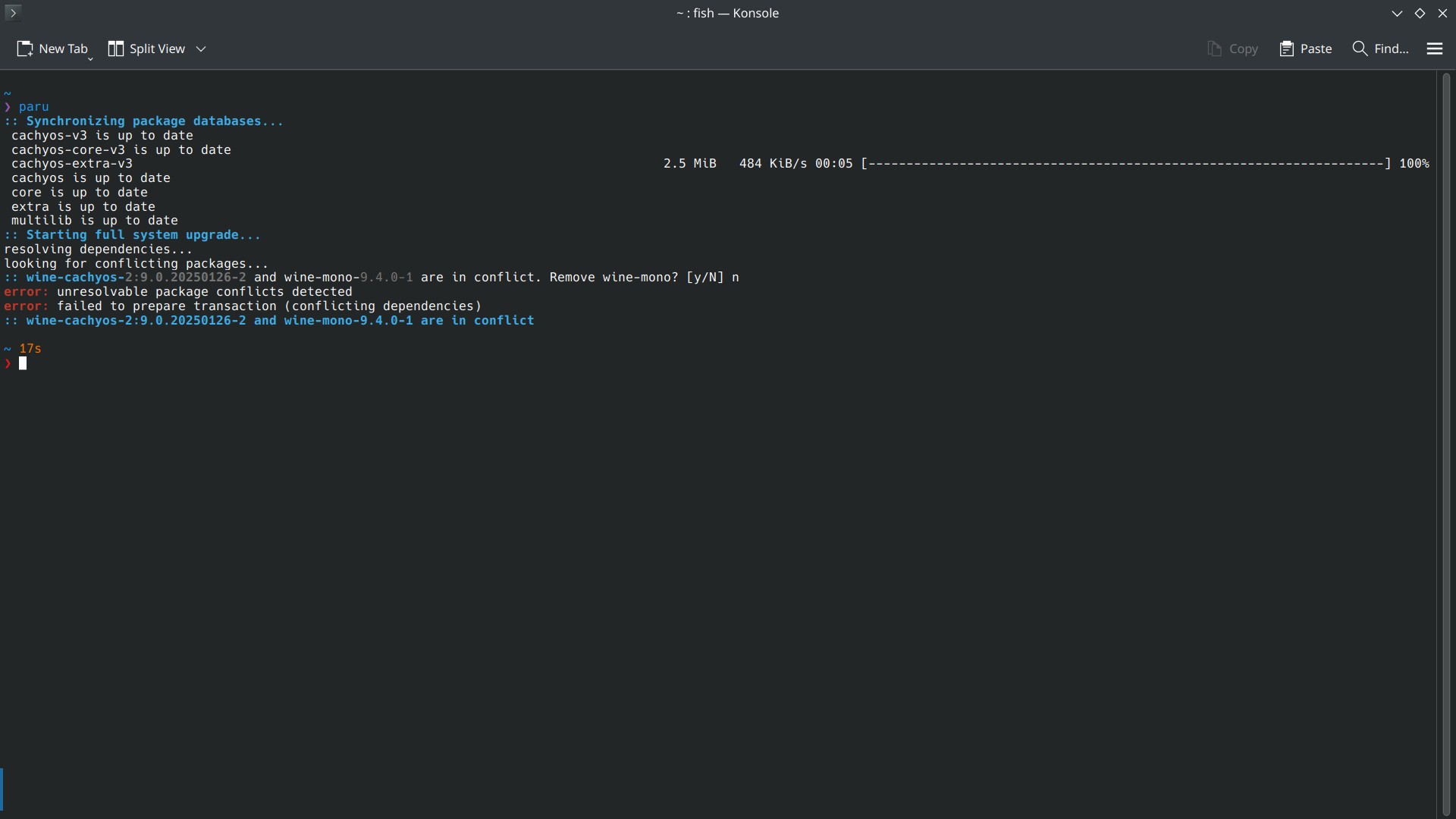
I installed CachyOS with Plasma DE and found it has no discover in it. When I searched on their sub lots of people say that one shouldn't use Discover with any Arch distro as it will break the system. Can anybody clarify why?
Also if I am not supposed to use Discover, can anybody suggest an actual GUI application store? Unlike Octopi (which I consider just as a TUI with check boxes and columns)
Edit: I only use Discover for find and install new apps.
For updating, I just use paru.
I run Debian 12 with KDE on my laptop. It is set up, that it locks the screen after 10 mins of inactivity. And that is typically want I want. But some times I use it with an external screen like a TV over HDMI to watch some videos, and forget to overwrite the setting to not lock the screen.
Is there some way to not lock the screen when connected to an external screen (and preferably to AC) but resume the previous behavior if no HDMI connection is made?
I've been migrating to linux recently and next headache on the list are my starr apps (sonarr, radarr, etc). On windows I just had them installed as background services but I wanted to give (rootless) podman a try on linux since everyone kept recommending it and saying how much better the experience is than on windows.
Anyway, I've set everything up and some of the services work, but specifically sonarr and radarr can't write to the main media folder with the error: Folder '/data/media/tv/' is not writable by user 'abc'
So, first of all, I didn't make user 'abc', it is some internal docker/podman/starr user allegedly and it's supposed to be mapped to my real user, which I did by providing the PUID=1000, PGID=1000 env variables.
Second, I tried to give read and write permissions to everyone for the placeholder folders but it didn't change anything. I don't think this is the issue since other services like the one for sabnzbd or jellyfin had no problems using folders I created.
Googling for the issue brought up some topics about NFS shares but I don't know anything about this - this is not a NAS or even some external drive, it's just podman installed on fedora.
Any help is appreciated, here's a pastebin of my compose file if it's relevant https://pastebin.com/uX9Saqvj
Hi. I read somewhere that you need to tinker with bios / secure boot? In order to install NVIDIA drivers on Linux. Is this true?
I could swear that my mouse is lagging on my second monitor but I don't how how to actually "prove" it, if there's even a way. I am dual booting windows with fedora workstation gnome and there is a noticeable sluggishness to my mouse control whenever I switch back and forth, but only on the secondary monitor. It is slight but it's messing with my muscle memory and constantly making me overshoot clicks and buttons. The main display seems to be fine, or at least it's less pronounced due to higher monitor refresh rate.
Is there any way I can measure it objectively and find the root cause? A diagnostic tool or an app that could test if something is wrong? It's a recent fedora installation and I've gone through all the nvidia driver and media setup steps at this fedora post-install guide but honestly I don't even know if this is a fedora, gnome, driver or wayland issue (or something else completely)
This is my disk layout:
500 GB Linux - BTRFS
100 GB Windows - NTFS
400 GB Storage - NTFS (shared between linux and windows)
I want to encrypt everything. For Linux I can use luks2 but what I'm supposed to do for Windows ? (No bitlocker please)
Will veracrypt replace refind boot manager?
Note: I am talking about the one that asks password before boot (full encryption)
I installed lots of OSs on my PC. The mistake I did was not backing up my EFI partition beforehand.
Now I deleted all the OS except CachyOS (Arch) and Windows.
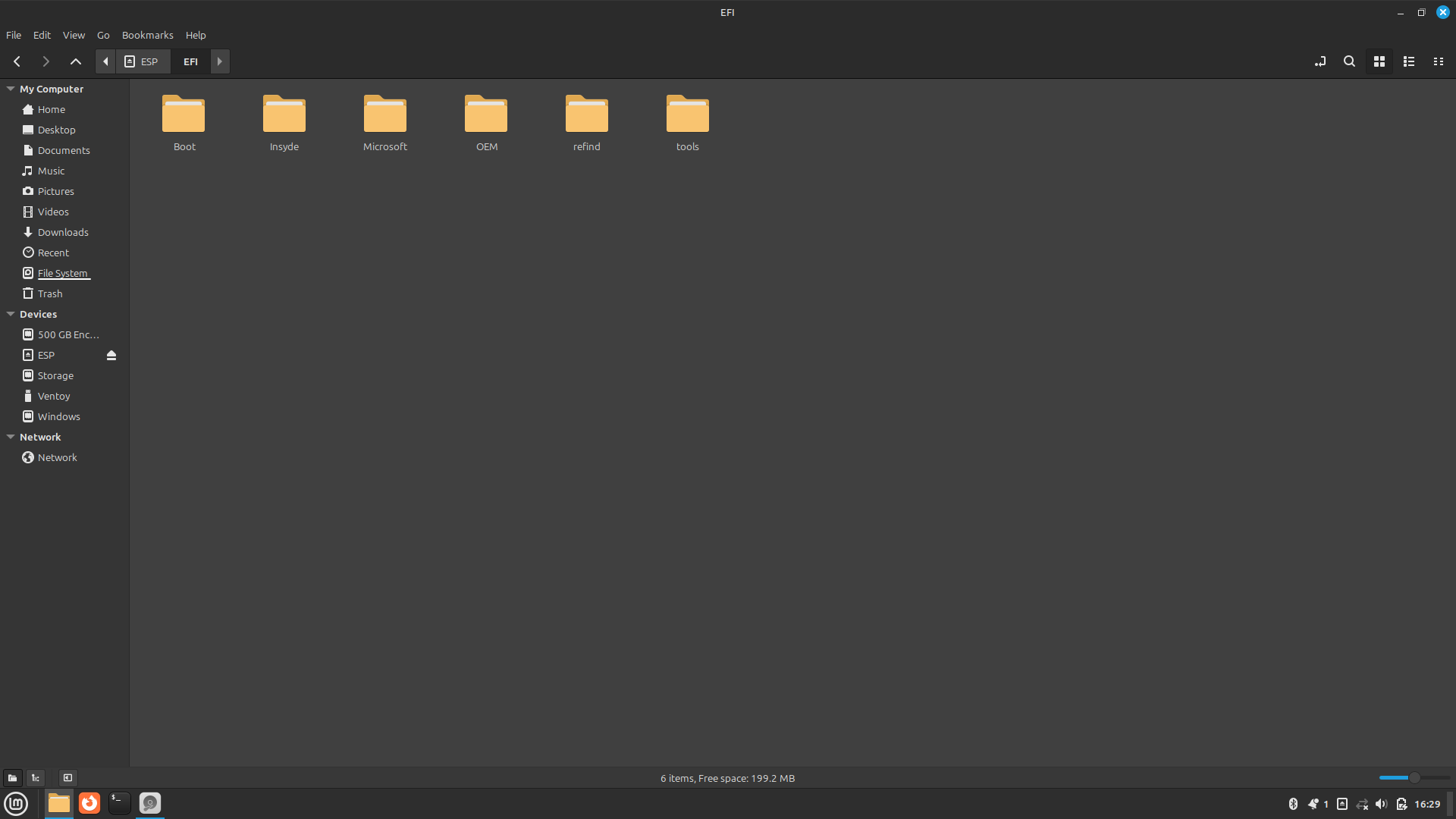
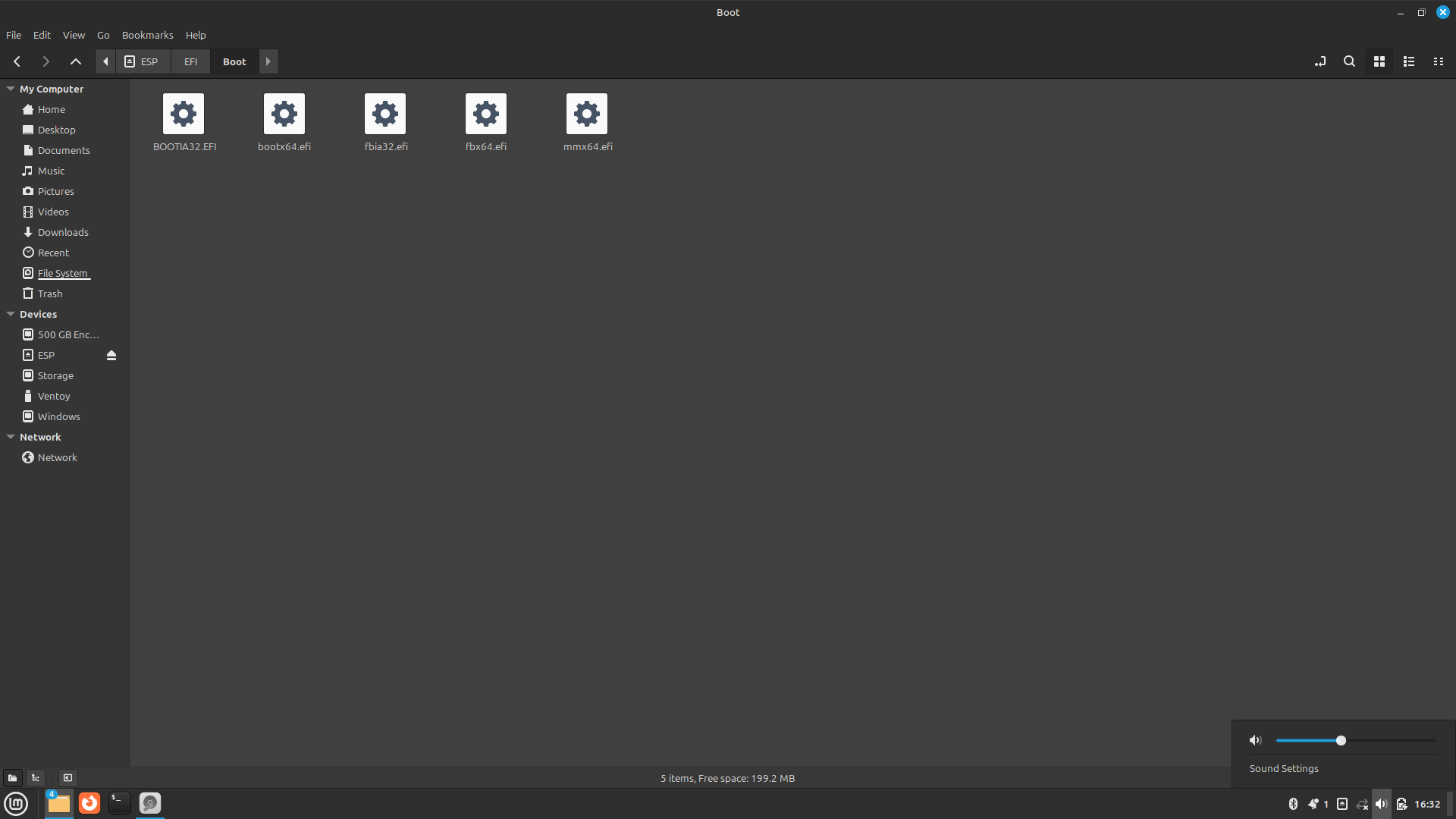
Now I want to tidy up my EFI partition. I want to delete everything (even rEFInd) except Windows and Default ones like OEM. (I am gonna reinstall CachyOS ) Can anybody please assist me?
I already deleted the obvious ones like ubuntu and fedora. Anything else?


I know this is not necessarily a linux question but anyways 😅
Solved
Before proceeding with any of the following, I STRONGLY suggest you to make a full backup of your ESP (efi) partition.
I deleted everything on boot folder, since I didn't need grub or any of those files ( after searching everything individually on internet)
I deleted refind folder, since I didn't need refind boot manager.
I kept insyde folder, since they are my uefi provider.
I kept OEM , microsoft folders because I need windows and whatever my OEM provides.
I kept tools folder since that's just an empty folder ( I didn't know which OS created it)
Trying to set tight permissions on my future NAS.
The essential on what I have:
TrueNAS NFS storage <- mounted via NFS -> Proxmox VE Host <-> Debian 12 VM
That's all fine and so on.
My little Debian VM:
NAME FSTYPE FSVER LABEL UUID FSAVAIL FSUSE% MOUNTPOINTS
sda
├─sda1 vfat FAT32 A5D7-88E3 505.1M 1% /boot/efi
└─sda2 ext4 1.0 3c43a477-51fd-425b-aee8-a6e75224f781 48.5G 16% /
sdb
└─sdb1 ext4 1.0 media e3e0eac5-806a-44e9-a0e9-07fb99a18281 933.2G 0% /srv/dev-disk-by-uuid-e3e0eac5-806a-44e9-a0e9-07fb99a18281
sdc
└─sdc1 ext4 1.0 nas 0f3a3d74-901d-4243-b20b-59210c1cee18 46.4G 0% /srv/dev-disk-by-uuid-0f3a3d74-901d-4243-b20b-59210c1cee18
sdd
└─sdd1 ext4 1.0 backup fbe21b9f-2339-4223-ac7e-00e75374fc32 46.4G 0% /srv/dev-disk-by-uuid-fbe21b9f-2339-4223-ac7e-00e75374fc32
sr0
Background:
- media = media library for Jellyfin
- nas = small (future) file server for my PC running Windows
- backup = used to store backups of various services like Firewall backups with SFTP etc.
The storage on the debian VM will be mounted by a NUC running bare metal Debian due to hardware acceleration. The proxmox host is unable to do it due to it also being a NUC. But I like the flexibility I will soon have because I can just nuke my bare-metal NUC without loosing any data.
Anyway my real problem is with permissions on my media drive.
My permissions right now are as following:
1. /srv/dev-disk-by-uuid-e3e0eac5-806a-44e9-a0e9-07fb99a18281# ls -l media
drwxrwxr-x 3 nobody nogroup 4096 Oct 12 20:45 media
2. /srv/dev-disk-by-uuid-e3e0eac5-806a-44e9-a0e9-07fb99a18281/media# ls -l data
drwxrwsr-x+ 6 mediaU serviceG 4096 Oct 13 00:21 data
3. /srv/dev-disk-by-uuid-e3e0eac5-806a-44e9-a0e9-07fb99a18281/media/data# ls -l *
drwxrwsr-x+ 7 mediaU serviceG 4096 Oct 13 00:21 media
drwxrwsr-x+ 2 mediaU serviceG 4096 Oct 13 00:21 recycle_bin
drwxrwsr-x+ 2 mediaU serviceG 4096 Oct 13 00:21 torrents
drwxrwsr-x+ 2 mediaU serviceG 4096 Oct 13 00:21 usenet
4. /srv/dev-disk-by-uuid-e3e0eac5-806a-44e9-a0e9-07fb99a18281/media/data/media# ls -l *
drwxrwsr-x+ 2 mediaU serviceG 4096 Oct 13 00:21 anime
drwxrwsr-x+ 3 mediaU serviceG 4096 Oct 13 00:22 movie
drwxrwsr-x+ 2 mediaU serviceG 4096 Oct 13 00:21 music
drwxrwsr-x+ 2 mediaU serviceG 4096 Oct 13 00:21 soundtrack
drwxrwsr-x+ 2 mediaU serviceG 4096 Oct 13 00:21 tv
Current directory tree:
srv-dev-disk-by-uuid-XXX/
└── media
└── data
├── media
│ ├── anime
│ ├── movie
│ ├── music
│ ├── soundtrack
│ └── tv
├── recycle_bin
├── torrents
└── usenet
What I am trying is:
- Docker host mounts
/srv/dev-disk-by-uuid-e3e0eac5-806a-44e9-a0e9-07fb99a18281/mediavia NFS - The docker containers should only be able to access the the
datadirectory inside it (2.ls -l) as mediaU:serviceG - In addition I wanna access, modify and move files with my windows user without being part of the service group. Because of this I have setup SGID and ACL on the
/media/data/mediafolder. The ACL was set recursive as follows:
/srv/dev-disk-by-uuid-e3e0eac5-806a-44e9-a0e9-07fb99a18281/media/data# getfacl media/
# file: media/
# owner: mediaU
# group: serviceG
# flags: -s-
user::rwx
group::rwx
group:extUserG:rwx
mask::rwx
other::r-x
default:user::rwx
default:group::rwx
default:group:extUserG:rwx
default:mask::rwx
default:other::r-x
So far so good. mediaU:serviceG has RWX permissions (2775).
My user is part of the group extUserG also with 775 permission.
My issue and how I tested it under the root user executing commands via su:
- Works:
root@NAS01:/srv/dev-disk-by-uuid-e3e0eac5-806a-44e9-a0e9-07fb99a18281/media/data# su mediaU -c 'mkdir dir-mediaU' - Doesn't work:
root@NAS01:/srv/dev-disk-by-uuid-e3e0eac5-806a-44e9-a0e9-07fb99a18281/media/data# su appoxo -c 'mkdir dir-extUserG' mkdir: cannot create directory ‘dir-extUserG’: Permission denied
BUT if I enter one level deeper inside the freshly created dir-mediaU folder I am able to create files with my personal account:
root@NAS01:/srv/dev-disk-by-uuid-e3e0eac5-806a-44e9-a0e9-07fb99a18281/media/data# cd dir-mediaU/
root@NAS01:/srv/dev-disk-by-uuid-e3e0eac5-806a-44e9-a0e9-07fb99a18281/media/data/dir-mediaU# su appoxo -c 'mkdir dir-extUserG'
root@NAS01:/srv/dev-disk-by-uuid-e3e0eac5-806a-44e9-a0e9-07fb99a18281/media/data/dir-mediaU# ls -l
total 4
drwxrwsr-x+ 2 appoxo serviceG 4096 Oct 13 00:45 dir-extUserG
root@NAS01:/srv/dev-disk-by-uuid-e3e0eac5-806a-44e9-a0e9-07fb99a18281/media/data/dir-mediaU# getfacl dir-extUserG/
# file: dir-extUserG/
# owner: appoxo
# group: serviceG
# flags: -s-
user::rwx
group::rwx
group:extUserG:rwx
mask::rwx
other::r-x
default:user::rwx
default:group::rwx
default:group:extUserG:rwx
default:mask::rwx
default:other::r-x
So dear Lemmy Community:
Have I done something wrong in my setup or thinking? I have no problem as it is right now but I am sure it will be annoying to troubleshoot in the future so might as well fix it while still setting it up.
Thanks in advance for helping slowly escaping the windows world :)