101


If anyone knows if this bug is already being tracked on the KDE bugzilla, or if its been fixed in newer versions, please link it below! :)

102


So, what's the deal with NumLock? I have it tuned on in the BIOS and in KDE settings, yet every time I boot up my PC or open the terminal as super user, it is turned off. Any way to deal with this? That happened on Bazzite, Fedora and now Cachy. I have a 100% keyboard and I want to use all 100% of it.

103


https://ubuntustudio.org/

I want something that's stupid easy to install, requires no setup, and has recording and gaming functionality from the beginning. I constantly see people shitting on ubuntu for semi-valid reasons, and I'm open to stable alterantives.

I'm installing it on this laptop :

https://www.laptopsdirect.co.uk/msi-gl62m-7rex-core-i7-7700hq-8gb-1tb-256gb-ssd-15.6-inch-geforce-gtx-105-9s7-16j962-1293/version.asp

NB : This is for mission critical etc laptop. This will be my only daily driver computer, stability is the topmost priority.

BONUS POINTS : If it's debian based so I can run solarus : https://solarus-games.org/

104


I am looking to build a machine to use for file backups and some light media serving (PhotoPrism, Calibre, and the like). My plan is to take a retired desktop, throw in every old drive I have lying around, and merge them with Greyhole.

I am a seasoned Linux user (in containers or on machines being managed by others). I am comfortable with CLI basics and should be able to use the system entirely over SSH and web UIs, so I am fine without a window manager. What I am not fine with is system administration (and do not want to spend time fixing issues that constantly pop-up).

Ideally, I would want to find a distro that I can install by accepting reasonable defaults, configure my storage and my various applications, create a cron job to periodically update packages and reboot the machine, and the machine will just keep working with no intervention on my part. I realize that that is an impossible goal, but I want to get as close as I can.

105


Hiya,

I've been meaning to switch off of Debian for a while but I'm intimidated by fear of having a worse experience and my only PC (work and personal) being out of action until I get it sorted. Maybe the time has come to take my current distro behind the woodshed.

I updated from Debian 12 to 13 yesterday, following the instructions here: https://www.linuxlookup.com/howto/upgrade_debian_12_debian_13

The last step fails, and I assume that's why I'm now in trouble.

$ sudo apt modernize-sources
E: Invalid operation modernize-sources

Searching for "Invalid operation modernize-sources" gives me literally zero results from DDG.

After reboot I opened KDE Discover and checked for updates - there are 2,000+. Yeesh. OK. I haven't found one that will actually update, presumably because the sources are wrong? I get different errors.

For example, updating the Clock (I can't believe the clock needs updating) auto-selects some other packages, I assume dependencies. Many minutes later I get the error:

The PackageKit daemon has crashed:
The PackageKit daemon has crashed

Firefox doesn't select any other options, but fails quickly with:

Dependency resolution failed:<br/><br/>The following packages have unmet dependencies:
  libreoffice-core: Depends: libgstreamer-plugins-base1.0-0 (&gt;= 1.0.0) but it is not going to be installed
                    Recommends: gstreamer1.0-plugins-base but it is not going to be installed
                    Recommends: gstreamer1.0-plugins-good but it is not going to be installed
                    Recommends: gstreamer1.0-plugins-ugly but it is not going to be installed
                    Recommends: gstreamer1.0-plugins-bad but it is not going to be installed
                    Recommends: gstreamer1.0-libav but it is not going to be installed

Is this worth fixing? Is it a sign to finally kill my Debian and try something new?

A kind lemming suggested Nixos and was persuasive, but my reading indicates that's more for sysadmins deploying systems than for a bearded guy in his home office with one PC.

I just want my computer to work...

106


Greetings!

I’m rebuilding my old gaming-focused beast. I’ve got parts coming today (new mobo, cpu, ram, and cooling unit, everything else I hope to reuse, to keep this cheap as possible), and I’ll be building it up tomorrow (thermal paste arrives tomorrow 😭)

I have no need for this computer to do anything but gaming, as I have others that can’t handle gaming for that. So I’m thinking a gaming-focused distro would be good. However this is nowhere near top of the line hardware, I’m aiming to run mostly cpu-heavy games (stuff like rimworld and oxygen not included), as I really like having way too much going on at once. So maybe that changes things.

I’ve had an absolute hell of a time getting games to run through lutris on stock Ubuntu. I’m hoping bazzite will improve that somewhat. It probably won’t.

But I understand it’s fedora based, which is a big new thing for me as I’ve only messed with Debian-based. And there’s probably a lot I’ve not considered.

So what do I need to know? What would be helpful to know before I start this? Any good resources you can point me toward for gaming on bazzite, like install troubleshooting guides or something that might make this less of a nightmare? (Seriously I can only get a handful of games installed that should be able to run, and that’s with an absolute ton of effort, very frustrating.)

Thanks in advance!

107


I use my Debian desktop for both work and personal uses. I have trouble with work-life balance, and I think segregating may help. I'm looking for tips on the best ways to accomplish this.

First thought is to create a user each for work and play, but I guess I'd want to somehow restrict applications to one or the other, and I do use some of the same. (Browser, IDE)

Second thought is to dual boot with an entirely unrelated install.

Is there a better way that I haven't thought of?

108


I'm moving away from Windows (yay!) and need to bring a few features with me. Microsoft added this auto complete feature to PowerShell recently and I need something similar:

I found this package which is helpful, but it requires you to hit tab before you get a list of suggested commands: https://wiki.debian.org/Add%20Bash%20Completion

Do I need a different shell entirely? I'm using bash on Debian now.

109


I would like to add another wireless access point near my little deck and 0.1 acre back yard and I have some extra Raspberry/Orange Pi hardware lying around that should easily be up to the task. I remember installing DD-WRT on a WRT54G north of twenty years ago in something like AP mode. Is it still up to the task or is there something better now?

110


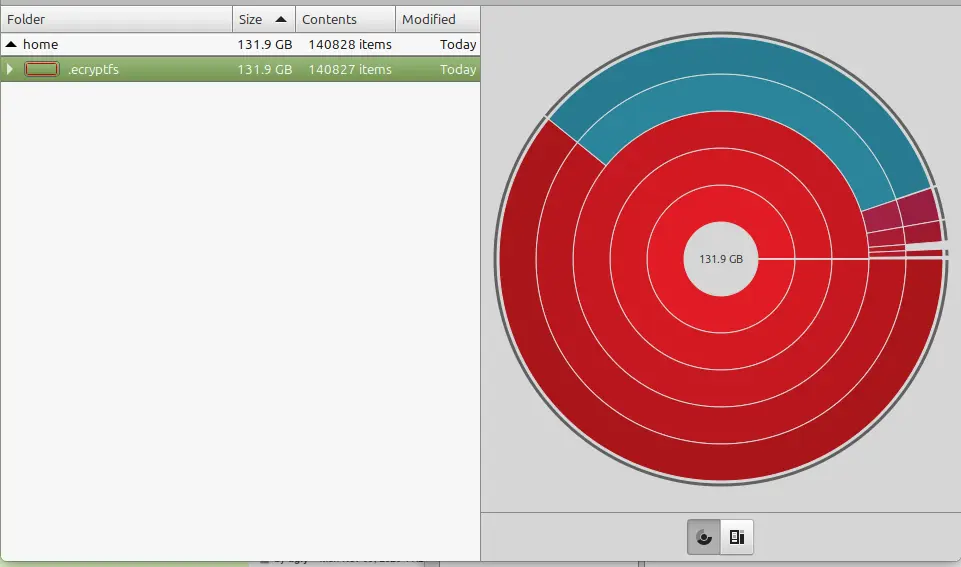
I set up a laptop with linux mint cinnamon within the last two weeks, and while trying to install The Sims 4 today I got a message that the hard drive was out of space. I have installed nothing so far except for Steam, and tools to get The Sims 4 running. I see that 131gb is taken up by .ecryptfs and a web search turned up this thread however I used the utility that was suggested with the same result. Then OP says multiple reboots have cleared up the issue. I am on reboot 4 now with no such luck.

Is it safe to delete this? Is it something with timeshifted?
111


i’ve been using a USB 2.0 drive to run a live linux OS for the past couple of years, mostly for storing linux ISOs, installing linux on laptops and live persistence. lately, i’ve noticed a huge drop in write speed, currently around 1.8 MB/s, which is pretty slow for the tasks i do. i'm planning to replace it with a USB 3.0 drive in the future, but i wanted to ask:

  • how long have you typically used a USB drive for live linux systems, including for live persistence??
  • do you still use USB 2.0, or did you upgrade to a 3.0 or higher?
  • any tips to extend the lifespan of a USB drive when using it for live linux systems?

i'm mainly looking for advice and insights on how others manage their USB drives for similar use cases. thanks in advance for sharing!

EDIT: it's a usb stick. forgot to tell.

112


My dad uses Ubuntu as an htpc and has livepatch enabled, but every year or so when I visit it's always out of date. This time it needed a partial patch.

Is Ubuntu just bad, is there a better alternative that's closer to Windows where the machine are actually kept up to date?

113


Some years ago, I make the mistake of doing a single partition for the system (I'm using EndeavourOS). Now I have a new disk, and I want to move the OS there, but not /home, which I want to stay in the old drive. How can I do it?

114
submitted 1 year ago* (last edited 1 year ago) by to c/linux4noobs@programming.dev


My wife has an old Lenovo i5 thinkpad that we would like to use again with linux, before buying a new computer. I was wondering if there is a tool that I can input the model and stats of the device and it will output a few suggested distros for it.

It is the X1 Carbon 20BT with the i5-5300U Processor, it has 8gb ram. https://support.lenovo.com/us/en/solutions/pd100509-overview-for-thinkpad-x1-carbon-type-20bs-20bt

Update: I have installed mint xfce but am downloading cinnamon and switching to that.

115
new battery issues (midwest.social)
submitted 1 year ago* (last edited 1 year ago) by to c/linux4noobs@programming.dev


installed a new battery in a macbook pro a1502, and the battery will not charge when plugged in using the original charger. tried a different charger, no luck.

did some distro hopping and none of the debian-based distros showed the battery charging. currently using debian 12.

tlp recalibrate gives an “error: battery charge thresholds/discharge/recalibrate not available.”

also, tried to reset the smc following the process for intel macs, to no avail.

any help is much appreciated, thanks!

116


I've been meaning to switch my pc to linux for a while but have only recently gotten enough time to switch. Is there anything that I would need a dualboot for? I was previously concerned with VR, specifically using a quest wirelessly. I heard about a year ago that it is possible but not the best. Has it improved since then?

And is there anything else I would still need a windows machine for? I don't know specifically what doesn't work and I don't mind using FOSS alternatives.

I was running a raspberry pi with raspian on it as a homelab for a few years (until the SD card died :( I still need to fix that) so I am not completely unfamiliar with linux and the terminal and am willing to use it to make programs work as long as they work as well as they would on windows.

(I've decided on swapping to mint if that matters)

117
submitted 1 year ago* (last edited 1 year ago) by to c/linux4noobs@programming.dev


Multiple systemd unit failed to start and then systemd hang boot log at github gist

what I did before I ended up here

  • changed boot partion
  • modified /etc/fstab
  • disabled SELinux (I thought file label problem)

[!NOTE] If I add <space>3 at end of kernel command line I will end up with

mmap: Permission denied

and prompt for username and I can't log; I don't reach password prompt

118


Hello, I’m not a total Linux noob, but I’m not sure what my plan is for windows 10s shutter, and I’m not going to 11. I have a PC exclusively for games with an nvidia gpu.

My dream setup works something like a headless gaming pc: I keep my tower on my desk with some monitors and mkb, then run Ethernet all over, and I can stream the tower to: my deck, my phone, a steam link, thin client etc. Then I could get a steam link for my driving sim and send it over there, maybe add in a flight sim later with another steam link. Is this possible?

Hurdles:

  1. can I still run halo/microsoft games easily? Rocket league? I don’t want to reconfigure every game after every patch.
  2. What distro would be best?
  3. Can it switch to the right resolution for what I’m streaming to? I have 16:9, 21:9, steam deck and my phone to contend with. When I tried moonlight it always swapped to the plugged in monitor resolution instead.
  4. Can it output 4K120hz over the Ethernet?
  5. Good option for steam link devices?
  6. Can I stream outside the home with Tailscale
119


cross-posted from: https://programming.dev/post/30407811

Website

It’s almost like the good ol’ days of install fests and the like! ‘End of 10’ is an organization that’s making it easy for Windows 10 users with computers that can’t upgrade to Windows 11, to install Linux instead of sending good hardware to the landfill.

120


specs: Pop OS // AMD Ryzen 7 5700U // 16GB RAM

Just trying to gauge the opinion on how to proceed in this case

I just set up Pop Os to run i2p and I was thinking about getting pihole as well.

I've read a few posts commenting about setting up pihole as a VM, perhaps even with dietpi to make it less resource intensive

What do you guys recommend? VM or no VM? dietpi or something else?

The machine will only be used for i2p, browsing and watching videos. Perhaps jellyfin and arr suite in the future when I feel more adventurous? idk, one step at a time i guess

Pi hole is intended to be used by other devices as well

Any other recommendations/tutorial links are welcome, thanks in advance

121


I've noticed that my secondary monitor usually doesn't turn on initially. In order to get it to turn on, I can do a restart after the initial boot and then it will turn on. Any idea what might be causing this or how to fix it? The monitor is hooked up through the laptop's hdmi port.

Fedora 42

KDE Plasma

Wayland

Nvidia RTX 4070

122


Hi all, I'm planning to do a clean install of Linux Mint on my laptop and completely remove Windows. I have about 300GB of personal data on the system and only one SSD, so everything is currently stored on that single drive.

Here’s what I want to do:

  1. Back up all my data safely, without losing any metadata (timestamps, folder structure, etc.).
  2. Wipe Windows and do a clean install of Linux Mint.
  3. Restore my data with everything intact—timestamps, folder structure, and metadata.
  4. Be able to open or run file types that are only supported by Windows, like certain .exe, .msi, or specific file types.

I don’t have a second internal drive, so I’ll probably use an external hard drive or cloud storage.

What i want to know is:

1.What’s the best way to back up and restore my data safely while preserving all metadata?

2.What tools or methods should I use for backup and restore?

3.How can I access or use files that are only supported by Windows once I’ve switched to Linux? Are there workarounds or compatibility layers?

I’m fairly new to Linux, so beginner-friendly advice would be awesome.

Thanks in advance!

123


cross-posted from: https://sh.itjust.works/post/37507334

I'm trying to generate AppArmor policies to secure my "major/internet-facing" programs.
Most of those programs are Flatpaks.
Flatpaks already have their own sandboxing mechanism, which uses bwrap and XDG portals.
Does AppArmor have any weird interactions with Flatpak, e. g. blocking too much, or blocking too little, or being unable to block anything without rendering the whole program unusable?

124


What Kernel are you guys using?

I have seen some people claiming that custom kernels like zen cachyos offer better battery life and performance.

Is it true ?

125


This post is mainly a response to people that have the same needs on reddit, I tried to invite them so please be patient & welcoming !

ღゝ◡╹)ノ♡

Just for information, I tried to lpadmin ppd file only, but had a problem with missing filter file, if someone's from debian/ubuntu based distro struggles like me (error shown by cups ui : /usr/lib/cups/filter/rastertotmtr not available: No such file or directory) just asks here and I'll give you people the right file I guess.

default install

print !

  • take not that i had specific needs with orientation & custom height/width on my .pdf files, also they were already imposed.
  • if default try a print lp BAT.pdf -o media=Custom.69x65mm -o orientation-requested=5 -o TmtSpeed=4
  • if NOT default try a print : lp -d TM-20-3 BAT.pdf -o media=Custom.69x65mm -o orientation-requested=5 -o TmtSpeed=4

modded installation with speed option ?

*%Head speed settings.
*TmtSpeedValue 1: "13"
*TmtSpeedValue 2: "9"
*TmtSpeedValue 3: "5"
*TmtSpeedValue 4: "1"

*OpenUI *TmtSpeed/Printing Speed: PickOne
*OrderDependency: 10 AnySetup *TmtSpeed
*DefaultTmtSpeed: Auto
*TmtSpeed Auto/Use the printer settings : ""
*TmtSpeed 1/1st (Fast): ""
*TmtSpeed 2/2nd: ""
*TmtSpeed 3/3rd: ""
*TmtSpeed 4/4th (Slow): ""
*CloseUI: *TmtSpeed
  • failed attempd ? lpadmin -p TM-20-3-speed-mod -v usb://EPSON/TM-T20III?serial=583741561792370000 -P speed-mod-tm-ba-thermal-rastertotmtr-203.ppd -E
  • lpoptions shows it all but -o TmtSpeed=4 won't be read by my printer ╰( ´◔ ω ◔ `)╯
lpoptions -p TM-20-3-speed-mod -l
PageSize/Media Size: *RP80x200 RP80x2000 RP58x200 RP58x2000 Custom.WIDTHxHEIGHT
Resolution/Resolution: *203x203dpi
TmtSpeed/Printing Speed: *Auto 1 2 3 4
TmxPaperReduction/Paper Reduction: Off Top *Bottom Both
TmxBuzzerAndDrawer/Buzzer/ Cash Drawer: *NotUsed InternalBuzzer ExternalBuzzer OpenDrawer1 OpenDrawer2
TmxPaperCut/Paper Cut: *NoCut CutPerJob CutPerPage

EDIT : adding disclaimer, changing for more clear title

view more: ‹ prev next ›