1
2


Am a sort of digital nomad (travel OS 8 months a year, home for 4) , and my Surface Pro 7 (running LMDE) just crapped itself while I am travelling. Hard to do any diagnostics while travelling and it won't boot from my LMDE USB thumb drive.

I had thought to replace it with either a System 76 or Framework when i got home and while I have never owned an Apple product, perhaps even a Macbook Air as there is always Apple repair places everywhere.

And god help me, I'd run MacOS on the Apple

3
4
5
6
submitted 2 months ago by to c/framework@lemmy.ca


That is the exact title of the YouTube video. Keep in mind I do not actually have any connection to Framework.

7


The response to our Framework Laptop 13 Pro launch last week was bigger than we ever could have imagined. Far more of you pre-ordered than we had originally forecast, and we’re already into Batch 10. We’re just wrapping up validation and final software and firmware for the Pro now, and our operations team is getting ready to ramp into manufacturing. In addition to Framework Laptop 13 Pro, we got a ton of positive feedback around the improvements to Framework Laptop 16, the OCuLink Dev Kit, and the Framework Wireless Touchpad Keyboard. If you missed the announcement, we have it up on our YouTube Channel, along with a recording of the community Q&A we did later in the event.

We built Framework Laptop 13 Pro to be the “MacBook Pro for Linux users”, and the initial sales metrics and post-purchase survey results are showing we’ve landed that. Configurations with Ubuntu pre-loaded are vastly outselling Windows ones, and we’re seeing >1/3rd of pre-orders come from people moving off of MacBook Pro’s. We got some excellent feedback from developers in the Linux space who we seeded pre-production hardware to, like this run-down from the team at CachyOS. We also saw a number of excellent hands-on videos and write-ups from reviewers, community members, and YouTubers who came to the event. Some of our favorites are:

There is one announcement that we couldn’t share during our launch event. Today, NVIDIA introduced a 12GB version of the NVIDIA GeForce RTX™ 5070 Laptop GPU, and we’re happy to share that we have variants of Framework Laptop 16 available for pre-order with it. Shipments start this June alongside the One Piece Haptic Touchpad and Keyboard. We also have the Graphics Module itself available for pre-order in the Framework Marketplace for those of you who already have a Framework Laptop 16. We’re continuing to live up to graphics upgradeability in a laptop, now with our third discrete GPU option!

We also snuck in one other mini product launch last week that we didn’t get a chance to share much detail about, which is the USB-A (2nd Gen) Expansion Card. This has a custom USB-A receptacle that detects whether a device is plugged into it. When nothing is plugged in, the card is invisible to the system. This improves power consumption specifically on AMD systems, where the rear two Expansion Card slots have retimers that can’t otherwise automatically enter a lower power state if an empty 1st Gen USB-A Expansion Card is plugged in. The 2nd Gen card is available with pre-orders of Framework Laptop 13 Pro, and will be coming to other systems and the Framework Marketplace later this summer.

If you want to try out Framework Laptop 13 Pro and our other new products too, we’ll be at a few events over the coming months:

8
9
10
11
12


Earlier today, we hosted our Framework [Next Gen] Event, where we announced Framework Laptop 13 Pro, updates to Framework Laptop 16, and previews of the OCuLink Dev Kit and the Framework Wireless Touchpad Keyboard. You can watch a recording of the full event livestream on the Framework YouTube channel. Six years into our existence as a company, these new products represent a step change in our capabilities. We have the scale and resources to build the products you want from us and to deliver on our mission of remaking consumer electronics. Each one of the updates is in response to the asks you’ve made of us over the years.

First, Framework Laptop 13 Pro is a complete ground up redesign that brings a massive leap in battery life with Intel’s Core Ultra Series 3 Processors, a 74Wh battery, and LPCAMM2 memory, a new full CNC aluminum chassis, our first purpose-built power-optimized display with touch support, an excellent feeling haptics touchpad, an option for pre-loaded Ubuntu, and much more. In many ways, this product has been six years in the making. We’ve taken all of the feedback you’ve given us on the first seven generations of Framework Laptop 13 to make this the ultimate portable developer and power user machine. Battery life is what you’ve asked for most, and we’ve delivered on this. On Netflix 4k streaming for example, we’re getting over 20 hours of battery life, which is not only 12 hours longer than we got on the previous-generation Framework Laptop 13, but it’s actually slightly longer than a 14-inch MacBook Pro M5! With all of this, it’s still a Framework Laptop, meaning it's repairable, upgradeable, customizable, and entirely yours to do what you want with. Framework Laptop 13 Pro is available to pre-order today, starting at $1,199 USD for DIY Edition and $1,499 USD for pre-built configurations, with first shipments in June.

We posted two videos on Framework Laptop 13 Pro to the Framework YouTube channel, a deep dive on the product, and a side-by-side comparison and upgrade guide with the original Framework Laptop 13. You can also check out the blog post we published for more detail on it.

Next, we introduced the latest updates to Framework Laptop 16, bringing one piece haptic touchpad and one piece keyboard options, along with a new Bezel color and a Ryzen 5 processor configuration. We’re also previewing a new OCuLink Dev Kit that enables extremely high throughput peripherals like eGPUs. Framework Laptop 16 is truly the ultimate portable workstation platform, with the flexibility of a desktop PC in a thin, robust magnesium and aluminum 16” chassis. All of the new updates take in the feedback you’ve given us over the last two years to both extend on modularity and level up performance and refinement. You can learn more on both the updates to Framework Laptop 16 and the OCuLink Dev Kit in this blog post.

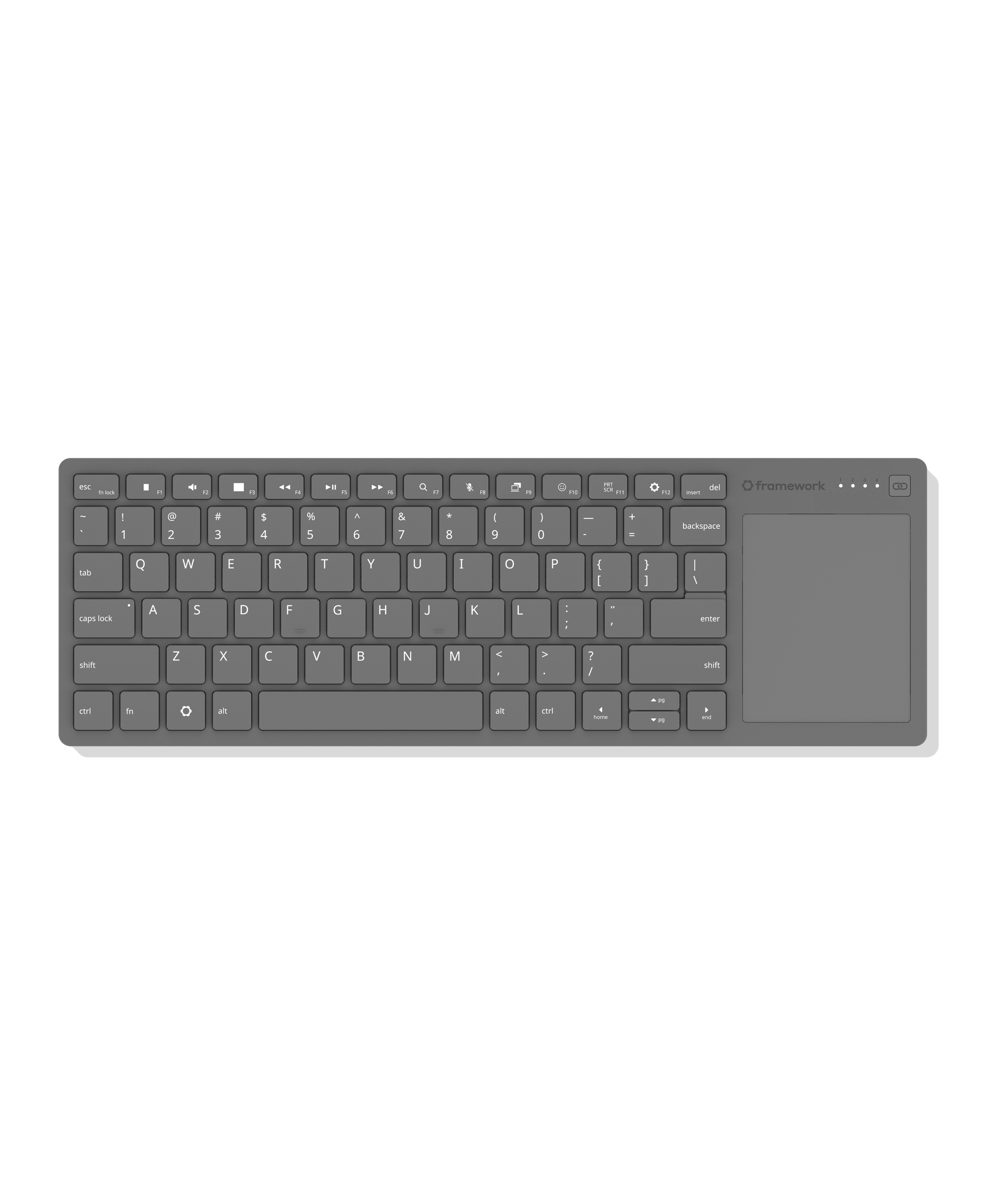
Finally, we’re excited to preview the Framework Wireless Touchpad Keyboard, a compact keyboard with integrated touchpad that is excellent for living room use, setting up computers, and mounting into sim rigs. As we were developing Framework Desktop and using it in these scenarios, we found that there was just one popular keyboard in this segment, and it was one that neither we nor the broader community particularly liked. We knew we could do better, and so we did! Our keyboard uses the same great-feeling mechanical key structure and touchpad architecture that we put in Framework Laptop 12. A highly power-efficient Nordic nRF54 radio and open source ZMK Firmware enable pairing four BLE and USB-A Dongle hosts along with wired USB-C connectivity. In addition to the dongle, which is storable in the back of the keyboard, we’re developing a USB-A Adapter Expansion Card that allows it to sit flush in a Framework Laptop or Desktop. We’re sharing this preview of Framework Wireless Touchpad Keyboard to give developers an early start on building around it. You can learn more about this in the blog post we published.

Six years in, we’re not only continuing to deliver on the original promise, we’re bringing it to an entirely new level. We wanted to prove that you can have products that are refined, robust, and high performance, that still respect your rights through repairability, upgradeability, and the power to choose the software you want to run on them. We’re confident we have achieved this, but more importantly, we’re excited to see if you agree!

13


Finally, a wireless keyboard with an integrated touchpad that you don’t hate.

Super slim and durable, it's ideal for HTPCs, sim rigs, and single-board computer setups, using the same keyboard and touchpad design as Framework Laptops.

Features a 68.8 × 85.6mm precision touchpad with multi-touch gesture support and 1.5mm key travel for a responsive typing experience. Connect via wired, Bluetooth, or USB-A dongle, and switch between up to four wireless devices. Compatible with the USB-A Adapter Expansion Card for added flexibility.

Powered by Nordic’s ultra-low-power nRF54L20 wireless SoC. Open-source CAD design and firmware based on ZMK Firmware allow for endless mod potential. The control board is available for purchase separately with breakout pinouts designed for DIY keyboard builds and custom projects.

Available later in the year

14
submitted 3 months ago* (last edited 3 months ago) by to c/framework@lemmy.ca


Hello, I have been using Framework 13 for 2 years now and this is the 3rd time I have to replace my screen. My screen is black partly with pixel lines etc. First time was 1.5 months after buying, second time was 6 months after the first one and this time is right after the waranty date.

I just want to ask how are your experience with your screen ? Is it a general issue or just me being unlucky, it has been a pretty rough month for me so far :-(

Thank you very much!

15
submitted 3 months ago by to c/framework@lemmy.ca


Hello all, hoping to get a little assistance on a hardware issue I'm having. I've got an older framework laptop (Batch 5, ~Nov. 2021), and recently it's been having issues powering on. Regardless of the laptop's charge, it will not power on unless it's plugged in. As soon as I past the POST, I can unplug it and it will continue on battery, but in order to get it to actually power on it needs to be plugged in.

Not sure what could be causing this, maybe just a weak battery? Battery health is at 84%. Looking forward to ya'lls thoughts. Thanks!

16
17


We’ve spent the last six years in Framework proving that it’s possible to build high-performance, thin, light computers that last longer and respect your rights through repairability, upgradeability, and customization. We’re happy to see repair rapidly becoming the norm rather than the exception, with even Apple of all companies embracing it on their latest notebook. I built this company specifically to reset and fix a broken industry. So, mission accomplished? Not quite. There is a very real scenario in which personal computing as we know it is dead.

Memory, storage, silicon, and everything related to it is being consumed at unprecedented levels in a “winner takes all” race to an AI-first world in which access to compute is metered by the token. It’s clear that the fundamentals of computing and electronics have changed. The computer in the cloud has increasingly greater economic output than the computer in the hand. This means that to the extent that there are constraints on the supply that feeds both, the cloud will win every time. We see this in the rapidly rising costs of silicon and all of the devices that depend on it, the shift from ownership to subscription, and the rise of closed black boxes over an open ecosystem. What does this all mean? The industry is asking you to own nothing and be happy. Computers are no longer a bicycle for the mind. They are becoming the self-driving car that takes you directly to the destination.

You might be reading all of this and thinking, is this a farewell letter to personal computing? Is this the end of Framework? No, this is a manifesto. No matter how inevitable the AI-takes-all scenario may sound, as long as there is a person in the world who still wants to own their means of computation, we will be here to build the hardware that enables it. That means computers that you can own at the deepest level and do what you want with, whether that is choosing your OS, modifying your hardware, or even just keeping your data and computation local rather than leased from the cloud. We won’t get there all at once, but we will always be fighting for a future where you can own everything and be free.

Every step we take and every product we ship serves that goal. With that, we’re happy to announce that we have our next live launch event coming on April 21st at 10:30am PT in San Francisco. During the event, we’ll be streaming our announcements live to the Framework YouTube channel. You can subscribe and get notified when the stream goes live. We can’t wait for you to see what we’ve been working on.

These products are for you, so we’re opening a batch of invitations to the Framework Community so you can meet the team and get hands on with our newest products. Having community members at our event last year was a lot of fun, and we can’t wait for you to join us alongside press and partners. If you’re a Framework fan and are in the San Francisco area (or are able to handle your own travel to us), you can apply to attend in this sign-up form. We expect we’ll see a lot more interest than we have available seats in our venue, so don’t wait to get your application in.

We have one other update for you ahead of our launch event, which is that our products are now available to ship to four additional countries: New Zealand, Norway, Switzerland, and Singapore. You can start ordering everything we have in-stock now, though you may want to wait until the 21st to see what we’re announcing!
For a hint at what we’ll be announcing, head to the event page.

18
19


Hardware vendor Framework has now become a KDE Patron, offering financial support to further push open source like the Plasma desktop. Framework join the likes of Google, Canonical, Blue Systems, Qt Group and others in supporting KDE directly.

20


Invidious mirror: https://yewtu.be/watch?v=uvYt1GgcsUI

Framework founder Nirav Patel heads to the Apple store to get the new Macbook Neo and takes it apart to see how it compares with our Framework Laptop 12. From repairability to design choices, this comparative teardown explores two very different, but overlapping approaches to building entry-level laptops.

  • 0:00 Intro
  • 0:44 Fit, Feel & Finish
  • 4:45 Teardown
  • 5:09 Opening It Up
  • 6:02 Internal Layout
  • 7:11 Mechanical Architecture
  • 8:42 Neo’s D Cover
  • 10:43 Battery
  • 13:00 Speakers
  • 15:18 Touchpad
  • 18:59 Mainboard
  • 24:19 Display
  • 27:45 Closing Thoughts

The observations in this video are based on publicly available information and physical inspection of the device. This video reflects our opinions and analysis and is not affiliated with or endorsed by Apple.

21


RAM price increases are slowing down, but it's still not a sign that costs will start stabilizing.

22


Work is underway by 9elements on porting Coreboot plus AMD openSIL to the first-generation Ryzen 7000 series Framework 16 laptop and is expected to be followed by a similar port to the Framework 13 Gen1 laptop too.

Alicja Michalska of 9elements shared the work-in-progress effort being done to get the Framework 16 Gen1 (Ryzen 7000 series models) up and running with Coreboot using the AMD openSIL CPU silicon initialization library. The plan is to follow-up with also porting Coreboot + openSIL for the Framework 13 laptop too with the similar Ryzen 7000 series AMD "Phoenix" SoCs.

23
submitted 5 months ago by to c/framework@lemmy.ca


We have a roundup of assorted announcements and updates for you today across every part of Framework. First, we’ve seen incredible progress over the last year in gaming on Linux. That spans ease of setup improvements, title compatibility, and also performance, where some titles at this point perform better than on Windows. We’ve published a deep dive blog post that goes into the current state of gaming on Linux and what distros we recommend checking out. Especially with memory and overall silicon pricing reaching unreasonable levels this year, a 32GB Framework Desktop running a distro like Bazzite ends up being a strong price to performance value for most games relative to pre-built Windows desktops or even DIYing a gaming rig.

Also on Framework Desktop, we’ve seen a ton of advancement in the maturity of the local machine learning use case, driven by both teams at AMD and efforts across the community with tools and frameworks like LMStudio and llama.cpp. The team at AMD just published a blog post digging into how to set-up a cluster of Framework Desktops to run colossal 1 trillion parameter models locally, letting you keep ownership of your data and privacy. We’re also starting to see a number of Framework Desktop users across the community playing with Openclaw to run autonomous agents locally, again with full control over data and privacy. The team at AMD is working on making this use case smoother, with documentation and blog posts coming soon.

We have a handful of community events coming up shortly. First, we have a livestream on our YouTube channel this Friday, February 27 at 2PM Pacific with our Director of Device Software, Kieran and our Founder and CEO, Nirav to talk through firmware, product architecture, open source software, and more. You can submit any questions you have ahead of time through the form here. We’ll also be at two events in the next few weeks. First, we’ll be at SCALE 23x, one of the largest Linux community conferences in the world, in Pasadena from March 6th through 8th at Exhibitor Hall B, #418. Next, we’ll be at Collabora’s booth at Embedded World in Nuremberg from March 10th through 12th at Hall 4, 4-404.

We have a few availability and product updates too. First, we’ve finally completed the massive number of pre-orders we received on Framework Desktop systems and Mainboards, and are now in-stock on all configurations. We’re also in stock on most configurations of Framework Laptop 12, Framework Laptop 13, and Framework Laptop 16, along with most items across the Framework Marketplace. Over the last few months we’ve accumulated enough B stock and return parts at our North America service center to bring back Mystery Boxes. These continue to sell out almost instantly each time we stock them, so we’ve slightly increased pricing from the last stocking.

Finally, we’ve seen some wild projects and products emerging from the Framework Community over the last few months. DockFrame is building a much requested accessory: a modular USB-C hub that leverages Framework Expansion Cards. We’re seeing the first projects come out of the One Key Module developer program too. One of the most impressive is HandyWork, a series of ergonomic keyboard layouts for Framework Laptop 16. If you’re working on a project using Framework parts or our open source CAD and code releases, we’d love to see it. Start a thread in our Creators & Developers forum or tag us in your social posts, and we’re happy to help provide feedback and visibility.

24


One of the most common questions we see about Linux is, “Can I game on Linux?“ The answer today is simple: Yes, absolutely! It’s not just possible, for many gamers it’s preferred.

There was a time when the idea of gaming on Linux was a pipedream, but today, a large portion of Windows games run on Linux right out of the box. At the time of writing, Valve has verified more than 25,000 titles as Playable on Linux through Steam alone. Combine the Steam numbers with Lutris for retro games and Heroic Launcher for Epic Games Store and GOG, and the catalog of available games to play on Linux is staggering and continues to grow.

At Framework, we work directly with Linux distribution maintainers to ensure our hardware delivers a smooth, reliable experience for users running Linux as their primary operating system. That includes users who expect strong gaming performance.

The State of Linux Gaming

Back in 2013, the gaming scene for Linux was limited to say the least, but then Valve changed everything when they brought Steam to Linux. This took Linux gaming from a few select games to a few thousand games, and game developers took notice. Then in 2018, Valve did it again, in collaboration with CodeWeavers, when they introduced Proton. Proton combines Wine with DXVK and VKD3D to translate DirectX into Vulkan. This combination brings improved DirectX 12 support, better shader compilation behavior, smooth support for most controllers, and more.

Now, most major AAA and indie titles are playable on Linux with minimal or without any setup. Compatibility databases like ProtonDB, tools like Heroic Launcher, Faugus Launcher, Lutris, and open graphics drivers have made Linux a viable, and for many users, preferable, platform for gaming.

Driver maturity has been equally important. The Linux platform has seen drastic improvements for drivers of all kinds and even more so with AMD & Intel hardware in particular. AMD & Intel provide their drivers in an open way with their implementations developed upstream and integrated directly into the Linux kernel alongside the open source Mesa drivers. Improvements arrive through normal system updates rather than through separate proprietary installers. All of this means that many games perform comparably, or better, to Windows and performance improvements land continuously through upstream driver updates.

Choosing a Linux distro for gaming

There’s not a single best distro that will be the best choice for everyone. What you want out of your system might be different from someone else and the hardware you choose comes into play as well. When it comes to Framework products, you’ve got a lot of flexibility in how you want to approach Linux, and that really comes down to what kind of experience you’re looking for. So we’ve made a breakdown of our recommended hardware and distro combinations. If your primary goal is gaming on Linux, pairing the right hardware with the right distribution matters. Below are the combinations we see delivering the most consistent results on Framework systems.

Framework Desktop

Framework Desktop systems are configured with modern AMD GPUs so they pair especially well with Fedora Linux based distros like Bazzite and Fedora itself as well as Arch Linux based distributions like EndeavourOS and CachyOS.

Fedora Linux is a solid choice as it stays current with kernel and Mesa updates, which matters for modern GPUs and Vulkan performance, and it aligns well with upstream development. If you want something more gaming-focused out of the box yet based on Fedora then there’s Bazzite & Nobara. Bazzite layers a gamer centric experience with an immutable-like atomic structure on top of Fedora with thoughtful defaults for gaming and controller use. Bazzite also offer a console style SteamOS-like setup if you want something for the living room. Nobara, also Fedora-based, includes additional patches and tweaks aimed specifically at gaming and content creation, reducing the number of manual steps needed to get up and running.

If you prefer a rolling release model with tight control over your system then you can consider some distros based on Arch Linux. Arch Linux is an outstanding distro but may not be ideal for most users as they intend it to be used by advanced Linux users. EndeavourOS offers a clean ready to go Arch-based experience without too much abstraction. CachyOS pushes even further with performance-tuned kernels and packages for users who want to experiment with squeezing out every bit of performance.

If you prefer Ubuntu, we recommend Ubuntu 25.10 or newer on the Framework Desktop to ensure solid support for the latest hardware, along with updated kernel and firmware integration. Starting with 25.10, hardware enablement, driver compatibility, and overall stability are in much better shape for modern gaming workloads on this platform.

Framework Laptop 16

For Framework Laptop 16, the distro conversation looks very similar to Framework Desktop, with one important layer on top: mobile thermals, hybrid graphics behavior, and power management. The good news is that everything that runs well on the Desktop translates cleanly to Laptop 16, whether you’re using the AMD GPU Module or configuring a build with NVIDIA graphics.

This means Fedora Linux, Bazzite, CachyOS, EndeavourOS, and Nobara all run well on Framework Laptop 16. Whether you choose AMD or NVIDIA graphics, you can expect the same level of compatibility and flexibility across these distributions without needing a different playbook. We also recommend Ubuntu 25.10 or newer for the Framework Laptop 16 to ensure solid support for the latest AMD and NVIDIA graphics stacks.

Framework Laptop 12

Framework Laptop 12 is not designed to be a high performance gaming machine, but that does not mean you cannot game on it. In fact on Linux it is a really nice fit for a certain class of games like indie titles, 2D games, retro emulation, strategy games, older AAA releases, and many esports titles at reduced settings can run well, especially with modern Mesa drivers and Proton continuing to improve performance. The open source graphics stack on Linux tends to scale efficiently on integrated GPUs, and lightweight desktop environments can help keep overhead low.

Framework Laptop 12 runs the same modern Linux distributions that work well on Framework Desktop and Framework Laptop 16, including Fedora, Bazzite, CachyOS, EndeavourOS, Nobara, and Ubuntu 25.10 or newer. While the performance envelope is different due to its integrated graphics and lower power design, the underlying compatibility story is the same, and you can expect a smooth experience across those distros.

Framework Laptop 13

The Framework Laptop 13 spans across multiple processor generations and two very different graphics architectures. The short version is that all of them can game on Linux, but the ceiling is quite different depending on which edition you’re looking at.

Starting with 11th Gen Intel, this was our first generation and it is the most limited from a gaming perspective. Intel Xe graphics from that era can handle indie titles, emulation, lighter esports games, and older AAA titles at reduced settings. On modern Linux kernels and Mesa versions, the experience is actually better than it was at launch, but you are still working within a modest GPU envelope. It is capable, just not high performance.

With 12th and 13th Gen Intel, CPU performance jumps significantly, and the newer Intel Xe graphics are more refined. On Linux, especially with up-to-date Mesa, you can comfortably run a wide range of indie games, many popular competitive titles at medium settings, and some modern AAA games with resolution and quality adjustments. It is a solid “work all day, game at night” setup, but still integrated graphics.

The big shift happens with Framework Laptop 13 AMD Ryzen 7040 Series. The RDNA3 integrated graphics in this generation are genuinely strong. On Linux, where the AMD open source driver stack is mature and well integrated, you can play many modern AAA titles at 1080p with tuned settings, along with excellent performance in esports and indie games. For an integrated GPU, it punches well above what people typically expect. If your goal is serious gaming without stepping up to a dedicated GPU, this is the edition that makes the most sense.

Starting with Intel Core Ultra Series 1, this is a noticeable step forward over prior Intel generations in both efficiency and graphics capability. The integrated Arc graphics are significantly stronger than older Xe parts, and on modern Linux kernels with up to date Mesa, performance is very respectable for an iGPU. Indie titles, esports games, and a good number of modern AAA games at tuned settings are very playable. Driver support has matured quickly upstream, and staying current with kernel and Mesa versions makes a real difference here. It is not a replacement for a discrete GPU, but it is the first Intel-based Framework Laptop 13 where gaming feels like a first class secondary workload instead of an afterthought.

With AMD Ryzen AI 300 Series, you are looking at the most capable integrated graphics we’ve shipped in the 13 inch form factor. The RDNA 3.5 graphics architecture combined with continued improvements in the open AMD Linux driver stack makes this a strong option for 1080p gaming with sensible settings. On Linux, AMD’s upstream model really pays off. You benefit from rapid Mesa and kernel improvements without needing proprietary driver layers. For users who want a thin and light machine that can handle development, content creation, and legitimately modern gaming without stepping up to Laptop 16, this is the edition that gives you the most headroom.

Across all editions, Linux support is solid with current kernels and Mesa, and tools like Proton continue to improve compatibility. The main difference is not whether you can game, but how demanding the games can be and how much graphical headroom you want. If gaming is a primary workload, AMD Ryzen AI 300 Series is the clear leader. If gaming is secondary to development, school, or work, the Intel editions are absolutely capable within their limits.

When it comes to our distro recommendations, you can expect solid support on the same distributions we mentioned previously including Fedora, Bazzite, CachyOS, EndeavourOS, Nobara, and Ubuntu 24.04 or newer. For the AMD Ryzen AI 300 Series specifically, we recommend Ubuntu 25.10 or newer to ensure the latest kernel, Mesa, and firmware support needed to get the best experience out of the updated graphics architecture.

Tools and Platforms That Make Gaming on Linux Work

One of the biggest improvements in Linux gaming over the past few years has been the ecosystem around it. Steam with Proton makes it possible to run a large portion of Windows games directly inside Steam with minimal setup, and ProtonDB helps you quickly check how a specific title performs in the real world. For non-Steam libraries, tools like Lutris, Heroic Games Launcher, and Faugus Launcher make it straightforward to manage games from Epic, GOG, and other storefronts without manually configuring compatibility layers.

On the performance side, GameMode can automatically optimize system behavior while you’re playing, and MangoHUD provides a lightweight overlay for monitoring FPS and hardware utilization while you tune settings. On Framework systems running current kernels and Mesa versions, these tools work reliably without requiring proprietary driver management or operating system level workarounds, making the overall experience cohesive and dependable.

Practical setup recommendations

If you are configuring a Framework system for Linux gaming, start by choosing a distribution that aligns with both your hardware and your comfort level with updates. Newer GPUs benefit from more recent kernels and Mesa releases, so staying reasonably current has a direct impact on performance and compatibility. When it comes to gaming through Steam, for a long time you had to manually enable Steam Play but that has changed so now Steam Play is automatically enabled for you by default so in some cases you can just press the green Play button. >
When launching newer titles, Proton Experimental can be helpful since it often carries fixes ahead of the main stable branch. It is also worth checking ProtonDB before purchasing a game to understand how it behaves on Linux and whether any specific launch options are recommended. A few minutes of preparation upfront usually translates into a much smoother experience once you hit play. A quick compatibility check and a habit of staying current with updates go a long way toward making gaming on Linux gaming smoother than you’d expect.

Looking ahead at the future of Linux gaming

The story of Linux gaming is not finished. With Proton continuing to improve compatibility and performance, and projects like SteamOS refining the console-like experience for the living room, the ecosystem is moving forward fast. I am especially excited about how open standards like Vulkan, Wayland, and open firmware initiatives are giving developers a more predictable stack to target.

When I am asked why I prefer Linux, I get excited and want to list every reason but ultimately, it comes down to the feeling of control you get when you know your system is truly yours. It's not just an operating system (or a kernel) but rather it's an experience that I enjoy using every day whether it’s for work or cookin’ in a few matches of Rocket League.

At Framework, we will keep listening to the community, keep building hardware that you can upgrade and explore, and keep working with distro teams to make sure gaming on Linux just feels good. There is work to do but the trajectory is clear. Linux gaming is not just viable, it is thriving and for many people, including myself, it is their favorite way to play.

If you are running a unique Linux gaming setup or have tips for Framework users who love Linux gaming, I would love to hear what you are running and what works for you.
25


Join our Director of Software, Kieran, for a livestream Q&A with our Founder and CEO, Nirav, as they discuss all things firmware and software at Framework. We’ll dive deep into open-source firmware and explore how we design and build for long-term longevity.

view more: next ›