An experimental PlayStation 5 emulator built in C# — PS5-faithful dashboard UI, native CPU execution, HLE syscall layer, and Vulkan rendering. Based on SharpEmu by par274. - Release CraziiEmu v0.27-alpha · craze1pirate/craziiEmu
[Note: This a WIP build. Crashes may occur]
Changelog:
Unity engine game 'New Super Lucky's Tale' now successfully progress past ELF/SELF loading and render their splash images.
Vastly improved Vulkan initialization and VideoOut implementation for better fullscreen presentation and swapchain management. Now games are forced to boot in Fullscreen mode (Press F11 to get back to windowed mode)
[Patched some work from SharpEmu] Optimized the Direct Execution backend, slashed runtime overhead, sped up module loading, and completely eliminated previous memory leak bottlenecks.
Restored and improved controller/keyboard mapping, alongside ongoing development of core kernel services (thread scheduling, memory management, and sync primitives).
Major overhaul to settings. Removed several unimplemented features that were present in previous build (Thought of adding it later but seems it is miles away to implement actually)
Known Bugs:
A known memory management issue prevents certain titles from launching successfully after the first execution. Restarting the emulator is currently required before attempting another launch (will be fixed in next build)
Certain Unity-based titles progress beyond ELF/SELF loading, module initialization, and Vulkan VideoOut initialization, but may enter repeated unresolved NID/HLE call loops. This results in excessive verbose logging, significantly increased log sizes, and eventual application termination (actively working on it for potential fix to boot).
I'm thinking of buying an AYN Thor soon but having second thoughts about it because I can't find any information about making instant save states when running programs like Citra. Can anyone confirm that the console supports save states like most desktop PC emulators can? Thanks.
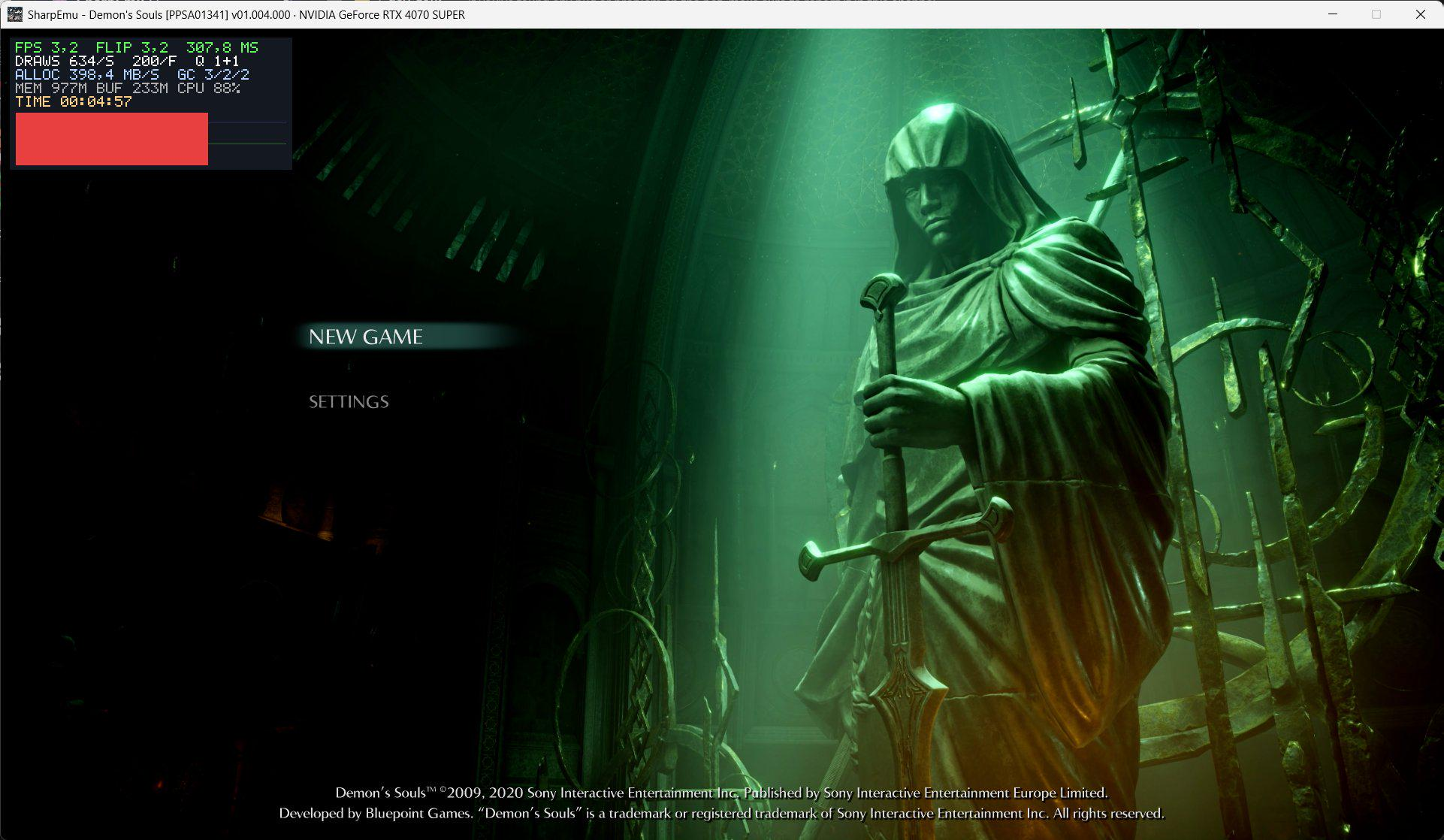
As tittle suggests, we got another open source PS5 emulator. Key differences are targeting games compatability and a cross-platform support: currently emulator supports and builds for MacOS, Windows and Linux. As I understand, this project also relays on Kyty, similarly to KytyPS5 fork.
Current progress includes loading Demon Souls up to it's menu ( image source)
In short, BLiNX: The Time Sweeper, Conker: Live and Reloaded, Crimson Skies: High Road to Revenge and Fuzion Frenzy were made available to "purchase" (likely a glorified rental considering Microsoft's history, thus the quotation marks).
But also saw someone commenting "will be interesting to see if they're native ports or if this is the emulation thing that was rumored", this rumor of which I am not familiar with.
Still, in the possibility of that, I ask, is it?
I don't have Win11 myself to check. But if someone's digging to do it, from my experience with the Microsoft Store on Win10, people may need to mount the Windows install as a file partition on Linux to see the files Microsoft Store installs, so it may be needed on Win11 too.
RPCS3 developers say the PlayStation 3 emulator may eventually run games without requiring users to install Sony’s PS3 system software. The project has now replaced another firmware component, called cellSysmodule, with code implemented directly in RPCS3.
In case anyone is wonder why progress on the emulator appears slow or feature requests feel ignored, we are currently still understaffed and have, in addition to new bugs reported every day that have to be fixed, a backlog of items on our internal TODO list such as:
EISA;
Turbo Button for XT PCs;
Emulation of the ESS Solo-1;
PD (Phase-change Dual) and DVD-RAM support;
IBM Expanded Memory Adapter (XMA);
Passthrough of real CD/DVD drives to the emulator on macOS;
Support for cloneCD and TOC CD-ROM image files;
Mitsumi CD-ROM emulation (it would also allow eventual emulation of the Tandy VIS).
In addition, we are currently in severe need of developers and/or maintainers for the following:
New dynamic recompiler;
macOS support;
Emulation of the NEC PC-98 family of computers;
A potential built-in non-GDBSTUB debugger to replace the current GDBSTUB implementation;
Our SDL backend;
The ImGui OSD;
The Qt UI.
We would also appreciate anyone who could help the fixing of issues that get reported to our GitHub or in our Discord server.
This issue: Behind the scenes with Castlevania: Symphony of the Night recompiled, and talking with the translator of a unique PS1 sim in English for the first time.
Sega Saturn emulator. Contribute to StrikerX3/Ymir development by creating an account on GitHub.
This is a small maintenance release that fixes a regression with Akumajou Dracula X (#904), improves autodetection of the Asia NTSC region (Korea and Taiwan), adds some missing theme colors introduced in recent ImGui updates, and corrects some documentation oversights. It also implements the VDP2 color gradation effect, fixing the background in Saturn Bomberman's Egg Birdon boss fight.
Changes
New features and improvements
GUI: Specify missing ImGui style colors.
System: Add Europe PAL and Asia NTSC (in that order) to default preferred regions after North America and Japan.
VDP2: Implemented color gradation effect. Fixes background in the Egg Birdon boss arena of Saturn Bomberman.
Sega Genesis / Sega CD / SNES / Master System / Game Gear emulator - Release v0.13.0 · jsgroth/jgenesis
ow with cheat code support for Sega systems, support for the XE-1 AP analog controller for Genesis, and lots of smaller fixes and improvements.
This release includes preliminary support for emulating the PC Engine / TurboGrafx-16, although the CD-ROM add-on is not yet supported so a huge chunk of the library doesn't work yet. All HuCard-based games should work, barring potential bugs.
Save states are not compatible with previous versions.
SUPER ZSNES - A GPU-powered SNES emulator rewritten from scratch with hi-res Mode 7, per-game enhancements, and a modernized classic UI.
What's new in v0.230:
Note: The PC version may trigger a false trojan warning in certain virus scanners. It's pretty common as emulators have a certain pattern in them that scanners find similar to how trojans sometimes work.
As many of you are aware, there have been longstanding issues with the redump.org site infrastructure. Basic features such as HTTPS have been missing and the project staff have been unable to address this due to the site being tightly controlled by an inactive administrator.
This has become increasingly untenable over the course of the past year, with major site outages and issues causing real concern that data could be permanently lost. Staff have made multiple attempts over several years to contact the redump.org admin to ask for these issues to be addressed, but all of these efforts have been either rebuffed or outright ignored. We believe that the work done here at Redump is very important for long-term preservation of data, which has necessitated this shift to ensure the project is successful for many years to come.
As a result, this year we decided to take the initiative and move to a new site, giving us a more solid and modern codebase to work from, and a more collaborative governance structure ensuring that major site decisions cannot be locked behind the availability of any single member of the team.
That site is now live at https://redump.info/ and as of today will be the official home of the Redump project. All of the existing data has been imported over and you may notice a number of immediate improvements, as well as some key changes to submission processes.
We have a Getting Started Guide on the wiki at (https://wiki.redump.info/Getting_Started_Guide) to answer some of your immediate questions and help you get started on submitting to the new site.
The Redump staff would like to thank all of you for your patience as we've worked through this process, and over the past few years in dealing with the difficulties presented by the old site. We ask for your continued patience as we get up and running, as it will take everyone some time to get fully up to speed. In particular, for the moment we ask that you keep a note of any feature requests you might have. We will soon be announcing an official process for submitting these, and we have many ideas of our own, but for now our focus is on making this transition as seamless as possible.
This marks an exciting new day for the Redump project and we're happy to have such an amazing community of contributors to this vital work. We look forward to you joining us in continuing that work as we move to this next stage in the project.
How to log in / register for the new site
if you already have an account on redump.org, go to https://forum.redump.info/, click Login and click "I forgot my password", follow the instructions.
The new site has none of the old restrictions regarding email providers, however initially you may find messages being marked as spam, so please make sure to check your spam/junk folders as well. If you have any issues or no longer have access to your original e-mail, please contact someone on the team for assistance. Thank you!
Game Boy (DMG-01) emulator written in C++17, featuring an interactive ImGui/SFML debugger. - Pratyush-gg/Simple-Boy
A cycle accurate, high performance Game Boy (DMG-01) emulator written in C++17. Built with modern software design patterns, a comprehensive interactive debugger, and fully optimized audio/graphics rendering using SFML and ImGui. Simple-Boy focuses on clean cycle accurate timing, precise hardware behavior (such as custom LCD timings and stack interrupt execution bounds), and automated test harness execution.
CPU: Complete emulation of the Sharp LR35902 CPU, featuring cycle-accurate instruction timings, correct interrupt boundaries, and stack-frame stack pointer validation.
PPU (Graphics): Pixel pipeline with correct timing for LCD status modes, scanline synchronization, sprites (OBJ rendering), background rendering, and window maps.
APU (Audio): Multi-channel audio engine emulating CH1 & CH2 (Square wave with sweep), CH3 (Custom Wave Pattern with retrigger safety), and CH4 (White Noise). Audio streams smoothly via an asynchronous ring-buffered SFML SoundStream.
Memory Mapper (MBC): Support for a wide variety of cartridges:
ROM Only
MBC1 (Bank switching, RAM enable)
MBC2 (Built in 512-nibble RAM)
MBC3 (RTC clock registers, RAM banking)
MBC5 (Up to 8MB ROM, RAM banking)
Battery-backed Save Support: Automatically saves and loads game battery RAM (saves as <rom_name>.sav or <rom_name>.battery in the ROM folder).
Automated Serial Outputs: Fully hooks the Game Boy link port ($FF01 and $FF02) to output test ROM text directly to your shell.