[–] 7 points 1 month ago (8 children)

What? I made a purchase from Epic instead of Steam since they didn't make the MENA currency change and as a result many older games are significantly cheaper on Epic in my country.

For example Celeste's base price on Epic is 66 cents in my country with no discount (currently on %75 discount) versus 10 USD with no sale and 2.5 USD currently on Steam.

  • source
  • [–] 1 point 1 month ago

    forgot to add this to my previous reply: if you configure the remote to put the PC to sleep instead of shutting down and allow waking up from USB devices, you might be able to wake your PC up with the remote. I can't do this because my remote uses Bluetooth low energy which I couldn't configure wake up for. And yes 2 of the PCs are ancient enough to use ATA instead of SATA probably, one has a Pentium T4300 and Intel GMA 3100. However I don't need 5 HTPCs lol.

    I am locked in the software space as I need something very specific that kodi could only partly satisfy and android tv could fully satisfy.

  • source
  • parent
  • context
  • [–] 0 points 1 month ago (2 children)

    My current setup is similar. the pc runs a custom build of android tv w/o google services, with the remote of the tv box. I already have checks notes 5 spare pcs, i just had no idea 2.4ghz remotes could be dirt cheap. The item you sent appears as 2 usd before taxes & shipment but doesn't ship to my location lol. Oh and every single one of the pcs have hdd, i'll need either a new ssd or use one of my flash drives with a live linux install as permanent is very slow from USB.

  • source
  • parent
  • context
  • [–] 0 points 2 months ago (4 children)

    Since there are a lot of comments here I want to ask this: we purchased a xiaomi tv stick (specs below) and a 15 year old intel pentium dual core w/ android runs circles around it with the exact same apps plus the PC has significantly more stable network connection. The stick's OS is old however not bloated and it even blocks google banner ads OOB. Did we get a very bad unit or are all of TV sticks / boxes unusably slow unless you get a shield or an apple tv?

    https://www.mi.com/us/product/mi-tv-stick/specs

  • source
  • [–] 0 points 2 months ago (1 child)

    Does it get better as it progresses? I dropped the game in Inazuma iirc part 3, might play until end of sumeru or fontaine (whichever is later) in a distant future just for finishing up what I started almost 2 yrs ago. Or wait till the story concludes then play the whole thing, if it ever actually concludes.

  • source
  • parent
  • context
  • [–] 0 points 2 months ago (1 child)

    It might not be the one you want, but you always get what you pay for. Similar concept to blind-box toys.

    With gachapon, you always “win,”

    Disagree with the 2nd point here. If you are playing genshin or whatever, spend real life money on pulls to get a specific character and instead get something else, you have effectively lost. What you got is not what you spent your money for and possible not or barely valuable.

  • source
  • parent
  • context
  •  

    I have 2 SIMs: The first one has only data and can't make calls, the second one can make calls but doesn't have any data. With the "backup calling" feature, I can make and receive calls over the cellular data of the first SIM if the second is offline. This is useful for me because my phone doesn't have dual SIM dual active so cellular data stops working if I am making a call. Backup calling requires the phone calls sim to have no signal which I can force by limiting the SIM to 5G. Obviously doing this is not ideal as the phone searches for 5G signal, can't find it and drains its battery quickly. The weird part is the phone supports 5G and so does the carrier, my account (?) doesn't support 5G because I don't have any plans on the SIM. Forcing 2G or 3G won't work, those are still available where I live.

    So is there a way to use backup calling without taking one of the SIMs offline? Or is there a way to take 1 SIM offline without making it search for an unavailable band? I don't want to lose cellular data each time I receive a call or drain my battery quickly. Phone is Galaxy A34 5G running Android 14, not rooted
     

    Long story short, I made a post in '23 August about my predictions for linux in the next 10 months. It has been more than 10 months I am here. Old post here: https://lemmy.world/post/3322139

    Here were my predictions:

    • Pop OS 24.04 will be awesome and be the go-to recommendation when it is released
    • SteamOS for PCs will not be released yet
    • Linux market share will be around %2-2.5 in Steam hardware survey
    • Plasma 6 will be released around January and will be a bit buggy, but most rough edges will be smoothed by the next release in 3-4 months
    • NVK will have performance parity with official drivers in certain configurations
    • Wayland will gain wider adoption, even on Nvidia
    • There will be little to no progress in compatibility with current anti-cheat blocked games
    • (bonus, not related to Linux) Web environment integrity will be adopted only in education industry because it is dominated by Chromebooks at least in US.

    And the results:

    • Pop OS 24.04 is still not here and even if it was I wouldn't recommend it to anyone yet because their custom DE is still cooking. (incorrect)
    • SteamOS is not released. (Correct)
    • Linux is exactly at %2 on Steam survey right now and was even higher before (Correct)
    • Plasma 6 is in a good shape (correct)
    • I haven't followed NVK development closely but afaik it doesn't offer performance parity at the moment. (incorrect)
    • 2024 has been a good year for Nvidia + Wayland :) (correct)
    • Ah, the anti cheats... <insert it's evolving but backwards meme here> (correct)
    • Web Environment Integrity is dead (incorrect) source: wikipedia

    So I got 5/8. Before you ask, no, the "decommision my PC" part didn't work out. That endeavour lasted only 1 and a half month. But I managed to isolate myself from Linux news.

    submitted 2 years ago* (last edited 2 years ago) by to c/selfhosted@lemmy.world
     

    Here is the past network setup:

    • Main Router (192.168.1.2) -> Ethernet Switch -> Multiple Ethernet cables connected to wall
    • Wall -> Second Router (192.168.1.1)
    • Wall -> PC

    After a blackout we thought the switch was no longer working so we replaced it with another router. The problem is the router has too few ports, not every room gets ethernet. The ethernet switch works in this configuration:

    • Main Router -> Third Router (Wi-Fi disabled) -> Ethernet cable connected to wall -> Wall -> Ethernet Splitter -> PC Under either of these configurations PC detects network but cannot reach 192.168.1.1, 192.168.1.2 or WWW:
    • Main Router -> Ethernet Switch -> PC
    • Main Router -> Ethernet Switch -> Ethernet cable connected to wall -> Wall -> PC

    Windows reports "Unidentified network", Linux tries to connect for a minute then fails. I knwo the PC isn't bad because other devices also fail to connect. Even if I set up a static IP I cannot reach a local IP. 2nd router has IP address 192.168.1.1 because it refuses to use anything else, first router is assigned different IP so these two don't conflict.

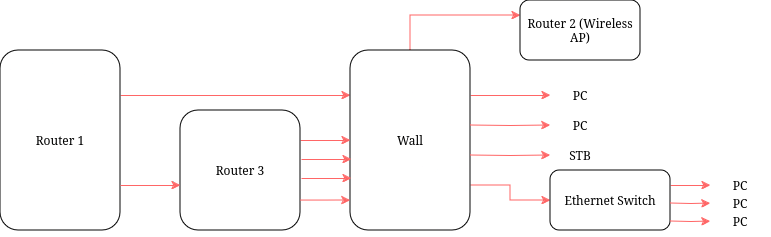
    Update: For testing I removed router 2, (the one I use as an extender / wireless AP) set router 1's IP address to 192.168.1.1. I tried connecting Router 1 to Router 3 (with DHCP disabled) and Router 3 (used as a switch) to PC via cables. It worked. Then I replaced Router 3 with the switch, network detected but no Internet. So even with the simplest possible setup and one DHCP server I had no network. My original problem was Router 3 had too few ports and not all rooms got Ethernet access. Router 3 is above Router 1 and connects to cables coming out from the wall that provide Ethernet to rooms. I recalled that WAN cable of Router 1 is too short so I cannot lift it to connect to cables, turns out that's not the case. So I lifted Router 1 and I could connect a cable to provide Ethernet for one more room which is what I needed. Routers 1 are 3 are held mid air with Ethernet cables. I previously mentioned that the switch works if it is connected to a wall plug in a room and it still works that way. Anyways here is the final setup:

     
    • Hardware: Intel Core i3-6100U, 8 GiB RAM, Intel HD 520
    • Software: Fedora Linux 40, Proton 8, Mesa 24.1.6
    • Game Settings: DX12, frame gen off, FSR, everything on low/off, 720p windowed with %100 resolution.

    Game did not start before renaming folder Engine/Plugins/Runtime/Nvidia. I was stuck at a black screen. I obviously did not expect good performance, I just wanted to see if I could run the benchmark.


    Installing OS, 10 years ago:

    Windows: click a couple of buttons enter username and password

    Linux: Terminal hacking, downloading shell scripts from github

    Installing OS today:

    Linux: click a couple of buttons, enter username and password

    Windows: Terminal hacking, downloading shell scripts from github.

    Link to video: https://m.youtube.com/watch?v=qKRmYW1D0S0


    My HP All-In-One 20-c081nt has the processor Intel Core i3-6100U, which is supposed to not run hotter than 100C. On Windows if 100C is reached, the screen will fade out and PC will immediately shutdown. A warning will be shown at next boot. On Linux, seen in the video, the PC will simply keep running as if nothing has happened and show the thermal shutdown warning after a graceful reboot.


    Long story short, this year is my exam preparation year and due to my nature I will take extreme measures to prevent distraction and focus on studying. I will decommision my PC, stop browsing Linux & tech related websites and leave this beautiful place called Lemmy. To make things clear, I am not influenced by anyone for doing this.

    I want to use this post as a time capsule to revisit after 10 months, so I will write my predictions and also collect everyone's. What do you expect to see in Linux and tech scene in 10 months from now? Here are my predictions:

    • Pop OS 24.04 will be awesome and be the go-to recommendation when it is released
    • SteamOS for PCs will not be released yet
    • Linux market share will be around %2-2.5 in Steam hardware survey
    • Plasma 6 will be released around January and will be a bit buggy, but most rough edges will be smoothed by the next release in 3-4 months
    • NVK will have performance parity with official drivers in certain configurations
    • Wayland will gain wider adoption, even on Nvidia
    • There will be little to no progress in compatibility with current anti-cheat blocked games

    Side note:

    • Web environment integrity will be adopted only in education industry because it is dominated by Chromebooks at least in US. It will not be adopted by streaming services because highest level of DRM is only available on Edge and Safari. Even if Chrome had WEI support it would be meaningless because Netflix will stream 720p / 1080p anyways. MSFT and Apple will not implement WEI in their browsers in order to preserve the end-to-end control they have currently. Banks will also not implement WEI because they may be still serving customers using legacy (Windows 7) technology or simply using Firefox.
     
    1. Download Firefox Nightly 115. The latest version has crackling audio. (118 at the time of writing) Here is a download link for aarch64: link
    2. Launch FF, tap 3 dots, settings, About Firefox Nightly, hammer the Firefox logo until debug options are enabled.
    3. In settings go to Customisation, set dark mode. Spotify doesn't support light mode so this will make it look nicer.
    4. In the address bar type about:config and hit the "+" icon.
    5. Set these parameters for new value:
    • Name: general.useragent.override
    • Type: String
    • Value: Mozilla/5.0 (X11; Linux x86_64; rv:115.0) Gecko/20100101 Firefox/115.0

    This step is necessary if you want to make a web app, otherwise you can use "request desktop website" option.

    1. In about:config, set this value to 1.0: layout.css.devPixelsPerPx
    2. Go to open.spotify.com and log in. You may need to change your device's orientation.
    3. Find the ideal value for layout.css.devPixelsPerPx. You can use float values like 1.22 and values lower than 1. Larger values will make everything bigger but the interface may not fit or the website may crash, smaller values will make everything tiny.
    4. Hit 3 dots and tap "Install".

    Here is how it looks like on my phone: https://imgur.com/a/CpiheUT


    I currently have 2 PCs which dual-boot from single drive:

    • W10+Garuda on UEFI
    • W10+Pop OS on previously CSM, now migrated to UEFI

    I have used dual boot for 2 years and Windows never decided to play the boss and override Linux. In fact, some Linux distros overwrote existing bootloader and put their own in my experience. I didn't have many problems and if I did, they were easy to fix. I even play Steam games from NTFS on both PCs. On the contrary, I heard many horror stories, dual booting is avoided and not recommended to newcomers by most users. How is your experience with dual booting Linux and Windows? Did Windows ever deleted Linux bootloader on updates for you?

    view more: next ›