[–] 4 points 10 months ago

I was looking for something similar and found an asset in the godot asset library called Font Auto Size Labels. (https://godotengine.org/asset-library/asset/2866) It only worked well at design time and not runtime so I abandoned the idea and stuck with regular labels and using elipses. But I bet if you examine how the asset works, you might be able to get it function at runtime or learn how it works and roll your own. Good luck!

  • source
  • [–] 2 points 10 months ago

    You can use Geometry2D to triangulate the polygon and then determine the area of each of the triangles from their points. I would do this in an editor script and put that results into a text file or maybe generate a dictionary and keep it directly in code.

  • source
  • [–] 2 points 11 months ago

    I played it for a few minites. It's pretty good for a first game. You didn't neglect sound, and there's a bit of dialog to add a "story" and a reason for what is going on. The art is nice too.

    I think a bit more polish for the projectile impacts would be nice. When I first managed to hit an astroid, nothing happened. Maybe make it flash or add impact particles with a sound so the player knows it had an effect.

    I did not like how the ship controlled, but that may just be me. I also wanted to be able to press a button to fire so I could time the shots.

    The powerups were good! And having an icon on the screen to indicate which is active was a nice touch. But I would ditch the dark panel behind them. If icon visibility is an issue, then make those icons more visible. Maybe add an outline to the icon themselves.

    Keep at it! You're off to a good start!

  • source
  • [–] 1 point 2 years ago

    I've thought about this problem creating a system to save game state. The issue with assigning a UUID works until you have dynamic scenes added to the game at runtime. The nodes in those scenes will all have the same UUID. In the end I ended up just using the paths and saving the fact that the scene that data is being saved for is dynamic. Then the system sees this and re-instances the scene and adds it back to the tree. (A slight adjustment to the path must be made as Godot will create nodes with the at (@) symbol in them, but you can't do that yourself.)

    You can see this in action at my demo repo on github.

  • source
  •  

    If you ever wanted to make a game using visibility masking like the classic horror survival game Darkwood, then this demo is for you! In the readme I go over how it works as well as some pitfalls I've found along the way.

    If you have any issues or feedback for the demo, please let me know. Thanks!
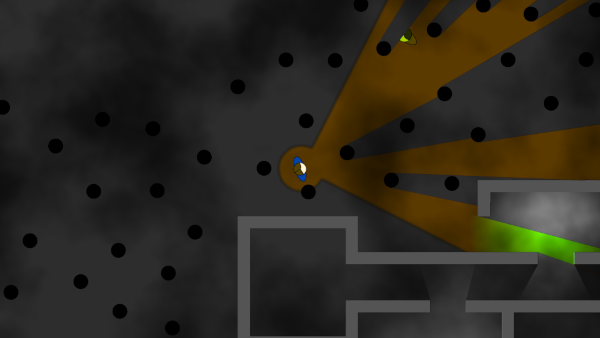
    Godot 4 Visibility Masking Demo on Github

    [–] 11 points 2 years ago

    GDQuest has some demos that may be applicable here. I've found four looking through the list at https://www.gdquest.com/tools/: Godot 2D Builder (simulation demo), Godot 2D Rhythm Game, 2D Space Game (top-down space mining demo), Godot 2D Platformer, and Godot Open RPG. Looking through their github some of these appear to only be Godot 3 though.

  • source
  • [–] 2 points 2 years ago

    So, it seems spawn_objects needs a reference to hexgrid? Then you can export a property in the spawn_objects script that takes a reference to hexgrid. And then from the map scene, you set that reference as it has both as children. In Godot 4 you can use "@export var hexgrid: HexGrid" (this assumes you give the hexgrid node script a class_name of HexGrid.) In Godot 3 I think there's a bit more to it as the export is "export var hexgrid:NodePath" (note no @ symbol in Godot 3) and then later you have to use the NodePath to get the node like this "onready var _hexgrid:HexGrid = get_node(hexgrid)" (note the onready here means the get_node call will happen just before the call to func _ready()) You could do the get_node call in func _ready(), but I like the onready better because it makes any code in the ready function that much simpler.

    That's just how I would do it given what I think I know. Now that you have these ideas, you can play with them and decide what you like best. Hope it helps!

  • source
  • parent
  • context
  • [–] 3 points 2 years ago (5 children)

    Signals are the same as events. It's just a different name. So, use signals to let other nodes/code know when something has happened (or is about to). It would only make sense to use a signal here if the values were changing and you wanted to let other nodes know about it. Like index_transform_changed(new_value).

    I'm not sure what the tiles are for, but they're probably part of a collection or board of some kind. I would make this board it's own scene and have the board manage things. It could also make available transforms and indexes to other nodes, but that seems like something that would be best encapsulated within the board node itself. Then have the board get references to the children is controls via get_node, or using the $ syntax, etc.

  • source