Yup, maar dan zonder verzekering, nummerplaat en met een frame en remmen die daar totaal niet op berekend zijn. De fatbiker mag blij zijn dat ze hem gestopt hebben voordat hij iemand aangereden heeft of onderuit gaat een onder een auto beland of zoiets.
Het zal niet helpen dat er beperkt budget is (en je er dus snel bij moet zijn) en dat de NS eigenlijk nooit dit soort beperkte sales heeft. Zelfs gewoon inloggen in de NS app werkt nu niet meer, hun infra kan duidelijk niet tegen pieken.
Ik vraag me ook af of dit wel echt zo'n goede aanbieding is voor veel mensen, weekend vrij kost al minder (€ 39,50/maand) en er is een grote kans dat als je een dagje weg gaat, ja alsnog ergens in de spits wil reizen.
Honestly the whole "change civ every age" change didn't feel that bad. However to me, every time they release a new civ game it feels like it is lacking civs. This time it was really bad with Hawaii being there on release and countries like the UK and the Ottomans only coming later in a a DLC. I might pick it up once I feel like I can play the countries I want to play.
*Of course I do understand they want to represent every region of the world, but it is just strange not to have some of the countries there that directed the world history for centuries. And even though we can now play as Great Britain, it does require you to buy an additional DLC for 5 euro's.
Yup although the creator claims to not want to post clickbait, one of the main issues of clickbait is a title that tells you in no way what the video is about, but does sound controversial enough so you want to know the content. And this video clearly manages to hit those goals. Just like the goal to not really talk about the topic for the first 2 minutes. It really just came down to "take things slow, don't move on to the next thing before your understand the thing you are learning now".
I guess it makes sense that it would be hard for the Chinese car companies to use the old factories that are not made for electric cars. It does sound good that they are considering manufacturing the cars here in Europe though. After having seen the self driving capabilities of Tesla, I do think it is a good thing that the European companies face some competition. Although I would eventually prefer to own such a system from an European company.
Het lijkt me goed om hier steun voor te vragen, ik vraag me alleen af hoeveel zin het nog heeft nadat de regering de zorgen van de tweede kamer op dit punt volledig lijkt te negeren. Het is zo raar dat we in deze tijd besluiten om zo'n overname goed te keuren. Je weet gewoon dat dit gebruikt kan worden in de toekomst om Nederland verder onder druk te zetten.
Last two weeks I have been playing a lot of Euro Truck Simulator 2, very relaxing game just driving trough the new maps (It looks so much better compared to when I bought it years ago). This weekend I also started playing Core Keeper, just a few hours in so far, but it seems like a fun underground survival game.
The game definitely has a lot of things to do yea. I'm looking forward to trying out the Dungeoneering rework they will release today.
Yup YouTube makes it very easy to receive money from adds and people that have YouTube premium. Having a YouTube premium subscription means that you are at least supporting the creator of every video that you watch a little bit (from what I can find 55% of what you pay is going to the creators). Yes YouTube takes quite a large cut, but video hosting in high quality costs a lot of money.
I think it will be very hard to do this on a decentralised platform. People don't trust just anyone with their money, so it could lead to people abandoning smaller servers and you can be sure that bad actors would pop up and try to abuse the system. And even if you do this the right way, you would have to build this system entirely before you can convince creators to move to this platform.
It will also be really hard to offer the same quality and reliability that YouTube offers, without taking a larger cut than the 45% that YouTube takes. Hosting a large video platform is expensive, and many of the Fediverse users are anti-adds and will run an add-blocker and maybe even sponsor-blocker.
On the touchscreen I can use pinch to zoom in browsers like Firefox and Microsoft Edge (I use it because Firefox doesn't have PWA support), it is also supported in apps like Gnome Maps and Kirta. In Krita I can even move and turn the canvas with two finger input, it seems moving and turning are both supported in GNOME.
Outside of apps, you can also use a three finger up gesture to go to the active app overview. And you can switch between the active workspace with a three finger swipe to the right or the left (this can make switching between applications really fast). Long press for right click seems to work in most places.
You can drag an app to the left or the right of the screen to make it fill up half of the screen, and drag it to the top to make it full screen.
I installed Fedora 40 with Gnome and Wayland a few days ago on my Surface pro gen 1 and have been very happy with the results so far. I do have a type cover and I do use it a lot and I use touch input instead of a mouse. Gnome supports most touch input, and that hasn't been an issue so far. Some third party applications don't understand what 'pinch to zoom' is though. The onscreen keyboard situation on Wayland seems to be a bit messy. I didn't really like the default gnome keyboard and I couldn't get a better keyboard to work (note that for me, it is also important that the OSK is disabled when the type cover is attached, so you won't have that issue).
The performance on the original Surface Pro is fine, I can even emulate Windows games trough Steam, I tried RuneScape (OldSchool and RuneScape 3) and Tunic. Browsing, reading Discord, watching videos all work fine. The main limitation when working with the device seems to be the 4 GB of RAM. So close other apps like the browser when starting a game, or the entire system can freeze. This seems to be mostly an issue when running multiple Electron based applications, gaming and compiling code.
The newer Surface devices have some Microsoft specific hardware that is not always well-supported by the kernel. If you have issues you can try the kernel made specifically for the Surface devices. https://github.com/linux-surface/linux-surface Personally I haven't tried it as everything just worked so far on my device (they do try to get their patches upstream, so that is probably the reason).
For drawing, I always used Adobe and Affinity software, I did try to get Affinity Photo installed, but I did not succeed yet. I tried both version 1 and 2.
Maybe we have some bias on this topic, but I had the same thought. Maven is such a well known tool in IT, that I'm surprised they just created a social network with the same name. Until they get a bit famous this won't be good for SEO.
cross-posted from: https://lemmy.ml/post/1390029
cross-posted from: https://popplesburger.hilciferous.nl/post/9969
After setting up my own Lemmy server, I've been intrigued by the server logs. I was surprised to see some search engines already start to crawl my instances despite it having very little content.
I've noticed that most requests seem to come in from IPv4 addresses, despite my server having both an IPv4 and an IPv6 address. This made me wonder.
IPv4 addresses are getting more scarce by the day and large parts of the world have to share an IPv4 address to get access to older websites. This often leads to unintended fallout, such as thousands of people getting blocked by an IP ban from a site admin that doesn't know any better, as well as anti-DDoS providers throwing up annoying CAPTCHA pages because of bad traffic coming from the shared IP address. Furthermore, hosting a Lemmy server of your own is impossible behind a shared IP address, so IPv6 is the only option.
IPv6 is the clear way forward. However, many people haven't configured IPv6 for their hosts. People running their own Lemmy instances behind an IPv6 address won't be able to federate with those servers, and that's a real shame.
Looking into it
So, I whipped up this quick Python script:
import requests
import sys
import socket
from progress.bar import Bar

lemmy_host = sys.argv[1]

site_request = requests.get(f"https://{lemmy_host}/api/v3/site").json()

hosts = site_request['federated_instances']['linked']

ipv4_only = []
ipv6_only = []
both = []
error = []

with Bar('Looking up hosts', max=len(hosts)) as bar:
    for host in hosts:
        host = host.strip()

        try:
            dns = socket.getaddrinfo(host, 443)
        except socket.gaierror:
            error.append(host)

        has_ipv4 = False
        has_ipv6 = False
        for entry in dns:
            (family, _, _, _, _) = entry

            if family == socket.AddressFamily.AF_INET:
                has_ipv4 = True
            elif family == socket.AddressFamily.AF_INET6:
                has_ipv6 = True

        if has_ipv4 and has_ipv6:
            both.append(host)
        elif has_ipv4:
            ipv4_only.append(host)
        elif has_ipv6:
            ipv6_only.append(host)
        else:
            error.append(host)

        bar.message = f"Looking up hosts (B:{len(both)} 4:{len(ipv4_only)} 6:{len(ipv6_only)} E:{len(error)})"
        bar.next()

print(f"Found {len(both)} hosts with both protocols, {len(ipv6_only)} hosts with IPv6 only, and {len(ipv4_only)} outdated hosts, failed to look up {len(error)} hosts")
This script fetches the instances a particular Lemmy server federates with (ignoring the blocked hosts) and then looks all of them up through DNS. It shows you the IPv4/IPv6 capabilities of the servers federating with your server.
I've run the script against a few popular servers and the results are in:
Results
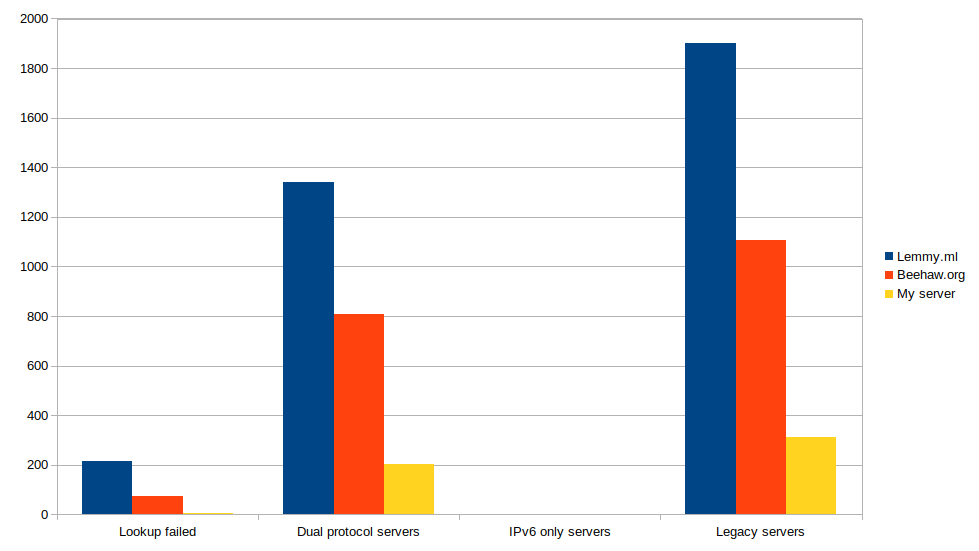
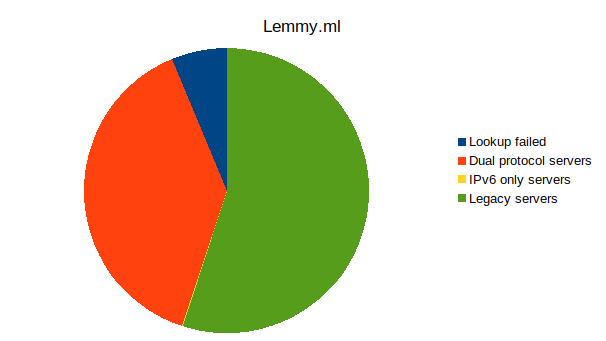
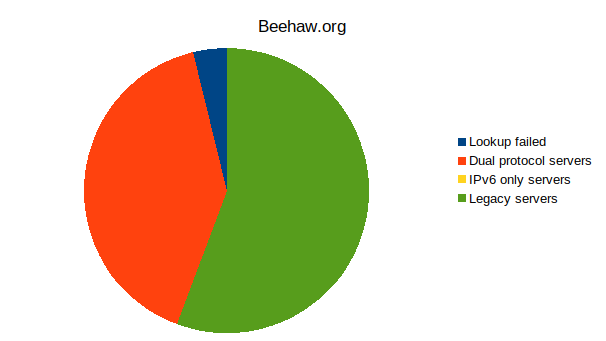
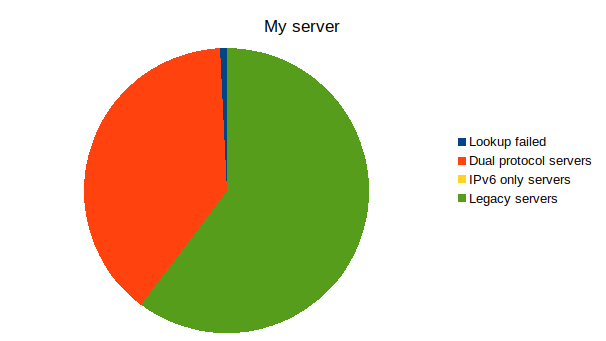
Server IPv6 + IPv4 IPv6 only IPv4 Error Total Lemmy.ml 1340 3 1903 215 3461 Beehaw.org 807 0 1105 74 1986 My server 202 0 312 4 518
It seems that over half (55%+) the servers on the Fediverse aren't reachable over IPv6!
I'm running my own server, what can I do?
Chances are you've already got an IPv6 address on your server. All you need to do is find out what it is (
ip address showin Linux), add an AAAA record in your DNS entries, and enable IPv6 in your web server of choice (i.e. listen [::]:443 in Nginx). Those running a firewall may need to allow traffic through IPv6 as well, but many modern firewalls treat whitelist entries the same these days.Some of you may be running servers on networks that haven't bothered implementing IPv6 yet. There are still ways to get IPv6 working!
Getting IPv6 through Tunnelbroker
If you've got a publicly reachable IPv4 address that can be pinged from outside, you can use Hurricane Electric's Tunnelbroker to get an IPv6 range, free of charge! You get up to five tunnels per account (each tunnel with a full /64 network) and a routed /48 network for larger installations, giving you up to 65k subnets to play with!
There are lots of guides out there, some for PfSense, some for Linux, some for Windows; there's probably one for your OS of choice.
Getting IPv6 behind CGNAT
Getting an IPv6 network through a tunnelbroker service behind CGNAT is (almost) impossible. Many ISPs that employ CGNAT already provide their customers with IPv6 networks, but some of them are particularly cheap, especially consumer ISPs.
It's still possible to get IPv6 into your network through a VPN, but for serving content you'll need a server with IPv6 access. You can get a free cloud server from various cloud providers to get started. An easy way forward may be to host your server in the cloud, but if you've got a powerful server at home, you can just use the free server for its networking capabilities.
Free servers are available from all kinds of providers, such as Amazon(free for a year), Azure(free for a year), Oracle(free without time limit). Alternatively, a dedicated VPS with IPv6 capabilities can be as cheap as $4-5 per month if you shop around.
You can install a VPN server on your cloud instance, like Wireguard, and that will allow you to use the cloud IPv6 address at home. Configure the VPN to assign an IPv6 address and to forward traffic, and you've got yourself an IPv6 capable server already!
There are guides online about how to set up such a system. This gist will give you the short version.
Final notes
It should be noted that this is a simple analysis based on server counts alone. Most people flock to only a few servers, so most Lemmy users should be able to access IPv6 servers. However, in terms of self hosting, these things can matter!
cross-posted from: https://lemmy.cat/post/6385
It is currently possible, through Lemmy's API, to create accounts automatically and without limit if verification by email address or captcha is not activated. I'd advise you to activate one or both of them NOW!
After registering x number of accounts (currently I could do thousands), all you have to do is list all the existing communities for each of the account to publishes one new post per community, or more. I'll leave you to picture the mess.
(I apologise to the administrators of sh.itjust.works, I should have done the test with my own server.)

view more:
next ›