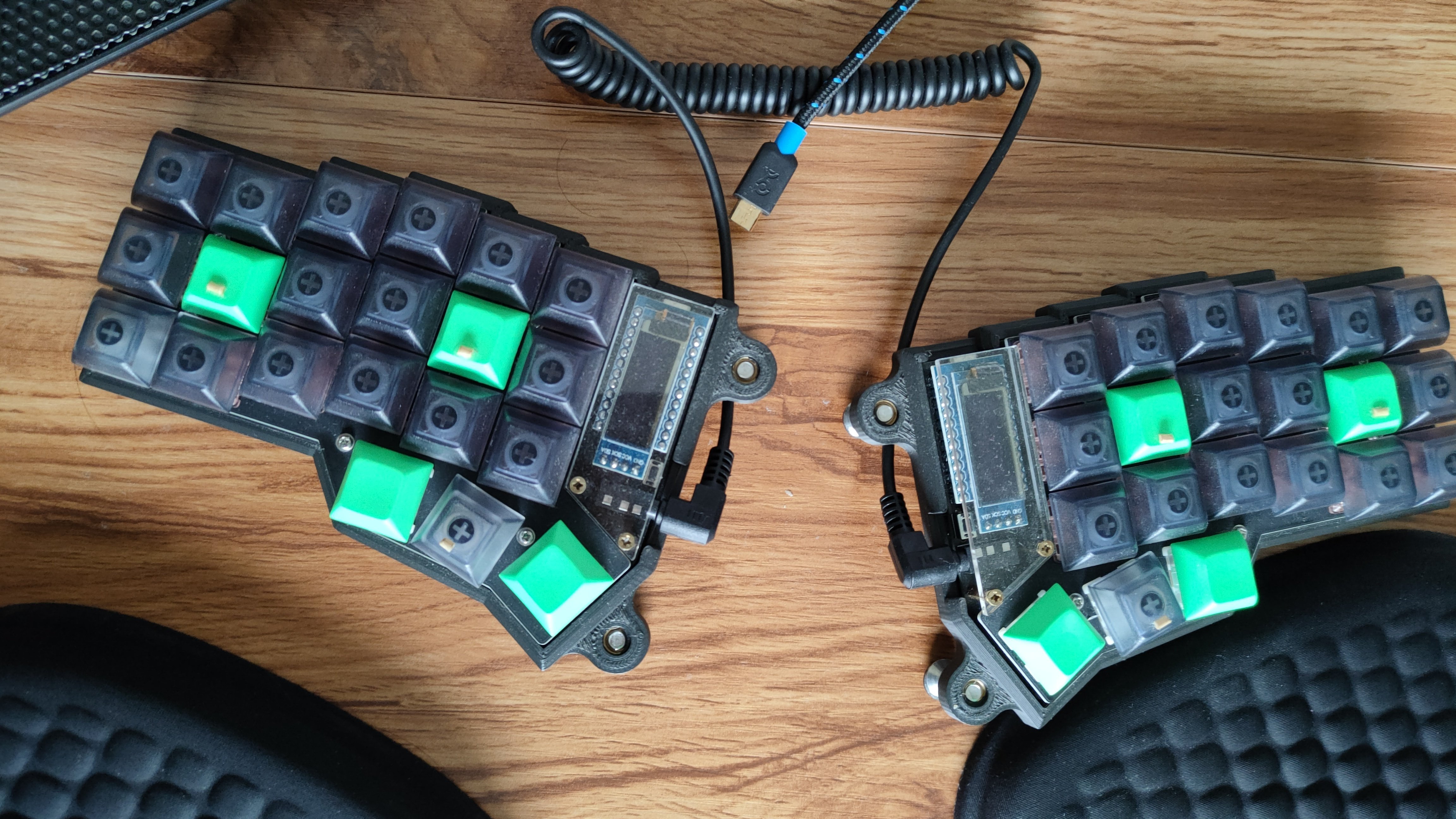
I'm typing this with my new ergo keeb right now. Holy fuck it is hard. I cannot seem to be able to hack my brain, I've spent 2 WEEKS desperately trying to learn the first SIX MOST FUCKIN COMMON LETTERS and I'm still completely unable to use them even remotely quickly or reliably. I am completely unable to even break the 70% confidence line on keybr on I,E,S and R despite hours of efforts. Worse, now my accuracy goes steadily down the toilet even if I slow down to a grind in an attempt to improve it.

I fuckin suck at this. It is despair and rage inducing. How the fuck do you manage to even learn new layouts?

I spent almost an hour typing this fuckin message.

But hey at least my keyboard looks awesome.

Edit: it seems using keybr is actually damaging my progress instead of helping. I'm switching to another tool.

Edit2: after a few days on monkeytype I'm up to 17 WPM and 91% accuracy in french, up from 4 WPM and almost negative accuracy. Not great BUT it's still a big win for me. I mostly know my layout now, except for the dev layer. I can only progress from now.

all 43 comments

sorted by: hot top controversial new old
[–] 25 points 2 years ago (1 child)

Do not try to type fast. Think about every keypress to get near 100% accuracy. And don't overdo it either, your brain needs to lay down new neural pathways, try to get enough sleep and, again, do not strive to get fast(er).

  • source
  • hideshow 2 child comments
  • [–] [S] 3 points 2 years ago (1 child)

    The thing is, I'm already super slow. 30 wpm with the 6 most common keys, less than prolly 5 wpm full keyboard.

  • source
  • parent
  • hideshow 2 child comments
  • [–] 5 points 2 years ago (1 child)

    You'll get better with practice. When I started with my Corne i was typing at 5-10 letters per minute the first week. After a month of practice I reached around 50 wpm, and hit a ceiling of ~90 wpm.

    Speed should be a metric, not a target. It should be a side effect of using a better keyboard, so don't focus on speed. Instead focus on accuracy, and learning exactly where each key is.

  • source
  • parent
  • hideshow 2 child comments
  • [+] 10 points 2 years ago* (last edited 1 year ago) (2 children)
  • [–] [S] 4 points 2 years ago (1 child)

    When learning Colemak I therefore switched to https://first20hours.github.io/keyzen-colemak for which exist many forks, probably also for your layout. Makes you type the letters, learning one after the other. If you mistype, it has you type the wrongly pressed and missed key repeatedly correct before it proceeds to the next letter.

    Wow thank you!! I was finally able to drill the entire keyboard after less than an hour and already feel a little less uncomfortable...

    I feel keybr is actually much more damaging than helpful. The keys that I drilled the most (I, S and R) are the ones I feel the least comfortable with. I keep mixing them up.

  • source
  • parent
  • hideshow 2 child comments
  • [–] 2 points 2 years ago

    Oh, that colemakclub one is more pleasant to use than colemak.academy which I used before. I'll also certainly check out they Keyzen one, there might be something to that as well.

  • source
  • parent
  • [+] 9 points 2 years ago* (last edited 1 year ago) (1 child)
  • [–] 6 points 2 years ago (1 child)

    Wow I love your arrow keys, that's brilliant

  • source
  • hideshow 2 child comments
  • [–] 5 points 2 years ago (1 child)

    I didn't use any training tools, I just forced myself to do the work that I normally do, using the ortholinear layout. I didn't try to type fast or brute force things, I went slow as hell and backspaced when I screwed up. I had to apologize to several coworkers and clients that were waiting on me to finish typing something, I just told them I was using a weird ergonomic keyboard and still getting the hang of it.

    But after a couple weeks I was just as fast on ortholinear as QWERTY.

    One thing that surprised me is that I don't really have a problem switching back to QWERTY, and then right back to ortholinear. I was expecting that to be a problem, but I'm happy that it's not.

  • source
  • hideshow 2 child comments
  • [–] 3 points 2 years ago (1 child)

    Ortholinear doesn’t necessarily mean not QWERTY though. I’m running an ortho QWERTY layout. I don’t really understand the appeal of breaking your brain for an entirely new layout tbh, but ortholinear just makes sense ergonomically.

  • source
  • parent
  • hideshow 2 child comments
  • [–] 4 points 2 years ago*

    I buy corne and at the same time I switch from query to colemak-hd and learn blind typing as well. First several days it was slow as hell. But I didn't rush myself. I tried to type with 100% accuracy so my brain is sure where every letter is placed. Humps are very helpful for this. I glue small wood pieces(from toothpick) to the key caps and my brain learn where to move my fingers for every letter. Accuracy is very important for this.

  • source
  • [–] 4 points 2 years ago

    Make an account on monkeytype and practice 1 hour a day. Look at the stats, you should improve in a week or two.

    When I switched layout first time (qwerty -> Colemak dh) it took me 2-3 weeks to learn it. Recently I switched again (canary) and it took me around a week of practicing around 2h a day to go to 60wmp English 1k. Then I just started using it at work.

    Now I'm switching to Piantor and it's difficult even without switching layout.

    I think you have to be patient and also keep track of your progress to motivate you.

  • source
  • [–] 3 points 2 years ago (1 child)

    What keyboard layout is this? I've never seen this layout before.

  • source
  • hideshow 2 child comments
  • [–] [S] 5 points 2 years ago (2 children)

    I called it the BYPOK layout 😅

    Basically heavily based on BÉPO (especially the home row and most of the top row), with a bit of Colemak sprinkled in, and a few letters shuffled based on frequency in both French and English (French taking precedence in case of conflict).

    Bépo's main limitation is that it requires at least a 60% sized keyboard. All French accented letters are directly accessible. That's near but not feasible with a smaller keyboard. So I kept É and À, which are very common, on the main layer and moved the other accented letters below their unaccented counterpart. It's mostly OK because these letters are quite infrequent anyway.

    Now that I'm starting to get used to it, it's not a bad layout at all. Some digraphs are a bit inefficient, but 99% of the time it seems fine.

  • source
  • parent
  • hideshow 4 child comments
  • [–] 1 point 2 years ago (1 child)

    Oh, so it is for typing in French?

  • source
  • parent
  • hideshow 2 child comments
  • [–] [S] 2 points 2 years ago (2 children)

    Yes. With some compromises made for English. I mostly type in English anyway, but communicate exclusively in French at work.

  • source
  • parent
  • hideshow 4 child comments
  • [–] 3 points 2 years ago (4 children)
  • [–] 2 points 2 years ago (1 child)

    only write on it from now on, and it will slowly but surely become second nature

  • source
  • hideshow 2 child comments
  • [–] 1 point 2 years ago

    Looks like your letters are all wonky

  • source
  • [–] 1 point 2 years ago (1 child)

    Bon courage à toi. Le modèle de clavier à un nom particulier?

  • source
  • hideshow 2 child comments
  • [–] [S] 1 point 2 years ago (1 child)

    Merci ! Déjà là ça va mieux même si je suis péniblement à 10-13WPM.

    Pas de nom particulier à part ErgoMechKeyboardV3 🤣

  • source
  • parent
  • hideshow 2 child comments
  • [–] 1 point 2 years ago (1 child)

    Après environ 3 semaine à l'utiliser au travail j'arrivais à écrire plutôt normalement. Et j'avais swtich en même temps au Colemak. À un moment t'a un déclic de surprise à te voir réussir sans y penser et c'est légendaire

  • source
  • parent
  • hideshow 2 child comments
  • [–] [S] 1 point 2 years ago

    Ça commence à marcher pour certaines lettres que j'arrive à taper sans réfléchir, la sensation est assez incroyable en effet 😅

    Pour l'instant quasiment chaque frappe est encore un effort conscient et délibéré, surtout après une erreur.

  • source
  • parent
  • [–] 1 point 2 years ago (1 child)

    This is what makes me skip over these cool looking custome keyboards since I started seeing them 5years ago. Only today did I see a really neat looking one with carbon fiber base that got me thinking.

    But nah...

  • source
  • hideshow 2 child comments
  • [–] [S] 1 point 2 years ago

    To be fair I wasn't using a good tool. Keybr is bad and actually harming progress. Instead of helping you learning your layout, it gets stuck on 1 or 2 letters indefinitely, never letting you progress because they're never good enough. I spent so much time on 3 letters that now I confuse them all the time, whereas other, almost unused letters are really solid.

    I'm done with the frustration now. I'm slow as fuck, but at least I kinda know my layout now and I can progress. I can be a fast learner, but for muscle memory stuff, I really suck. I could never learn touch typing because my hybrid technique is actually decent (~50-55 WPM 100% accuracy), so if I wanted to save my neck and my back in the long term, I needed a 'big bang'.

  • source
  • parent
  • [–] 0 points 2 years ago

    Why are you people doing this to yourselves. These are keyboards for masochists!

  • source