all 33 comments

sorted by: hot top controversial new old
[–] 60 points 2 years ago (5 children)
  • [–] 13 points 2 years ago* (last edited 2 years ago) (2 children)

    This is the best way. It's also the way the Shellcheck wants sometimes recommends.

  • source
  • parent
  • hideshow 4 child comments
  • [–] 8 points 2 years ago (1 child)

    @bloopernova As you mention it, here the links for anyone interested: Online tool https://www.shellcheck.net/ and you can install it locally too https://github.com/koalaman/shellcheck .

  • source
  • parent
  • hideshow 2 child comments
  • [–] 3 points 2 years ago (2 children)

    This has never stuck with me, and I hadn't thought about why until now. I have two reasons why I will always write ${x}_$y.z instead of ${x}_${y}.z:

    • Syntax highlighting and shellcheck have always caught the cases I need to add braces to prevent $x_ being expanded as ${x_}.
    • I write a lot of Zsh. In Zsh, braces are optional in way more cases. "$#array[3]" actually prints the length of the third item in array, rather than (Bash:) the number of positional parameters, then the string 'array[3]'.
  • source
  • parent
  • hideshow 4 child comments
  • [–] 1 point 2 years ago (1 child)

    I will always write ${x}_$y.z instead of ${x}_${y}.z:

    The difference between the two seems different to what's in the OP. Is there a typo here?

  • source
  • parent
  • hideshow 2 child comments
  • [–] 1 point 2 years ago

    in the OP

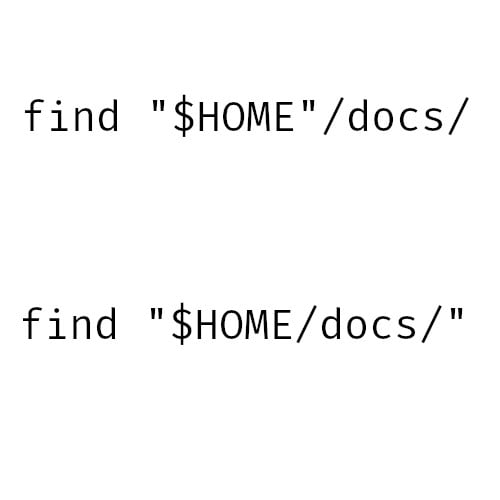
    My reply is to a commenter who said they prefer "${HOME}/docs" over both options in the original image ("$HOME/docs" or "$HOME"/docs). Many people prefer to always include braces around the parameter name out of consistency, instead of only when they are required.

    My comment explained why my habit is to only include braces when they are necessary.

  • source
  • parent
  • [–] 39 points 2 years ago (5 children)

    find “$(echo $HOME > variable_holder.txt && cat variable_holder.txt)/$(cat alphabet.txt | grep “d”) $(cat alphabet.txt | grep “o”)$(cat alphabet.txt | grep “c”)$(cat alphabet.txt | grep “s”)”

    This is the easiest method

  • source
  • hideshow 10 child comments
  • [–] 3 points 2 years ago* (last edited 2 years ago) (1 child)

    @ilega_dh You don't need cat in cases when grep "d" alphabet.txt can read from file too. Edit: But obviously your comment was more of a joke to over complicate it. So never mind then.

  • source
  • parent
  • hideshow 2 child comments
  • [–] 3 points 2 years ago (1 child)

    To be safe, should probably output grep to a file, then cat that.

  • source
  • parent
  • hideshow 2 child comments
  • [–] 1 point 2 years ago (3 children)

    What should I search to better understand what is written here? Don't mind learning myself, just looking for the correct keywords. Thanks!

  • source
  • parent
  • hideshow 6 child comments
  • [–] 17 points 2 years ago

    First one, then the other, then I forget the quotes, then I put them in single quotes by accident, then I utilize that "default value" colon syntax in case I'm missing HOME , then I just stick to ~ for the rest of the file.

  • source
  • [–] 6 points 2 years ago* (last edited 2 years ago)

    Typically find "$HOME/docs", but with a few caveats:

    • In Zsh or Fish, the quotes are unnecessary: find $HOME/docs

    • If I'm using anything potentially destructive: mv "${HOME:?}/bin" ...

    • Of course, if it's followed by a valid identifier character, I'll add braces: "${basename}_$num.txt"

  • source
  • [–] 5 points 2 years ago
    [+] 4 points 2 years ago* (last edited 2 years ago)
    [+] 1 point 2 years ago