top 50 comments

sorted by: hot top controversial new old
[–] 130 points 2 years ago (2 children)

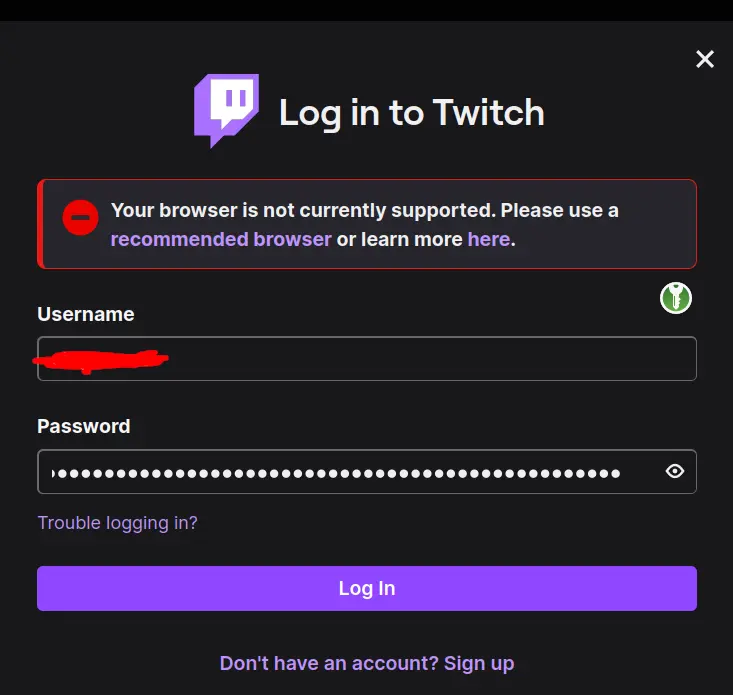
I really don't believe twitch is blocking Firefox. Check your add-ons, clear cookies, etc.

  • source
  • hideshow 4 child comments
  • [–] 4 points 2 years ago

    I've also had trouble logging into Twitch a few times over the last year on Firefox, but the same is true for Paypal. Both of them don't work in a private window without any addons either, and at least for Paypal changing the user agent didn't help. Twitch works fine If I'm already logged into Twitch, same with Paypal. Just the login fails for some reason.

    There's other payment options, and I seldomly watch streams anyway.

  • source
  • parent
  • [–] 84 points 2 years ago (1 child)

    Firefox is actually one of the recommended browsers, if you were to click on that link. Twitch just has some issues sometimes

  • source
  • hideshow 2 child comments
  • [–] 45 points 2 years ago* (1 child)

    I just logged in, no issues, probably check your extensions. Mine are minimal, includes uBlock, regular Firefox updated to latest.

  • source
  • hideshow 2 child comments
  • [–] 44 points 2 years ago* (last edited 2 years ago) (1 child)

    Differing experiences might mean that Twitch is performing A/B testing on blocking Firefox.

  • source
  • hideshow 2 child comments
  • [–] 16 points 2 years ago

    Usually it means that OP either uses a "hardened" fork, or did some messing around with about:config like resistFingerprinting, without understanding the ramnifications of such hardening on various web technologies that aren't primarily related to tracking/tracing.

  • source
  • parent
  • [–] 40 points 2 years ago* (1 child)

    Seems to be working OK for me on FF with Ublock and Privacy Badger running.

  • source
  • hideshow 1 child comment
  • load more comments (1 reply)
    [–] 25 points 2 years ago

    I had this come up when I was using a locked down version of FF.

    Basically what happened was the security settings were not allowing Twitch the access it required.

    Once I went through and allowed access it worked fine.

  • source
  • [–] 22 points 2 years ago

    Anecdotally, it's still working for me. Using uBlock Origin, logged in with a Twitch account.

    What does the "recommend browser" link point to? Is it this page, which lists Firefox as a supported browser? https://help.twitch.tv/s/article/supported-browsers?language=en_US

  • source
  • [–] 22 points 2 years ago* (2 children)

    You need to disable resist fingerprinting. It's annoying, but you can reenable it after you've logged in

  • source
  • hideshow 4 child comments
  • [–] 18 points 2 years ago*

    That's the solution if you immediately tried to login and it didn't work.

    Twitch login has in general very misleading error messages. The exact same message with unsupported browser also appears if you take too long to login

  • source
  • parent
  • [–] 22 points 2 years ago (2 children)

    Change user agent. Log in, opting to stay logged in for 30 days. Change user agent back.

    That's my routine with LibreWolf.

    I also believe they don't like a particular security setting present on FF based browsers, though I don't recall off the top of my head which one.

  • source
  • hideshow 3 child comments
  • [–] 8 points 2 years ago (3 children)

    Aite maybe this is a dumb question, but what is “changing the user agent”?

  • source
  • parent
  • hideshow 6 child comments
  • [–] 13 points 2 years ago (1 child)

    When your browser connects to a website, it will tell the webserver what type of browser you are using in the HTTP headers. This can be used for serving a special web page for browsers with quirks, or it can be used to block certain browsers.

    It may look something like this:

    User-Agent: Mozilla/5.0 (X11; Linux x86_64; rv:123.0) Gecko/20100101 Firefox/123.0
    

    But you can use an extension like this one to spoof your user agent and send out one that corresponds to a chromium browser.

  • source
  • parent
  • hideshow 2 child comments
  • load more comments (1 reply)
    [–] 20 points 2 years ago

    Stop using recommended when you mean required FFS.

  • source
  • [–] 19 points 2 years ago*

    This is a cookies/tracking issue, not a Firefox issue.

    If you set it to allow tracking, it will let you login, and you can disable tracking again after and it will remember you.

  • source
  • [–] 10 points 2 years ago (3 children)

    Now that is a long password lol

  • source
  • hideshow 5 child comments
  • [–] 5 points 2 years ago (1 child)

    Idk someone could probably brute force it in only a few trillion years, I'd make it longer if you plan to be using Twitch long-term.

  • source
  • parent
  • hideshow 2 child comments
  • load more comments (1 reply)
    [–] 9 points 2 years ago

    It was doing this to me a while back. Are you using a VPN or using an ad-blocker specifically for Twitch's embedded stream ads? (e.g. TTV-LOL-Pro) The latter work by using proxies and so I think trigger the same sort of effects. Disabled it and it worked fine. It also happened on a Chromium-based browser when I tested it out.

  • source
  • [–] 7 points 2 years ago

    When I got that message I just refreshed the page and tried logging in again and it worked.

  • source
  • [–] 7 points 2 years ago

    Everyone boo this service! BOOOOOOOOOOO!

  • source
  • [–] 6 points 2 years ago*

    As if I needed more reason to not go to Twitch. 😂

    But it actually works fine for me. Firefox beta 122.0, uBlock Origin and Consent-O-Matic installed.

  • source
  • [–] 6 points 2 years ago (1 child)

    Does it still let you sign in? I am currently signed in and it works

  • source
  • hideshow 1 child comment
  • load more comments (1 reply)
    [–] 3 points 2 years ago

    I had to disable an extension to log in last time I got this message. Alternatively, force refresh the page.

  • source
  • load more comments
    view more: next ›