▲ 51 ▼ How do you get the top bar? (www.home-assistant.io) submitted 2 years ago by sabreW4K3@lemmy.tf to c/homeassistant@lemmy.world 5 comments fedilink hide all child comments There's this picture on the home assistant front page with an epic top bar. How would one enable such a thing?
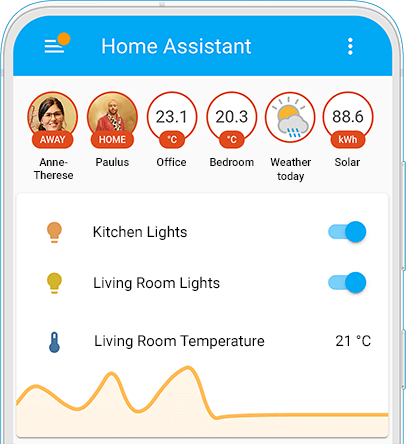
[–] CondorWonder@lemmy.ca 37 points 2 years ago (1 child) It’s called Badges - edit the dashboard page, then click on the edit button beside the tab. permalink fedilink source hideshow 2 child comments replies: [–] sabreW4K3@lemmy.tf [S] 8 points 2 years ago (1 child) Thank you! permalink fedilink source parent hideshow 2 child comments replies: [–] ThrustyRL@lemmy.world 2 points 2 years ago (2 children) Do either of you know what entity is being used for weather? I use openweathermap for my weather entities, but none of them provide a nice image of the weather like in the picture above permalink fedilink source parent hideshow 4 child comments replies: [–] CondorWonder@lemmy.ca 2 points 2 years ago Maybe a template sensor over the openweathermap_forecast_condition state? You can pretty easily have a template change its icon, and mdi: has all the icons built in. Here’s a template I use for current condition in a card, but it should work similarly for the forecast. Or works just need to be applied to the icon of a template sensor. {{ iif( is_state("weather.openweathermap", "partlycloudy"), "mdi:weather-partly-cloudy", iif(is_state("weather.openweathermap", "clear-night"), "mdi:weather-night", iif(is_state("weather.openweathermap", "exceptional"), "mdi:exclamation-thick", "mdi:weather-" + states("weather.openweathermap" )))) }} permalink fedilink source parent [–] sabreW4K3@lemmy.tf [S] 1 point 2 years ago If you go into your HA, open up the integrations panel and it should list all the entities permalink fedilink source parent
[–] sabreW4K3@lemmy.tf [S] 8 points 2 years ago (1 child) Thank you! permalink fedilink source parent hideshow 2 child comments replies: [–] ThrustyRL@lemmy.world 2 points 2 years ago (2 children) Do either of you know what entity is being used for weather? I use openweathermap for my weather entities, but none of them provide a nice image of the weather like in the picture above permalink fedilink source parent hideshow 4 child comments replies: [–] CondorWonder@lemmy.ca 2 points 2 years ago Maybe a template sensor over the openweathermap_forecast_condition state? You can pretty easily have a template change its icon, and mdi: has all the icons built in. Here’s a template I use for current condition in a card, but it should work similarly for the forecast. Or works just need to be applied to the icon of a template sensor. {{ iif( is_state("weather.openweathermap", "partlycloudy"), "mdi:weather-partly-cloudy", iif(is_state("weather.openweathermap", "clear-night"), "mdi:weather-night", iif(is_state("weather.openweathermap", "exceptional"), "mdi:exclamation-thick", "mdi:weather-" + states("weather.openweathermap" )))) }} permalink fedilink source parent [–] sabreW4K3@lemmy.tf [S] 1 point 2 years ago If you go into your HA, open up the integrations panel and it should list all the entities permalink fedilink source parent
[–] ThrustyRL@lemmy.world 2 points 2 years ago (2 children) Do either of you know what entity is being used for weather? I use openweathermap for my weather entities, but none of them provide a nice image of the weather like in the picture above permalink fedilink source parent hideshow 4 child comments replies: [–] CondorWonder@lemmy.ca 2 points 2 years ago Maybe a template sensor over the openweathermap_forecast_condition state? You can pretty easily have a template change its icon, and mdi: has all the icons built in. Here’s a template I use for current condition in a card, but it should work similarly for the forecast. Or works just need to be applied to the icon of a template sensor. {{ iif( is_state("weather.openweathermap", "partlycloudy"), "mdi:weather-partly-cloudy", iif(is_state("weather.openweathermap", "clear-night"), "mdi:weather-night", iif(is_state("weather.openweathermap", "exceptional"), "mdi:exclamation-thick", "mdi:weather-" + states("weather.openweathermap" )))) }} permalink fedilink source parent [–] sabreW4K3@lemmy.tf [S] 1 point 2 years ago If you go into your HA, open up the integrations panel and it should list all the entities permalink fedilink source parent
[–] CondorWonder@lemmy.ca 2 points 2 years ago Maybe a template sensor over the openweathermap_forecast_condition state? You can pretty easily have a template change its icon, and mdi: has all the icons built in. Here’s a template I use for current condition in a card, but it should work similarly for the forecast. Or works just need to be applied to the icon of a template sensor. {{ iif( is_state("weather.openweathermap", "partlycloudy"), "mdi:weather-partly-cloudy", iif(is_state("weather.openweathermap", "clear-night"), "mdi:weather-night", iif(is_state("weather.openweathermap", "exceptional"), "mdi:exclamation-thick", "mdi:weather-" + states("weather.openweathermap" )))) }} permalink fedilink source parent
[–] sabreW4K3@lemmy.tf [S] 1 point 2 years ago If you go into your HA, open up the integrations panel and it should list all the entities permalink fedilink source parent
all 5 comments