submitted 10 months ago* (last edited 10 months ago) by to c/rust@programming.dev
 

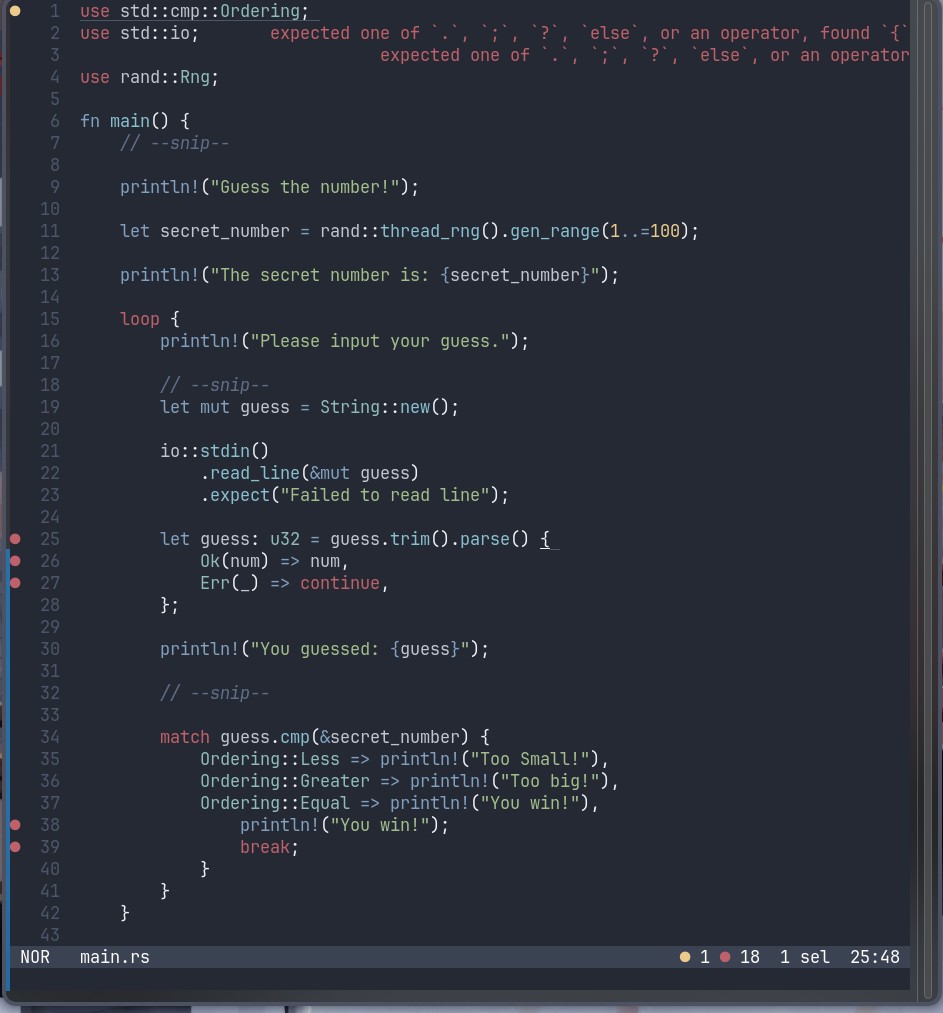
Why can't I open the thing it nags me about an operator but how is that relevant I'm just trying to open the thing
all 7 comments

sorted by: hot top controversial new old
[–] 9 points 10 months ago* (2 children)

You're missing a match after the = and before guess… on line 25.

The multiple statements on 37, 38, 39 after => also need to be enclosed in a {}.

Also, why is your error message all the way up on the top, far away from the error? Something seems misconfigured.

  • source
  • hideshow 4 child comments
  • [–] [S] 7 points 10 months ago* (2 children)

    Thank you're a lifesaver, IDK about the error message on the top didn't configure much except nord-night theme must be a bad design choice on helix's part

  • source
  • parent
  • hideshow 4 child comments
  • [–] 7 points 10 months ago

    fwiw if you do a cargo build you should be able to see the error messages in the correct context. If I replicate line 25 in a little test project and run cargo build I get

    error: expected one of `.`, `;`, `?`, `else`, or an operator, found `{`
     --> src/main.rs:4:43
      |
    4 |     let guess: u32 = guess.trim().parse() {
      |                                           ^ expected one of `.`, `;`, `?`, `else`, or an operator
    
    error: could not compile `unacceptable-rs` (bin "unacceptable-rs") due to 1 previous error
    

    If I try this with a blank helix config I don't get any of the text output from rust-analyzer at all, just the three dots indicating there's a problem there, so it's unlikely it's a bad design choice on helix's part.

  • source
  • parent
  • [–] 7 points 10 months ago (1 child)

    Inline diagnostics was implemented earlier this year, and is still not enabled by default (likely to prevent breaking existing configs). The changelog is from January of this year:

    https://helix-editor.com/news/release-25-01-highlights/

    You can set it up here, and is straightforward:

    https://docs.helix-editor.com/editor.html#editorinline-diagnostics-section

  • source
  • parent
  • hideshow 2 child comments
  • [–] 3 points 10 months ago*

    By default, the message on the top-right refers to the location of the cursor in Helix. Though, I don't see a selected line or the cursor itself, so, I'm a bit confused, too.

    From the bottom right, we know there is one selection and it's on 25:48, but lack of visual indication tripped me, too.

  • source
  • parent
  • [–] 3 points 10 months ago*

    You are missing a match keyword in line 25

  • source