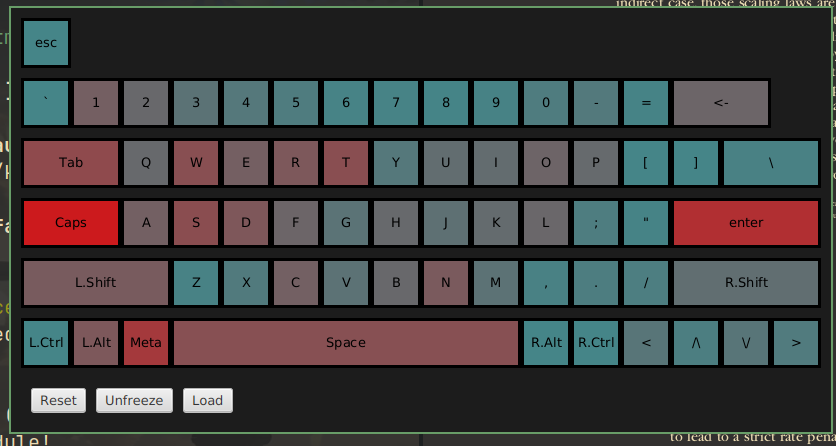
Have you ever wondered if your keyboard shortcuts are set up optimally? Well, I did, so I decided to visualize it with a heat-map.

It proved to me that I rely on my left pinky too much, so I'll try to rework my shortcuts.

You can check out the project here, currently it only works on Linux.
you are viewing a single comment's thread
view the rest of the comments
[–] 0 points 2 years ago (1 child)

What's the Meta key? Is that like the Super key?

  • source
  • hideshow 2 child comments
  • [–] [S] 0 points 2 years ago (1 child)

    I thought it meant the same, Meta/Super/Windows

    I saw these used in documentation interchangeably

  • source
  • parent
  • hideshow 2 child comments
  • [–] 1 point 2 years ago* (last edited 2 years ago) (1 child)

    Meta, Hyper, and Super were all originally different keys. See this lisp machine keyboard from in the 70s that had 7 modifiers, including all of those. Most of the time Hyper or Super are mapped to the Windows key. With Meta it varies more from program to program. A lot of desktop software maps it to the Windows key. In Emacs its usually mapped as Alt or the Esc key.

  • source
  • parent
  • hideshow 2 child comments
  • [–] [S] 0 points 2 years ago (1 child)

    Thank you for clarification!

    I don't really understand how can specific programs map the Meta key as something. Isn't it the job of the driver to map key-presses to input events (which are then passed to display server by evdev)?

  • source
  • parent
  • hideshow 2 child comments
  • [–] 1 point 2 years ago* (last edited 2 years ago)

    I'm not sure if it's directly mapping the input. I think it's getting the other keys input and binding it to the same commands. Also, Emacs was around even before the X windowing system, so they probably came up with the mappings before a lot of these common defaults came about.

  • source
  • parent