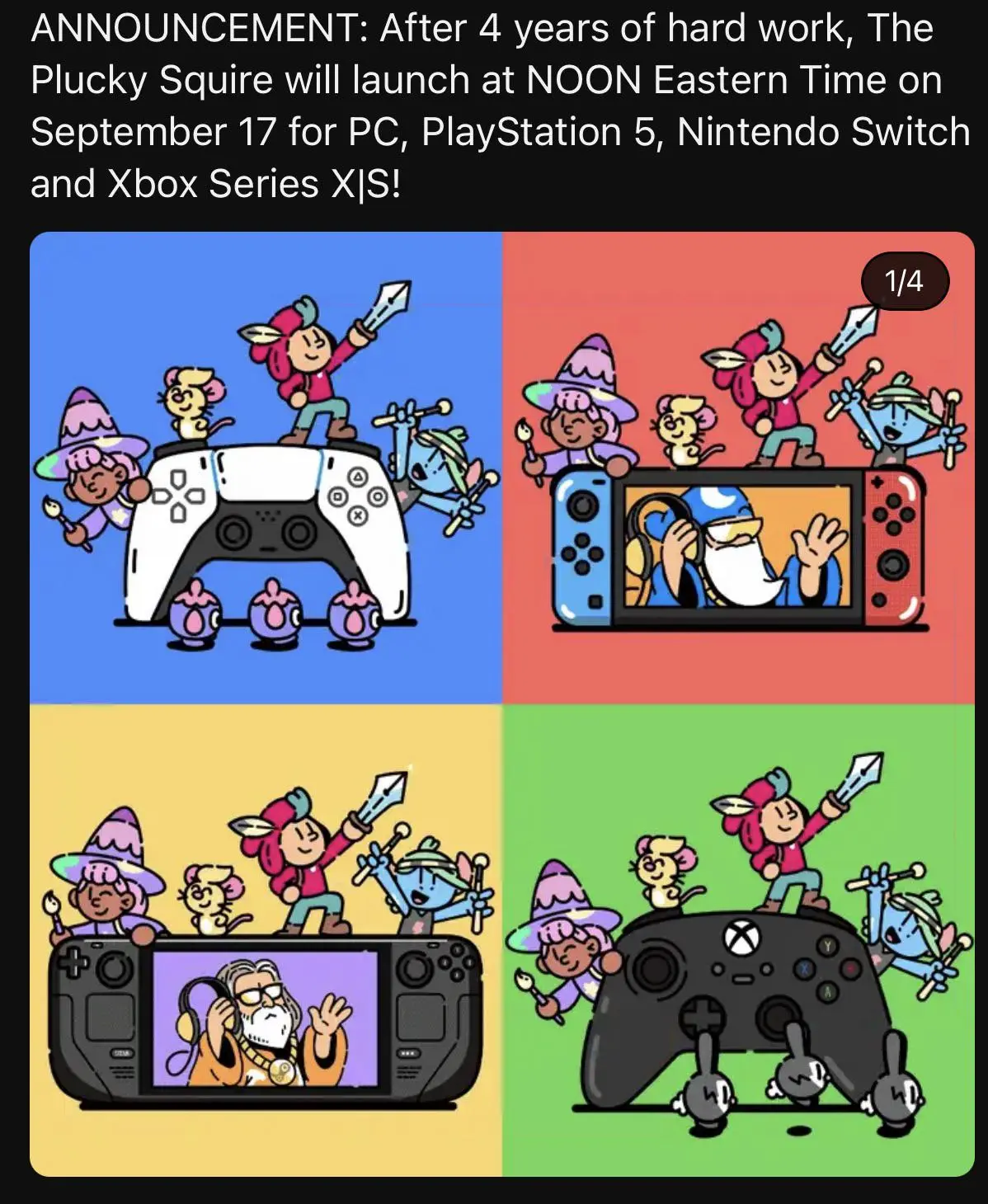
▲ 609 ▼ The Plucky Squire recently came out, and used the Steam Deck to represent PC (sopuli.xyz) submitted 2 years ago* by Fubarberry@sopuli.xyz [M] to c/steamdeck@sopuli.xyz 97 comments fedilink hide all child comments Here's a link to the game's store page And here's a link to their X post with the animated Steam Deck art.
[–] termain@programming.dev 3 points 2 years ago (1 child) What do you mean immutable? permalink fedilink source parent hideshow 2 child comments replies: [–] SeekPie@lemm.ee 7 points 2 years ago (1 child) SteamOS is immutable, so you can't install system-wide apps on there, only flatpaks, appimages etc. permalink fedilink source parent hideshow 2 child comments replies: [–] Fizz@lemmy.nz 8 points 2 years ago (3 children) You can install system wide apps by turning off immutabe mode and configurating something. I might be talking out my ass though cause I have done this but I don't remember if it persisted across updates. permalink fedilink source parent hideshow 6 child comments replies: [–] LucidNightmare@lemm.ee 6 points 2 years ago (2 children) You can for sure! It’s just I wouldn’t go around recommending that to just any person because they then might get a little crazy with the freedom, brick their Steam deck install, and then try to say that the Deck is a POS. Bad word of mouth is always a lot more damaging than spreading the good word that it’s a solid system. permalink fedilink source parent hideshow 4 child comments replies: [–] JohnEdwa@sopuli.xyz 6 points 2 years ago Good point. Though the deck actually keeps a backup. Updates are done to a second partition and if it fails to boot for some reason, it automatically rolls back to booting from the previous good installation. That's why it's really hard to completely brick the system. But also why with every update all the modifications you did are reverted. Not that big of a deal once you know about it though, I just have a script that installs and configures everything after each update. permalink fedilink source parent [–] Fizz@lemmy.nz 2 points 2 years ago (1 child) People should know its an option they can. Explore. Especially since this person was using it as a reason to call the steamdeck not a PC. permalink fedilink source parent hideshow 2 child comments replies: [–] LucidNightmare@lemm.ee 1 point 2 years ago I agree 100%! I just know that the average Joe doesn’t look at these things the same way we do. :/ permalink fedilink source parent [–] SeekPie@lemm.ee 5 points 2 years ago (IIRC) the changes are reverted after each update so you'd have to re-install every app. permalink fedilink source parent [–] Damage@slrpnk.net 5 points 2 years ago You don't need to turn off anything, you can install whatever package you want, but they'll be overwritten by some updates permalink fedilink source parent
[–] SeekPie@lemm.ee 7 points 2 years ago (1 child) SteamOS is immutable, so you can't install system-wide apps on there, only flatpaks, appimages etc. permalink fedilink source parent hideshow 2 child comments replies: [–] Fizz@lemmy.nz 8 points 2 years ago (3 children) You can install system wide apps by turning off immutabe mode and configurating something. I might be talking out my ass though cause I have done this but I don't remember if it persisted across updates. permalink fedilink source parent hideshow 6 child comments replies: [–] LucidNightmare@lemm.ee 6 points 2 years ago (2 children) You can for sure! It’s just I wouldn’t go around recommending that to just any person because they then might get a little crazy with the freedom, brick their Steam deck install, and then try to say that the Deck is a POS. Bad word of mouth is always a lot more damaging than spreading the good word that it’s a solid system. permalink fedilink source parent hideshow 4 child comments replies: [–] JohnEdwa@sopuli.xyz 6 points 2 years ago Good point. Though the deck actually keeps a backup. Updates are done to a second partition and if it fails to boot for some reason, it automatically rolls back to booting from the previous good installation. That's why it's really hard to completely brick the system. But also why with every update all the modifications you did are reverted. Not that big of a deal once you know about it though, I just have a script that installs and configures everything after each update. permalink fedilink source parent [–] Fizz@lemmy.nz 2 points 2 years ago (1 child) People should know its an option they can. Explore. Especially since this person was using it as a reason to call the steamdeck not a PC. permalink fedilink source parent hideshow 2 child comments replies: [–] LucidNightmare@lemm.ee 1 point 2 years ago I agree 100%! I just know that the average Joe doesn’t look at these things the same way we do. :/ permalink fedilink source parent [–] SeekPie@lemm.ee 5 points 2 years ago (IIRC) the changes are reverted after each update so you'd have to re-install every app. permalink fedilink source parent [–] Damage@slrpnk.net 5 points 2 years ago You don't need to turn off anything, you can install whatever package you want, but they'll be overwritten by some updates permalink fedilink source parent
[–] Fizz@lemmy.nz 8 points 2 years ago (3 children) You can install system wide apps by turning off immutabe mode and configurating something. I might be talking out my ass though cause I have done this but I don't remember if it persisted across updates. permalink fedilink source parent hideshow 6 child comments replies: [–] LucidNightmare@lemm.ee 6 points 2 years ago (2 children) You can for sure! It’s just I wouldn’t go around recommending that to just any person because they then might get a little crazy with the freedom, brick their Steam deck install, and then try to say that the Deck is a POS. Bad word of mouth is always a lot more damaging than spreading the good word that it’s a solid system. permalink fedilink source parent hideshow 4 child comments replies: [–] JohnEdwa@sopuli.xyz 6 points 2 years ago Good point. Though the deck actually keeps a backup. Updates are done to a second partition and if it fails to boot for some reason, it automatically rolls back to booting from the previous good installation. That's why it's really hard to completely brick the system. But also why with every update all the modifications you did are reverted. Not that big of a deal once you know about it though, I just have a script that installs and configures everything after each update. permalink fedilink source parent [–] Fizz@lemmy.nz 2 points 2 years ago (1 child) People should know its an option they can. Explore. Especially since this person was using it as a reason to call the steamdeck not a PC. permalink fedilink source parent hideshow 2 child comments replies: [–] LucidNightmare@lemm.ee 1 point 2 years ago I agree 100%! I just know that the average Joe doesn’t look at these things the same way we do. :/ permalink fedilink source parent [–] SeekPie@lemm.ee 5 points 2 years ago (IIRC) the changes are reverted after each update so you'd have to re-install every app. permalink fedilink source parent [–] Damage@slrpnk.net 5 points 2 years ago You don't need to turn off anything, you can install whatever package you want, but they'll be overwritten by some updates permalink fedilink source parent
[–] LucidNightmare@lemm.ee 6 points 2 years ago (2 children) You can for sure! It’s just I wouldn’t go around recommending that to just any person because they then might get a little crazy with the freedom, brick their Steam deck install, and then try to say that the Deck is a POS. Bad word of mouth is always a lot more damaging than spreading the good word that it’s a solid system. permalink fedilink source parent hideshow 4 child comments replies: [–] JohnEdwa@sopuli.xyz 6 points 2 years ago Good point. Though the deck actually keeps a backup. Updates are done to a second partition and if it fails to boot for some reason, it automatically rolls back to booting from the previous good installation. That's why it's really hard to completely brick the system. But also why with every update all the modifications you did are reverted. Not that big of a deal once you know about it though, I just have a script that installs and configures everything after each update. permalink fedilink source parent [–] Fizz@lemmy.nz 2 points 2 years ago (1 child) People should know its an option they can. Explore. Especially since this person was using it as a reason to call the steamdeck not a PC. permalink fedilink source parent hideshow 2 child comments replies: [–] LucidNightmare@lemm.ee 1 point 2 years ago I agree 100%! I just know that the average Joe doesn’t look at these things the same way we do. :/ permalink fedilink source parent
[–] JohnEdwa@sopuli.xyz 6 points 2 years ago Good point. Though the deck actually keeps a backup. Updates are done to a second partition and if it fails to boot for some reason, it automatically rolls back to booting from the previous good installation. That's why it's really hard to completely brick the system. But also why with every update all the modifications you did are reverted. Not that big of a deal once you know about it though, I just have a script that installs and configures everything after each update. permalink fedilink source parent
[–] Fizz@lemmy.nz 2 points 2 years ago (1 child) People should know its an option they can. Explore. Especially since this person was using it as a reason to call the steamdeck not a PC. permalink fedilink source parent hideshow 2 child comments replies: [–] LucidNightmare@lemm.ee 1 point 2 years ago I agree 100%! I just know that the average Joe doesn’t look at these things the same way we do. :/ permalink fedilink source parent
[–] LucidNightmare@lemm.ee 1 point 2 years ago I agree 100%! I just know that the average Joe doesn’t look at these things the same way we do. :/ permalink fedilink source parent
[–] SeekPie@lemm.ee 5 points 2 years ago (IIRC) the changes are reverted after each update so you'd have to re-install every app. permalink fedilink source parent
[–] Damage@slrpnk.net 5 points 2 years ago You don't need to turn off anything, you can install whatever package you want, but they'll be overwritten by some updates permalink fedilink source parent