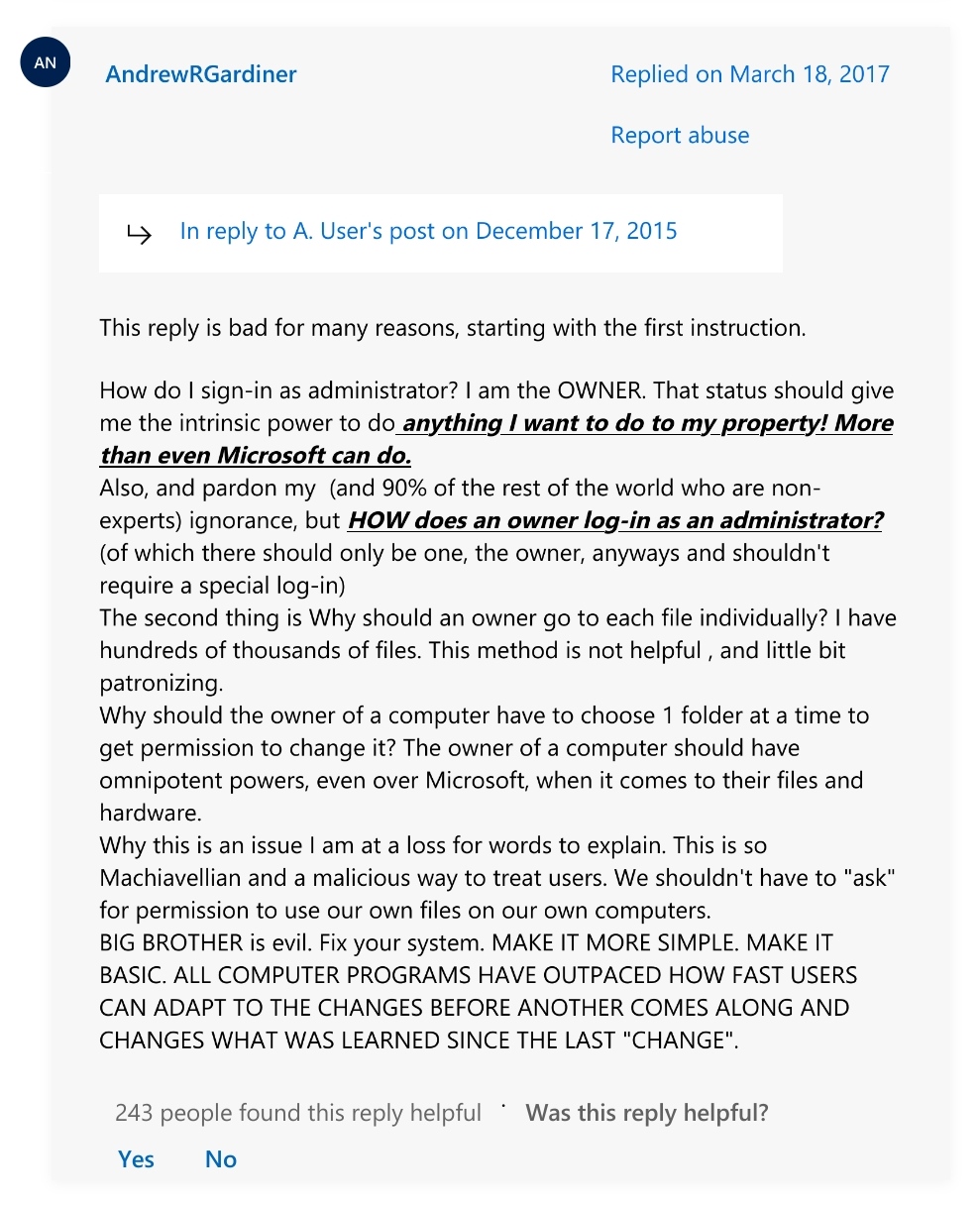
▲ 634 ▼ Andrew just wants to open his files on Windows 10 (programming.dev) submitted 2 years ago by starman@programming.dev to c/programmerhumor@lemmy.ml 147 comments fedilink hide all child comments https://answers.microsoft.com/en-us/windows/forum/all/windows-10-why-dont-i-have-permission-to-open-my/6f33e814-3cc6-4ce6-993c-dffcf1bb5b75
[+] Yearly1845@reddthat.com 26 points 2 years ago* (last edited 2 years ago) (1 child) [deleted] permalink fedilink source hideshow 2 child comments replies: [–] miridius@lemmy.world 10 points 2 years ago (2 children) Eh? On Linux you also aren't supposed to log in as root, and you also have to individually set file permissions. This issue is unrelated to windows, it's a safety feature that all modern desktop OSes have permalink fedilink source parent hideshow 4 child comments replies: [–] laughterlaughter@lemmy.world 17 points 2 years ago* (1 child) Yes, but on Linux, if I am root, I am God. I do whatever the fuck I want with my machine, for good, evil or stupidity. That's the poster's point. It seems like Windows doesn't allow you to do this, or at least not easily. So I guess people who want to have absolute control over their computer shouldn't be using Windows, I guess. permalink fedilink source parent hideshow 2 child comments replies: [–] miridius@lemmy.world 1 point 2 years ago I think windows is a pretty good middle ground. Yes it's annoying that you might need to install a 3rd party tool to give you a right click menu option to take ownership of any file/folder, but at least you can do that and it's easy. And for normies that don't have Linux-fu they'll get into a lot less trouble than if you give them Linux. MacOS on the other hand, if there's something Apple decided users are too dumb to be allowed to do (which it turns out, is a lot of stuff), then you just can't do it, period. permalink fedilink source parent [–] Lemzlez@lemmy.world 7 points 2 years ago (2 children) It’s quite common to login as admin on windows though (in home setups), you’ll still have to authenticate for administrative tasks (the UAC popups). The issue here is mostly that the user has probably upgraded and windows changed their account, resulting in the files being owned by their old account. In linux, that’s fixable with ‘sudo chmod -R’ In Windows, there’s no built-in way, you need the take ownership script. permalink fedilink source parent hideshow 4 child comments replies: [–] billgamesh@lemmy.ml 1 point 2 years ago (1 child) i mean, chown is just a binary. takeown is probably pretty similar, right? permalink fedilink source parent hideshow 2 child comments replies: [–] Lemzlez@lemmy.world 1 point 2 years ago Pretty much, yeah I assume the equivalent would just be ‘takeown /r ’ As far as I can tell it always uses the currently logged in user as target though permalink fedilink source parent [–] JoeDyrt57@lemmy.ml 1 point 2 years ago I am the installer and only user of my pc, but Windows neeeds other users. Note: Phil is USERS not ADMIN! Not even Authenticated Users. permalink fedilink source parent
[–] miridius@lemmy.world 10 points 2 years ago (2 children) Eh? On Linux you also aren't supposed to log in as root, and you also have to individually set file permissions. This issue is unrelated to windows, it's a safety feature that all modern desktop OSes have permalink fedilink source parent hideshow 4 child comments replies: [–] laughterlaughter@lemmy.world 17 points 2 years ago* (1 child) Yes, but on Linux, if I am root, I am God. I do whatever the fuck I want with my machine, for good, evil or stupidity. That's the poster's point. It seems like Windows doesn't allow you to do this, or at least not easily. So I guess people who want to have absolute control over their computer shouldn't be using Windows, I guess. permalink fedilink source parent hideshow 2 child comments replies: [–] miridius@lemmy.world 1 point 2 years ago I think windows is a pretty good middle ground. Yes it's annoying that you might need to install a 3rd party tool to give you a right click menu option to take ownership of any file/folder, but at least you can do that and it's easy. And for normies that don't have Linux-fu they'll get into a lot less trouble than if you give them Linux. MacOS on the other hand, if there's something Apple decided users are too dumb to be allowed to do (which it turns out, is a lot of stuff), then you just can't do it, period. permalink fedilink source parent [–] Lemzlez@lemmy.world 7 points 2 years ago (2 children) It’s quite common to login as admin on windows though (in home setups), you’ll still have to authenticate for administrative tasks (the UAC popups). The issue here is mostly that the user has probably upgraded and windows changed their account, resulting in the files being owned by their old account. In linux, that’s fixable with ‘sudo chmod -R’ In Windows, there’s no built-in way, you need the take ownership script. permalink fedilink source parent hideshow 4 child comments replies: [–] billgamesh@lemmy.ml 1 point 2 years ago (1 child) i mean, chown is just a binary. takeown is probably pretty similar, right? permalink fedilink source parent hideshow 2 child comments replies: [–] Lemzlez@lemmy.world 1 point 2 years ago Pretty much, yeah I assume the equivalent would just be ‘takeown /r ’ As far as I can tell it always uses the currently logged in user as target though permalink fedilink source parent [–] JoeDyrt57@lemmy.ml 1 point 2 years ago I am the installer and only user of my pc, but Windows neeeds other users. Note: Phil is USERS not ADMIN! Not even Authenticated Users. permalink fedilink source parent
[–] laughterlaughter@lemmy.world 17 points 2 years ago* (1 child) Yes, but on Linux, if I am root, I am God. I do whatever the fuck I want with my machine, for good, evil or stupidity. That's the poster's point. It seems like Windows doesn't allow you to do this, or at least not easily. So I guess people who want to have absolute control over their computer shouldn't be using Windows, I guess. permalink fedilink source parent hideshow 2 child comments replies: [–] miridius@lemmy.world 1 point 2 years ago I think windows is a pretty good middle ground. Yes it's annoying that you might need to install a 3rd party tool to give you a right click menu option to take ownership of any file/folder, but at least you can do that and it's easy. And for normies that don't have Linux-fu they'll get into a lot less trouble than if you give them Linux. MacOS on the other hand, if there's something Apple decided users are too dumb to be allowed to do (which it turns out, is a lot of stuff), then you just can't do it, period. permalink fedilink source parent
[–] miridius@lemmy.world 1 point 2 years ago I think windows is a pretty good middle ground. Yes it's annoying that you might need to install a 3rd party tool to give you a right click menu option to take ownership of any file/folder, but at least you can do that and it's easy. And for normies that don't have Linux-fu they'll get into a lot less trouble than if you give them Linux. MacOS on the other hand, if there's something Apple decided users are too dumb to be allowed to do (which it turns out, is a lot of stuff), then you just can't do it, period. permalink fedilink source parent
[–] Lemzlez@lemmy.world 7 points 2 years ago (2 children) It’s quite common to login as admin on windows though (in home setups), you’ll still have to authenticate for administrative tasks (the UAC popups). The issue here is mostly that the user has probably upgraded and windows changed their account, resulting in the files being owned by their old account. In linux, that’s fixable with ‘sudo chmod -R’ In Windows, there’s no built-in way, you need the take ownership script. permalink fedilink source parent hideshow 4 child comments replies: [–] billgamesh@lemmy.ml 1 point 2 years ago (1 child) i mean, chown is just a binary. takeown is probably pretty similar, right? permalink fedilink source parent hideshow 2 child comments replies: [–] Lemzlez@lemmy.world 1 point 2 years ago Pretty much, yeah I assume the equivalent would just be ‘takeown /r ’ As far as I can tell it always uses the currently logged in user as target though permalink fedilink source parent [–] JoeDyrt57@lemmy.ml 1 point 2 years ago I am the installer and only user of my pc, but Windows neeeds other users. Note: Phil is USERS not ADMIN! Not even Authenticated Users. permalink fedilink source parent
[–] billgamesh@lemmy.ml 1 point 2 years ago (1 child) i mean, chown is just a binary. takeown is probably pretty similar, right? permalink fedilink source parent hideshow 2 child comments replies: [–] Lemzlez@lemmy.world 1 point 2 years ago Pretty much, yeah I assume the equivalent would just be ‘takeown /r ’ As far as I can tell it always uses the currently logged in user as target though permalink fedilink source parent
[–] Lemzlez@lemmy.world 1 point 2 years ago Pretty much, yeah I assume the equivalent would just be ‘takeown /r ’ As far as I can tell it always uses the currently logged in user as target though permalink fedilink source parent
[–] JoeDyrt57@lemmy.ml 1 point 2 years ago I am the installer and only user of my pc, but Windows neeeds other users. Note: Phil is USERS not ADMIN! Not even Authenticated Users. permalink fedilink source parent