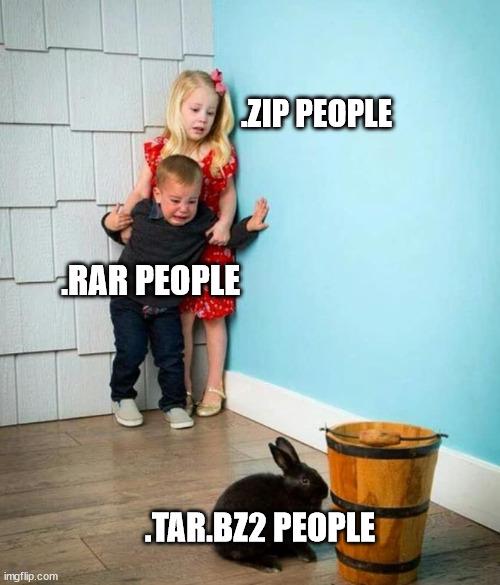
▲ 938 ▼ the fear of missing out a better compression (lemmy.world) submitted 2 years ago by Krafting@lemmy.world to c/linuxmemes@lemmy.world 191 comments fedilink hide all child comments Source - Posted with Reddy
[–] eager_eagle@lemmy.world 14 points 2 years ago* (4 children) I use the command line every day, but can't be bothered with all the compression options of tar and company. zip -r thing.zip things/ and unzip thing.zip are temptingly more straightforward. Need more compression? zip -r -9 thing.zip things/. Need a faster option? Use a smaller digit. permalink fedilink source hideshow 8 child comments replies: [–] lseif@sopuli.xyz 20 points 2 years ago (1 child) "yes i would love to tar -xvjpf my files" -- statement dreamed up by the utterly insane permalink fedilink source parent hideshow 2 child comments replies: [–] programmer_belch@lemmy.dbzer0.com 2 points 2 years ago Present, I'm the tar cvJf insane permalink fedilink source parent [–] janAkali@lemmy.one 15 points 2 years ago* Zip is fine (I prefer 7z), until you want to preserve attributes like ownership and read/write/execute rights. Some zip programs support saving unix attributes, other - do not. So when you download a zip file from the internet - it's always a gamble. Tar + gzip/bz2/xz is more Linux-friendly in that regard. Also, zip compresses each file separately and then collects all of them in one archive. Tar collects all the files first, then you compress the tarball into an archive, which is more efficient and produces smaller size. permalink fedilink source parent [–] UniversalFlamingo@lemmy.world 14 points 2 years ago (2 children) tar czf thing.tgz things/ tar xzf thing.tgz permalink fedilink source parent hideshow 4 child comments replies: [–] eager_eagle@lemmy.world 9 points 2 years ago (1 child) yes, and you still need zhe mnemonics permalink fedilink source parent hideshow 2 child comments replies: [–] brbposting@sh.itjust.works 2 points 2 years ago (1 child) There’s gotta be a buncha tools that Clippy into the terminal to say “did you mean ____?” right? Including some new ones where they trained/fine-tuned a language model on man pages? Interesting it’s not the most popular thing to use a GUI and use shortcuts for everything you want to do while still having the option to click through a menu or wizard for whatever you haven’t memorized. I suppose the power and speed of the command line are difficult to match if you introduce anything else, and if you spend time using a user interface that’s time you can’t spend honing your command line skills. permalink fedilink source parent hideshow 2 child comments replies: [–] PoolloverNathan@programming.dev 3 points 2 years ago There's thefuck, but it hasn't given me good suggestions. permalink fedilink source parent [–] user1234@lemmynsfw.com 2 points 2 years ago tar xf things.tar.gz/bz2/etc Should be enough to extract. It can usually figure out the compression automatically. permalink fedilink source parent [–] nocteb@lemmy.ml 4 points 2 years ago The problem with that is that it will not preserve flags and access rights. permalink fedilink source parent
[–] lseif@sopuli.xyz 20 points 2 years ago (1 child) "yes i would love to tar -xvjpf my files" -- statement dreamed up by the utterly insane permalink fedilink source parent hideshow 2 child comments replies: [–] programmer_belch@lemmy.dbzer0.com 2 points 2 years ago Present, I'm the tar cvJf insane permalink fedilink source parent
[–] programmer_belch@lemmy.dbzer0.com 2 points 2 years ago Present, I'm the tar cvJf insane permalink fedilink source parent
[–] janAkali@lemmy.one 15 points 2 years ago* Zip is fine (I prefer 7z), until you want to preserve attributes like ownership and read/write/execute rights. Some zip programs support saving unix attributes, other - do not. So when you download a zip file from the internet - it's always a gamble. Tar + gzip/bz2/xz is more Linux-friendly in that regard. Also, zip compresses each file separately and then collects all of them in one archive. Tar collects all the files first, then you compress the tarball into an archive, which is more efficient and produces smaller size. permalink fedilink source parent
[–] UniversalFlamingo@lemmy.world 14 points 2 years ago (2 children) tar czf thing.tgz things/ tar xzf thing.tgz permalink fedilink source parent hideshow 4 child comments replies: [–] eager_eagle@lemmy.world 9 points 2 years ago (1 child) yes, and you still need zhe mnemonics permalink fedilink source parent hideshow 2 child comments replies: [–] brbposting@sh.itjust.works 2 points 2 years ago (1 child) There’s gotta be a buncha tools that Clippy into the terminal to say “did you mean ____?” right? Including some new ones where they trained/fine-tuned a language model on man pages? Interesting it’s not the most popular thing to use a GUI and use shortcuts for everything you want to do while still having the option to click through a menu or wizard for whatever you haven’t memorized. I suppose the power and speed of the command line are difficult to match if you introduce anything else, and if you spend time using a user interface that’s time you can’t spend honing your command line skills. permalink fedilink source parent hideshow 2 child comments replies: [–] PoolloverNathan@programming.dev 3 points 2 years ago There's thefuck, but it hasn't given me good suggestions. permalink fedilink source parent [–] user1234@lemmynsfw.com 2 points 2 years ago tar xf things.tar.gz/bz2/etc Should be enough to extract. It can usually figure out the compression automatically. permalink fedilink source parent
[–] eager_eagle@lemmy.world 9 points 2 years ago (1 child) yes, and you still need zhe mnemonics permalink fedilink source parent hideshow 2 child comments replies: [–] brbposting@sh.itjust.works 2 points 2 years ago (1 child) There’s gotta be a buncha tools that Clippy into the terminal to say “did you mean ____?” right? Including some new ones where they trained/fine-tuned a language model on man pages? Interesting it’s not the most popular thing to use a GUI and use shortcuts for everything you want to do while still having the option to click through a menu or wizard for whatever you haven’t memorized. I suppose the power and speed of the command line are difficult to match if you introduce anything else, and if you spend time using a user interface that’s time you can’t spend honing your command line skills. permalink fedilink source parent hideshow 2 child comments replies: [–] PoolloverNathan@programming.dev 3 points 2 years ago There's thefuck, but it hasn't given me good suggestions. permalink fedilink source parent
[–] brbposting@sh.itjust.works 2 points 2 years ago (1 child) There’s gotta be a buncha tools that Clippy into the terminal to say “did you mean ____?” right? Including some new ones where they trained/fine-tuned a language model on man pages? Interesting it’s not the most popular thing to use a GUI and use shortcuts for everything you want to do while still having the option to click through a menu or wizard for whatever you haven’t memorized. I suppose the power and speed of the command line are difficult to match if you introduce anything else, and if you spend time using a user interface that’s time you can’t spend honing your command line skills. permalink fedilink source parent hideshow 2 child comments replies: [–] PoolloverNathan@programming.dev 3 points 2 years ago There's thefuck, but it hasn't given me good suggestions. permalink fedilink source parent
[–] PoolloverNathan@programming.dev 3 points 2 years ago There's thefuck, but it hasn't given me good suggestions. permalink fedilink source parent
[–] user1234@lemmynsfw.com 2 points 2 years ago tar xf things.tar.gz/bz2/etc Should be enough to extract. It can usually figure out the compression automatically. permalink fedilink source parent
[–] nocteb@lemmy.ml 4 points 2 years ago The problem with that is that it will not preserve flags and access rights. permalink fedilink source parent