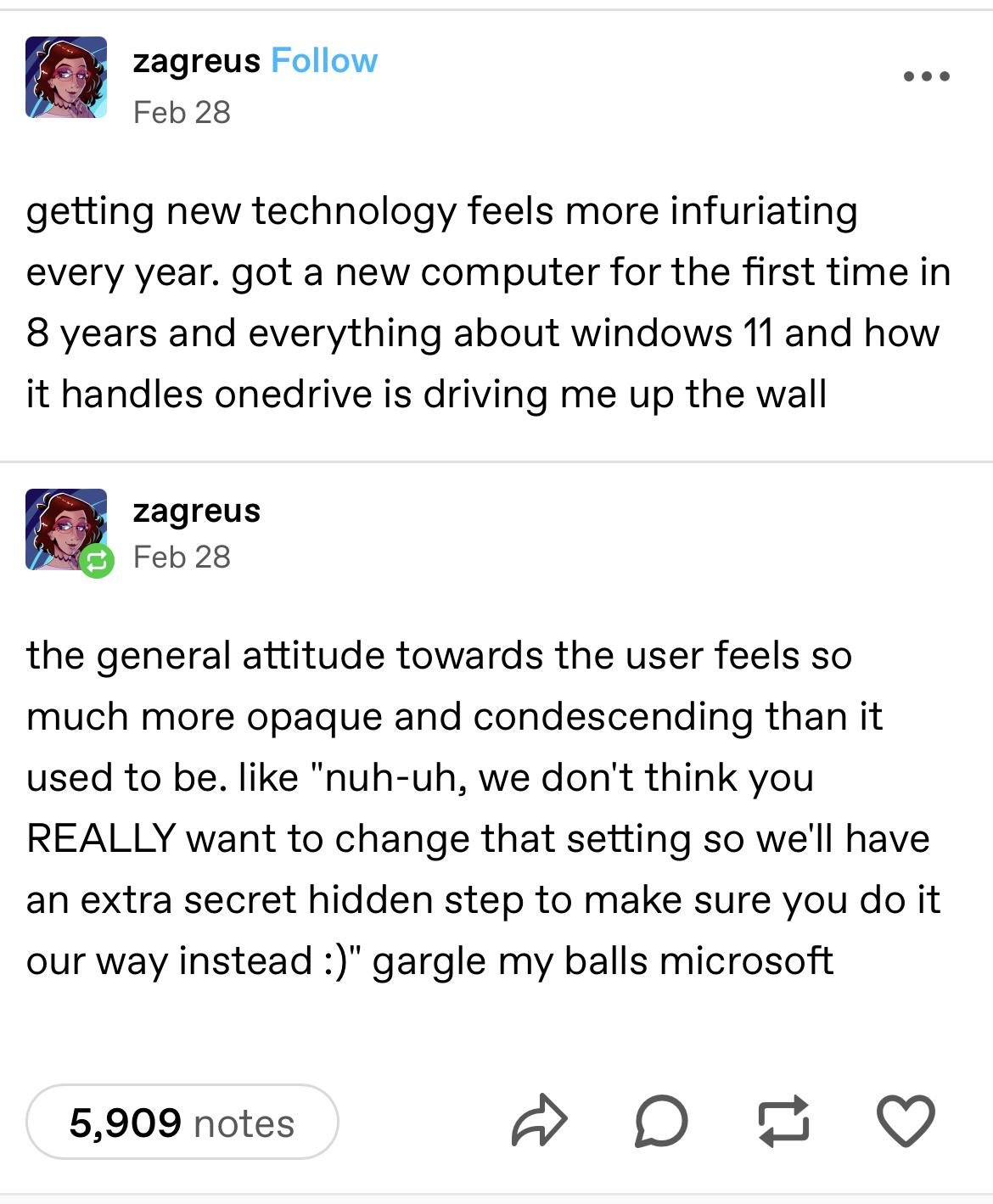
▲ 1284 ▼ "Twy Edge Pwetty Pwease" (lemmy.world) submitted 2 years ago by TheBat@lemmy.world to c/curatedtumblr@sh.itjust.works 251 comments fedilink hide all child comments
[–] ultimitchow@sh.itjust.works 47 points 2 years ago (1 child) i uninstalled edge. that solved most of my edge related problems. permalink fedilink source parent hideshow 2 child comments replies: [–] princessnorah@lemmy.blahaj.zone 8 points 2 years ago (3 children) Dude, please explain how, because I cannot on Windows 10 as far as I’m aware. permalink fedilink source parent hideshow 6 child comments replies: [–] bdonvr@thelemmy.club 11 points 2 years ago (1 child) https://github.com/ShadowWhisperer/Remove-MS-Edge permalink fedilink source parent hideshow 2 child comments replies: [–] pHr34kY@lemmy.world 21 points 2 years ago Shipping five separate executables to avoid CLI arguments is the most Windowsy thing ever. permalink fedilink source parent [–] ultimitchow@sh.itjust.works 5 points 2 years ago When I made a fresh install of windows 11 a few months ago I used this tool. The readme says it works on windows 10 but I’ve never tried it myself on 10. https://github.com/LeDragoX/Win-Debloat-Tools When I got rid of edge on windows 10 a few years ago I think I booted into a live linux USB stick and deleted or renamed the edge directory. Maybe that doesn’t quite fit the definition of uninstall but the end result was edge couldn’t run afterward which is what I wanted. I don’t remember if disabling edge updates is part of the debloat tools or if I did this myself, but the tasks starting with MicrosoftEdgeUpdateTask in Task Scheduler are disabled now on my system. Method 3 of this guide shows how to find those tasks. https://www.askvg.com/how-to-disable-or-remove-microsoftedgeupdate-exe-process-running-in-task-manager/ permalink fedilink source parent [–] vox@sopuli.xyz 2 points 2 years ago* well last time i tried doing that all pdf files got borked with no way to fix the issue, on windows 11. there used to be a semi official way to do it in win10 from 2021-2024, they broke it in January and reinstalled edge tho permalink fedilink source parent
[–] princessnorah@lemmy.blahaj.zone 8 points 2 years ago (3 children) Dude, please explain how, because I cannot on Windows 10 as far as I’m aware. permalink fedilink source parent hideshow 6 child comments replies: [–] bdonvr@thelemmy.club 11 points 2 years ago (1 child) https://github.com/ShadowWhisperer/Remove-MS-Edge permalink fedilink source parent hideshow 2 child comments replies: [–] pHr34kY@lemmy.world 21 points 2 years ago Shipping five separate executables to avoid CLI arguments is the most Windowsy thing ever. permalink fedilink source parent [–] ultimitchow@sh.itjust.works 5 points 2 years ago When I made a fresh install of windows 11 a few months ago I used this tool. The readme says it works on windows 10 but I’ve never tried it myself on 10. https://github.com/LeDragoX/Win-Debloat-Tools When I got rid of edge on windows 10 a few years ago I think I booted into a live linux USB stick and deleted or renamed the edge directory. Maybe that doesn’t quite fit the definition of uninstall but the end result was edge couldn’t run afterward which is what I wanted. I don’t remember if disabling edge updates is part of the debloat tools or if I did this myself, but the tasks starting with MicrosoftEdgeUpdateTask in Task Scheduler are disabled now on my system. Method 3 of this guide shows how to find those tasks. https://www.askvg.com/how-to-disable-or-remove-microsoftedgeupdate-exe-process-running-in-task-manager/ permalink fedilink source parent [–] vox@sopuli.xyz 2 points 2 years ago* well last time i tried doing that all pdf files got borked with no way to fix the issue, on windows 11. there used to be a semi official way to do it in win10 from 2021-2024, they broke it in January and reinstalled edge tho permalink fedilink source parent
[–] bdonvr@thelemmy.club 11 points 2 years ago (1 child) https://github.com/ShadowWhisperer/Remove-MS-Edge permalink fedilink source parent hideshow 2 child comments replies: [–] pHr34kY@lemmy.world 21 points 2 years ago Shipping five separate executables to avoid CLI arguments is the most Windowsy thing ever. permalink fedilink source parent
[–] pHr34kY@lemmy.world 21 points 2 years ago Shipping five separate executables to avoid CLI arguments is the most Windowsy thing ever. permalink fedilink source parent
[–] ultimitchow@sh.itjust.works 5 points 2 years ago When I made a fresh install of windows 11 a few months ago I used this tool. The readme says it works on windows 10 but I’ve never tried it myself on 10. https://github.com/LeDragoX/Win-Debloat-Tools When I got rid of edge on windows 10 a few years ago I think I booted into a live linux USB stick and deleted or renamed the edge directory. Maybe that doesn’t quite fit the definition of uninstall but the end result was edge couldn’t run afterward which is what I wanted. I don’t remember if disabling edge updates is part of the debloat tools or if I did this myself, but the tasks starting with MicrosoftEdgeUpdateTask in Task Scheduler are disabled now on my system. Method 3 of this guide shows how to find those tasks. https://www.askvg.com/how-to-disable-or-remove-microsoftedgeupdate-exe-process-running-in-task-manager/ permalink fedilink source parent
[–] vox@sopuli.xyz 2 points 2 years ago* well last time i tried doing that all pdf files got borked with no way to fix the issue, on windows 11. there used to be a semi official way to do it in win10 from 2021-2024, they broke it in January and reinstalled edge tho permalink fedilink source parent