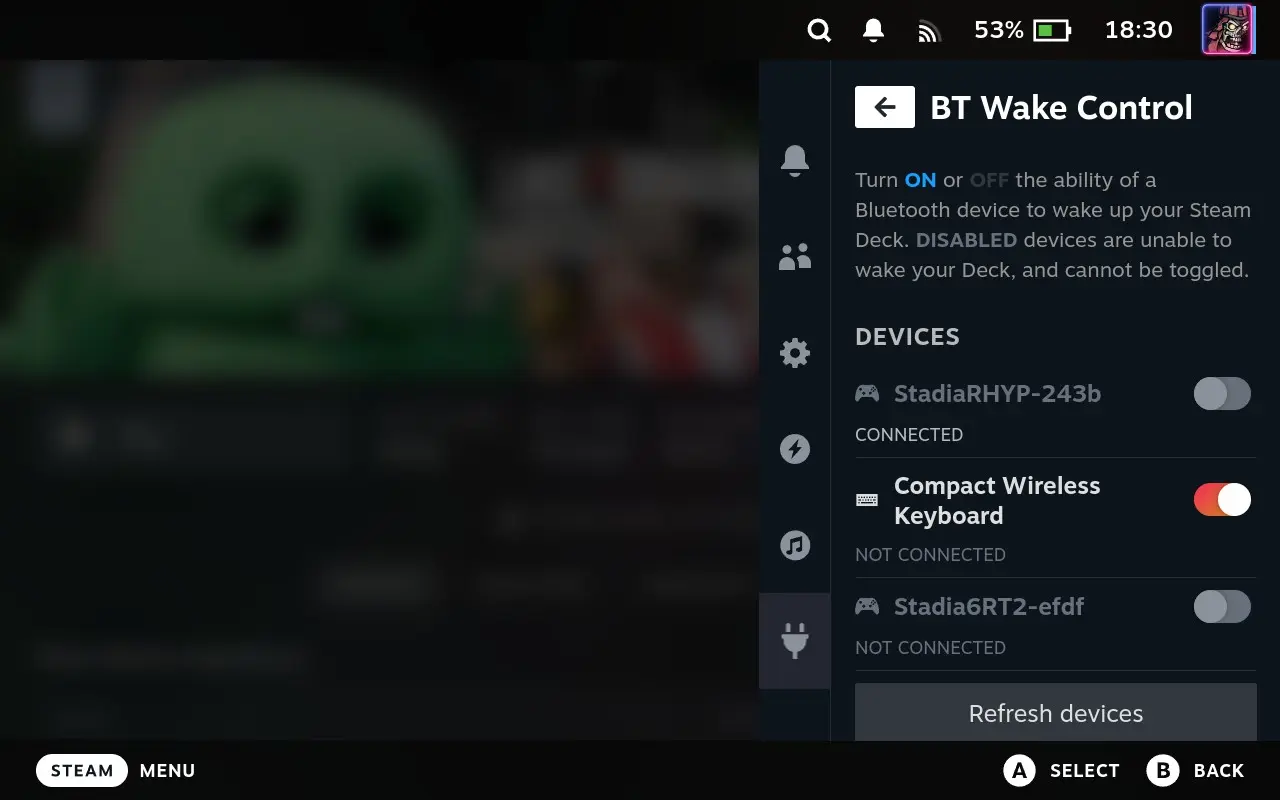
▲ 105 ▼ New Decky plugin lets you enable/disable individual BT devices waking your OLED Steam Deck (sopuli.xyz) submitted 2 years ago by Fubarberry@sopuli.xyz [M] to c/steamdeck@sopuli.xyz 10 comments fedilink hide all child comments It also shows you what devices are even capable of waking the deck while it's asleep. To install it you need to first have Decky installed, and then look for BT Wake Control in the Decky store.
[–] jasonlearst@lemmy.ml 3 points 2 years ago (1 child) Has it always been possible to remote wake the Steam Deck? Or is this a feature exclusive to the OLED model? I have an LCD model and would love to be able to wake it while it’s in the dock hooked up to my TV. permalink fedilink source hideshow 2 child comments replies: [–] Fubarberry@sopuli.xyz [S] 21 points 2 years ago (1 child) Exclusive to the OLED, it has a different wireless chip. From my rough understanding, it supports BLE which lets it stay on while the deck is asleep. Controllers that also support BLE can connect to it and wake the deck up that way. For LCD decks, I've heard of people buying a smart plug and using that to toggle the Dock charger off/on. If you have wake on charge turned on in bios, this will let you remotely wake up the LCD deck from your phone or a home voice assistant. permalink fedilink source parent hideshow 2 child comments replies: [–] jasonlearst@lemmy.ml 4 points 2 years ago (1 child) Thanks for the information and the suggestion! permalink fedilink source parent hideshow 2 child comments replies: [–] runjun@lemmy.world 3 points 2 years ago Yes, I’m going to look into doing just that. permalink fedilink source parent
[–] Fubarberry@sopuli.xyz [S] 21 points 2 years ago (1 child) Exclusive to the OLED, it has a different wireless chip. From my rough understanding, it supports BLE which lets it stay on while the deck is asleep. Controllers that also support BLE can connect to it and wake the deck up that way. For LCD decks, I've heard of people buying a smart plug and using that to toggle the Dock charger off/on. If you have wake on charge turned on in bios, this will let you remotely wake up the LCD deck from your phone or a home voice assistant. permalink fedilink source parent hideshow 2 child comments replies: [–] jasonlearst@lemmy.ml 4 points 2 years ago (1 child) Thanks for the information and the suggestion! permalink fedilink source parent hideshow 2 child comments replies: [–] runjun@lemmy.world 3 points 2 years ago Yes, I’m going to look into doing just that. permalink fedilink source parent
[–] jasonlearst@lemmy.ml 4 points 2 years ago (1 child) Thanks for the information and the suggestion! permalink fedilink source parent hideshow 2 child comments replies: [–] runjun@lemmy.world 3 points 2 years ago Yes, I’m going to look into doing just that. permalink fedilink source parent
[–] runjun@lemmy.world 3 points 2 years ago Yes, I’m going to look into doing just that. permalink fedilink source parent