▲ 1782 ▼ Hot take (lemmy.ml) submitted 2 years ago by SchrodingersPat@lemmy.ml to c/linuxmemes@lemmy.world 353 comments fedilink hide all child comments
[–] cashews_best_nut@lemmy.world 27 points 2 years ago (5 children) There's Two Main Choices: Packages.... Pacman-based - Arch, Arco, Endeavour RPM-based - Fedora, SuSE Aptitude-based - Ubuntu, Debian Choose Pacman for rolling release, bleeding edge. Pick aptitude for servers and pick RPM if you want something that 'just works'. Desktop.... Full DE - Gnome, KDE Window Manager - Awesome, i3 High end machines with lots of fancy features and ease of use pick a full DE. WM is good for speed and low-end hardware but harder to use. permalink fedilink source hideshow 10 child comments replies: [–] FalseDiamond@sh.itjust.works 9 points 2 years ago (4 children) Disagree on picking RPM distros for an absolute beginner (this is what the image is about at least). SUSE maybe but you don't want a newbie having to deal with US patent bullshit and especially SELinux. Similarly, no newbie will ever pic a barebones WM as a first time user. permalink fedilink source parent hideshow 8 child comments replies: [–] danielf@aussie.zone 6 points 2 years ago I have used Fedora for nearly all the time I've daily driven Linux, and haven't encountered any problem that a newbie would encounter and couldn't overcome, excluding distro-agnostic stuff. Yeah, the h264 shit sucks, but if you use flatpaks you shouldn't have to worry about it. And if you ever have to face SELinux, then you're probably doing something that's beyond beginner level. permalink fedilink source parent [–] Fox@pawb.social 3 points 2 years ago (2 children) I dunno, I picked RedHat 5.2 as a complete beginner along with fvwm95 and afterstep, and that worked out okay. Of course, that was 25 years ago. permalink fedilink source parent hideshow 4 child comments replies: [–] recapitated@lemmy.world 4 points 2 years ago 25 years ago the viability of options were slightly more prescriptive permalink fedilink source parent [–] JasonDJ@lemmy.zip 3 points 2 years ago Same. I remember getting interested in Linux in like 1997 or so, and it seemed like RedHat was preferred for newbies. Of course, what were the alternatives then? It was basically Slackware (or Suse), Debian, and RedHat (or Caldera). There was no RHEL or Canonical or SElinux back then. It was a different time. Hell one of the language packs for installing RedHat was “Redneck”. It was a gimmick to demonstrate localization options. permalink fedilink source parent [–] cashews_best_nut@lemmy.world 3 points 2 years ago It's a very rough guide I threw together. There's all sorts of wedge cases you could use to argue against it. E.g. you could use RPMs on slack Linux. Not exactly user friendly. Bit on the whole fedora or Suse do the job. Also desktops are better for newbies. I thought I'd mentioned that but yeah I agree deffo better for newbies while WM managers more for tinkerers/power users. permalink fedilink source parent [–] jimbolauski@lemm.ee -1 points 2 years ago I started on CentOS and don't remember any issues but that was a long time ago. I flirted with Suse, Ubuntu, and Arch when RH started being a super dick. I finally settled on Rocky, rpm is the devil I know. permalink fedilink source parent [–] lolcatnip@reddthat.com 7 points 2 years ago Apt, not Aptitude. Aptitude is just one of many front ends for Apt. I usually go for Synaptic. permalink fedilink source parent [–] uranibaba@lemmy.world 4 points 2 years ago Started using Debian because I only used it for servers to begin with. Learned APT and never dared to learn anything else. So now I just stick with any distro using APT and a DE I like. permalink fedilink source parent [–] AngryCommieKender@lemmy.world 3 points 2 years ago (4 children) So for gaming.... Pacman? I thought mint and kubuntu use aptitude, and was under the impression those are two of the better gaming distros. I hate windows, but am sick of trying Linux every 5-6 years and finding out that I cannot get half the games I play to work. Admittedly, with you guys I might not be going it alone this time..... permalink fedilink source parent hideshow 8 child comments replies: [–] captain_aggravated@sh.itjust.works 5 points 2 years ago Debian-based systems (including Ubuntu and its forks such as Mint) uses dpkg and APT (APT does all the communicating with repositories, dependency managment etc, dpkg actually installs and removes packages.) Aptitude is a TUI front-end for APT that gives you a menu-based system in the terminal. Synaptic (not to be confused with the trackpad driver) is a GUI front-end for APT. I game on Linux Mint. Now it might be my tendency to play single player and/or cooperative multiplayer (think Stardew Valley or Unrailed!) games often made by smaller studios and indie developers as most of the AAA space has otherwise offended me, but...I don't really have a problem. The vast majority of things just install and run from Steam. permalink fedilink source parent [–] MonkeMischief@lemmy.today 5 points 2 years ago* The package manager is usually tied to the distro, but the point above is to let the package manager inform your distro choice. You'll notice a running theme in my lecture here is "choice." You can switch Desktop Environment and other stuff on just about any distro and make it feel like yours. Switching package managers isn't recommended though! 😅 So for instance, Arch (btw lol), or Manjaro, or Endeavour use Pacman. I've switched to Endeavour recently which is essentially "User-friendly Arch-based" with an installer and stuff, and it's absolutely lovely for games. My old 960M laptop runs plenty of stuff great. :D On my main rig I've used OpenSUSE Tumbleweed for years, which is also a rolling release (constantly updated) distro that technically uses RPMs, but uses its own package manager called Zypper, which I find mostly user friendly. Packages are also a bit more thoroughly tested. Both use KDE Plasma desktop environment and it's gorgeous. Alternatively, especially for laptops with hybrid Nvidia graphics, POP!_OS is alright if you're okay with GNOME desktop environment. (You can always change, but it's geared toward GNOME). It used Aptitude, and the updates trail behind a bit, but generally that's supposed to make a more stable system. (Note that when I say "lags behind", latest security fixes tend to be backported, but you won't see fancy new shiny features as fast.) For gaming specifically though: Win10 is gonna be my last Windows. 11 is invasive and opinionated, and 12 is gonna have a forced Ai fetish. Gross. Good news: Steam games work wonderfully. Thanks to advances with Proton and all their support for the SteamDeck (which runs Linux btw!) For other platforms, look into Heroic Launcher, which takes a lot of the headache out of managing stuff like GOG games. :) With rolling releases you usually want to update cautiously and check news updates and stuff, because newer versions aren't as thoroughly tested and some stuff might break...but you get new features faster so that's fun. That being said: If you're willing to learn a little as you go, OpenSUSE Tumbleweed is a big win in my book for getting the latest fun stuff while still being stable! It's also thoroughly security-minded. And by default, it includes "Snapper" set up for you, so you can just roll the system back to a working version in the rare case something goes wrong. You can install snapper on any distro, but it comes pre-configured and ready to go, as long as you use the default "BTRFS" file system. I won't get into filesystems because hoo boi...but TL;DR: BTRFS allows "snapshots" and rollbacks that don't require literally doubling your disk space for rolling back, so it's a great safety net. That being said: ALWAYS have more than one backup, in multiple locations, of anything you find important! Good luck and have fun. I will say, Endeavour, OpenSUSE, and Pop_OS all have great communities that are eager to help if you're eager to learn! :) permalink fedilink source parent [–] menemen@lemmy.world 3 points 2 years ago* (last edited 2 years ago) I'd say, just use Ubuntu if gaming is your main concern. Imo the main problem for games are 1. hardware drivers (afaik only if you have brand new hardware), 2. game launchers (fuck those fucking game launchers, fuck; except steam) and 3. anti- cheat software. Otherwise gaming is really good under Linux nowadays. permalink fedilink source parent [–] mayotte2048@lemm.ee 1 point 2 years ago (2 children) Steam on linux has tons of games. But not all of them (Baulder's Gate 3.) permalink fedilink source parent hideshow 4 child comments replies: [–] Forbo@lemmy.ml 1 point 2 years ago BG3 running fine on my Ubuntu box. permalink fedilink source parent [–] CosmicCleric@lemmy.world 1 point 2 years ago Steam on linux has tons of games. But not all of them (Baulder’s Gate 3.) I play Baldur's Gate 3 on my Fedora KDE Linux system just fine. permalink fedilink source parent [–] Ghostbanjo1949@lemmy.mengsk.org 1 point 2 years ago Most new Linux users if not all, are unable to make an educated decision on package management. The UI that they think they will like better would be more important. permalink fedilink source parent
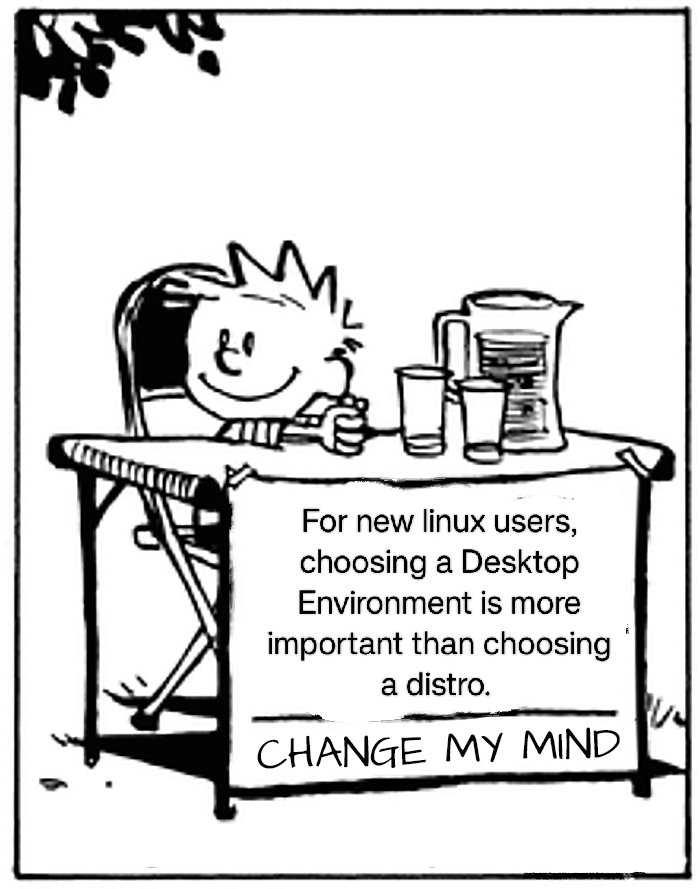
[–] FalseDiamond@sh.itjust.works 9 points 2 years ago (4 children) Disagree on picking RPM distros for an absolute beginner (this is what the image is about at least). SUSE maybe but you don't want a newbie having to deal with US patent bullshit and especially SELinux. Similarly, no newbie will ever pic a barebones WM as a first time user. permalink fedilink source parent hideshow 8 child comments replies: [–] danielf@aussie.zone 6 points 2 years ago I have used Fedora for nearly all the time I've daily driven Linux, and haven't encountered any problem that a newbie would encounter and couldn't overcome, excluding distro-agnostic stuff. Yeah, the h264 shit sucks, but if you use flatpaks you shouldn't have to worry about it. And if you ever have to face SELinux, then you're probably doing something that's beyond beginner level. permalink fedilink source parent [–] Fox@pawb.social 3 points 2 years ago (2 children) I dunno, I picked RedHat 5.2 as a complete beginner along with fvwm95 and afterstep, and that worked out okay. Of course, that was 25 years ago. permalink fedilink source parent hideshow 4 child comments replies: [–] recapitated@lemmy.world 4 points 2 years ago 25 years ago the viability of options were slightly more prescriptive permalink fedilink source parent [–] JasonDJ@lemmy.zip 3 points 2 years ago Same. I remember getting interested in Linux in like 1997 or so, and it seemed like RedHat was preferred for newbies. Of course, what were the alternatives then? It was basically Slackware (or Suse), Debian, and RedHat (or Caldera). There was no RHEL or Canonical or SElinux back then. It was a different time. Hell one of the language packs for installing RedHat was “Redneck”. It was a gimmick to demonstrate localization options. permalink fedilink source parent [–] cashews_best_nut@lemmy.world 3 points 2 years ago It's a very rough guide I threw together. There's all sorts of wedge cases you could use to argue against it. E.g. you could use RPMs on slack Linux. Not exactly user friendly. Bit on the whole fedora or Suse do the job. Also desktops are better for newbies. I thought I'd mentioned that but yeah I agree deffo better for newbies while WM managers more for tinkerers/power users. permalink fedilink source parent [–] jimbolauski@lemm.ee -1 points 2 years ago I started on CentOS and don't remember any issues but that was a long time ago. I flirted with Suse, Ubuntu, and Arch when RH started being a super dick. I finally settled on Rocky, rpm is the devil I know. permalink fedilink source parent
[–] danielf@aussie.zone 6 points 2 years ago I have used Fedora for nearly all the time I've daily driven Linux, and haven't encountered any problem that a newbie would encounter and couldn't overcome, excluding distro-agnostic stuff. Yeah, the h264 shit sucks, but if you use flatpaks you shouldn't have to worry about it. And if you ever have to face SELinux, then you're probably doing something that's beyond beginner level. permalink fedilink source parent
[–] Fox@pawb.social 3 points 2 years ago (2 children) I dunno, I picked RedHat 5.2 as a complete beginner along with fvwm95 and afterstep, and that worked out okay. Of course, that was 25 years ago. permalink fedilink source parent hideshow 4 child comments replies: [–] recapitated@lemmy.world 4 points 2 years ago 25 years ago the viability of options were slightly more prescriptive permalink fedilink source parent [–] JasonDJ@lemmy.zip 3 points 2 years ago Same. I remember getting interested in Linux in like 1997 or so, and it seemed like RedHat was preferred for newbies. Of course, what were the alternatives then? It was basically Slackware (or Suse), Debian, and RedHat (or Caldera). There was no RHEL or Canonical or SElinux back then. It was a different time. Hell one of the language packs for installing RedHat was “Redneck”. It was a gimmick to demonstrate localization options. permalink fedilink source parent
[–] recapitated@lemmy.world 4 points 2 years ago 25 years ago the viability of options were slightly more prescriptive permalink fedilink source parent
[–] JasonDJ@lemmy.zip 3 points 2 years ago Same. I remember getting interested in Linux in like 1997 or so, and it seemed like RedHat was preferred for newbies. Of course, what were the alternatives then? It was basically Slackware (or Suse), Debian, and RedHat (or Caldera). There was no RHEL or Canonical or SElinux back then. It was a different time. Hell one of the language packs for installing RedHat was “Redneck”. It was a gimmick to demonstrate localization options. permalink fedilink source parent
[–] cashews_best_nut@lemmy.world 3 points 2 years ago It's a very rough guide I threw together. There's all sorts of wedge cases you could use to argue against it. E.g. you could use RPMs on slack Linux. Not exactly user friendly. Bit on the whole fedora or Suse do the job. Also desktops are better for newbies. I thought I'd mentioned that but yeah I agree deffo better for newbies while WM managers more for tinkerers/power users. permalink fedilink source parent
[–] jimbolauski@lemm.ee -1 points 2 years ago I started on CentOS and don't remember any issues but that was a long time ago. I flirted with Suse, Ubuntu, and Arch when RH started being a super dick. I finally settled on Rocky, rpm is the devil I know. permalink fedilink source parent
[–] lolcatnip@reddthat.com 7 points 2 years ago Apt, not Aptitude. Aptitude is just one of many front ends for Apt. I usually go for Synaptic. permalink fedilink source parent
[–] uranibaba@lemmy.world 4 points 2 years ago Started using Debian because I only used it for servers to begin with. Learned APT and never dared to learn anything else. So now I just stick with any distro using APT and a DE I like. permalink fedilink source parent
[–] AngryCommieKender@lemmy.world 3 points 2 years ago (4 children) So for gaming.... Pacman? I thought mint and kubuntu use aptitude, and was under the impression those are two of the better gaming distros. I hate windows, but am sick of trying Linux every 5-6 years and finding out that I cannot get half the games I play to work. Admittedly, with you guys I might not be going it alone this time..... permalink fedilink source parent hideshow 8 child comments replies: [–] captain_aggravated@sh.itjust.works 5 points 2 years ago Debian-based systems (including Ubuntu and its forks such as Mint) uses dpkg and APT (APT does all the communicating with repositories, dependency managment etc, dpkg actually installs and removes packages.) Aptitude is a TUI front-end for APT that gives you a menu-based system in the terminal. Synaptic (not to be confused with the trackpad driver) is a GUI front-end for APT. I game on Linux Mint. Now it might be my tendency to play single player and/or cooperative multiplayer (think Stardew Valley or Unrailed!) games often made by smaller studios and indie developers as most of the AAA space has otherwise offended me, but...I don't really have a problem. The vast majority of things just install and run from Steam. permalink fedilink source parent [–] MonkeMischief@lemmy.today 5 points 2 years ago* The package manager is usually tied to the distro, but the point above is to let the package manager inform your distro choice. You'll notice a running theme in my lecture here is "choice." You can switch Desktop Environment and other stuff on just about any distro and make it feel like yours. Switching package managers isn't recommended though! 😅 So for instance, Arch (btw lol), or Manjaro, or Endeavour use Pacman. I've switched to Endeavour recently which is essentially "User-friendly Arch-based" with an installer and stuff, and it's absolutely lovely for games. My old 960M laptop runs plenty of stuff great. :D On my main rig I've used OpenSUSE Tumbleweed for years, which is also a rolling release (constantly updated) distro that technically uses RPMs, but uses its own package manager called Zypper, which I find mostly user friendly. Packages are also a bit more thoroughly tested. Both use KDE Plasma desktop environment and it's gorgeous. Alternatively, especially for laptops with hybrid Nvidia graphics, POP!_OS is alright if you're okay with GNOME desktop environment. (You can always change, but it's geared toward GNOME). It used Aptitude, and the updates trail behind a bit, but generally that's supposed to make a more stable system. (Note that when I say "lags behind", latest security fixes tend to be backported, but you won't see fancy new shiny features as fast.) For gaming specifically though: Win10 is gonna be my last Windows. 11 is invasive and opinionated, and 12 is gonna have a forced Ai fetish. Gross. Good news: Steam games work wonderfully. Thanks to advances with Proton and all their support for the SteamDeck (which runs Linux btw!) For other platforms, look into Heroic Launcher, which takes a lot of the headache out of managing stuff like GOG games. :) With rolling releases you usually want to update cautiously and check news updates and stuff, because newer versions aren't as thoroughly tested and some stuff might break...but you get new features faster so that's fun. That being said: If you're willing to learn a little as you go, OpenSUSE Tumbleweed is a big win in my book for getting the latest fun stuff while still being stable! It's also thoroughly security-minded. And by default, it includes "Snapper" set up for you, so you can just roll the system back to a working version in the rare case something goes wrong. You can install snapper on any distro, but it comes pre-configured and ready to go, as long as you use the default "BTRFS" file system. I won't get into filesystems because hoo boi...but TL;DR: BTRFS allows "snapshots" and rollbacks that don't require literally doubling your disk space for rolling back, so it's a great safety net. That being said: ALWAYS have more than one backup, in multiple locations, of anything you find important! Good luck and have fun. I will say, Endeavour, OpenSUSE, and Pop_OS all have great communities that are eager to help if you're eager to learn! :) permalink fedilink source parent [–] menemen@lemmy.world 3 points 2 years ago* (last edited 2 years ago) I'd say, just use Ubuntu if gaming is your main concern. Imo the main problem for games are 1. hardware drivers (afaik only if you have brand new hardware), 2. game launchers (fuck those fucking game launchers, fuck; except steam) and 3. anti- cheat software. Otherwise gaming is really good under Linux nowadays. permalink fedilink source parent [–] mayotte2048@lemm.ee 1 point 2 years ago (2 children) Steam on linux has tons of games. But not all of them (Baulder's Gate 3.) permalink fedilink source parent hideshow 4 child comments replies: [–] Forbo@lemmy.ml 1 point 2 years ago BG3 running fine on my Ubuntu box. permalink fedilink source parent [–] CosmicCleric@lemmy.world 1 point 2 years ago Steam on linux has tons of games. But not all of them (Baulder’s Gate 3.) I play Baldur's Gate 3 on my Fedora KDE Linux system just fine. permalink fedilink source parent
[–] captain_aggravated@sh.itjust.works 5 points 2 years ago Debian-based systems (including Ubuntu and its forks such as Mint) uses dpkg and APT (APT does all the communicating with repositories, dependency managment etc, dpkg actually installs and removes packages.) Aptitude is a TUI front-end for APT that gives you a menu-based system in the terminal. Synaptic (not to be confused with the trackpad driver) is a GUI front-end for APT. I game on Linux Mint. Now it might be my tendency to play single player and/or cooperative multiplayer (think Stardew Valley or Unrailed!) games often made by smaller studios and indie developers as most of the AAA space has otherwise offended me, but...I don't really have a problem. The vast majority of things just install and run from Steam. permalink fedilink source parent
[–] MonkeMischief@lemmy.today 5 points 2 years ago* The package manager is usually tied to the distro, but the point above is to let the package manager inform your distro choice. You'll notice a running theme in my lecture here is "choice." You can switch Desktop Environment and other stuff on just about any distro and make it feel like yours. Switching package managers isn't recommended though! 😅 So for instance, Arch (btw lol), or Manjaro, or Endeavour use Pacman. I've switched to Endeavour recently which is essentially "User-friendly Arch-based" with an installer and stuff, and it's absolutely lovely for games. My old 960M laptop runs plenty of stuff great. :D On my main rig I've used OpenSUSE Tumbleweed for years, which is also a rolling release (constantly updated) distro that technically uses RPMs, but uses its own package manager called Zypper, which I find mostly user friendly. Packages are also a bit more thoroughly tested. Both use KDE Plasma desktop environment and it's gorgeous. Alternatively, especially for laptops with hybrid Nvidia graphics, POP!_OS is alright if you're okay with GNOME desktop environment. (You can always change, but it's geared toward GNOME). It used Aptitude, and the updates trail behind a bit, but generally that's supposed to make a more stable system. (Note that when I say "lags behind", latest security fixes tend to be backported, but you won't see fancy new shiny features as fast.) For gaming specifically though: Win10 is gonna be my last Windows. 11 is invasive and opinionated, and 12 is gonna have a forced Ai fetish. Gross. Good news: Steam games work wonderfully. Thanks to advances with Proton and all their support for the SteamDeck (which runs Linux btw!) For other platforms, look into Heroic Launcher, which takes a lot of the headache out of managing stuff like GOG games. :) With rolling releases you usually want to update cautiously and check news updates and stuff, because newer versions aren't as thoroughly tested and some stuff might break...but you get new features faster so that's fun. That being said: If you're willing to learn a little as you go, OpenSUSE Tumbleweed is a big win in my book for getting the latest fun stuff while still being stable! It's also thoroughly security-minded. And by default, it includes "Snapper" set up for you, so you can just roll the system back to a working version in the rare case something goes wrong. You can install snapper on any distro, but it comes pre-configured and ready to go, as long as you use the default "BTRFS" file system. I won't get into filesystems because hoo boi...but TL;DR: BTRFS allows "snapshots" and rollbacks that don't require literally doubling your disk space for rolling back, so it's a great safety net. That being said: ALWAYS have more than one backup, in multiple locations, of anything you find important! Good luck and have fun. I will say, Endeavour, OpenSUSE, and Pop_OS all have great communities that are eager to help if you're eager to learn! :) permalink fedilink source parent
[–] menemen@lemmy.world 3 points 2 years ago* (last edited 2 years ago) I'd say, just use Ubuntu if gaming is your main concern. Imo the main problem for games are 1. hardware drivers (afaik only if you have brand new hardware), 2. game launchers (fuck those fucking game launchers, fuck; except steam) and 3. anti- cheat software. Otherwise gaming is really good under Linux nowadays. permalink fedilink source parent
[–] mayotte2048@lemm.ee 1 point 2 years ago (2 children) Steam on linux has tons of games. But not all of them (Baulder's Gate 3.) permalink fedilink source parent hideshow 4 child comments replies: [–] Forbo@lemmy.ml 1 point 2 years ago BG3 running fine on my Ubuntu box. permalink fedilink source parent [–] CosmicCleric@lemmy.world 1 point 2 years ago Steam on linux has tons of games. But not all of them (Baulder’s Gate 3.) I play Baldur's Gate 3 on my Fedora KDE Linux system just fine. permalink fedilink source parent
[–] Forbo@lemmy.ml 1 point 2 years ago BG3 running fine on my Ubuntu box. permalink fedilink source parent
[–] CosmicCleric@lemmy.world 1 point 2 years ago Steam on linux has tons of games. But not all of them (Baulder’s Gate 3.) I play Baldur's Gate 3 on my Fedora KDE Linux system just fine. permalink fedilink source parent
[–] Ghostbanjo1949@lemmy.mengsk.org 1 point 2 years ago Most new Linux users if not all, are unable to make an educated decision on package management. The UI that they think they will like better would be more important. permalink fedilink source parent