▲ 1308 ▼ Anon uses arch btw (sh.itjust.works) submitted 3 years ago by spez@sh.itjust.works to c/greentext@lemmy.ml 201 comments fedilink hide all child comments
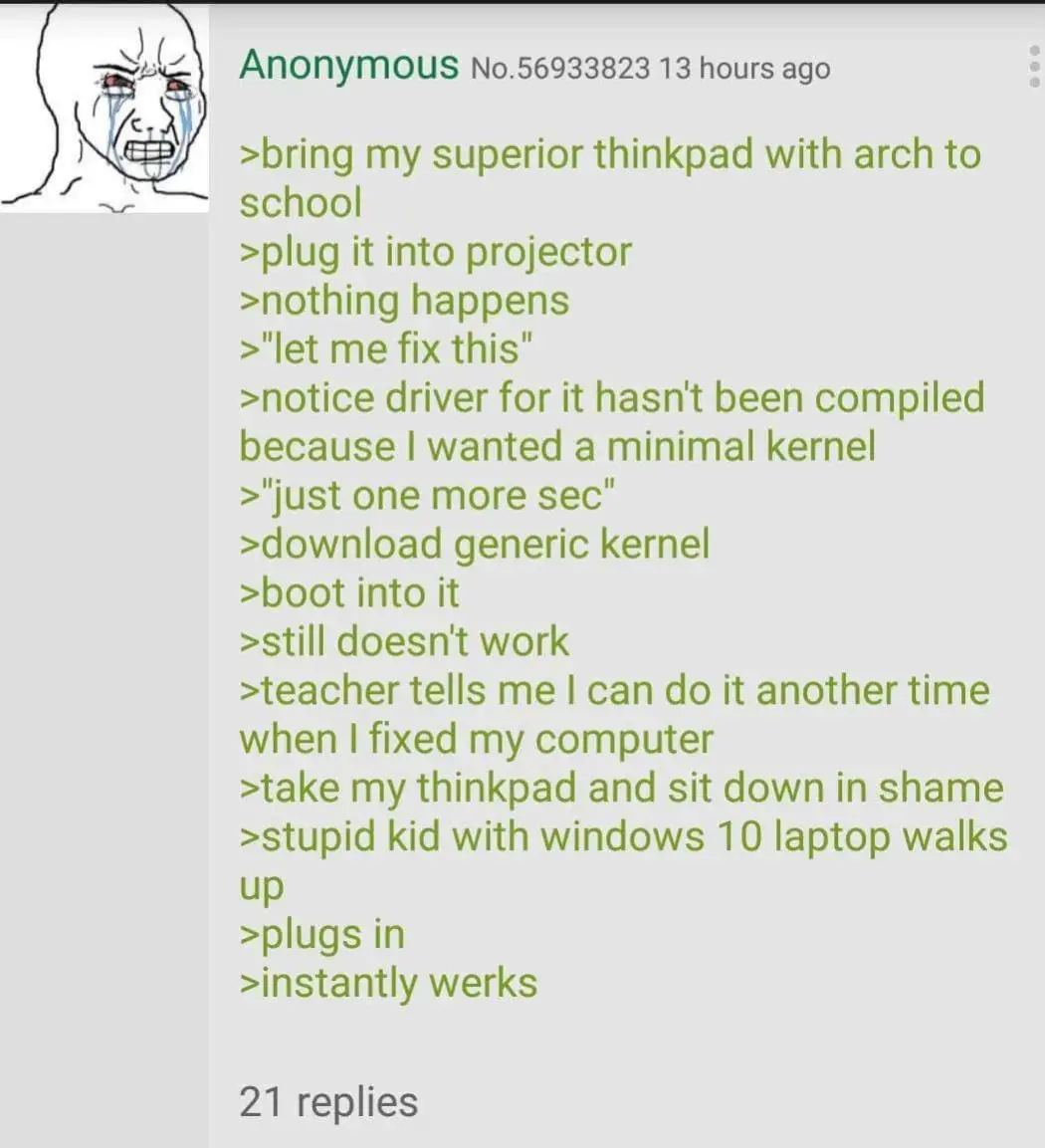
[–] Moc@lemmy.world 42 points 3 years ago (1 child) Forgot to enable non-free packages on Debian 🤬 permalink fedilink source hideshow 2 child comments replies: [–] frippa@lemmy.ml 11 points 3 years ago (2 children) They should come by default in Debian 12 (i use Debian btw) (on my server btw) (this incident will be reported btw) permalink fedilink source parent hideshow 4 child comments replies: [–] sep@lemmy.world 5 points 3 years ago (2 children) Non-free firmware is now enabled by default in the installer. To install non-free software, you still need to enable the non-free repo. Installed potato, 23 years ago, have Dist-upgraded since. permalink fedilink source parent hideshow 4 child comments replies: [–] Darth_Vader__@lemmy.world 2 points 3 years ago (1 child) can we opt out of non-free firmware? permalink fedilink source parent hideshow 2 child comments replies: [–] sep@lemmy.world 1 point 3 years ago Yes, you can give an argument to the installer not to install. Or just remove the non-free firmware packages after installation. Keep in mind thatbif you have hardware that require those firmwares. That hardware will not work without. Often wifi chips. Buying hardware that have no non-free firmware is an increasingly complex labyrinth nowadays. permalink fedilink source parent [–] frippa@lemmy.ml 1 point 3 years ago (1 child) Idk, ive installed non-free software without touching stuff, weirdly enough non-free drivers break my system (Nvidia 32kb "gpu" ) permalink fedilink source parent hideshow 2 child comments replies: [–] sep@lemmy.world 1 point 3 years ago Then you must have non-free enabled. Looking in /etc/apt/sources.list would quickly tell you https://www.debian.org/doc/debian-policy/ch-archive#s-non-free If you followed the wiki when installing nvidia drivers. It would have told you to enable non-free https://wiki.debian.org/NvidiaGraphicsDrivers#Debian_12_.22Bookworm.22 permalink fedilink source parent [+] Moc@lemmy.world 1 point 3 years ago [deleted] permalink fedilink source parent
[–] frippa@lemmy.ml 11 points 3 years ago (2 children) They should come by default in Debian 12 (i use Debian btw) (on my server btw) (this incident will be reported btw) permalink fedilink source parent hideshow 4 child comments replies: [–] sep@lemmy.world 5 points 3 years ago (2 children) Non-free firmware is now enabled by default in the installer. To install non-free software, you still need to enable the non-free repo. Installed potato, 23 years ago, have Dist-upgraded since. permalink fedilink source parent hideshow 4 child comments replies: [–] Darth_Vader__@lemmy.world 2 points 3 years ago (1 child) can we opt out of non-free firmware? permalink fedilink source parent hideshow 2 child comments replies: [–] sep@lemmy.world 1 point 3 years ago Yes, you can give an argument to the installer not to install. Or just remove the non-free firmware packages after installation. Keep in mind thatbif you have hardware that require those firmwares. That hardware will not work without. Often wifi chips. Buying hardware that have no non-free firmware is an increasingly complex labyrinth nowadays. permalink fedilink source parent [–] frippa@lemmy.ml 1 point 3 years ago (1 child) Idk, ive installed non-free software without touching stuff, weirdly enough non-free drivers break my system (Nvidia 32kb "gpu" ) permalink fedilink source parent hideshow 2 child comments replies: [–] sep@lemmy.world 1 point 3 years ago Then you must have non-free enabled. Looking in /etc/apt/sources.list would quickly tell you https://www.debian.org/doc/debian-policy/ch-archive#s-non-free If you followed the wiki when installing nvidia drivers. It would have told you to enable non-free https://wiki.debian.org/NvidiaGraphicsDrivers#Debian_12_.22Bookworm.22 permalink fedilink source parent [+] Moc@lemmy.world 1 point 3 years ago [deleted] permalink fedilink source parent
[–] sep@lemmy.world 5 points 3 years ago (2 children) Non-free firmware is now enabled by default in the installer. To install non-free software, you still need to enable the non-free repo. Installed potato, 23 years ago, have Dist-upgraded since. permalink fedilink source parent hideshow 4 child comments replies: [–] Darth_Vader__@lemmy.world 2 points 3 years ago (1 child) can we opt out of non-free firmware? permalink fedilink source parent hideshow 2 child comments replies: [–] sep@lemmy.world 1 point 3 years ago Yes, you can give an argument to the installer not to install. Or just remove the non-free firmware packages after installation. Keep in mind thatbif you have hardware that require those firmwares. That hardware will not work without. Often wifi chips. Buying hardware that have no non-free firmware is an increasingly complex labyrinth nowadays. permalink fedilink source parent [–] frippa@lemmy.ml 1 point 3 years ago (1 child) Idk, ive installed non-free software without touching stuff, weirdly enough non-free drivers break my system (Nvidia 32kb "gpu" ) permalink fedilink source parent hideshow 2 child comments replies: [–] sep@lemmy.world 1 point 3 years ago Then you must have non-free enabled. Looking in /etc/apt/sources.list would quickly tell you https://www.debian.org/doc/debian-policy/ch-archive#s-non-free If you followed the wiki when installing nvidia drivers. It would have told you to enable non-free https://wiki.debian.org/NvidiaGraphicsDrivers#Debian_12_.22Bookworm.22 permalink fedilink source parent
[–] Darth_Vader__@lemmy.world 2 points 3 years ago (1 child) can we opt out of non-free firmware? permalink fedilink source parent hideshow 2 child comments replies: [–] sep@lemmy.world 1 point 3 years ago Yes, you can give an argument to the installer not to install. Or just remove the non-free firmware packages after installation. Keep in mind thatbif you have hardware that require those firmwares. That hardware will not work without. Often wifi chips. Buying hardware that have no non-free firmware is an increasingly complex labyrinth nowadays. permalink fedilink source parent
[–] sep@lemmy.world 1 point 3 years ago Yes, you can give an argument to the installer not to install. Or just remove the non-free firmware packages after installation. Keep in mind thatbif you have hardware that require those firmwares. That hardware will not work without. Often wifi chips. Buying hardware that have no non-free firmware is an increasingly complex labyrinth nowadays. permalink fedilink source parent
[–] frippa@lemmy.ml 1 point 3 years ago (1 child) Idk, ive installed non-free software without touching stuff, weirdly enough non-free drivers break my system (Nvidia 32kb "gpu" ) permalink fedilink source parent hideshow 2 child comments replies: [–] sep@lemmy.world 1 point 3 years ago Then you must have non-free enabled. Looking in /etc/apt/sources.list would quickly tell you https://www.debian.org/doc/debian-policy/ch-archive#s-non-free If you followed the wiki when installing nvidia drivers. It would have told you to enable non-free https://wiki.debian.org/NvidiaGraphicsDrivers#Debian_12_.22Bookworm.22 permalink fedilink source parent
[–] sep@lemmy.world 1 point 3 years ago Then you must have non-free enabled. Looking in /etc/apt/sources.list would quickly tell you https://www.debian.org/doc/debian-policy/ch-archive#s-non-free If you followed the wiki when installing nvidia drivers. It would have told you to enable non-free https://wiki.debian.org/NvidiaGraphicsDrivers#Debian_12_.22Bookworm.22 permalink fedilink source parent