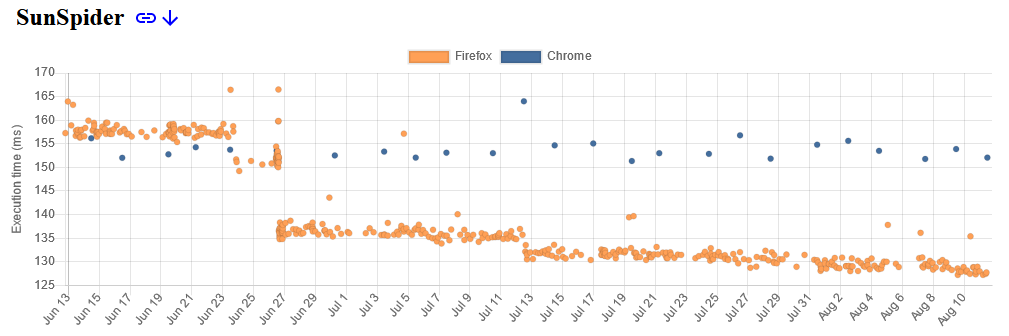
▲ 387 ▼ Firefox is now beating chrome in sunspider benchmark (blog.nightly.mozilla.org) submitted 3 years ago by Neikon@lemmy.world to c/firefox@lemmy.world 12 comments fedilink hide all child comments
[–] Razorwire666@lemm.ee 25 points 3 years ago (4 children) Now if they would let you customize keyboard shortcuts, it would have been my default browser years ago. permalink fedilink source hideshow 8 child comments replies: [–] w2tpmf@kbin.social 29 points 3 years ago (1 child) Easy to fix with an extension. Shortkeys permalink fedilink source parent hideshow 2 child comments replies: [–] twirl7303@lemmy.world 2 points 3 years ago* (last edited 3 years ago) I use qutebrowser for this reason. Keyboard first controls. All the workaround extensions for Firefox have limitations on about, config, and addon pages. I also had trouble with losing focus to Google docs and when a page is loading. Until Firefox offers full native control options, this was too brittle for me from a keyboard accessibility perspective. I would love to use Firefox more though once this happens! permalink fedilink source parent [–] Redjard@lemmy.dbzer0.com 6 points 3 years ago* (last edited 3 years ago) (1 child) You can customize browser-internal shortcuts with a script in your profile dir. For example this is my script ‹user profile›/chrome/removeshortcuts.uc.jsvar ids = ` viewBookmarksSidebarKb key_quitApplication openFileKb key_savePage printKb goBackKb2 goForwardKb2 addBookmarkAsKb bookmarkAllTabsKb manBookmarkKb viewBookmarksToolbarKb `.replace(/\s+/g,' ').trim().split(' '); ids.forEach( id=>{ var key = document.getElementById(id); if (key) key.remove(); }); var originalKey = document.getElementById("key_screenshot"); if (originalKey) { // Clone the original key var newKey = originalKey.cloneNode(true); // Set the new id and shortcut for the new key newKey.setAttribute("id", newKey.id+"_redjard_alt"); if (newKey.hasAttribute('data-l10n-id')) newKey.setAttribute("data-l10n-id", newKey.getAttribute('data-l10n-id')+"_redjard_alt"); newKey.setAttribute("key", "S"); newKey.setAttribute("modifiers", "accel"); // Add the new key to the parent of the original key originalKey.parentNode.appendChild(newKey); } The script removes the shortcuts listed in the beginning and adds an alternate shortcut for screenshots to ctrl+s. You can see all internashortcuts by opening a browser console and querying the shortcut elements (using regular javascript) permalink fedilink source parent hideshow 2 child comments replies: [–] Redjard@lemmy.dbzer0.com 1 point 2 years ago To complete this, probably with ff117 I had to fix the way I load my userchrome files, reminding me I should probably put them here too: /usr/lib64/firefox/firefox.cfg// firefox.cfg file needs to start with a comment line // it is included by having the following two lines in defaults/pref/autoconfig.js: // pref("general.config.sandbox_enabled", false); // pref("general.config.filename", "firefox.cfg"); // pref("general.config.obscure_value", 0); var Services = globalThis.Services; Services.obs.addObserver((aSubject, _aTopic, _aData)=>{ var chromeWindow = aSubject; chromeWindow.setTimeout(()=>{ try { if (chromeWindow.userChromeJsMod) return; chromeWindow.userChromeJsMod = true; var chromeFiles = chromeWindow.FileUtils.getDir("UChrm", []).directoryEntries; var sss = Components.classes["@mozilla.org/content/style-sheet-service;1"].getService(Components.interfaces.nsIStyleSheetService); while (chromeFiles.hasMoreElements()) { var file = chromeFiles.getNext().QueryInterface(Components.interfaces.nsIFile); var fileURI = Services.io.newFileURI(file); if (!file.isFile()) continue; if (/(^userChrome|\.uc)\.js$/i.test(file.leafName)) { // load userChrome.js and *.uc.js (case insensitive) as js file Services.scriptloader.loadSubScriptWithOptions(fileURI.spec, { target: chromeWindow, charset: "UTF-8", ignoreCache: true, }); } else if (/\.as\.css$/i.test(file.leafName)) { // load *.as.css (case insensitive) as css file (in browser scope) if (!sss.sheetRegistered(fileURI, sss.AGENT_SHEET)) { sss.loadAndRegisterSheet(fileURI, sss.AGENT_SHEET); } } else if (/^(?!(userChrome|userContent)\.css$).+\.css$/i.test(file.leafName)) { if (!sss.sheetRegistered(fileURI, sss.USER_SHEET)) { sss.loadAndRegisterSheet(fileURI, sss.USER_SHEET); } } } } catch (e) { Components.utils.reportError(e); // [check] Show Content Messages } }, 10); // end of timeout }, "browser-delayed-startup-finished", false); /usr/lib64/firefox/defaults/pref/autoconfig.jspref("general.config.sandbox_enabled", false); pref("general.config.filename", "firefox.cfg"); pref("general.config.obscure_value", 0); permalink fedilink source parent [–] cognitive@kbin.social 5 points 3 years ago (1 child) How can you use anything that doesn't support Tree Style Tabs? Or do you use Orion or something? permalink fedilink source parent hideshow 2 child comments replies: [–] persolb@lemmy.ml 1 point 3 years ago (1 child) I’ll have to try out tree style tabs. I miss chrome’s tab groups sooo much permalink fedilink source parent hideshow 2 child comments replies: [–] cognitive@kbin.social 2 points 3 years ago (1 child) When you do, feel free to find the "cheat code" to disable the top tab bar, it makes it a whole lot less noisy to me at least. permalink fedilink source parent hideshow 2 child comments replies: [–] persolb@lemmy.ml 1 point 3 years ago (1 child) Just tried it. This is great. NOW I agree Firefox is better in every way. permalink fedilink source parent hideshow 2 child comments replies: [–] cognitive@kbin.social 2 points 3 years ago Welcome to the club! And yes, it really makes a difference. And, there are even extra extensions for TST: I use a color tabs extenaion for it as welm as an extension that lets me export a tab tree as markdown for use in my notes or to batch "bookmark" them before closing them. permalink fedilink source parent [–] beta_tester@lemmy.ml 4 points 3 years ago (1 child) It's also sad to depreciate firefox' bangs "@". They could've been big permalink fedilink source parent hideshow 2 child comments replies: [–] Anafabula@discuss.tchncs.de 9 points 3 years ago* (last edited 3 years ago) What do you mean? about:preferences#search > Search Shortcuts you can double click on the right next to the search engine to set any keyword (starting with @ or not). If that's not enough, you have been able to set any keywords for any bookmarks (with %s argument replacing) since at least 2006. Is any of that getting deprecated? permalink fedilink source parent
[–] w2tpmf@kbin.social 29 points 3 years ago (1 child) Easy to fix with an extension. Shortkeys permalink fedilink source parent hideshow 2 child comments replies: [–] twirl7303@lemmy.world 2 points 3 years ago* (last edited 3 years ago) I use qutebrowser for this reason. Keyboard first controls. All the workaround extensions for Firefox have limitations on about, config, and addon pages. I also had trouble with losing focus to Google docs and when a page is loading. Until Firefox offers full native control options, this was too brittle for me from a keyboard accessibility perspective. I would love to use Firefox more though once this happens! permalink fedilink source parent
[–] twirl7303@lemmy.world 2 points 3 years ago* (last edited 3 years ago) I use qutebrowser for this reason. Keyboard first controls. All the workaround extensions for Firefox have limitations on about, config, and addon pages. I also had trouble with losing focus to Google docs and when a page is loading. Until Firefox offers full native control options, this was too brittle for me from a keyboard accessibility perspective. I would love to use Firefox more though once this happens! permalink fedilink source parent
[–] Redjard@lemmy.dbzer0.com 6 points 3 years ago* (last edited 3 years ago) (1 child) You can customize browser-internal shortcuts with a script in your profile dir. For example this is my script ‹user profile›/chrome/removeshortcuts.uc.jsvar ids = ` viewBookmarksSidebarKb key_quitApplication openFileKb key_savePage printKb goBackKb2 goForwardKb2 addBookmarkAsKb bookmarkAllTabsKb manBookmarkKb viewBookmarksToolbarKb `.replace(/\s+/g,' ').trim().split(' '); ids.forEach( id=>{ var key = document.getElementById(id); if (key) key.remove(); }); var originalKey = document.getElementById("key_screenshot"); if (originalKey) { // Clone the original key var newKey = originalKey.cloneNode(true); // Set the new id and shortcut for the new key newKey.setAttribute("id", newKey.id+"_redjard_alt"); if (newKey.hasAttribute('data-l10n-id')) newKey.setAttribute("data-l10n-id", newKey.getAttribute('data-l10n-id')+"_redjard_alt"); newKey.setAttribute("key", "S"); newKey.setAttribute("modifiers", "accel"); // Add the new key to the parent of the original key originalKey.parentNode.appendChild(newKey); } The script removes the shortcuts listed in the beginning and adds an alternate shortcut for screenshots to ctrl+s. You can see all internashortcuts by opening a browser console and querying the shortcut elements (using regular javascript) permalink fedilink source parent hideshow 2 child comments replies: [–] Redjard@lemmy.dbzer0.com 1 point 2 years ago To complete this, probably with ff117 I had to fix the way I load my userchrome files, reminding me I should probably put them here too: /usr/lib64/firefox/firefox.cfg// firefox.cfg file needs to start with a comment line // it is included by having the following two lines in defaults/pref/autoconfig.js: // pref("general.config.sandbox_enabled", false); // pref("general.config.filename", "firefox.cfg"); // pref("general.config.obscure_value", 0); var Services = globalThis.Services; Services.obs.addObserver((aSubject, _aTopic, _aData)=>{ var chromeWindow = aSubject; chromeWindow.setTimeout(()=>{ try { if (chromeWindow.userChromeJsMod) return; chromeWindow.userChromeJsMod = true; var chromeFiles = chromeWindow.FileUtils.getDir("UChrm", []).directoryEntries; var sss = Components.classes["@mozilla.org/content/style-sheet-service;1"].getService(Components.interfaces.nsIStyleSheetService); while (chromeFiles.hasMoreElements()) { var file = chromeFiles.getNext().QueryInterface(Components.interfaces.nsIFile); var fileURI = Services.io.newFileURI(file); if (!file.isFile()) continue; if (/(^userChrome|\.uc)\.js$/i.test(file.leafName)) { // load userChrome.js and *.uc.js (case insensitive) as js file Services.scriptloader.loadSubScriptWithOptions(fileURI.spec, { target: chromeWindow, charset: "UTF-8", ignoreCache: true, }); } else if (/\.as\.css$/i.test(file.leafName)) { // load *.as.css (case insensitive) as css file (in browser scope) if (!sss.sheetRegistered(fileURI, sss.AGENT_SHEET)) { sss.loadAndRegisterSheet(fileURI, sss.AGENT_SHEET); } } else if (/^(?!(userChrome|userContent)\.css$).+\.css$/i.test(file.leafName)) { if (!sss.sheetRegistered(fileURI, sss.USER_SHEET)) { sss.loadAndRegisterSheet(fileURI, sss.USER_SHEET); } } } } catch (e) { Components.utils.reportError(e); // [check] Show Content Messages } }, 10); // end of timeout }, "browser-delayed-startup-finished", false); /usr/lib64/firefox/defaults/pref/autoconfig.jspref("general.config.sandbox_enabled", false); pref("general.config.filename", "firefox.cfg"); pref("general.config.obscure_value", 0); permalink fedilink source parent
[–] Redjard@lemmy.dbzer0.com 1 point 2 years ago To complete this, probably with ff117 I had to fix the way I load my userchrome files, reminding me I should probably put them here too: /usr/lib64/firefox/firefox.cfg// firefox.cfg file needs to start with a comment line // it is included by having the following two lines in defaults/pref/autoconfig.js: // pref("general.config.sandbox_enabled", false); // pref("general.config.filename", "firefox.cfg"); // pref("general.config.obscure_value", 0); var Services = globalThis.Services; Services.obs.addObserver((aSubject, _aTopic, _aData)=>{ var chromeWindow = aSubject; chromeWindow.setTimeout(()=>{ try { if (chromeWindow.userChromeJsMod) return; chromeWindow.userChromeJsMod = true; var chromeFiles = chromeWindow.FileUtils.getDir("UChrm", []).directoryEntries; var sss = Components.classes["@mozilla.org/content/style-sheet-service;1"].getService(Components.interfaces.nsIStyleSheetService); while (chromeFiles.hasMoreElements()) { var file = chromeFiles.getNext().QueryInterface(Components.interfaces.nsIFile); var fileURI = Services.io.newFileURI(file); if (!file.isFile()) continue; if (/(^userChrome|\.uc)\.js$/i.test(file.leafName)) { // load userChrome.js and *.uc.js (case insensitive) as js file Services.scriptloader.loadSubScriptWithOptions(fileURI.spec, { target: chromeWindow, charset: "UTF-8", ignoreCache: true, }); } else if (/\.as\.css$/i.test(file.leafName)) { // load *.as.css (case insensitive) as css file (in browser scope) if (!sss.sheetRegistered(fileURI, sss.AGENT_SHEET)) { sss.loadAndRegisterSheet(fileURI, sss.AGENT_SHEET); } } else if (/^(?!(userChrome|userContent)\.css$).+\.css$/i.test(file.leafName)) { if (!sss.sheetRegistered(fileURI, sss.USER_SHEET)) { sss.loadAndRegisterSheet(fileURI, sss.USER_SHEET); } } } } catch (e) { Components.utils.reportError(e); // [check] Show Content Messages } }, 10); // end of timeout }, "browser-delayed-startup-finished", false); /usr/lib64/firefox/defaults/pref/autoconfig.jspref("general.config.sandbox_enabled", false); pref("general.config.filename", "firefox.cfg"); pref("general.config.obscure_value", 0); permalink fedilink source parent
[–] cognitive@kbin.social 5 points 3 years ago (1 child) How can you use anything that doesn't support Tree Style Tabs? Or do you use Orion or something? permalink fedilink source parent hideshow 2 child comments replies: [–] persolb@lemmy.ml 1 point 3 years ago (1 child) I’ll have to try out tree style tabs. I miss chrome’s tab groups sooo much permalink fedilink source parent hideshow 2 child comments replies: [–] cognitive@kbin.social 2 points 3 years ago (1 child) When you do, feel free to find the "cheat code" to disable the top tab bar, it makes it a whole lot less noisy to me at least. permalink fedilink source parent hideshow 2 child comments replies: [–] persolb@lemmy.ml 1 point 3 years ago (1 child) Just tried it. This is great. NOW I agree Firefox is better in every way. permalink fedilink source parent hideshow 2 child comments replies: [–] cognitive@kbin.social 2 points 3 years ago Welcome to the club! And yes, it really makes a difference. And, there are even extra extensions for TST: I use a color tabs extenaion for it as welm as an extension that lets me export a tab tree as markdown for use in my notes or to batch "bookmark" them before closing them. permalink fedilink source parent
[–] persolb@lemmy.ml 1 point 3 years ago (1 child) I’ll have to try out tree style tabs. I miss chrome’s tab groups sooo much permalink fedilink source parent hideshow 2 child comments replies: [–] cognitive@kbin.social 2 points 3 years ago (1 child) When you do, feel free to find the "cheat code" to disable the top tab bar, it makes it a whole lot less noisy to me at least. permalink fedilink source parent hideshow 2 child comments replies: [–] persolb@lemmy.ml 1 point 3 years ago (1 child) Just tried it. This is great. NOW I agree Firefox is better in every way. permalink fedilink source parent hideshow 2 child comments replies: [–] cognitive@kbin.social 2 points 3 years ago Welcome to the club! And yes, it really makes a difference. And, there are even extra extensions for TST: I use a color tabs extenaion for it as welm as an extension that lets me export a tab tree as markdown for use in my notes or to batch "bookmark" them before closing them. permalink fedilink source parent
[–] cognitive@kbin.social 2 points 3 years ago (1 child) When you do, feel free to find the "cheat code" to disable the top tab bar, it makes it a whole lot less noisy to me at least. permalink fedilink source parent hideshow 2 child comments replies: [–] persolb@lemmy.ml 1 point 3 years ago (1 child) Just tried it. This is great. NOW I agree Firefox is better in every way. permalink fedilink source parent hideshow 2 child comments replies: [–] cognitive@kbin.social 2 points 3 years ago Welcome to the club! And yes, it really makes a difference. And, there are even extra extensions for TST: I use a color tabs extenaion for it as welm as an extension that lets me export a tab tree as markdown for use in my notes or to batch "bookmark" them before closing them. permalink fedilink source parent
[–] persolb@lemmy.ml 1 point 3 years ago (1 child) Just tried it. This is great. NOW I agree Firefox is better in every way. permalink fedilink source parent hideshow 2 child comments replies: [–] cognitive@kbin.social 2 points 3 years ago Welcome to the club! And yes, it really makes a difference. And, there are even extra extensions for TST: I use a color tabs extenaion for it as welm as an extension that lets me export a tab tree as markdown for use in my notes or to batch "bookmark" them before closing them. permalink fedilink source parent
[–] cognitive@kbin.social 2 points 3 years ago Welcome to the club! And yes, it really makes a difference. And, there are even extra extensions for TST: I use a color tabs extenaion for it as welm as an extension that lets me export a tab tree as markdown for use in my notes or to batch "bookmark" them before closing them. permalink fedilink source parent
[–] beta_tester@lemmy.ml 4 points 3 years ago (1 child) It's also sad to depreciate firefox' bangs "@". They could've been big permalink fedilink source parent hideshow 2 child comments replies: [–] Anafabula@discuss.tchncs.de 9 points 3 years ago* (last edited 3 years ago) What do you mean? about:preferences#search > Search Shortcuts you can double click on the right next to the search engine to set any keyword (starting with @ or not). If that's not enough, you have been able to set any keywords for any bookmarks (with %s argument replacing) since at least 2006. Is any of that getting deprecated? permalink fedilink source parent
[–] Anafabula@discuss.tchncs.de 9 points 3 years ago* (last edited 3 years ago) What do you mean? about:preferences#search > Search Shortcuts you can double click on the right next to the search engine to set any keyword (starting with @ or not). If that's not enough, you have been able to set any keywords for any bookmarks (with %s argument replacing) since at least 2006. Is any of that getting deprecated? permalink fedilink source parent