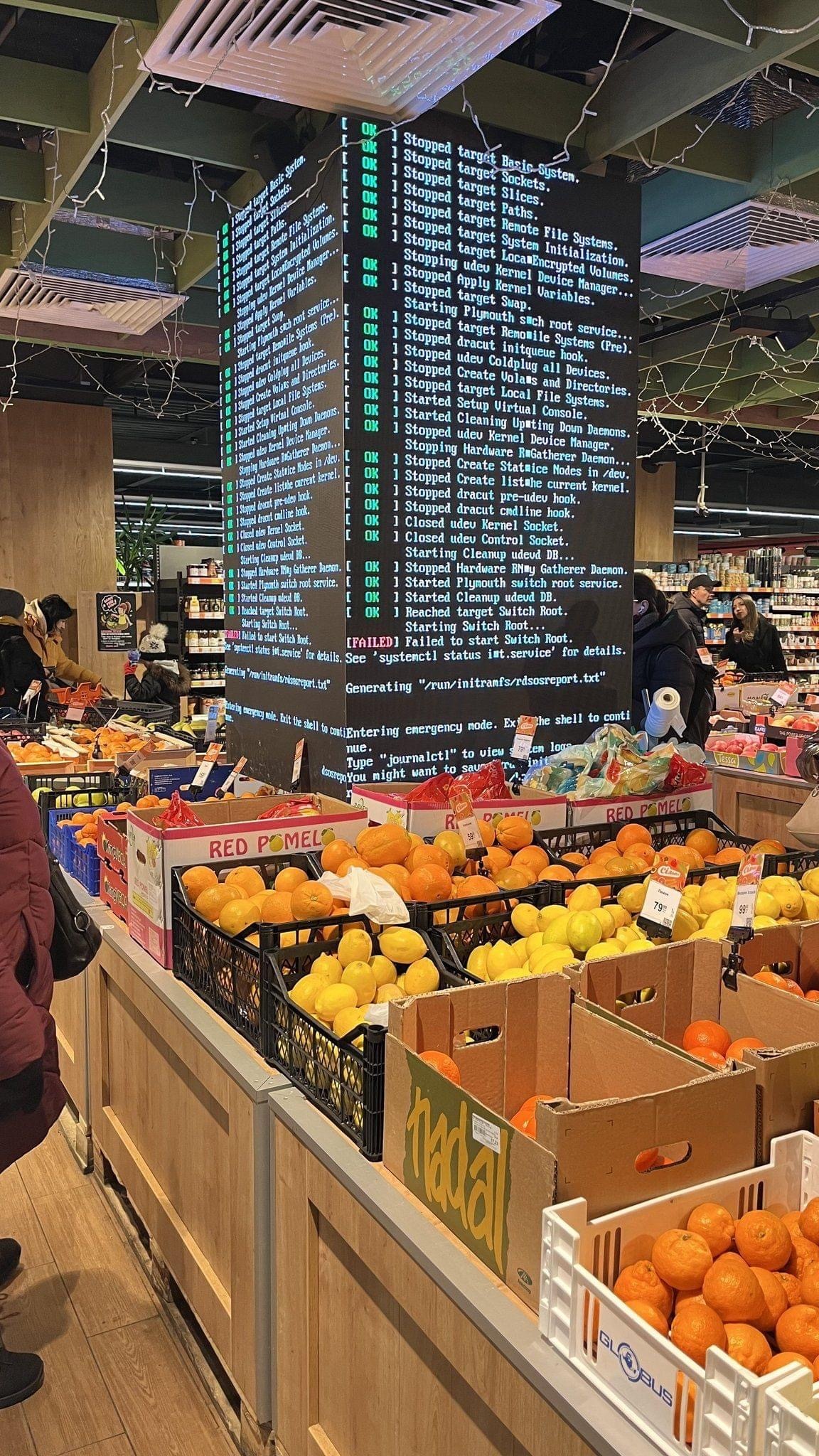
▲ 996 ▼ Can I get a filesystem cleanup on aisle 6? (lemmy.today) submitted 2 years ago by CmdrKeen@lemmy.today to c/linuxmemes@lemmy.world 93 comments fedilink hide all child comments
[–] earthquake@lemm.ee 51 points 2 years ago (1 child) These kinds of public errors are almost always a hard drive failure. permalink fedilink source parent hideshow 2 child comments replies: [–] CmdrKeen@lemmy.today [S] 12 points 2 years ago (6 children) Using an actual hard drive for an embedded system like this would be a failure in and of itself. Unless it literally has to store several hours' worth of HD video content, no reason the entire system couldn't fit on an SD card. permalink fedilink source parent hideshow 12 child comments replies: [–] constantokra@lemmy.one 31 points 2 years ago It's been my experience that SD cards are almost always what causes a failure on a SBC. Given the cost of the screens, i'd probably choose something that could boot off nvme storage. Or at least tape a new, configured SD card to the case of the SBC for when this inevitably happens. permalink fedilink source parent [–] VieuxQueb@lemmy.ca 21 points 2 years ago An SD card is MUCH less reliable than a good hdd unless it's read only. permalink fedilink source parent [–] dublet@lemmy.world 4 points 2 years ago As someone who works on embedded devices: HDDs are used for media storage and can be easily replaced. Any NAND as a limited life span and good embedded software will try very hard to minimise writes. Though in my particular area, there's additional security constraints on the OS, which preclude any removable flash storage from being used. permalink fedilink source parent [–] Cqrd@lemmy.dbzer0.com 3 points 2 years ago They probably expect the signage to change a lot and don't want a hardware failure when they do it too much, or didn't use an external drive in this case and the SD card failed because they wrote to it too much (which would happen eventually anyway). permalink fedilink source parent [–] glibg10b@lemmy.ml 2 points 2 years ago (1 child) Even better: Three SD cards with a ZFS mirror and failure notifications permalink fedilink source parent hideshow 2 child comments replies: [–] CmdrKeen@lemmy.today [S] 2 points 2 years ago (1 child) Bah humbug, just hook it up to the cloud, WCGW? permalink fedilink source parent hideshow 2 child comments replies: [–] glibg10b@lemmy.ml 2 points 2 years ago You don't need an internet connection for failure notifications permalink fedilink source parent [–] corsicanguppy@lemmy.ca 1 point 2 years ago Using an actual hard drive for an embedded system like this would be a failure in and of itself. You may be surprised to learn that these stores use machines that are occasionally more than a year old and also use inexpensive tech like enterprise spinny disk. A spinny disk will work in this space, and you know they'll be deciding based on cost. permalink fedilink source parent
[–] CmdrKeen@lemmy.today [S] 12 points 2 years ago (6 children) Using an actual hard drive for an embedded system like this would be a failure in and of itself. Unless it literally has to store several hours' worth of HD video content, no reason the entire system couldn't fit on an SD card. permalink fedilink source parent hideshow 12 child comments replies: [–] constantokra@lemmy.one 31 points 2 years ago It's been my experience that SD cards are almost always what causes a failure on a SBC. Given the cost of the screens, i'd probably choose something that could boot off nvme storage. Or at least tape a new, configured SD card to the case of the SBC for when this inevitably happens. permalink fedilink source parent [–] VieuxQueb@lemmy.ca 21 points 2 years ago An SD card is MUCH less reliable than a good hdd unless it's read only. permalink fedilink source parent [–] dublet@lemmy.world 4 points 2 years ago As someone who works on embedded devices: HDDs are used for media storage and can be easily replaced. Any NAND as a limited life span and good embedded software will try very hard to minimise writes. Though in my particular area, there's additional security constraints on the OS, which preclude any removable flash storage from being used. permalink fedilink source parent [–] Cqrd@lemmy.dbzer0.com 3 points 2 years ago They probably expect the signage to change a lot and don't want a hardware failure when they do it too much, or didn't use an external drive in this case and the SD card failed because they wrote to it too much (which would happen eventually anyway). permalink fedilink source parent [–] glibg10b@lemmy.ml 2 points 2 years ago (1 child) Even better: Three SD cards with a ZFS mirror and failure notifications permalink fedilink source parent hideshow 2 child comments replies: [–] CmdrKeen@lemmy.today [S] 2 points 2 years ago (1 child) Bah humbug, just hook it up to the cloud, WCGW? permalink fedilink source parent hideshow 2 child comments replies: [–] glibg10b@lemmy.ml 2 points 2 years ago You don't need an internet connection for failure notifications permalink fedilink source parent [–] corsicanguppy@lemmy.ca 1 point 2 years ago Using an actual hard drive for an embedded system like this would be a failure in and of itself. You may be surprised to learn that these stores use machines that are occasionally more than a year old and also use inexpensive tech like enterprise spinny disk. A spinny disk will work in this space, and you know they'll be deciding based on cost. permalink fedilink source parent
[–] constantokra@lemmy.one 31 points 2 years ago It's been my experience that SD cards are almost always what causes a failure on a SBC. Given the cost of the screens, i'd probably choose something that could boot off nvme storage. Or at least tape a new, configured SD card to the case of the SBC for when this inevitably happens. permalink fedilink source parent
[–] VieuxQueb@lemmy.ca 21 points 2 years ago An SD card is MUCH less reliable than a good hdd unless it's read only. permalink fedilink source parent
[–] dublet@lemmy.world 4 points 2 years ago As someone who works on embedded devices: HDDs are used for media storage and can be easily replaced. Any NAND as a limited life span and good embedded software will try very hard to minimise writes. Though in my particular area, there's additional security constraints on the OS, which preclude any removable flash storage from being used. permalink fedilink source parent
[–] Cqrd@lemmy.dbzer0.com 3 points 2 years ago They probably expect the signage to change a lot and don't want a hardware failure when they do it too much, or didn't use an external drive in this case and the SD card failed because they wrote to it too much (which would happen eventually anyway). permalink fedilink source parent
[–] glibg10b@lemmy.ml 2 points 2 years ago (1 child) Even better: Three SD cards with a ZFS mirror and failure notifications permalink fedilink source parent hideshow 2 child comments replies: [–] CmdrKeen@lemmy.today [S] 2 points 2 years ago (1 child) Bah humbug, just hook it up to the cloud, WCGW? permalink fedilink source parent hideshow 2 child comments replies: [–] glibg10b@lemmy.ml 2 points 2 years ago You don't need an internet connection for failure notifications permalink fedilink source parent
[–] CmdrKeen@lemmy.today [S] 2 points 2 years ago (1 child) Bah humbug, just hook it up to the cloud, WCGW? permalink fedilink source parent hideshow 2 child comments replies: [–] glibg10b@lemmy.ml 2 points 2 years ago You don't need an internet connection for failure notifications permalink fedilink source parent
[–] glibg10b@lemmy.ml 2 points 2 years ago You don't need an internet connection for failure notifications permalink fedilink source parent
[–] corsicanguppy@lemmy.ca 1 point 2 years ago Using an actual hard drive for an embedded system like this would be a failure in and of itself. You may be surprised to learn that these stores use machines that are occasionally more than a year old and also use inexpensive tech like enterprise spinny disk. A spinny disk will work in this space, and you know they'll be deciding based on cost. permalink fedilink source parent