▲ 347 ▼ CSS: Chaos-Soothe-Shake (programming.dev) submitted 3 years ago by TechCodecPawx@programming.dev to c/programmerhumor@lemmy.ml 10 comments fedilink hide all child comments
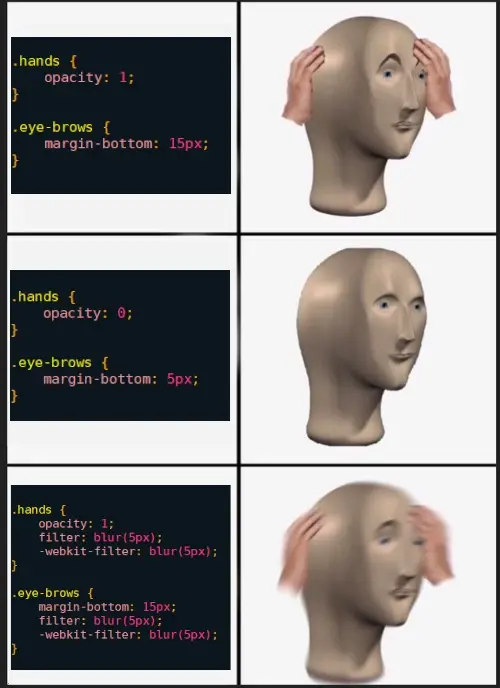
[+] Hazzia@discuss.tchncs.de 6 points 3 years ago* (last edited 2 years ago) (3 children) [deleted] permalink fedilink source hideshow 6 child comments replies: [–] TechCodecPawx@programming.dev [S] 17 points 3 years ago* (2 children) In HTML: div class="hands"> In CSS: .hands A dot in CSS means you're referring to an HTML Class. Note that this is different from the OOP Class in scripting languages. Think of HTML classes as classrooms. You can have multiple divs with the same class name, each will be affected when you style that class name. Just like students follow the same rule when applied to a classroom. In some specific instances, ID is used instead of class. # is used in CSS instead of a dot. The only difference is that in ID, each element should have a unique ID. div id="right-arm" CSS: #right-arm permalink fedilink source parent hideshow 4 child comments replies: [–] nero@lemmy.world 6 points 3 years ago To add onto this, you can also have: And style it with: div { background-color: red; } just using the html tags without a . or # permalink fedilink source parent [+] Hazzia@discuss.tchncs.de 1 point 3 years ago* (last edited 2 years ago) [deleted] permalink fedilink source parent [–] b_crussin@programming.dev 10 points 3 years ago The language is CSS, the dot signifies that it’s the name of a class. So any HTML elements with the same class name will have those CSS styles applied to them permalink fedilink source parent [–] PsychedSy@lemmy.world 3 points 3 years ago CSS class? permalink fedilink source parent
[–] TechCodecPawx@programming.dev [S] 17 points 3 years ago* (2 children) In HTML: div class="hands"> In CSS: .hands A dot in CSS means you're referring to an HTML Class. Note that this is different from the OOP Class in scripting languages. Think of HTML classes as classrooms. You can have multiple divs with the same class name, each will be affected when you style that class name. Just like students follow the same rule when applied to a classroom. In some specific instances, ID is used instead of class. # is used in CSS instead of a dot. The only difference is that in ID, each element should have a unique ID. div id="right-arm" CSS: #right-arm permalink fedilink source parent hideshow 4 child comments replies: [–] nero@lemmy.world 6 points 3 years ago To add onto this, you can also have: And style it with: div { background-color: red; } just using the html tags without a . or # permalink fedilink source parent [+] Hazzia@discuss.tchncs.de 1 point 3 years ago* (last edited 2 years ago) [deleted] permalink fedilink source parent
[–] nero@lemmy.world 6 points 3 years ago To add onto this, you can also have: And style it with: div { background-color: red; } just using the html tags without a . or # permalink fedilink source parent
[+] Hazzia@discuss.tchncs.de 1 point 3 years ago* (last edited 2 years ago) [deleted] permalink fedilink source parent
[–] b_crussin@programming.dev 10 points 3 years ago The language is CSS, the dot signifies that it’s the name of a class. So any HTML elements with the same class name will have those CSS styles applied to them permalink fedilink source parent