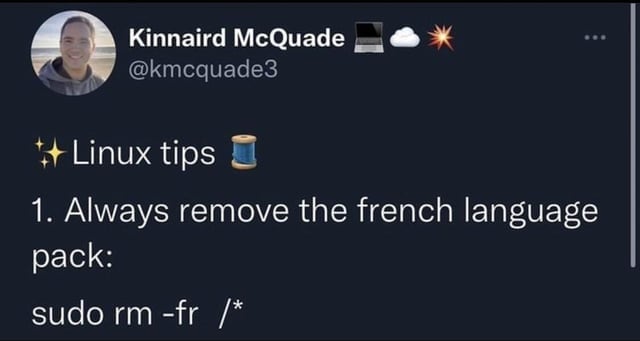
▲ 1219 ▼ Very useful tip (lemmy.world) submitted 2 years ago by hypertown@lemmy.world to c/linuxmemes@lemmy.world 80 comments fedilink hide all child comments
[+] Whisp@kbin.social 40 points 2 years ago (2 children) [deleted] permalink fedilink source hideshow 4 child comments replies: [–] Tuxman@kbin.social 54 points 2 years ago A little more destructive 😅 “As a ‘super user’, do ‘remove’ with ‘force’ and ‘recursively’ everything starting from the beginning of the hard drive (‘/‘) Though I think most consumer Linux OS has like 2-3 warnings before actually doing it……… doesn’t stop everybody 😅 permalink fedilink source parent [–] Wulff@sh.itjust.works 44 points 2 years ago (2 children) In Linux, the root of the filesystem is / The command would remove recursively every file/directory in the filesystem, essentially nuking the whole system. permalink fedilink source parent hideshow 4 child comments replies: [–] cows_are_underrated@feddit.de 14 points 2 years ago (6 children) Im not sure if it would delete the whole system. Isn't it more likely that it will destroy everything until it kills a file/directory necessary for the operation to run? permalink fedilink source parent hideshow 12 child comments replies: [–] possiblylinux127@lemmy.zip 33 points 2 years ago (1 child) Its running in ram so no, it would destroy everything. What's worse is if you have any storage mounted. I've known people who wiped there backups permalink fedilink source parent hideshow 2 child comments replies: [–] Haui@discuss.tchncs.de 4 points 2 years ago Thats rough. Good to know. Also one reason why I ever only connect to storage when I need it and dismount when I don’t and don’t save the credentials (and have another backup off site). permalink fedilink source parent [–] Cypher@aussie.zone 32 points 2 years ago (3 children) The reason you expect this is because Windows has a file lock behaviour that won’t let you delete a file when it’s in use, in Linux this limitation doesn’t exist. Raymond Chan, arguably one of the best software engineers in the world, and a Microsoft employee, has repeatedly lamented the near malware like work arounds developers have had to invent to overcome this limitation with uninstallers. Think about uninstalling a game. You need to run “uninstall.exe” but you don’t want uninstall.exe to exist after you’ve run it… but you can’t delete a file that’s in use. Uninstall.exe will always be in use when you run it….so how do you make it remove itself? Schedule a task? Side load a process? Inject a process? Many ways…. But most look like malware. Linux has never suffered this flaw. permalink fedilink source parent hideshow 6 child comments replies: [–] Tlaloc_Temporal@lemmy.ca 6 points 2 years ago (1 child) This seems like a pretty specific use case, but also pretty common. A system function to delete the file that called it should cover that entirely, but I guess psudo-malware is acceptable? permalink fedilink source parent hideshow 2 child comments replies: [–] Cypher@aussie.zone 5 points 2 years ago (1 child) Pseudo-malware is pretty much the way to go as a developer in my experience. I believe his suggestion of a javascript file that deletes itself works only works because javascript gets sandboxed and doesn't suffer from Windows "flaw" with file locks. https://devblogs.microsoft.com/oldnewthing/20230911-00/?p=108749 While Raymond does offer a solution he's also completely side stepping any responsibility on Microsoft's part in creating and perpetuating this problem without offering their own native solution. permalink fedilink source parent hideshow 2 child comments replies: [–] Buddahriffic@lemmy.world 3 points 2 years ago That last bit IMO is one reason to argue against him being the best software engineer. He might have the skills, but they are offset by his conflict of interest with MS. permalink fedilink source parent [–] jaybone@lemmy.world 4 points 2 years ago (1 child) So what is the solution on windows? permalink fedilink source parent hideshow 2 child comments replies: [–] Cypher@aussie.zone 1 point 2 years ago Generally the solution is to do something that looks like malware, or use a third party feature that side steps the problem, as happens with javascript. https://devblogs.microsoft.com/oldnewthing/20230911-00/?p=108749 permalink fedilink source parent [–] Octopus1348@thelemmy.club 1 point 2 years ago (1 child) I made a Batch uninstaller (to one of my other bat scripts I think), and it could remove itself without any problem just with the command "del whateverthenamewas.bat" permalink fedilink source parent hideshow 2 child comments replies: [–] tslnox@reddthat.com 4 points 2 years ago (1 child) Yeah, because the bat file isn't actually running, it's just a list of commands cmd should execute. permalink fedilink source parent hideshow 2 child comments replies: [–] Natanael@slrpnk.net 3 points 2 years ago Yup, CMD acts as a parser / runtime and the process is bound to the CMD binary, the script file is being run by CMD which keeps a copy of it in its own working memory in RAM permalink fedilink source parent [–] Knusper@feddit.de 24 points 2 years ago (1 child) Before throwing away an old laptop, I had it do that to itself. Well, more specifically I used shred, which doesn't just mark files as 'deleted', but also actively overwrites the bytes on disk. I started it from a TTY, so that there was no GUI that could want to load files from disk and then potentially crash the whole operation. But yeah, it just went through like normal and I ended up back on my shell (which makes sense, the shell should be in RAM). It was only when I ran exit to close that shell, that the system showed it was irreparably broken. I did then also take out the hard drive to whack it with a hammer, just to be sure. ¯\_(ツ)_/¯ permalink fedilink source parent hideshow 2 child comments replies: [–] TheGreenGolem@lemm.ee 6 points 2 years ago There is no way mom would ever see my pron folder! permalink fedilink source parent [–] JPAKx4@lemmy.sdf.org 20 points 2 years ago A lot of Linux distros load most system required processes into memory, which is why you can update while using the system. This would also allow you to (probably) delete everything. permalink fedilink source parent [–] Wulff@sh.itjust.works 4 points 2 years ago Well, maybe. My explanation was an oversimplification. You can always try it and see for yourself (in a VM of course). permalink fedilink source parent [–] Natanael@slrpnk.net 1 point 2 years ago* It would delete all files, but if you happen to be running a distro configured to run from a RAM disk after boot then it won't actually immediately halt (see almost every single liveCD Linux environment) permalink fedilink source parent [+] Whisp@kbin.social 1 point 2 years ago [deleted] permalink fedilink source parent
[–] Tuxman@kbin.social 54 points 2 years ago A little more destructive 😅 “As a ‘super user’, do ‘remove’ with ‘force’ and ‘recursively’ everything starting from the beginning of the hard drive (‘/‘) Though I think most consumer Linux OS has like 2-3 warnings before actually doing it……… doesn’t stop everybody 😅 permalink fedilink source parent
[–] Wulff@sh.itjust.works 44 points 2 years ago (2 children) In Linux, the root of the filesystem is / The command would remove recursively every file/directory in the filesystem, essentially nuking the whole system. permalink fedilink source parent hideshow 4 child comments replies: [–] cows_are_underrated@feddit.de 14 points 2 years ago (6 children) Im not sure if it would delete the whole system. Isn't it more likely that it will destroy everything until it kills a file/directory necessary for the operation to run? permalink fedilink source parent hideshow 12 child comments replies: [–] possiblylinux127@lemmy.zip 33 points 2 years ago (1 child) Its running in ram so no, it would destroy everything. What's worse is if you have any storage mounted. I've known people who wiped there backups permalink fedilink source parent hideshow 2 child comments replies: [–] Haui@discuss.tchncs.de 4 points 2 years ago Thats rough. Good to know. Also one reason why I ever only connect to storage when I need it and dismount when I don’t and don’t save the credentials (and have another backup off site). permalink fedilink source parent [–] Cypher@aussie.zone 32 points 2 years ago (3 children) The reason you expect this is because Windows has a file lock behaviour that won’t let you delete a file when it’s in use, in Linux this limitation doesn’t exist. Raymond Chan, arguably one of the best software engineers in the world, and a Microsoft employee, has repeatedly lamented the near malware like work arounds developers have had to invent to overcome this limitation with uninstallers. Think about uninstalling a game. You need to run “uninstall.exe” but you don’t want uninstall.exe to exist after you’ve run it… but you can’t delete a file that’s in use. Uninstall.exe will always be in use when you run it….so how do you make it remove itself? Schedule a task? Side load a process? Inject a process? Many ways…. But most look like malware. Linux has never suffered this flaw. permalink fedilink source parent hideshow 6 child comments replies: [–] Tlaloc_Temporal@lemmy.ca 6 points 2 years ago (1 child) This seems like a pretty specific use case, but also pretty common. A system function to delete the file that called it should cover that entirely, but I guess psudo-malware is acceptable? permalink fedilink source parent hideshow 2 child comments replies: [–] Cypher@aussie.zone 5 points 2 years ago (1 child) Pseudo-malware is pretty much the way to go as a developer in my experience. I believe his suggestion of a javascript file that deletes itself works only works because javascript gets sandboxed and doesn't suffer from Windows "flaw" with file locks. https://devblogs.microsoft.com/oldnewthing/20230911-00/?p=108749 While Raymond does offer a solution he's also completely side stepping any responsibility on Microsoft's part in creating and perpetuating this problem without offering their own native solution. permalink fedilink source parent hideshow 2 child comments replies: [–] Buddahriffic@lemmy.world 3 points 2 years ago That last bit IMO is one reason to argue against him being the best software engineer. He might have the skills, but they are offset by his conflict of interest with MS. permalink fedilink source parent [–] jaybone@lemmy.world 4 points 2 years ago (1 child) So what is the solution on windows? permalink fedilink source parent hideshow 2 child comments replies: [–] Cypher@aussie.zone 1 point 2 years ago Generally the solution is to do something that looks like malware, or use a third party feature that side steps the problem, as happens with javascript. https://devblogs.microsoft.com/oldnewthing/20230911-00/?p=108749 permalink fedilink source parent [–] Octopus1348@thelemmy.club 1 point 2 years ago (1 child) I made a Batch uninstaller (to one of my other bat scripts I think), and it could remove itself without any problem just with the command "del whateverthenamewas.bat" permalink fedilink source parent hideshow 2 child comments replies: [–] tslnox@reddthat.com 4 points 2 years ago (1 child) Yeah, because the bat file isn't actually running, it's just a list of commands cmd should execute. permalink fedilink source parent hideshow 2 child comments replies: [–] Natanael@slrpnk.net 3 points 2 years ago Yup, CMD acts as a parser / runtime and the process is bound to the CMD binary, the script file is being run by CMD which keeps a copy of it in its own working memory in RAM permalink fedilink source parent [–] Knusper@feddit.de 24 points 2 years ago (1 child) Before throwing away an old laptop, I had it do that to itself. Well, more specifically I used shred, which doesn't just mark files as 'deleted', but also actively overwrites the bytes on disk. I started it from a TTY, so that there was no GUI that could want to load files from disk and then potentially crash the whole operation. But yeah, it just went through like normal and I ended up back on my shell (which makes sense, the shell should be in RAM). It was only when I ran exit to close that shell, that the system showed it was irreparably broken. I did then also take out the hard drive to whack it with a hammer, just to be sure. ¯\_(ツ)_/¯ permalink fedilink source parent hideshow 2 child comments replies: [–] TheGreenGolem@lemm.ee 6 points 2 years ago There is no way mom would ever see my pron folder! permalink fedilink source parent [–] JPAKx4@lemmy.sdf.org 20 points 2 years ago A lot of Linux distros load most system required processes into memory, which is why you can update while using the system. This would also allow you to (probably) delete everything. permalink fedilink source parent [–] Wulff@sh.itjust.works 4 points 2 years ago Well, maybe. My explanation was an oversimplification. You can always try it and see for yourself (in a VM of course). permalink fedilink source parent [–] Natanael@slrpnk.net 1 point 2 years ago* It would delete all files, but if you happen to be running a distro configured to run from a RAM disk after boot then it won't actually immediately halt (see almost every single liveCD Linux environment) permalink fedilink source parent [+] Whisp@kbin.social 1 point 2 years ago [deleted] permalink fedilink source parent
[–] cows_are_underrated@feddit.de 14 points 2 years ago (6 children) Im not sure if it would delete the whole system. Isn't it more likely that it will destroy everything until it kills a file/directory necessary for the operation to run? permalink fedilink source parent hideshow 12 child comments replies: [–] possiblylinux127@lemmy.zip 33 points 2 years ago (1 child) Its running in ram so no, it would destroy everything. What's worse is if you have any storage mounted. I've known people who wiped there backups permalink fedilink source parent hideshow 2 child comments replies: [–] Haui@discuss.tchncs.de 4 points 2 years ago Thats rough. Good to know. Also one reason why I ever only connect to storage when I need it and dismount when I don’t and don’t save the credentials (and have another backup off site). permalink fedilink source parent [–] Cypher@aussie.zone 32 points 2 years ago (3 children) The reason you expect this is because Windows has a file lock behaviour that won’t let you delete a file when it’s in use, in Linux this limitation doesn’t exist. Raymond Chan, arguably one of the best software engineers in the world, and a Microsoft employee, has repeatedly lamented the near malware like work arounds developers have had to invent to overcome this limitation with uninstallers. Think about uninstalling a game. You need to run “uninstall.exe” but you don’t want uninstall.exe to exist after you’ve run it… but you can’t delete a file that’s in use. Uninstall.exe will always be in use when you run it….so how do you make it remove itself? Schedule a task? Side load a process? Inject a process? Many ways…. But most look like malware. Linux has never suffered this flaw. permalink fedilink source parent hideshow 6 child comments replies: [–] Tlaloc_Temporal@lemmy.ca 6 points 2 years ago (1 child) This seems like a pretty specific use case, but also pretty common. A system function to delete the file that called it should cover that entirely, but I guess psudo-malware is acceptable? permalink fedilink source parent hideshow 2 child comments replies: [–] Cypher@aussie.zone 5 points 2 years ago (1 child) Pseudo-malware is pretty much the way to go as a developer in my experience. I believe his suggestion of a javascript file that deletes itself works only works because javascript gets sandboxed and doesn't suffer from Windows "flaw" with file locks. https://devblogs.microsoft.com/oldnewthing/20230911-00/?p=108749 While Raymond does offer a solution he's also completely side stepping any responsibility on Microsoft's part in creating and perpetuating this problem without offering their own native solution. permalink fedilink source parent hideshow 2 child comments replies: [–] Buddahriffic@lemmy.world 3 points 2 years ago That last bit IMO is one reason to argue against him being the best software engineer. He might have the skills, but they are offset by his conflict of interest with MS. permalink fedilink source parent [–] jaybone@lemmy.world 4 points 2 years ago (1 child) So what is the solution on windows? permalink fedilink source parent hideshow 2 child comments replies: [–] Cypher@aussie.zone 1 point 2 years ago Generally the solution is to do something that looks like malware, or use a third party feature that side steps the problem, as happens with javascript. https://devblogs.microsoft.com/oldnewthing/20230911-00/?p=108749 permalink fedilink source parent [–] Octopus1348@thelemmy.club 1 point 2 years ago (1 child) I made a Batch uninstaller (to one of my other bat scripts I think), and it could remove itself without any problem just with the command "del whateverthenamewas.bat" permalink fedilink source parent hideshow 2 child comments replies: [–] tslnox@reddthat.com 4 points 2 years ago (1 child) Yeah, because the bat file isn't actually running, it's just a list of commands cmd should execute. permalink fedilink source parent hideshow 2 child comments replies: [–] Natanael@slrpnk.net 3 points 2 years ago Yup, CMD acts as a parser / runtime and the process is bound to the CMD binary, the script file is being run by CMD which keeps a copy of it in its own working memory in RAM permalink fedilink source parent [–] Knusper@feddit.de 24 points 2 years ago (1 child) Before throwing away an old laptop, I had it do that to itself. Well, more specifically I used shred, which doesn't just mark files as 'deleted', but also actively overwrites the bytes on disk. I started it from a TTY, so that there was no GUI that could want to load files from disk and then potentially crash the whole operation. But yeah, it just went through like normal and I ended up back on my shell (which makes sense, the shell should be in RAM). It was only when I ran exit to close that shell, that the system showed it was irreparably broken. I did then also take out the hard drive to whack it with a hammer, just to be sure. ¯\_(ツ)_/¯ permalink fedilink source parent hideshow 2 child comments replies: [–] TheGreenGolem@lemm.ee 6 points 2 years ago There is no way mom would ever see my pron folder! permalink fedilink source parent [–] JPAKx4@lemmy.sdf.org 20 points 2 years ago A lot of Linux distros load most system required processes into memory, which is why you can update while using the system. This would also allow you to (probably) delete everything. permalink fedilink source parent [–] Wulff@sh.itjust.works 4 points 2 years ago Well, maybe. My explanation was an oversimplification. You can always try it and see for yourself (in a VM of course). permalink fedilink source parent [–] Natanael@slrpnk.net 1 point 2 years ago* It would delete all files, but if you happen to be running a distro configured to run from a RAM disk after boot then it won't actually immediately halt (see almost every single liveCD Linux environment) permalink fedilink source parent
[–] possiblylinux127@lemmy.zip 33 points 2 years ago (1 child) Its running in ram so no, it would destroy everything. What's worse is if you have any storage mounted. I've known people who wiped there backups permalink fedilink source parent hideshow 2 child comments replies: [–] Haui@discuss.tchncs.de 4 points 2 years ago Thats rough. Good to know. Also one reason why I ever only connect to storage when I need it and dismount when I don’t and don’t save the credentials (and have another backup off site). permalink fedilink source parent
[–] Haui@discuss.tchncs.de 4 points 2 years ago Thats rough. Good to know. Also one reason why I ever only connect to storage when I need it and dismount when I don’t and don’t save the credentials (and have another backup off site). permalink fedilink source parent
[–] Cypher@aussie.zone 32 points 2 years ago (3 children) The reason you expect this is because Windows has a file lock behaviour that won’t let you delete a file when it’s in use, in Linux this limitation doesn’t exist. Raymond Chan, arguably one of the best software engineers in the world, and a Microsoft employee, has repeatedly lamented the near malware like work arounds developers have had to invent to overcome this limitation with uninstallers. Think about uninstalling a game. You need to run “uninstall.exe” but you don’t want uninstall.exe to exist after you’ve run it… but you can’t delete a file that’s in use. Uninstall.exe will always be in use when you run it….so how do you make it remove itself? Schedule a task? Side load a process? Inject a process? Many ways…. But most look like malware. Linux has never suffered this flaw. permalink fedilink source parent hideshow 6 child comments replies: [–] Tlaloc_Temporal@lemmy.ca 6 points 2 years ago (1 child) This seems like a pretty specific use case, but also pretty common. A system function to delete the file that called it should cover that entirely, but I guess psudo-malware is acceptable? permalink fedilink source parent hideshow 2 child comments replies: [–] Cypher@aussie.zone 5 points 2 years ago (1 child) Pseudo-malware is pretty much the way to go as a developer in my experience. I believe his suggestion of a javascript file that deletes itself works only works because javascript gets sandboxed and doesn't suffer from Windows "flaw" with file locks. https://devblogs.microsoft.com/oldnewthing/20230911-00/?p=108749 While Raymond does offer a solution he's also completely side stepping any responsibility on Microsoft's part in creating and perpetuating this problem without offering their own native solution. permalink fedilink source parent hideshow 2 child comments replies: [–] Buddahriffic@lemmy.world 3 points 2 years ago That last bit IMO is one reason to argue against him being the best software engineer. He might have the skills, but they are offset by his conflict of interest with MS. permalink fedilink source parent [–] jaybone@lemmy.world 4 points 2 years ago (1 child) So what is the solution on windows? permalink fedilink source parent hideshow 2 child comments replies: [–] Cypher@aussie.zone 1 point 2 years ago Generally the solution is to do something that looks like malware, or use a third party feature that side steps the problem, as happens with javascript. https://devblogs.microsoft.com/oldnewthing/20230911-00/?p=108749 permalink fedilink source parent [–] Octopus1348@thelemmy.club 1 point 2 years ago (1 child) I made a Batch uninstaller (to one of my other bat scripts I think), and it could remove itself without any problem just with the command "del whateverthenamewas.bat" permalink fedilink source parent hideshow 2 child comments replies: [–] tslnox@reddthat.com 4 points 2 years ago (1 child) Yeah, because the bat file isn't actually running, it's just a list of commands cmd should execute. permalink fedilink source parent hideshow 2 child comments replies: [–] Natanael@slrpnk.net 3 points 2 years ago Yup, CMD acts as a parser / runtime and the process is bound to the CMD binary, the script file is being run by CMD which keeps a copy of it in its own working memory in RAM permalink fedilink source parent
[–] Tlaloc_Temporal@lemmy.ca 6 points 2 years ago (1 child) This seems like a pretty specific use case, but also pretty common. A system function to delete the file that called it should cover that entirely, but I guess psudo-malware is acceptable? permalink fedilink source parent hideshow 2 child comments replies: [–] Cypher@aussie.zone 5 points 2 years ago (1 child) Pseudo-malware is pretty much the way to go as a developer in my experience. I believe his suggestion of a javascript file that deletes itself works only works because javascript gets sandboxed and doesn't suffer from Windows "flaw" with file locks. https://devblogs.microsoft.com/oldnewthing/20230911-00/?p=108749 While Raymond does offer a solution he's also completely side stepping any responsibility on Microsoft's part in creating and perpetuating this problem without offering their own native solution. permalink fedilink source parent hideshow 2 child comments replies: [–] Buddahriffic@lemmy.world 3 points 2 years ago That last bit IMO is one reason to argue against him being the best software engineer. He might have the skills, but they are offset by his conflict of interest with MS. permalink fedilink source parent
[–] Cypher@aussie.zone 5 points 2 years ago (1 child) Pseudo-malware is pretty much the way to go as a developer in my experience. I believe his suggestion of a javascript file that deletes itself works only works because javascript gets sandboxed and doesn't suffer from Windows "flaw" with file locks. https://devblogs.microsoft.com/oldnewthing/20230911-00/?p=108749 While Raymond does offer a solution he's also completely side stepping any responsibility on Microsoft's part in creating and perpetuating this problem without offering their own native solution. permalink fedilink source parent hideshow 2 child comments replies: [–] Buddahriffic@lemmy.world 3 points 2 years ago That last bit IMO is one reason to argue against him being the best software engineer. He might have the skills, but they are offset by his conflict of interest with MS. permalink fedilink source parent
[–] Buddahriffic@lemmy.world 3 points 2 years ago That last bit IMO is one reason to argue against him being the best software engineer. He might have the skills, but they are offset by his conflict of interest with MS. permalink fedilink source parent
[–] jaybone@lemmy.world 4 points 2 years ago (1 child) So what is the solution on windows? permalink fedilink source parent hideshow 2 child comments replies: [–] Cypher@aussie.zone 1 point 2 years ago Generally the solution is to do something that looks like malware, or use a third party feature that side steps the problem, as happens with javascript. https://devblogs.microsoft.com/oldnewthing/20230911-00/?p=108749 permalink fedilink source parent
[–] Cypher@aussie.zone 1 point 2 years ago Generally the solution is to do something that looks like malware, or use a third party feature that side steps the problem, as happens with javascript. https://devblogs.microsoft.com/oldnewthing/20230911-00/?p=108749 permalink fedilink source parent
[–] Octopus1348@thelemmy.club 1 point 2 years ago (1 child) I made a Batch uninstaller (to one of my other bat scripts I think), and it could remove itself without any problem just with the command "del whateverthenamewas.bat" permalink fedilink source parent hideshow 2 child comments replies: [–] tslnox@reddthat.com 4 points 2 years ago (1 child) Yeah, because the bat file isn't actually running, it's just a list of commands cmd should execute. permalink fedilink source parent hideshow 2 child comments replies: [–] Natanael@slrpnk.net 3 points 2 years ago Yup, CMD acts as a parser / runtime and the process is bound to the CMD binary, the script file is being run by CMD which keeps a copy of it in its own working memory in RAM permalink fedilink source parent
[–] tslnox@reddthat.com 4 points 2 years ago (1 child) Yeah, because the bat file isn't actually running, it's just a list of commands cmd should execute. permalink fedilink source parent hideshow 2 child comments replies: [–] Natanael@slrpnk.net 3 points 2 years ago Yup, CMD acts as a parser / runtime and the process is bound to the CMD binary, the script file is being run by CMD which keeps a copy of it in its own working memory in RAM permalink fedilink source parent
[–] Natanael@slrpnk.net 3 points 2 years ago Yup, CMD acts as a parser / runtime and the process is bound to the CMD binary, the script file is being run by CMD which keeps a copy of it in its own working memory in RAM permalink fedilink source parent
[–] Knusper@feddit.de 24 points 2 years ago (1 child) Before throwing away an old laptop, I had it do that to itself. Well, more specifically I used shred, which doesn't just mark files as 'deleted', but also actively overwrites the bytes on disk. I started it from a TTY, so that there was no GUI that could want to load files from disk and then potentially crash the whole operation. But yeah, it just went through like normal and I ended up back on my shell (which makes sense, the shell should be in RAM). It was only when I ran exit to close that shell, that the system showed it was irreparably broken. I did then also take out the hard drive to whack it with a hammer, just to be sure. ¯\_(ツ)_/¯ permalink fedilink source parent hideshow 2 child comments replies: [–] TheGreenGolem@lemm.ee 6 points 2 years ago There is no way mom would ever see my pron folder! permalink fedilink source parent
[–] TheGreenGolem@lemm.ee 6 points 2 years ago There is no way mom would ever see my pron folder! permalink fedilink source parent
[–] JPAKx4@lemmy.sdf.org 20 points 2 years ago A lot of Linux distros load most system required processes into memory, which is why you can update while using the system. This would also allow you to (probably) delete everything. permalink fedilink source parent
[–] Wulff@sh.itjust.works 4 points 2 years ago Well, maybe. My explanation was an oversimplification. You can always try it and see for yourself (in a VM of course). permalink fedilink source parent
[–] Natanael@slrpnk.net 1 point 2 years ago* It would delete all files, but if you happen to be running a distro configured to run from a RAM disk after boot then it won't actually immediately halt (see almost every single liveCD Linux environment) permalink fedilink source parent