▲ 232 ▼ "I want my software to stay out of my way and only update when I say to" also me the moment an update releases for anything: (media.kbin.earth) submitted 1 year ago by unknown1234_5@kbin.earth to c/kde@lemmy.kde.social 70 comments fedilink hide all child comments
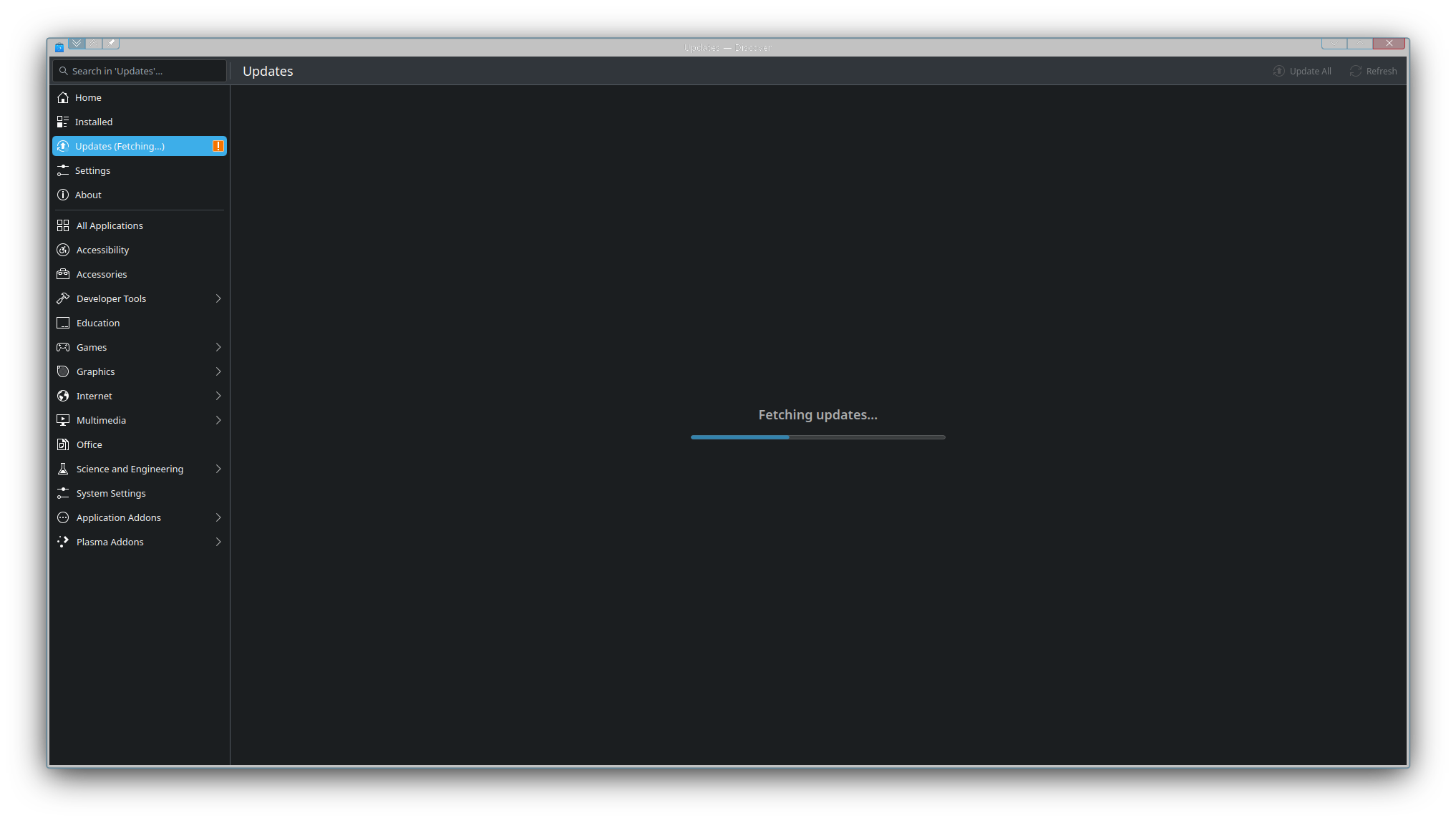
[–] maxwellfire@lemmy.world 12 points 1 year ago (1 child) There's probably an option in your distro to automatically install updates, but it's annoying when that happens when you're in the middle of something or if they require restarts permalink fedilink source parent hideshow 2 child comments replies: [–] Ulrich@feddit.org 6 points 1 year ago (4 children) As much as I hate to praise Windows, that's why they have "update and shut down" when there are updates available. permalink fedilink source parent hideshow 8 child comments replies: [–] BlueKey@fedia.io 10 points 1 year ago (2 children) This is a thing in all KDE distros I know. Once Discover downloaded them, they will be installed on next shutdown / reboot. permalink fedilink source parent hideshow 4 child comments replies: [–] dubious_savior@lemmy.dbzer0.com 1 point 1 year ago Have not gotten this feature to work on Fedora, seems nice if it would work automatically permalink fedilink source parent [–] Ulrich@feddit.org 0 points 1 year ago (1 child) Never seen it. And KDE nags me incessantly about updates. permalink fedilink source parent hideshow 2 child comments replies: [–] Asparagus0098@sh.itjust.works 1 point 1 year ago (1 child) You can change the update notification frequency somewhere in settings. Pretty sure you can disable it too. permalink fedilink source parent hideshow 2 child comments replies: [–] Ulrich@feddit.org 1 point 1 year ago (1 child) The problem is not that it nags me, the problem is that it expects me to manually approve updates. permalink fedilink source parent hideshow 2 child comments replies: [–] SqueakyBeaver@lemmy.blahaj.zone 3 points 1 year ago (1 child) I believe there's a setting either in Discover (the KDE "app store") in the main plasma settings (somewhere in the "updates" section? That might be somewhere else, I don't remember) that will automatically install updates without you needing to approve them. And there's also a setting that will wait to install them until the next boot. When I had that setting on, it only added maybe 10 seconds to my startup time when I needed to apply something like a kernel update. permalink fedilink source parent hideshow 2 child comments replies: [–] Ulrich@feddit.org 1 point 1 year ago There is. It doesn't do anything. permalink fedilink source parent [–] Nalivai@discuss.tchncs.de 6 points 1 year ago (1 child) yay --noconfirm && poweroff permalink fedilink source parent hideshow 2 child comments replies: [–] Ulrich@feddit.org 2 points 1 year ago (1 child) I think you may have glossed over the "automatically" part. permalink fedilink source parent hideshow 2 child comments replies: [–] MyNameIsRichard@lemmy.ml 4 points 1 year ago (1 child) Set up a cron job or systemd timer and have your computer suddenly powerdown. permalink fedilink source parent hideshow 2 child comments replies: [–] Ulrich@feddit.org 1 point 1 year ago (3 children) Brother, I am not a programmer and do not know what any of these words mean, and am not interested in becoming one. I just want to use a computer. This is precisely why I can't use Linux. permalink fedilink source parent hideshow 6 child comments replies: [–] MyNameIsRichard@lemmy.ml 4 points 1 year ago (1 child) If I recall Windows correctly, a scheduled task. permalink fedilink source parent hideshow 2 child comments replies: [–] Ulrich@feddit.org -1 points 1 year ago (1 child) I don't know what that is either. permalink fedilink source parent hideshow 2 child comments replies: [–] oftheair@lemmy.blahaj.zone 3 points 1 year ago* (1 child) Both cron jobs and scheduled tasks are ways of making a computer do something at a certain time and/or date automatically without any user input apart from the initial inputting of setting it up. permalink fedilink source parent hideshow 2 child comments replies: [–] Ulrich@feddit.org 2 points 1 year ago Thanks permalink fedilink source parent [–] JackbyDev@programming.dev 3 points 1 year ago (1 child) You think you can't use Linux because you can't set up something to automatically install updates? Nah, don't worry about that. You really still can. You don't need to know what a cronjob is lol. (Just some commands that run on a schedule.) permalink fedilink source parent hideshow 2 child comments replies: [–] Ulrich@feddit.org -1 points 1 year ago (1 child) You think you can't use Linux because you can't set up something to automatically install updates? No, because doing anything in Linux is DIY in the terminal. I don't have time for that. I have a job already. permalink fedilink source parent hideshow 2 child comments replies: [–] unknown1234_5@kbin.earth [S] 2 points 1 year ago (1 child) only enthusiast distros like arch are diy in any sense. you dont need the terminal for most things, what you need is to get the settings in discover set up for the thing you want it to do and if it doesn't worm reach out and get support. that guy talking about cronjobs is probably just familiar with the command line and forgot that that isn't normal. permalink fedilink source parent hideshow 2 child comments replies: [–] Ulrich@feddit.org 1 point 1 year ago (1 child) you dont need the terminal for most things No but you do need it for a lot of things. what you need is to get the settings in discover set up for the thing you want it to do There is a setting. It doesn't work. if it doesn't worm reach out and get support Do a search for "how to [literally anything] on Linux" and tell me it doesn't send you into the terminal. permalink fedilink source parent hideshow 2 child comments replies: [–] unknown1234_5@kbin.earth [S] 2 points 1 year ago (1 child) TL;DR: make bug reports and look for support in the support channels, not google. most often thats because it's much faster to do it in the terminal if you know how, or because the result is an old post from before graphical tools were as good as they are now. also, a google search is not reaching out and getting support. post/send smth in the KDE communities on here or on the matrix (Foss discord, basically) channels for KDE or your distro, or on KDE discuss. people look at those often for the express purpose of helping with this stuff. maybe go to the KDE bug reporting site and report the bug, it'll probably be resolved in the next update. there are graphical ways to do most of these things that work, you're just new and dont know where they are. there are people out there literally watching whenever they can to help people like you with issues like yours, you are looking in the wrong places. also, even though it can be avoided most of the time you are best off familiarizing yourself with the command line at least a little so you can troubleshoot quicker and better, just like every other operating system. permalink fedilink source parent hideshow 2 child comments replies: [–] Ulrich@feddit.org 0 points 1 year ago TL;DR: make bug reports and look for support in the support channels, not google. No? I don't want to. I have no responsibility to. And even if I did, I'm sure this isn't the kind of discussion that's never been had before. most often thats because it's much faster to do it in the terminal if you know how I'm sure it is. I don't know how. And every time I try, I end up spending hours trying to figure it out, which is the opposite of fast. Put a button I can click and there's no need to go scowering the web looking for the exact correct combination of random characters to type in the black box. post/send smth in the KDE communities on here or on the matrix That's just takes even more time, and is often either ignored or berated for being so ignorant to ask the question in the first place or for not searching it first. there are graphical ways to do most of these things that work, you're just new and dont know where they are. There aren't. And even when there are, the support sites will send you into the terminal every time anyway. even though it can be avoided most of the time you are best off familiarizing yourself with the command line at least a little so you can troubleshoot quicker and better I don't want to do that. I don't know why it's so hard to understand that some people just want to use their PCs and not spend all their time trying to figure out how to make them do things that other computers can just figure out how to do by clicking buttons in a menu. permalink fedilink source parent [–] Nalivai@discuss.tchncs.de 0 points 1 year ago (1 child) Then how do you know that the magic spell I gave you doesn't do it "automatically"? Either you're lying and you actually a programmer, since we know you need to be a programmer to be able to read, or you somehow figured out how to read it without being one, but that would be crazy, absolutely crazy. Anyway, if for some reason you need your system to decide when to update and reboot, there is an easily googlable setting for it, and if you just need to emulate window's "update and shutdown" button, I gave you it for my preferred Linux distribution, and it's not more complicated on all the other ones. permalink fedilink source parent hideshow 2 child comments replies: [–] Ulrich@feddit.org -2 points 1 year ago (2 children) Because I know enough to know that commands don't run themselves. permalink fedilink source parent hideshow 4 child comments replies: [–] towerful@programming.dev 4 points 1 year ago* (1 child) Except from the cron job part. Which is exactly what that's for permalink fedilink source parent hideshow 2 child comments replies: [–] Ulrich@feddit.org -1 points 1 year ago I am not a programmer and do not know what any of these words mean permalink fedilink source parent [–] Nalivai@discuss.tchncs.de 3 points 1 year ago (1 child) Well, "update and shutdown" button is a button, it also doesn't press itself. I hope you're being intentionally obtuse, at least this way someone is having fun permalink fedilink source parent hideshow 2 child comments replies: [–] Ulrich@feddit.org -1 points 1 year ago* No, but the updates are downloaded automatically and the button is changed from "shut down" to "update and shut down" automatically. And I don't appreciate your unwarranted insinuations. permalink fedilink source parent [–] sneaky@r.nf 3 points 1 year ago (1 child) Never actually shuts down for me. Always have to shutdown manually after the update. permalink fedilink source parent hideshow 2 child comments replies: [–] Ulrich@feddit.org -1 points 1 year ago Not really going to debate the efficacy, just the concept. permalink fedilink source parent [–] maxwellfire@lemmy.world 3 points 1 year ago Kubuntu at least also has this option! permalink fedilink source parent
[–] Ulrich@feddit.org 6 points 1 year ago (4 children) As much as I hate to praise Windows, that's why they have "update and shut down" when there are updates available. permalink fedilink source parent hideshow 8 child comments replies: [–] BlueKey@fedia.io 10 points 1 year ago (2 children) This is a thing in all KDE distros I know. Once Discover downloaded them, they will be installed on next shutdown / reboot. permalink fedilink source parent hideshow 4 child comments replies: [–] dubious_savior@lemmy.dbzer0.com 1 point 1 year ago Have not gotten this feature to work on Fedora, seems nice if it would work automatically permalink fedilink source parent [–] Ulrich@feddit.org 0 points 1 year ago (1 child) Never seen it. And KDE nags me incessantly about updates. permalink fedilink source parent hideshow 2 child comments replies: [–] Asparagus0098@sh.itjust.works 1 point 1 year ago (1 child) You can change the update notification frequency somewhere in settings. Pretty sure you can disable it too. permalink fedilink source parent hideshow 2 child comments replies: [–] Ulrich@feddit.org 1 point 1 year ago (1 child) The problem is not that it nags me, the problem is that it expects me to manually approve updates. permalink fedilink source parent hideshow 2 child comments replies: [–] SqueakyBeaver@lemmy.blahaj.zone 3 points 1 year ago (1 child) I believe there's a setting either in Discover (the KDE "app store") in the main plasma settings (somewhere in the "updates" section? That might be somewhere else, I don't remember) that will automatically install updates without you needing to approve them. And there's also a setting that will wait to install them until the next boot. When I had that setting on, it only added maybe 10 seconds to my startup time when I needed to apply something like a kernel update. permalink fedilink source parent hideshow 2 child comments replies: [–] Ulrich@feddit.org 1 point 1 year ago There is. It doesn't do anything. permalink fedilink source parent [–] Nalivai@discuss.tchncs.de 6 points 1 year ago (1 child) yay --noconfirm && poweroff permalink fedilink source parent hideshow 2 child comments replies: [–] Ulrich@feddit.org 2 points 1 year ago (1 child) I think you may have glossed over the "automatically" part. permalink fedilink source parent hideshow 2 child comments replies: [–] MyNameIsRichard@lemmy.ml 4 points 1 year ago (1 child) Set up a cron job or systemd timer and have your computer suddenly powerdown. permalink fedilink source parent hideshow 2 child comments replies: [–] Ulrich@feddit.org 1 point 1 year ago (3 children) Brother, I am not a programmer and do not know what any of these words mean, and am not interested in becoming one. I just want to use a computer. This is precisely why I can't use Linux. permalink fedilink source parent hideshow 6 child comments replies: [–] MyNameIsRichard@lemmy.ml 4 points 1 year ago (1 child) If I recall Windows correctly, a scheduled task. permalink fedilink source parent hideshow 2 child comments replies: [–] Ulrich@feddit.org -1 points 1 year ago (1 child) I don't know what that is either. permalink fedilink source parent hideshow 2 child comments replies: [–] oftheair@lemmy.blahaj.zone 3 points 1 year ago* (1 child) Both cron jobs and scheduled tasks are ways of making a computer do something at a certain time and/or date automatically without any user input apart from the initial inputting of setting it up. permalink fedilink source parent hideshow 2 child comments replies: [–] Ulrich@feddit.org 2 points 1 year ago Thanks permalink fedilink source parent [–] JackbyDev@programming.dev 3 points 1 year ago (1 child) You think you can't use Linux because you can't set up something to automatically install updates? Nah, don't worry about that. You really still can. You don't need to know what a cronjob is lol. (Just some commands that run on a schedule.) permalink fedilink source parent hideshow 2 child comments replies: [–] Ulrich@feddit.org -1 points 1 year ago (1 child) You think you can't use Linux because you can't set up something to automatically install updates? No, because doing anything in Linux is DIY in the terminal. I don't have time for that. I have a job already. permalink fedilink source parent hideshow 2 child comments replies: [–] unknown1234_5@kbin.earth [S] 2 points 1 year ago (1 child) only enthusiast distros like arch are diy in any sense. you dont need the terminal for most things, what you need is to get the settings in discover set up for the thing you want it to do and if it doesn't worm reach out and get support. that guy talking about cronjobs is probably just familiar with the command line and forgot that that isn't normal. permalink fedilink source parent hideshow 2 child comments replies: [–] Ulrich@feddit.org 1 point 1 year ago (1 child) you dont need the terminal for most things No but you do need it for a lot of things. what you need is to get the settings in discover set up for the thing you want it to do There is a setting. It doesn't work. if it doesn't worm reach out and get support Do a search for "how to [literally anything] on Linux" and tell me it doesn't send you into the terminal. permalink fedilink source parent hideshow 2 child comments replies: [–] unknown1234_5@kbin.earth [S] 2 points 1 year ago (1 child) TL;DR: make bug reports and look for support in the support channels, not google. most often thats because it's much faster to do it in the terminal if you know how, or because the result is an old post from before graphical tools were as good as they are now. also, a google search is not reaching out and getting support. post/send smth in the KDE communities on here or on the matrix (Foss discord, basically) channels for KDE or your distro, or on KDE discuss. people look at those often for the express purpose of helping with this stuff. maybe go to the KDE bug reporting site and report the bug, it'll probably be resolved in the next update. there are graphical ways to do most of these things that work, you're just new and dont know where they are. there are people out there literally watching whenever they can to help people like you with issues like yours, you are looking in the wrong places. also, even though it can be avoided most of the time you are best off familiarizing yourself with the command line at least a little so you can troubleshoot quicker and better, just like every other operating system. permalink fedilink source parent hideshow 2 child comments replies: [–] Ulrich@feddit.org 0 points 1 year ago TL;DR: make bug reports and look for support in the support channels, not google. No? I don't want to. I have no responsibility to. And even if I did, I'm sure this isn't the kind of discussion that's never been had before. most often thats because it's much faster to do it in the terminal if you know how I'm sure it is. I don't know how. And every time I try, I end up spending hours trying to figure it out, which is the opposite of fast. Put a button I can click and there's no need to go scowering the web looking for the exact correct combination of random characters to type in the black box. post/send smth in the KDE communities on here or on the matrix That's just takes even more time, and is often either ignored or berated for being so ignorant to ask the question in the first place or for not searching it first. there are graphical ways to do most of these things that work, you're just new and dont know where they are. There aren't. And even when there are, the support sites will send you into the terminal every time anyway. even though it can be avoided most of the time you are best off familiarizing yourself with the command line at least a little so you can troubleshoot quicker and better I don't want to do that. I don't know why it's so hard to understand that some people just want to use their PCs and not spend all their time trying to figure out how to make them do things that other computers can just figure out how to do by clicking buttons in a menu. permalink fedilink source parent [–] Nalivai@discuss.tchncs.de 0 points 1 year ago (1 child) Then how do you know that the magic spell I gave you doesn't do it "automatically"? Either you're lying and you actually a programmer, since we know you need to be a programmer to be able to read, or you somehow figured out how to read it without being one, but that would be crazy, absolutely crazy. Anyway, if for some reason you need your system to decide when to update and reboot, there is an easily googlable setting for it, and if you just need to emulate window's "update and shutdown" button, I gave you it for my preferred Linux distribution, and it's not more complicated on all the other ones. permalink fedilink source parent hideshow 2 child comments replies: [–] Ulrich@feddit.org -2 points 1 year ago (2 children) Because I know enough to know that commands don't run themselves. permalink fedilink source parent hideshow 4 child comments replies: [–] towerful@programming.dev 4 points 1 year ago* (1 child) Except from the cron job part. Which is exactly what that's for permalink fedilink source parent hideshow 2 child comments replies: [–] Ulrich@feddit.org -1 points 1 year ago I am not a programmer and do not know what any of these words mean permalink fedilink source parent [–] Nalivai@discuss.tchncs.de 3 points 1 year ago (1 child) Well, "update and shutdown" button is a button, it also doesn't press itself. I hope you're being intentionally obtuse, at least this way someone is having fun permalink fedilink source parent hideshow 2 child comments replies: [–] Ulrich@feddit.org -1 points 1 year ago* No, but the updates are downloaded automatically and the button is changed from "shut down" to "update and shut down" automatically. And I don't appreciate your unwarranted insinuations. permalink fedilink source parent [–] sneaky@r.nf 3 points 1 year ago (1 child) Never actually shuts down for me. Always have to shutdown manually after the update. permalink fedilink source parent hideshow 2 child comments replies: [–] Ulrich@feddit.org -1 points 1 year ago Not really going to debate the efficacy, just the concept. permalink fedilink source parent [–] maxwellfire@lemmy.world 3 points 1 year ago Kubuntu at least also has this option! permalink fedilink source parent
[–] BlueKey@fedia.io 10 points 1 year ago (2 children) This is a thing in all KDE distros I know. Once Discover downloaded them, they will be installed on next shutdown / reboot. permalink fedilink source parent hideshow 4 child comments replies: [–] dubious_savior@lemmy.dbzer0.com 1 point 1 year ago Have not gotten this feature to work on Fedora, seems nice if it would work automatically permalink fedilink source parent [–] Ulrich@feddit.org 0 points 1 year ago (1 child) Never seen it. And KDE nags me incessantly about updates. permalink fedilink source parent hideshow 2 child comments replies: [–] Asparagus0098@sh.itjust.works 1 point 1 year ago (1 child) You can change the update notification frequency somewhere in settings. Pretty sure you can disable it too. permalink fedilink source parent hideshow 2 child comments replies: [–] Ulrich@feddit.org 1 point 1 year ago (1 child) The problem is not that it nags me, the problem is that it expects me to manually approve updates. permalink fedilink source parent hideshow 2 child comments replies: [–] SqueakyBeaver@lemmy.blahaj.zone 3 points 1 year ago (1 child) I believe there's a setting either in Discover (the KDE "app store") in the main plasma settings (somewhere in the "updates" section? That might be somewhere else, I don't remember) that will automatically install updates without you needing to approve them. And there's also a setting that will wait to install them until the next boot. When I had that setting on, it only added maybe 10 seconds to my startup time when I needed to apply something like a kernel update. permalink fedilink source parent hideshow 2 child comments replies: [–] Ulrich@feddit.org 1 point 1 year ago There is. It doesn't do anything. permalink fedilink source parent
[–] dubious_savior@lemmy.dbzer0.com 1 point 1 year ago Have not gotten this feature to work on Fedora, seems nice if it would work automatically permalink fedilink source parent
[–] Ulrich@feddit.org 0 points 1 year ago (1 child) Never seen it. And KDE nags me incessantly about updates. permalink fedilink source parent hideshow 2 child comments replies: [–] Asparagus0098@sh.itjust.works 1 point 1 year ago (1 child) You can change the update notification frequency somewhere in settings. Pretty sure you can disable it too. permalink fedilink source parent hideshow 2 child comments replies: [–] Ulrich@feddit.org 1 point 1 year ago (1 child) The problem is not that it nags me, the problem is that it expects me to manually approve updates. permalink fedilink source parent hideshow 2 child comments replies: [–] SqueakyBeaver@lemmy.blahaj.zone 3 points 1 year ago (1 child) I believe there's a setting either in Discover (the KDE "app store") in the main plasma settings (somewhere in the "updates" section? That might be somewhere else, I don't remember) that will automatically install updates without you needing to approve them. And there's also a setting that will wait to install them until the next boot. When I had that setting on, it only added maybe 10 seconds to my startup time when I needed to apply something like a kernel update. permalink fedilink source parent hideshow 2 child comments replies: [–] Ulrich@feddit.org 1 point 1 year ago There is. It doesn't do anything. permalink fedilink source parent
[–] Asparagus0098@sh.itjust.works 1 point 1 year ago (1 child) You can change the update notification frequency somewhere in settings. Pretty sure you can disable it too. permalink fedilink source parent hideshow 2 child comments replies: [–] Ulrich@feddit.org 1 point 1 year ago (1 child) The problem is not that it nags me, the problem is that it expects me to manually approve updates. permalink fedilink source parent hideshow 2 child comments replies: [–] SqueakyBeaver@lemmy.blahaj.zone 3 points 1 year ago (1 child) I believe there's a setting either in Discover (the KDE "app store") in the main plasma settings (somewhere in the "updates" section? That might be somewhere else, I don't remember) that will automatically install updates without you needing to approve them. And there's also a setting that will wait to install them until the next boot. When I had that setting on, it only added maybe 10 seconds to my startup time when I needed to apply something like a kernel update. permalink fedilink source parent hideshow 2 child comments replies: [–] Ulrich@feddit.org 1 point 1 year ago There is. It doesn't do anything. permalink fedilink source parent
[–] Ulrich@feddit.org 1 point 1 year ago (1 child) The problem is not that it nags me, the problem is that it expects me to manually approve updates. permalink fedilink source parent hideshow 2 child comments replies: [–] SqueakyBeaver@lemmy.blahaj.zone 3 points 1 year ago (1 child) I believe there's a setting either in Discover (the KDE "app store") in the main plasma settings (somewhere in the "updates" section? That might be somewhere else, I don't remember) that will automatically install updates without you needing to approve them. And there's also a setting that will wait to install them until the next boot. When I had that setting on, it only added maybe 10 seconds to my startup time when I needed to apply something like a kernel update. permalink fedilink source parent hideshow 2 child comments replies: [–] Ulrich@feddit.org 1 point 1 year ago There is. It doesn't do anything. permalink fedilink source parent
[–] SqueakyBeaver@lemmy.blahaj.zone 3 points 1 year ago (1 child) I believe there's a setting either in Discover (the KDE "app store") in the main plasma settings (somewhere in the "updates" section? That might be somewhere else, I don't remember) that will automatically install updates without you needing to approve them. And there's also a setting that will wait to install them until the next boot. When I had that setting on, it only added maybe 10 seconds to my startup time when I needed to apply something like a kernel update. permalink fedilink source parent hideshow 2 child comments replies: [–] Ulrich@feddit.org 1 point 1 year ago There is. It doesn't do anything. permalink fedilink source parent
[–] Ulrich@feddit.org 1 point 1 year ago There is. It doesn't do anything. permalink fedilink source parent
[–] Nalivai@discuss.tchncs.de 6 points 1 year ago (1 child) yay --noconfirm && poweroff permalink fedilink source parent hideshow 2 child comments replies: [–] Ulrich@feddit.org 2 points 1 year ago (1 child) I think you may have glossed over the "automatically" part. permalink fedilink source parent hideshow 2 child comments replies: [–] MyNameIsRichard@lemmy.ml 4 points 1 year ago (1 child) Set up a cron job or systemd timer and have your computer suddenly powerdown. permalink fedilink source parent hideshow 2 child comments replies: [–] Ulrich@feddit.org 1 point 1 year ago (3 children) Brother, I am not a programmer and do not know what any of these words mean, and am not interested in becoming one. I just want to use a computer. This is precisely why I can't use Linux. permalink fedilink source parent hideshow 6 child comments replies: [–] MyNameIsRichard@lemmy.ml 4 points 1 year ago (1 child) If I recall Windows correctly, a scheduled task. permalink fedilink source parent hideshow 2 child comments replies: [–] Ulrich@feddit.org -1 points 1 year ago (1 child) I don't know what that is either. permalink fedilink source parent hideshow 2 child comments replies: [–] oftheair@lemmy.blahaj.zone 3 points 1 year ago* (1 child) Both cron jobs and scheduled tasks are ways of making a computer do something at a certain time and/or date automatically without any user input apart from the initial inputting of setting it up. permalink fedilink source parent hideshow 2 child comments replies: [–] Ulrich@feddit.org 2 points 1 year ago Thanks permalink fedilink source parent [–] JackbyDev@programming.dev 3 points 1 year ago (1 child) You think you can't use Linux because you can't set up something to automatically install updates? Nah, don't worry about that. You really still can. You don't need to know what a cronjob is lol. (Just some commands that run on a schedule.) permalink fedilink source parent hideshow 2 child comments replies: [–] Ulrich@feddit.org -1 points 1 year ago (1 child) You think you can't use Linux because you can't set up something to automatically install updates? No, because doing anything in Linux is DIY in the terminal. I don't have time for that. I have a job already. permalink fedilink source parent hideshow 2 child comments replies: [–] unknown1234_5@kbin.earth [S] 2 points 1 year ago (1 child) only enthusiast distros like arch are diy in any sense. you dont need the terminal for most things, what you need is to get the settings in discover set up for the thing you want it to do and if it doesn't worm reach out and get support. that guy talking about cronjobs is probably just familiar with the command line and forgot that that isn't normal. permalink fedilink source parent hideshow 2 child comments replies: [–] Ulrich@feddit.org 1 point 1 year ago (1 child) you dont need the terminal for most things No but you do need it for a lot of things. what you need is to get the settings in discover set up for the thing you want it to do There is a setting. It doesn't work. if it doesn't worm reach out and get support Do a search for "how to [literally anything] on Linux" and tell me it doesn't send you into the terminal. permalink fedilink source parent hideshow 2 child comments replies: [–] unknown1234_5@kbin.earth [S] 2 points 1 year ago (1 child) TL;DR: make bug reports and look for support in the support channels, not google. most often thats because it's much faster to do it in the terminal if you know how, or because the result is an old post from before graphical tools were as good as they are now. also, a google search is not reaching out and getting support. post/send smth in the KDE communities on here or on the matrix (Foss discord, basically) channels for KDE or your distro, or on KDE discuss. people look at those often for the express purpose of helping with this stuff. maybe go to the KDE bug reporting site and report the bug, it'll probably be resolved in the next update. there are graphical ways to do most of these things that work, you're just new and dont know where they are. there are people out there literally watching whenever they can to help people like you with issues like yours, you are looking in the wrong places. also, even though it can be avoided most of the time you are best off familiarizing yourself with the command line at least a little so you can troubleshoot quicker and better, just like every other operating system. permalink fedilink source parent hideshow 2 child comments replies: [–] Ulrich@feddit.org 0 points 1 year ago TL;DR: make bug reports and look for support in the support channels, not google. No? I don't want to. I have no responsibility to. And even if I did, I'm sure this isn't the kind of discussion that's never been had before. most often thats because it's much faster to do it in the terminal if you know how I'm sure it is. I don't know how. And every time I try, I end up spending hours trying to figure it out, which is the opposite of fast. Put a button I can click and there's no need to go scowering the web looking for the exact correct combination of random characters to type in the black box. post/send smth in the KDE communities on here or on the matrix That's just takes even more time, and is often either ignored or berated for being so ignorant to ask the question in the first place or for not searching it first. there are graphical ways to do most of these things that work, you're just new and dont know where they are. There aren't. And even when there are, the support sites will send you into the terminal every time anyway. even though it can be avoided most of the time you are best off familiarizing yourself with the command line at least a little so you can troubleshoot quicker and better I don't want to do that. I don't know why it's so hard to understand that some people just want to use their PCs and not spend all their time trying to figure out how to make them do things that other computers can just figure out how to do by clicking buttons in a menu. permalink fedilink source parent [–] Nalivai@discuss.tchncs.de 0 points 1 year ago (1 child) Then how do you know that the magic spell I gave you doesn't do it "automatically"? Either you're lying and you actually a programmer, since we know you need to be a programmer to be able to read, or you somehow figured out how to read it without being one, but that would be crazy, absolutely crazy. Anyway, if for some reason you need your system to decide when to update and reboot, there is an easily googlable setting for it, and if you just need to emulate window's "update and shutdown" button, I gave you it for my preferred Linux distribution, and it's not more complicated on all the other ones. permalink fedilink source parent hideshow 2 child comments replies: [–] Ulrich@feddit.org -2 points 1 year ago (2 children) Because I know enough to know that commands don't run themselves. permalink fedilink source parent hideshow 4 child comments replies: [–] towerful@programming.dev 4 points 1 year ago* (1 child) Except from the cron job part. Which is exactly what that's for permalink fedilink source parent hideshow 2 child comments replies: [–] Ulrich@feddit.org -1 points 1 year ago I am not a programmer and do not know what any of these words mean permalink fedilink source parent [–] Nalivai@discuss.tchncs.de 3 points 1 year ago (1 child) Well, "update and shutdown" button is a button, it also doesn't press itself. I hope you're being intentionally obtuse, at least this way someone is having fun permalink fedilink source parent hideshow 2 child comments replies: [–] Ulrich@feddit.org -1 points 1 year ago* No, but the updates are downloaded automatically and the button is changed from "shut down" to "update and shut down" automatically. And I don't appreciate your unwarranted insinuations. permalink fedilink source parent
[–] Ulrich@feddit.org 2 points 1 year ago (1 child) I think you may have glossed over the "automatically" part. permalink fedilink source parent hideshow 2 child comments replies: [–] MyNameIsRichard@lemmy.ml 4 points 1 year ago (1 child) Set up a cron job or systemd timer and have your computer suddenly powerdown. permalink fedilink source parent hideshow 2 child comments replies: [–] Ulrich@feddit.org 1 point 1 year ago (3 children) Brother, I am not a programmer and do not know what any of these words mean, and am not interested in becoming one. I just want to use a computer. This is precisely why I can't use Linux. permalink fedilink source parent hideshow 6 child comments replies: [–] MyNameIsRichard@lemmy.ml 4 points 1 year ago (1 child) If I recall Windows correctly, a scheduled task. permalink fedilink source parent hideshow 2 child comments replies: [–] Ulrich@feddit.org -1 points 1 year ago (1 child) I don't know what that is either. permalink fedilink source parent hideshow 2 child comments replies: [–] oftheair@lemmy.blahaj.zone 3 points 1 year ago* (1 child) Both cron jobs and scheduled tasks are ways of making a computer do something at a certain time and/or date automatically without any user input apart from the initial inputting of setting it up. permalink fedilink source parent hideshow 2 child comments replies: [–] Ulrich@feddit.org 2 points 1 year ago Thanks permalink fedilink source parent [–] JackbyDev@programming.dev 3 points 1 year ago (1 child) You think you can't use Linux because you can't set up something to automatically install updates? Nah, don't worry about that. You really still can. You don't need to know what a cronjob is lol. (Just some commands that run on a schedule.) permalink fedilink source parent hideshow 2 child comments replies: [–] Ulrich@feddit.org -1 points 1 year ago (1 child) You think you can't use Linux because you can't set up something to automatically install updates? No, because doing anything in Linux is DIY in the terminal. I don't have time for that. I have a job already. permalink fedilink source parent hideshow 2 child comments replies: [–] unknown1234_5@kbin.earth [S] 2 points 1 year ago (1 child) only enthusiast distros like arch are diy in any sense. you dont need the terminal for most things, what you need is to get the settings in discover set up for the thing you want it to do and if it doesn't worm reach out and get support. that guy talking about cronjobs is probably just familiar with the command line and forgot that that isn't normal. permalink fedilink source parent hideshow 2 child comments replies: [–] Ulrich@feddit.org 1 point 1 year ago (1 child) you dont need the terminal for most things No but you do need it for a lot of things. what you need is to get the settings in discover set up for the thing you want it to do There is a setting. It doesn't work. if it doesn't worm reach out and get support Do a search for "how to [literally anything] on Linux" and tell me it doesn't send you into the terminal. permalink fedilink source parent hideshow 2 child comments replies: [–] unknown1234_5@kbin.earth [S] 2 points 1 year ago (1 child) TL;DR: make bug reports and look for support in the support channels, not google. most often thats because it's much faster to do it in the terminal if you know how, or because the result is an old post from before graphical tools were as good as they are now. also, a google search is not reaching out and getting support. post/send smth in the KDE communities on here or on the matrix (Foss discord, basically) channels for KDE or your distro, or on KDE discuss. people look at those often for the express purpose of helping with this stuff. maybe go to the KDE bug reporting site and report the bug, it'll probably be resolved in the next update. there are graphical ways to do most of these things that work, you're just new and dont know where they are. there are people out there literally watching whenever they can to help people like you with issues like yours, you are looking in the wrong places. also, even though it can be avoided most of the time you are best off familiarizing yourself with the command line at least a little so you can troubleshoot quicker and better, just like every other operating system. permalink fedilink source parent hideshow 2 child comments replies: [–] Ulrich@feddit.org 0 points 1 year ago TL;DR: make bug reports and look for support in the support channels, not google. No? I don't want to. I have no responsibility to. And even if I did, I'm sure this isn't the kind of discussion that's never been had before. most often thats because it's much faster to do it in the terminal if you know how I'm sure it is. I don't know how. And every time I try, I end up spending hours trying to figure it out, which is the opposite of fast. Put a button I can click and there's no need to go scowering the web looking for the exact correct combination of random characters to type in the black box. post/send smth in the KDE communities on here or on the matrix That's just takes even more time, and is often either ignored or berated for being so ignorant to ask the question in the first place or for not searching it first. there are graphical ways to do most of these things that work, you're just new and dont know where they are. There aren't. And even when there are, the support sites will send you into the terminal every time anyway. even though it can be avoided most of the time you are best off familiarizing yourself with the command line at least a little so you can troubleshoot quicker and better I don't want to do that. I don't know why it's so hard to understand that some people just want to use their PCs and not spend all their time trying to figure out how to make them do things that other computers can just figure out how to do by clicking buttons in a menu. permalink fedilink source parent [–] Nalivai@discuss.tchncs.de 0 points 1 year ago (1 child) Then how do you know that the magic spell I gave you doesn't do it "automatically"? Either you're lying and you actually a programmer, since we know you need to be a programmer to be able to read, or you somehow figured out how to read it without being one, but that would be crazy, absolutely crazy. Anyway, if for some reason you need your system to decide when to update and reboot, there is an easily googlable setting for it, and if you just need to emulate window's "update and shutdown" button, I gave you it for my preferred Linux distribution, and it's not more complicated on all the other ones. permalink fedilink source parent hideshow 2 child comments replies: [–] Ulrich@feddit.org -2 points 1 year ago (2 children) Because I know enough to know that commands don't run themselves. permalink fedilink source parent hideshow 4 child comments replies: [–] towerful@programming.dev 4 points 1 year ago* (1 child) Except from the cron job part. Which is exactly what that's for permalink fedilink source parent hideshow 2 child comments replies: [–] Ulrich@feddit.org -1 points 1 year ago I am not a programmer and do not know what any of these words mean permalink fedilink source parent [–] Nalivai@discuss.tchncs.de 3 points 1 year ago (1 child) Well, "update and shutdown" button is a button, it also doesn't press itself. I hope you're being intentionally obtuse, at least this way someone is having fun permalink fedilink source parent hideshow 2 child comments replies: [–] Ulrich@feddit.org -1 points 1 year ago* No, but the updates are downloaded automatically and the button is changed from "shut down" to "update and shut down" automatically. And I don't appreciate your unwarranted insinuations. permalink fedilink source parent
[–] MyNameIsRichard@lemmy.ml 4 points 1 year ago (1 child) Set up a cron job or systemd timer and have your computer suddenly powerdown. permalink fedilink source parent hideshow 2 child comments replies: [–] Ulrich@feddit.org 1 point 1 year ago (3 children) Brother, I am not a programmer and do not know what any of these words mean, and am not interested in becoming one. I just want to use a computer. This is precisely why I can't use Linux. permalink fedilink source parent hideshow 6 child comments replies: [–] MyNameIsRichard@lemmy.ml 4 points 1 year ago (1 child) If I recall Windows correctly, a scheduled task. permalink fedilink source parent hideshow 2 child comments replies: [–] Ulrich@feddit.org -1 points 1 year ago (1 child) I don't know what that is either. permalink fedilink source parent hideshow 2 child comments replies: [–] oftheair@lemmy.blahaj.zone 3 points 1 year ago* (1 child) Both cron jobs and scheduled tasks are ways of making a computer do something at a certain time and/or date automatically without any user input apart from the initial inputting of setting it up. permalink fedilink source parent hideshow 2 child comments replies: [–] Ulrich@feddit.org 2 points 1 year ago Thanks permalink fedilink source parent [–] JackbyDev@programming.dev 3 points 1 year ago (1 child) You think you can't use Linux because you can't set up something to automatically install updates? Nah, don't worry about that. You really still can. You don't need to know what a cronjob is lol. (Just some commands that run on a schedule.) permalink fedilink source parent hideshow 2 child comments replies: [–] Ulrich@feddit.org -1 points 1 year ago (1 child) You think you can't use Linux because you can't set up something to automatically install updates? No, because doing anything in Linux is DIY in the terminal. I don't have time for that. I have a job already. permalink fedilink source parent hideshow 2 child comments replies: [–] unknown1234_5@kbin.earth [S] 2 points 1 year ago (1 child) only enthusiast distros like arch are diy in any sense. you dont need the terminal for most things, what you need is to get the settings in discover set up for the thing you want it to do and if it doesn't worm reach out and get support. that guy talking about cronjobs is probably just familiar with the command line and forgot that that isn't normal. permalink fedilink source parent hideshow 2 child comments replies: [–] Ulrich@feddit.org 1 point 1 year ago (1 child) you dont need the terminal for most things No but you do need it for a lot of things. what you need is to get the settings in discover set up for the thing you want it to do There is a setting. It doesn't work. if it doesn't worm reach out and get support Do a search for "how to [literally anything] on Linux" and tell me it doesn't send you into the terminal. permalink fedilink source parent hideshow 2 child comments replies: [–] unknown1234_5@kbin.earth [S] 2 points 1 year ago (1 child) TL;DR: make bug reports and look for support in the support channels, not google. most often thats because it's much faster to do it in the terminal if you know how, or because the result is an old post from before graphical tools were as good as they are now. also, a google search is not reaching out and getting support. post/send smth in the KDE communities on here or on the matrix (Foss discord, basically) channels for KDE or your distro, or on KDE discuss. people look at those often for the express purpose of helping with this stuff. maybe go to the KDE bug reporting site and report the bug, it'll probably be resolved in the next update. there are graphical ways to do most of these things that work, you're just new and dont know where they are. there are people out there literally watching whenever they can to help people like you with issues like yours, you are looking in the wrong places. also, even though it can be avoided most of the time you are best off familiarizing yourself with the command line at least a little so you can troubleshoot quicker and better, just like every other operating system. permalink fedilink source parent hideshow 2 child comments replies: [–] Ulrich@feddit.org 0 points 1 year ago TL;DR: make bug reports and look for support in the support channels, not google. No? I don't want to. I have no responsibility to. And even if I did, I'm sure this isn't the kind of discussion that's never been had before. most often thats because it's much faster to do it in the terminal if you know how I'm sure it is. I don't know how. And every time I try, I end up spending hours trying to figure it out, which is the opposite of fast. Put a button I can click and there's no need to go scowering the web looking for the exact correct combination of random characters to type in the black box. post/send smth in the KDE communities on here or on the matrix That's just takes even more time, and is often either ignored or berated for being so ignorant to ask the question in the first place or for not searching it first. there are graphical ways to do most of these things that work, you're just new and dont know where they are. There aren't. And even when there are, the support sites will send you into the terminal every time anyway. even though it can be avoided most of the time you are best off familiarizing yourself with the command line at least a little so you can troubleshoot quicker and better I don't want to do that. I don't know why it's so hard to understand that some people just want to use their PCs and not spend all their time trying to figure out how to make them do things that other computers can just figure out how to do by clicking buttons in a menu. permalink fedilink source parent [–] Nalivai@discuss.tchncs.de 0 points 1 year ago (1 child) Then how do you know that the magic spell I gave you doesn't do it "automatically"? Either you're lying and you actually a programmer, since we know you need to be a programmer to be able to read, or you somehow figured out how to read it without being one, but that would be crazy, absolutely crazy. Anyway, if for some reason you need your system to decide when to update and reboot, there is an easily googlable setting for it, and if you just need to emulate window's "update and shutdown" button, I gave you it for my preferred Linux distribution, and it's not more complicated on all the other ones. permalink fedilink source parent hideshow 2 child comments replies: [–] Ulrich@feddit.org -2 points 1 year ago (2 children) Because I know enough to know that commands don't run themselves. permalink fedilink source parent hideshow 4 child comments replies: [–] towerful@programming.dev 4 points 1 year ago* (1 child) Except from the cron job part. Which is exactly what that's for permalink fedilink source parent hideshow 2 child comments replies: [–] Ulrich@feddit.org -1 points 1 year ago I am not a programmer and do not know what any of these words mean permalink fedilink source parent [–] Nalivai@discuss.tchncs.de 3 points 1 year ago (1 child) Well, "update and shutdown" button is a button, it also doesn't press itself. I hope you're being intentionally obtuse, at least this way someone is having fun permalink fedilink source parent hideshow 2 child comments replies: [–] Ulrich@feddit.org -1 points 1 year ago* No, but the updates are downloaded automatically and the button is changed from "shut down" to "update and shut down" automatically. And I don't appreciate your unwarranted insinuations. permalink fedilink source parent
[–] Ulrich@feddit.org 1 point 1 year ago (3 children) Brother, I am not a programmer and do not know what any of these words mean, and am not interested in becoming one. I just want to use a computer. This is precisely why I can't use Linux. permalink fedilink source parent hideshow 6 child comments replies: [–] MyNameIsRichard@lemmy.ml 4 points 1 year ago (1 child) If I recall Windows correctly, a scheduled task. permalink fedilink source parent hideshow 2 child comments replies: [–] Ulrich@feddit.org -1 points 1 year ago (1 child) I don't know what that is either. permalink fedilink source parent hideshow 2 child comments replies: [–] oftheair@lemmy.blahaj.zone 3 points 1 year ago* (1 child) Both cron jobs and scheduled tasks are ways of making a computer do something at a certain time and/or date automatically without any user input apart from the initial inputting of setting it up. permalink fedilink source parent hideshow 2 child comments replies: [–] Ulrich@feddit.org 2 points 1 year ago Thanks permalink fedilink source parent [–] JackbyDev@programming.dev 3 points 1 year ago (1 child) You think you can't use Linux because you can't set up something to automatically install updates? Nah, don't worry about that. You really still can. You don't need to know what a cronjob is lol. (Just some commands that run on a schedule.) permalink fedilink source parent hideshow 2 child comments replies: [–] Ulrich@feddit.org -1 points 1 year ago (1 child) You think you can't use Linux because you can't set up something to automatically install updates? No, because doing anything in Linux is DIY in the terminal. I don't have time for that. I have a job already. permalink fedilink source parent hideshow 2 child comments replies: [–] unknown1234_5@kbin.earth [S] 2 points 1 year ago (1 child) only enthusiast distros like arch are diy in any sense. you dont need the terminal for most things, what you need is to get the settings in discover set up for the thing you want it to do and if it doesn't worm reach out and get support. that guy talking about cronjobs is probably just familiar with the command line and forgot that that isn't normal. permalink fedilink source parent hideshow 2 child comments replies: [–] Ulrich@feddit.org 1 point 1 year ago (1 child) you dont need the terminal for most things No but you do need it for a lot of things. what you need is to get the settings in discover set up for the thing you want it to do There is a setting. It doesn't work. if it doesn't worm reach out and get support Do a search for "how to [literally anything] on Linux" and tell me it doesn't send you into the terminal. permalink fedilink source parent hideshow 2 child comments replies: [–] unknown1234_5@kbin.earth [S] 2 points 1 year ago (1 child) TL;DR: make bug reports and look for support in the support channels, not google. most often thats because it's much faster to do it in the terminal if you know how, or because the result is an old post from before graphical tools were as good as they are now. also, a google search is not reaching out and getting support. post/send smth in the KDE communities on here or on the matrix (Foss discord, basically) channels for KDE or your distro, or on KDE discuss. people look at those often for the express purpose of helping with this stuff. maybe go to the KDE bug reporting site and report the bug, it'll probably be resolved in the next update. there are graphical ways to do most of these things that work, you're just new and dont know where they are. there are people out there literally watching whenever they can to help people like you with issues like yours, you are looking in the wrong places. also, even though it can be avoided most of the time you are best off familiarizing yourself with the command line at least a little so you can troubleshoot quicker and better, just like every other operating system. permalink fedilink source parent hideshow 2 child comments replies: [–] Ulrich@feddit.org 0 points 1 year ago TL;DR: make bug reports and look for support in the support channels, not google. No? I don't want to. I have no responsibility to. And even if I did, I'm sure this isn't the kind of discussion that's never been had before. most often thats because it's much faster to do it in the terminal if you know how I'm sure it is. I don't know how. And every time I try, I end up spending hours trying to figure it out, which is the opposite of fast. Put a button I can click and there's no need to go scowering the web looking for the exact correct combination of random characters to type in the black box. post/send smth in the KDE communities on here or on the matrix That's just takes even more time, and is often either ignored or berated for being so ignorant to ask the question in the first place or for not searching it first. there are graphical ways to do most of these things that work, you're just new and dont know where they are. There aren't. And even when there are, the support sites will send you into the terminal every time anyway. even though it can be avoided most of the time you are best off familiarizing yourself with the command line at least a little so you can troubleshoot quicker and better I don't want to do that. I don't know why it's so hard to understand that some people just want to use their PCs and not spend all their time trying to figure out how to make them do things that other computers can just figure out how to do by clicking buttons in a menu. permalink fedilink source parent [–] Nalivai@discuss.tchncs.de 0 points 1 year ago (1 child) Then how do you know that the magic spell I gave you doesn't do it "automatically"? Either you're lying and you actually a programmer, since we know you need to be a programmer to be able to read, or you somehow figured out how to read it without being one, but that would be crazy, absolutely crazy. Anyway, if for some reason you need your system to decide when to update and reboot, there is an easily googlable setting for it, and if you just need to emulate window's "update and shutdown" button, I gave you it for my preferred Linux distribution, and it's not more complicated on all the other ones. permalink fedilink source parent hideshow 2 child comments replies: [–] Ulrich@feddit.org -2 points 1 year ago (2 children) Because I know enough to know that commands don't run themselves. permalink fedilink source parent hideshow 4 child comments replies: [–] towerful@programming.dev 4 points 1 year ago* (1 child) Except from the cron job part. Which is exactly what that's for permalink fedilink source parent hideshow 2 child comments replies: [–] Ulrich@feddit.org -1 points 1 year ago I am not a programmer and do not know what any of these words mean permalink fedilink source parent [–] Nalivai@discuss.tchncs.de 3 points 1 year ago (1 child) Well, "update and shutdown" button is a button, it also doesn't press itself. I hope you're being intentionally obtuse, at least this way someone is having fun permalink fedilink source parent hideshow 2 child comments replies: [–] Ulrich@feddit.org -1 points 1 year ago* No, but the updates are downloaded automatically and the button is changed from "shut down" to "update and shut down" automatically. And I don't appreciate your unwarranted insinuations. permalink fedilink source parent
[–] MyNameIsRichard@lemmy.ml 4 points 1 year ago (1 child) If I recall Windows correctly, a scheduled task. permalink fedilink source parent hideshow 2 child comments replies: [–] Ulrich@feddit.org -1 points 1 year ago (1 child) I don't know what that is either. permalink fedilink source parent hideshow 2 child comments replies: [–] oftheair@lemmy.blahaj.zone 3 points 1 year ago* (1 child) Both cron jobs and scheduled tasks are ways of making a computer do something at a certain time and/or date automatically without any user input apart from the initial inputting of setting it up. permalink fedilink source parent hideshow 2 child comments replies: [–] Ulrich@feddit.org 2 points 1 year ago Thanks permalink fedilink source parent
[–] Ulrich@feddit.org -1 points 1 year ago (1 child) I don't know what that is either. permalink fedilink source parent hideshow 2 child comments replies: [–] oftheair@lemmy.blahaj.zone 3 points 1 year ago* (1 child) Both cron jobs and scheduled tasks are ways of making a computer do something at a certain time and/or date automatically without any user input apart from the initial inputting of setting it up. permalink fedilink source parent hideshow 2 child comments replies: [–] Ulrich@feddit.org 2 points 1 year ago Thanks permalink fedilink source parent
[–] oftheair@lemmy.blahaj.zone 3 points 1 year ago* (1 child) Both cron jobs and scheduled tasks are ways of making a computer do something at a certain time and/or date automatically without any user input apart from the initial inputting of setting it up. permalink fedilink source parent hideshow 2 child comments replies: [–] Ulrich@feddit.org 2 points 1 year ago Thanks permalink fedilink source parent
[–] JackbyDev@programming.dev 3 points 1 year ago (1 child) You think you can't use Linux because you can't set up something to automatically install updates? Nah, don't worry about that. You really still can. You don't need to know what a cronjob is lol. (Just some commands that run on a schedule.) permalink fedilink source parent hideshow 2 child comments replies: [–] Ulrich@feddit.org -1 points 1 year ago (1 child) You think you can't use Linux because you can't set up something to automatically install updates? No, because doing anything in Linux is DIY in the terminal. I don't have time for that. I have a job already. permalink fedilink source parent hideshow 2 child comments replies: [–] unknown1234_5@kbin.earth [S] 2 points 1 year ago (1 child) only enthusiast distros like arch are diy in any sense. you dont need the terminal for most things, what you need is to get the settings in discover set up for the thing you want it to do and if it doesn't worm reach out and get support. that guy talking about cronjobs is probably just familiar with the command line and forgot that that isn't normal. permalink fedilink source parent hideshow 2 child comments replies: [–] Ulrich@feddit.org 1 point 1 year ago (1 child) you dont need the terminal for most things No but you do need it for a lot of things. what you need is to get the settings in discover set up for the thing you want it to do There is a setting. It doesn't work. if it doesn't worm reach out and get support Do a search for "how to [literally anything] on Linux" and tell me it doesn't send you into the terminal. permalink fedilink source parent hideshow 2 child comments replies: [–] unknown1234_5@kbin.earth [S] 2 points 1 year ago (1 child) TL;DR: make bug reports and look for support in the support channels, not google. most often thats because it's much faster to do it in the terminal if you know how, or because the result is an old post from before graphical tools were as good as they are now. also, a google search is not reaching out and getting support. post/send smth in the KDE communities on here or on the matrix (Foss discord, basically) channels for KDE or your distro, or on KDE discuss. people look at those often for the express purpose of helping with this stuff. maybe go to the KDE bug reporting site and report the bug, it'll probably be resolved in the next update. there are graphical ways to do most of these things that work, you're just new and dont know where they are. there are people out there literally watching whenever they can to help people like you with issues like yours, you are looking in the wrong places. also, even though it can be avoided most of the time you are best off familiarizing yourself with the command line at least a little so you can troubleshoot quicker and better, just like every other operating system. permalink fedilink source parent hideshow 2 child comments replies: [–] Ulrich@feddit.org 0 points 1 year ago TL;DR: make bug reports and look for support in the support channels, not google. No? I don't want to. I have no responsibility to. And even if I did, I'm sure this isn't the kind of discussion that's never been had before. most often thats because it's much faster to do it in the terminal if you know how I'm sure it is. I don't know how. And every time I try, I end up spending hours trying to figure it out, which is the opposite of fast. Put a button I can click and there's no need to go scowering the web looking for the exact correct combination of random characters to type in the black box. post/send smth in the KDE communities on here or on the matrix That's just takes even more time, and is often either ignored or berated for being so ignorant to ask the question in the first place or for not searching it first. there are graphical ways to do most of these things that work, you're just new and dont know where they are. There aren't. And even when there are, the support sites will send you into the terminal every time anyway. even though it can be avoided most of the time you are best off familiarizing yourself with the command line at least a little so you can troubleshoot quicker and better I don't want to do that. I don't know why it's so hard to understand that some people just want to use their PCs and not spend all their time trying to figure out how to make them do things that other computers can just figure out how to do by clicking buttons in a menu. permalink fedilink source parent
[–] Ulrich@feddit.org -1 points 1 year ago (1 child) You think you can't use Linux because you can't set up something to automatically install updates? No, because doing anything in Linux is DIY in the terminal. I don't have time for that. I have a job already. permalink fedilink source parent hideshow 2 child comments replies: [–] unknown1234_5@kbin.earth [S] 2 points 1 year ago (1 child) only enthusiast distros like arch are diy in any sense. you dont need the terminal for most things, what you need is to get the settings in discover set up for the thing you want it to do and if it doesn't worm reach out and get support. that guy talking about cronjobs is probably just familiar with the command line and forgot that that isn't normal. permalink fedilink source parent hideshow 2 child comments replies: [–] Ulrich@feddit.org 1 point 1 year ago (1 child) you dont need the terminal for most things No but you do need it for a lot of things. what you need is to get the settings in discover set up for the thing you want it to do There is a setting. It doesn't work. if it doesn't worm reach out and get support Do a search for "how to [literally anything] on Linux" and tell me it doesn't send you into the terminal. permalink fedilink source parent hideshow 2 child comments replies: [–] unknown1234_5@kbin.earth [S] 2 points 1 year ago (1 child) TL;DR: make bug reports and look for support in the support channels, not google. most often thats because it's much faster to do it in the terminal if you know how, or because the result is an old post from before graphical tools were as good as they are now. also, a google search is not reaching out and getting support. post/send smth in the KDE communities on here or on the matrix (Foss discord, basically) channels for KDE or your distro, or on KDE discuss. people look at those often for the express purpose of helping with this stuff. maybe go to the KDE bug reporting site and report the bug, it'll probably be resolved in the next update. there are graphical ways to do most of these things that work, you're just new and dont know where they are. there are people out there literally watching whenever they can to help people like you with issues like yours, you are looking in the wrong places. also, even though it can be avoided most of the time you are best off familiarizing yourself with the command line at least a little so you can troubleshoot quicker and better, just like every other operating system. permalink fedilink source parent hideshow 2 child comments replies: [–] Ulrich@feddit.org 0 points 1 year ago TL;DR: make bug reports and look for support in the support channels, not google. No? I don't want to. I have no responsibility to. And even if I did, I'm sure this isn't the kind of discussion that's never been had before. most often thats because it's much faster to do it in the terminal if you know how I'm sure it is. I don't know how. And every time I try, I end up spending hours trying to figure it out, which is the opposite of fast. Put a button I can click and there's no need to go scowering the web looking for the exact correct combination of random characters to type in the black box. post/send smth in the KDE communities on here or on the matrix That's just takes even more time, and is often either ignored or berated for being so ignorant to ask the question in the first place or for not searching it first. there are graphical ways to do most of these things that work, you're just new and dont know where they are. There aren't. And even when there are, the support sites will send you into the terminal every time anyway. even though it can be avoided most of the time you are best off familiarizing yourself with the command line at least a little so you can troubleshoot quicker and better I don't want to do that. I don't know why it's so hard to understand that some people just want to use their PCs and not spend all their time trying to figure out how to make them do things that other computers can just figure out how to do by clicking buttons in a menu. permalink fedilink source parent
[–] unknown1234_5@kbin.earth [S] 2 points 1 year ago (1 child) only enthusiast distros like arch are diy in any sense. you dont need the terminal for most things, what you need is to get the settings in discover set up for the thing you want it to do and if it doesn't worm reach out and get support. that guy talking about cronjobs is probably just familiar with the command line and forgot that that isn't normal. permalink fedilink source parent hideshow 2 child comments replies: [–] Ulrich@feddit.org 1 point 1 year ago (1 child) you dont need the terminal for most things No but you do need it for a lot of things. what you need is to get the settings in discover set up for the thing you want it to do There is a setting. It doesn't work. if it doesn't worm reach out and get support Do a search for "how to [literally anything] on Linux" and tell me it doesn't send you into the terminal. permalink fedilink source parent hideshow 2 child comments replies: [–] unknown1234_5@kbin.earth [S] 2 points 1 year ago (1 child) TL;DR: make bug reports and look for support in the support channels, not google. most often thats because it's much faster to do it in the terminal if you know how, or because the result is an old post from before graphical tools were as good as they are now. also, a google search is not reaching out and getting support. post/send smth in the KDE communities on here or on the matrix (Foss discord, basically) channels for KDE or your distro, or on KDE discuss. people look at those often for the express purpose of helping with this stuff. maybe go to the KDE bug reporting site and report the bug, it'll probably be resolved in the next update. there are graphical ways to do most of these things that work, you're just new and dont know where they are. there are people out there literally watching whenever they can to help people like you with issues like yours, you are looking in the wrong places. also, even though it can be avoided most of the time you are best off familiarizing yourself with the command line at least a little so you can troubleshoot quicker and better, just like every other operating system. permalink fedilink source parent hideshow 2 child comments replies: [–] Ulrich@feddit.org 0 points 1 year ago TL;DR: make bug reports and look for support in the support channels, not google. No? I don't want to. I have no responsibility to. And even if I did, I'm sure this isn't the kind of discussion that's never been had before. most often thats because it's much faster to do it in the terminal if you know how I'm sure it is. I don't know how. And every time I try, I end up spending hours trying to figure it out, which is the opposite of fast. Put a button I can click and there's no need to go scowering the web looking for the exact correct combination of random characters to type in the black box. post/send smth in the KDE communities on here or on the matrix That's just takes even more time, and is often either ignored or berated for being so ignorant to ask the question in the first place or for not searching it first. there are graphical ways to do most of these things that work, you're just new and dont know where they are. There aren't. And even when there are, the support sites will send you into the terminal every time anyway. even though it can be avoided most of the time you are best off familiarizing yourself with the command line at least a little so you can troubleshoot quicker and better I don't want to do that. I don't know why it's so hard to understand that some people just want to use their PCs and not spend all their time trying to figure out how to make them do things that other computers can just figure out how to do by clicking buttons in a menu. permalink fedilink source parent
[–] Ulrich@feddit.org 1 point 1 year ago (1 child) you dont need the terminal for most things No but you do need it for a lot of things. what you need is to get the settings in discover set up for the thing you want it to do There is a setting. It doesn't work. if it doesn't worm reach out and get support Do a search for "how to [literally anything] on Linux" and tell me it doesn't send you into the terminal. permalink fedilink source parent hideshow 2 child comments replies: [–] unknown1234_5@kbin.earth [S] 2 points 1 year ago (1 child) TL;DR: make bug reports and look for support in the support channels, not google. most often thats because it's much faster to do it in the terminal if you know how, or because the result is an old post from before graphical tools were as good as they are now. also, a google search is not reaching out and getting support. post/send smth in the KDE communities on here or on the matrix (Foss discord, basically) channels for KDE or your distro, or on KDE discuss. people look at those often for the express purpose of helping with this stuff. maybe go to the KDE bug reporting site and report the bug, it'll probably be resolved in the next update. there are graphical ways to do most of these things that work, you're just new and dont know where they are. there are people out there literally watching whenever they can to help people like you with issues like yours, you are looking in the wrong places. also, even though it can be avoided most of the time you are best off familiarizing yourself with the command line at least a little so you can troubleshoot quicker and better, just like every other operating system. permalink fedilink source parent hideshow 2 child comments replies: [–] Ulrich@feddit.org 0 points 1 year ago TL;DR: make bug reports and look for support in the support channels, not google. No? I don't want to. I have no responsibility to. And even if I did, I'm sure this isn't the kind of discussion that's never been had before. most often thats because it's much faster to do it in the terminal if you know how I'm sure it is. I don't know how. And every time I try, I end up spending hours trying to figure it out, which is the opposite of fast. Put a button I can click and there's no need to go scowering the web looking for the exact correct combination of random characters to type in the black box. post/send smth in the KDE communities on here or on the matrix That's just takes even more time, and is often either ignored or berated for being so ignorant to ask the question in the first place or for not searching it first. there are graphical ways to do most of these things that work, you're just new and dont know where they are. There aren't. And even when there are, the support sites will send you into the terminal every time anyway. even though it can be avoided most of the time you are best off familiarizing yourself with the command line at least a little so you can troubleshoot quicker and better I don't want to do that. I don't know why it's so hard to understand that some people just want to use their PCs and not spend all their time trying to figure out how to make them do things that other computers can just figure out how to do by clicking buttons in a menu. permalink fedilink source parent
[–] unknown1234_5@kbin.earth [S] 2 points 1 year ago (1 child) TL;DR: make bug reports and look for support in the support channels, not google. most often thats because it's much faster to do it in the terminal if you know how, or because the result is an old post from before graphical tools were as good as they are now. also, a google search is not reaching out and getting support. post/send smth in the KDE communities on here or on the matrix (Foss discord, basically) channels for KDE or your distro, or on KDE discuss. people look at those often for the express purpose of helping with this stuff. maybe go to the KDE bug reporting site and report the bug, it'll probably be resolved in the next update. there are graphical ways to do most of these things that work, you're just new and dont know where they are. there are people out there literally watching whenever they can to help people like you with issues like yours, you are looking in the wrong places. also, even though it can be avoided most of the time you are best off familiarizing yourself with the command line at least a little so you can troubleshoot quicker and better, just like every other operating system. permalink fedilink source parent hideshow 2 child comments replies: [–] Ulrich@feddit.org 0 points 1 year ago TL;DR: make bug reports and look for support in the support channels, not google. No? I don't want to. I have no responsibility to. And even if I did, I'm sure this isn't the kind of discussion that's never been had before. most often thats because it's much faster to do it in the terminal if you know how I'm sure it is. I don't know how. And every time I try, I end up spending hours trying to figure it out, which is the opposite of fast. Put a button I can click and there's no need to go scowering the web looking for the exact correct combination of random characters to type in the black box. post/send smth in the KDE communities on here or on the matrix That's just takes even more time, and is often either ignored or berated for being so ignorant to ask the question in the first place or for not searching it first. there are graphical ways to do most of these things that work, you're just new and dont know where they are. There aren't. And even when there are, the support sites will send you into the terminal every time anyway. even though it can be avoided most of the time you are best off familiarizing yourself with the command line at least a little so you can troubleshoot quicker and better I don't want to do that. I don't know why it's so hard to understand that some people just want to use their PCs and not spend all their time trying to figure out how to make them do things that other computers can just figure out how to do by clicking buttons in a menu. permalink fedilink source parent
[–] Ulrich@feddit.org 0 points 1 year ago TL;DR: make bug reports and look for support in the support channels, not google. No? I don't want to. I have no responsibility to. And even if I did, I'm sure this isn't the kind of discussion that's never been had before. most often thats because it's much faster to do it in the terminal if you know how I'm sure it is. I don't know how. And every time I try, I end up spending hours trying to figure it out, which is the opposite of fast. Put a button I can click and there's no need to go scowering the web looking for the exact correct combination of random characters to type in the black box. post/send smth in the KDE communities on here or on the matrix That's just takes even more time, and is often either ignored or berated for being so ignorant to ask the question in the first place or for not searching it first. there are graphical ways to do most of these things that work, you're just new and dont know where they are. There aren't. And even when there are, the support sites will send you into the terminal every time anyway. even though it can be avoided most of the time you are best off familiarizing yourself with the command line at least a little so you can troubleshoot quicker and better I don't want to do that. I don't know why it's so hard to understand that some people just want to use their PCs and not spend all their time trying to figure out how to make them do things that other computers can just figure out how to do by clicking buttons in a menu. permalink fedilink source parent
[–] Nalivai@discuss.tchncs.de 0 points 1 year ago (1 child) Then how do you know that the magic spell I gave you doesn't do it "automatically"? Either you're lying and you actually a programmer, since we know you need to be a programmer to be able to read, or you somehow figured out how to read it without being one, but that would be crazy, absolutely crazy. Anyway, if for some reason you need your system to decide when to update and reboot, there is an easily googlable setting for it, and if you just need to emulate window's "update and shutdown" button, I gave you it for my preferred Linux distribution, and it's not more complicated on all the other ones. permalink fedilink source parent hideshow 2 child comments replies: [–] Ulrich@feddit.org -2 points 1 year ago (2 children) Because I know enough to know that commands don't run themselves. permalink fedilink source parent hideshow 4 child comments replies: [–] towerful@programming.dev 4 points 1 year ago* (1 child) Except from the cron job part. Which is exactly what that's for permalink fedilink source parent hideshow 2 child comments replies: [–] Ulrich@feddit.org -1 points 1 year ago I am not a programmer and do not know what any of these words mean permalink fedilink source parent [–] Nalivai@discuss.tchncs.de 3 points 1 year ago (1 child) Well, "update and shutdown" button is a button, it also doesn't press itself. I hope you're being intentionally obtuse, at least this way someone is having fun permalink fedilink source parent hideshow 2 child comments replies: [–] Ulrich@feddit.org -1 points 1 year ago* No, but the updates are downloaded automatically and the button is changed from "shut down" to "update and shut down" automatically. And I don't appreciate your unwarranted insinuations. permalink fedilink source parent
[–] Ulrich@feddit.org -2 points 1 year ago (2 children) Because I know enough to know that commands don't run themselves. permalink fedilink source parent hideshow 4 child comments replies: [–] towerful@programming.dev 4 points 1 year ago* (1 child) Except from the cron job part. Which is exactly what that's for permalink fedilink source parent hideshow 2 child comments replies: [–] Ulrich@feddit.org -1 points 1 year ago I am not a programmer and do not know what any of these words mean permalink fedilink source parent [–] Nalivai@discuss.tchncs.de 3 points 1 year ago (1 child) Well, "update and shutdown" button is a button, it also doesn't press itself. I hope you're being intentionally obtuse, at least this way someone is having fun permalink fedilink source parent hideshow 2 child comments replies: [–] Ulrich@feddit.org -1 points 1 year ago* No, but the updates are downloaded automatically and the button is changed from "shut down" to "update and shut down" automatically. And I don't appreciate your unwarranted insinuations. permalink fedilink source parent
[–] towerful@programming.dev 4 points 1 year ago* (1 child) Except from the cron job part. Which is exactly what that's for permalink fedilink source parent hideshow 2 child comments replies: [–] Ulrich@feddit.org -1 points 1 year ago I am not a programmer and do not know what any of these words mean permalink fedilink source parent
[–] Ulrich@feddit.org -1 points 1 year ago I am not a programmer and do not know what any of these words mean permalink fedilink source parent
[–] Nalivai@discuss.tchncs.de 3 points 1 year ago (1 child) Well, "update and shutdown" button is a button, it also doesn't press itself. I hope you're being intentionally obtuse, at least this way someone is having fun permalink fedilink source parent hideshow 2 child comments replies: [–] Ulrich@feddit.org -1 points 1 year ago* No, but the updates are downloaded automatically and the button is changed from "shut down" to "update and shut down" automatically. And I don't appreciate your unwarranted insinuations. permalink fedilink source parent
[–] Ulrich@feddit.org -1 points 1 year ago* No, but the updates are downloaded automatically and the button is changed from "shut down" to "update and shut down" automatically. And I don't appreciate your unwarranted insinuations. permalink fedilink source parent
[–] sneaky@r.nf 3 points 1 year ago (1 child) Never actually shuts down for me. Always have to shutdown manually after the update. permalink fedilink source parent hideshow 2 child comments replies: [–] Ulrich@feddit.org -1 points 1 year ago Not really going to debate the efficacy, just the concept. permalink fedilink source parent
[–] Ulrich@feddit.org -1 points 1 year ago Not really going to debate the efficacy, just the concept. permalink fedilink source parent
[–] maxwellfire@lemmy.world 3 points 1 year ago Kubuntu at least also has this option! permalink fedilink source parent